Monect PC Remote Play
Monect PC Remote lets a smart device control a PC for gaming, work, and screen mirroring.
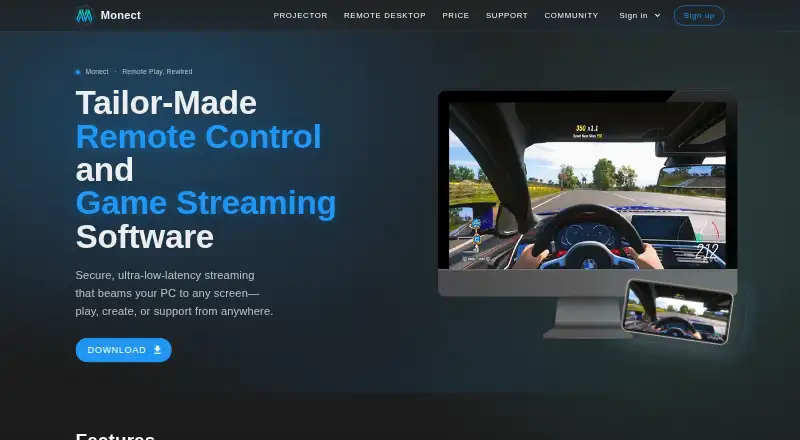
What Monect PC Remote Play is
Monect PC Remote lets a smart device control a PC for gaming, work, and screen mirroring. For games, users can create custom button layouts and use onboard device sensors. Its remote desktop feature mirrors a PC screen to a phone in HD with low latency, alongside desktop control and annotation. A phone camera can act as a virtual webcam on the PC, and the app listing says it can add up to four virtual displays. A device can also serve as a graphics drawing tablet with pressure-sensitive stylus pens.
Connections documented by the support guide include local Wi-Fi, internet Wi-Fi, USB tethering, and Bluetooth. Remote network connections use 256-bit AES session encoding. The attended service supports Windows, macOS, Android, iOS, and web browsers. PC receiver downloads are listed for Windows and macOS, and companion apps for Android and iOS. The Free plan costs nothing and includes core PC remote-control features. Premium is described as ad-free with higher feature limits. Subscription choices include 12 Months at CN¥12 a month, 6 Months at CN¥16 a month, and 3 Months at CN¥20 a month. Google Play reports that the app may share personal info and app activity plus two other data types, may collect personal info, encrypts data in transit, and allows deletion requests.
Good
- Custom gaming layouts use onboard device sensors.
- Mirrors a PC screen to a phone in HD with low latency.
- Offers Wi-Fi, USB tethering, and Bluetooth connection methods.
- A phone camera can act as a PC virtual webcam.
- Remote network connections use 256-bit AES session encoding.
Watch out
- The service is attended rather than unattended.
- Google Play reports possible sharing and collection of personal info.
Who it suits
Monect PC Remote suits people who want to control a PC from a smart device for games, work, or screen mirroring. Its drawing-tablet, virtual-camera, and virtual-display functions also suit users needing those specific PC-connected tools.
Verdict
Choose Monect PC Remote if you want a smart device to serve as a PC controller, remote desktop, webcam, or drawing tablet. The Free plan covers core remote-control features; look elsewhere if you need unattended access, which is not the access mode listed here.
Plans and prices
From Monect PC Remote Play's own pricing page, checked 20 Sep 2026.
| Plan | Price | What it gives you |
|---|---|---|
| Premium | — | Ad-free experience · Higher feature limits |
| Free | Free | Free app; contains ads and in-app purchases |
| 12 Months | CN¥12 a month | Subscription plan · ¥12 per month · Total price: ¥144 |
| 6 Months | CN¥16 a month | Subscription plan · ¥16 per month · Total price: ¥96 |
| 3 Months | CN¥20 a month | Subscription plan · ¥20 per month · Total price: ¥60 |
The facts
Each one read from Monect PC Remote Play's own pages, with the date it was checked.
What it does
- Access mode
- attendedchecked 20 Sep 2026
- Connections
- The support guide documents local Wi-Fi, internet Wi-Fi, USB tethering, and Bluetooth connection methods.checked 8 Oct 2026
- Data safety
- Google Play reports that the app may share personal info and app activity plus two other data types, may collect personal info, encrypts data in transit, and allows users to request deletion.checked 8 Oct 2026
- Drawing tablet
- The app supports using a device as a graphics drawing tablet with pressure-sensitive stylus pens.checked 8 Oct 2026
- File transfer
- The app supports transferring files between devices.checked 8 Oct 2026
- Gaming
- The app offers custom gaming button layouts and uses onboard device sensors.checked 8 Oct 2026
- Product
- Monect PC Remote lets users control a PC from a smart device for gaming, work, and screen mirroring.checked 8 Oct 2026
- Remote desktop
- The maker describes HD low-latency PC screen mirroring to a phone, with desktop control and annotation.checked 8 Oct 2026
- Security
- The app listing states that remote network connections use 256-bit AES session encoding.checked 8 Oct 2026
- Support
- The app listing provides support by email at [email protected].checked 8 Oct 2026
- Virtual camera
- The app can use a phone camera as a virtual webcam on a PC.checked 8 Oct 2026
- Virtual displays
- The app listing says it can add up to four virtual displays to a PC.checked 8 Oct 2026
Money
- Free plan
- Yeschecked 20 Sep 2026
Where it runs
- Mobile apps
- Yeschecked 20 Sep 2026
- Platform downloads
- The product page lists PC receiver downloads for Windows and macOS and companion apps for Android and iOS.checked 8 Oct 2026
- Supported platforms
- Windows,macOS,Android,iOS,web browserchecked 20 Sep 2026
The full review of Monect PC Remote Play
Monect PC Remote Play turns an Android or iOS device into a multi-purpose PC companion, covering game controls as well as remote desktop and creative tasks. It is most compelling for people who want one phone or tablet to serve several roles; its attended connection model makes it a poor fit for access that must work without someone present.
Overview
Monect combines PC control with gaming, screen mirroring, webcam, and drawing-tablet features. The breadth is useful when a smart device is already nearby and a separate peripheral would be inconvenient, but it also makes the app less focused than a dedicated controller or remote desktop tool.
Connections can use local Wi-Fi, internet Wi-Fi, USB tethering, or Bluetooth, and file transfer is supported. Remote network connections use 256-bit AES session encoding. Google Play reports that the app may share personal information, app activity, and two other data types, and may collect personal information; data is encrypted in transit and users can request deletion.
Key features
Gaming and desktop control
Custom gaming button layouts and device sensors let a phone take on controller duties. That flexibility can suit casual play or games that benefit from touch-specific layouts, though players who want dedicated physical controls may prefer a purpose-built controller. For desktop tasks, Monect mirrors a PC screen to a phone in HD with low latency, alongside desktop control and annotation.
Camera, displays, and drawing
A phone camera can serve as a virtual webcam on a PC, and Monect supports adding up to four virtual displays. It can also turn a device into a drawing tablet, including support for pressure-sensitive stylus pens. These extras make the app more useful as a general-purpose PC companion, especially for someone who wants to reuse a mobile device for input and display tasks rather than install a separate tool for each one.
Pricing
The Free plan costs nothing and covers core PC remote-control features. It is the sensible starting point for basic control, but does not promise the ad-free experience or higher feature limits attached to paid options.
Premium offers an ad-free experience and higher feature limits, with custom pricing. The subscription choices are CN¥12 a month billed ¥12 per month for a total of ¥144 over 12 months; CN¥16 a month billed ¥16 per month for a total of ¥96 over 6 months; or CN¥20 a month billed ¥20 per month for a total of ¥60 over 3 months. The longer terms cost less per month, while the shorter term has a smaller total commitment. Choose a paid option if the free tier's limits or ads are a practical obstacle; otherwise, the free plan covers the stated core controls.
Platforms
Monect supports Windows and macOS computers, with Android and iOS companion apps and a web-browser platform. PC receiver downloads are provided for Windows and macOS, and mobile apps are available for Android and iOS. The broad platform mix gives it reach across common desktop and mobile systems, though the computer-and-device pairing remains central to its use.
Who it's for
Monect is a strong candidate for people who want a phone to control a PC for gaming, occasional desktop work, mirroring, webcam use, or drawing. It is less suited to remote support that must happen unattended, and players who strongly prefer a dedicated controller may find its phone-based layouts less appropriate. Support is available by email at [email protected].
Pros and cons
- Pro: One app spans gaming, desktop control, webcam, virtual displays, and drawing-tablet use, reducing the need to switch among separate utilities.
- Pro: Four connection methods, including USB tethering and Bluetooth, give users alternatives when Wi-Fi is not the preferred route.
- Pro: The Free plan includes core PC remote-control features, making it possible to start without a subscription.
- Con: Attended access rules it out for workflows that depend on connecting to a computer with nobody there.
- Con: Higher feature limits and an ad-free experience are paid benefits, so the Free plan may be restrictive for heavier use.
- Con: Google Play reports potential sharing and collection of personal information and app activity, a consideration for privacy-conscious users.
Alternatives
For a narrower focus on game-controller mapping, compare Game Controller Mapper Software. For desktop access as the main job, see Remote desktop software.
- GameFlow is a free, open-source beta with Windows, Linux, and macOS archives; choose it if those desktop platforms and its beta status suit your needs.
- AntiMicroX is a free GPL v3 desktop application for Linux and Windows, a fit if you want a free desktop option on either system.
- DS5 Mapper is a free MIT-licensed option with macOS and Windows downloads; choose it if those are your target platforms.
- LEA Extended Input offers free clients and server across Android, iOS, and Windows, making it worth considering for that platform combination.
- ControllerBuddy is free and open source under GNU GPL v3.0 for Linux and Windows; pick it if you want that desktop-platform and licensing combination.
- Universal Control Remapper is a free, open-source MIT-licensed Windows option.
- JoyShockMapper is free, with a Windows release and Linux builds from source; consider it if that distribution model suits you.
- OmniControl has a no-time-limit, no-account Free plan for controller reading, mapping, and tuning on Windows. Its Insider plan costs $9.99 a month and renews monthly until canceled; choose it if that controller-focused scope better matches your needs.
Verdict
Choose Monect when you want a smart device to cover PC control, gaming layouts, mirroring, webcam, and drawing-tablet duties in one package. Its breadth and free core controls are the main reasons to start with it; look elsewhere if unattended access is essential or if you need a dedicated physical controller rather than a phone-based input device.
Getting started
- Visit https://www.monect.com/pc-remote/.
- Download the PC receiver for Windows or macOS.
- Install the companion app on Android or iOS.
- Connect using local Wi-Fi, internet Wi-Fi, USB tethering, or Bluetooth.
- Start with the Free plan at no cost, or choose a listed subscription.
Limits worth knowing
The Free plan includes core PC remote-control features. Premium is described as ad-free with higher feature limits; the listed subscriptions are 12 Months at CN¥12 a month, 6 Months at CN¥16 a month, and 3 Months at CN¥20 a month.
Questions
Is Monect PC Remote free?
Yes. Its Free plan costs nothing and includes core PC remote-control features.
Which platforms are supported?
The listed platforms are Windows, macOS, Android, iOS, and web browser.
How can devices connect?
The support guide documents local Wi-Fi, internet Wi-Fi, USB tethering, and Bluetooth.
What are the listed subscription prices?
12 Months costs CN¥12 a month, 6 Months costs CN¥16 a month, and 3 Months costs CN¥20 a month.
What does Google Play say about data?
It reports that the app may share personal info and app activity plus two other data types, may collect personal info, encrypts data in transit, and allows deletion requests.
Alternatives to Monect PC Remote Play
- 1
GameFlow
Free planOpen sourceWebLinuxmacOSSelf-hosted7.4Free plan - 2
OmniControl
Free planWindows7.3From $59.99 a year - 3
ControllerBuddy
Free planOpen sourceLinuxmacOSWindows7.2Free plan - 4
JoyShockMapper
Free planOpen sourceLinuxSelf-hostedWindows7.2Free plan - 5
reWASD
AndroidiOSWindows7.1$14.99 one-time - 6
JoyToKey
Windows6.9$7.50 one-time