JoyToKey
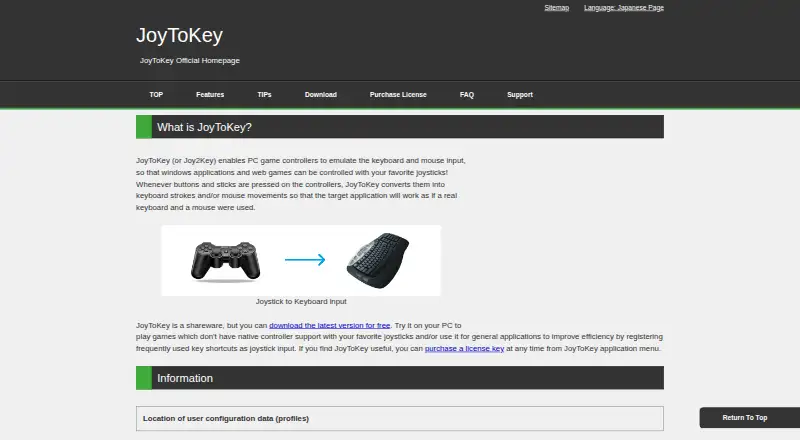
JoyToKey converts game-controller buttons and stick input into keyboard and mouse actions for Windows applications and web games.
What JoyToKey is
JoyToKey converts game-controller buttons and stick input into keyboard and mouse actions for Windows applications and web games. A joystick button can send a key, key combination, mouse movement, wheel movement or click. Users can create multiple profiles and have JoyToKey switch the active profile according to the focused application. An Auto Setting Wizard helps set up basic assignments; advanced options let a button rotate among two or three sets of assignments or vary them by press duration or analog input level. Button Alias can create virtual buttons, combine actions on one input or trigger an action when two buttons are pressed together. Profiles can be associated with target applications, and command-line arguments can switch profiles or refresh joystick devices. JoyToKey supports Windows 11, 10, 8, 7 and Vista, and is offered as an installer or ZIP archive, with an ASCII-only build also listed. Its shareware can be evaluated without functional limits. The JoyToKey License Key is listed at $7.50 a month for continued use after the trial period. The download page says the product comes with no warranty.
Good
- Maps buttons to keys, combinations and mouse actions.
- Profiles can switch based on the focused application.
- Button Alias can combine input functions.
- Shareware evaluation has no functional limits.
Watch out
- Windows only.
- License listed at $7.50 a month.
- Download page states there is no warranty.
Who it suits
JoyToKey suits Windows users who want to map controller input to keyboard or mouse actions in applications and web games. It may be useful when different focused applications need different controller profiles.
Verdict
JoyToKey offers detailed controller-to-keyboard and mouse mapping, including app-specific profiles and more advanced assignment options. Review the Windows requirements and listed monthly license cost before continuing beyond evaluation.
Plans and prices
From JoyToKey's own pricing page, checked 14 Oct 2026.
| Plan | Price | What it gives you |
|---|---|---|
| JoyToKey license key | $7.50, paid once | Shareware trial has full functionality · commercial use requires one license per device · no refunds after purchase · one-time payment |
The facts
Each one read from JoyToKey's own pages, with the date it was checked.
What it does
- Accessibility support
- Free license keys are offered for disability-related accessibility use, and the company cites work with Dekimouse, Miyabi Project, and OneSwitch.org.uk.checked 14 Oct 2026
- Advanced assignments
- A button can switch among two or three sets of key assignments by rotation, press duration, or analog input level.checked 4 Oct 2026
- Button aliases
- Button Alias mappings create virtual buttons, combine functions, and support simultaneous-button combinations.checked 14 Oct 2026
- Commercial licensing
- Personal non-commercial users may install on multiple devices, while commercial use requires a separate license for each device.checked 14 Oct 2026
- Configuration storage
- Installer builds store JoyToKey.ini and profiles in Documents/JoyToKey, while ZIP builds use the executable folder; registry values can override locations.checked 14 Oct 2026
- Distribution formats
- JoyToKey is offered as an installer or ZIP archive, with a separate ASCII-only build also listed.checked 4 Oct 2026
- Download formats
- The maker provides installer, ZIP, beta, older stable, and ASCII-only builds.checked 14 Oct 2026
- External programs
- Mappings can launch external programs with command parameters and a specified working directory.checked 14 Oct 2026
- Integrations
- Profiles can be associated with target applications, and JoyToKey supports command-line arguments to refresh joystick devices or switch profiles.checked 4 Oct 2026
- Licence terms
- JoyToKey is proprietary software licensed under a non-exclusive, non-transferable agreement; reverse engineering, modification, and redistribution are prohibited.checked 14 Oct 2026
- Limit: Anti-cheat compatibility
- A Reddit discussion reports controller inputs working in Notepad but failing in a game where anti-cheat software may have blocked JoyToKey.checked 14 Oct 2026
- Limit: CHIP setup
- CHIP reports that every key must be assigned manually and numbered buttons can make identification guesswork.checked 14 Oct 2026
- Limit: Clubic
- Clubic criticizes the dated interface, complex initial setup, and paid advanced functions.checked 14 Oct 2026
- Limit: Reliability complaint
- A Reddit user reported silent termination after several minutes and, in an older version, mouse output jumping to the top-left corner.checked 14 Oct 2026
- Limit: Softpedia currency
- Softpedia's listing is outdated at version 6.3 from July 2019 and therefore does not reflect the current 7.4 release.checked 14 Oct 2026
Where it runs
- Basic mapping
- Each joystick button can be assigned keyboard input, key combinations, mouse movement, wheel movement, or mouse clicks.checked 4 Oct 2026
- Keyboard mapping
- Buttons can emit single keys, multi-key combinations such as Alt+F4, and special keys.checked 14 Oct 2026
- Limit: Windows security
- The official FAQ says enhanced Windows security can block control of some applications, including Alt-Tab and on-screen-keyboard mouse clicks.checked 14 Oct 2026
- Macro command input
- Version 7.4 adds command input with unlimited rows, per-row hold durations, and up to four simultaneous keyboard or mouse inputs per row.checked 14 Oct 2026
- Macro support
- Yeschecked 20 Sep 2026
Money
- Free evaluation
- The shareware can be downloaded and evaluated without limitation in functionality.checked 4 Oct 2026
- Free plan
- Nochecked 20 Sep 2026
The company
- Maker founded
- Free Colors, Ltd. was established on March 24, 2022 to take over the former JTK software business.checked 14 Oct 2026
- Maker headquarters
- The legal seller lists its address in Urawa-ku, Saitama, Japan.checked 14 Oct 2026
Alternatives to JoyToKey
- 1
Monect PC Remote Play
Free planAndroidiOSWebmacOS7.6Free plan - 2
GameFlow
Free planOpen sourceWebLinuxmacOSSelf-hosted7.4Free plan - 3

OmniControl
Free planWindows7.3From $59.99 a year - 4
ControllerBuddy
Free planOpen sourceLinuxmacOSWindows7.2Free plan - 5
JoyShockMapper
Free planOpen sourceLinuxSelf-hostedWindows7.2Free plan - 6
reWASD
AndroidiOSWindows7.1$14.99 one-time