
OmniControl
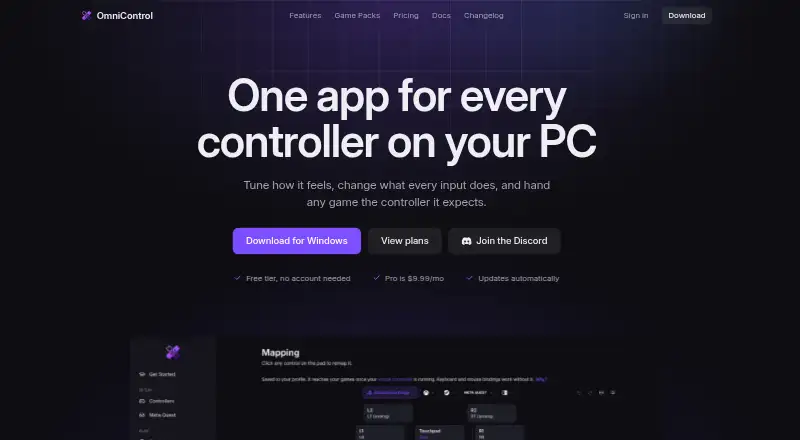
OmniControl is a Windows desktop app for remapping and tuning game-controller input.
What OmniControl is
OmniControl is a Windows desktop app for remapping and tuning game-controller input. It can read motion, record macros, and present input to games as a virtual controller; that emulation requires the separate ViGEmBus driver, which can be installed from the app. It supports controllers including DualSense, DualShock, Xbox, Switch Pro, GameCube, Wii Remote, Meta Touch Plus, Quest 3/3S over Meta Horizon Link, and Razer Raiju V3. Its Game Packs catalog offers free ready-made setups for 251 games. For PS5 Remote Play, OmniControl works with chiaki-ng by presenting a virtual DualShock 4, with presets for about 60 PS5 games. Game Center can scan Steam and Epic libraries, accept manual game additions, and switch profiles automatically. Mappings, motion settings, macros, overlays, and per-game profiles remain on the PC. The Windows 10 and 11 64-bit installer is 48.1 MB and updates automatically.
Good
- Free plan has no time limit and needs no account.
- Game Packs offer setups for 251 games.
- Profiles can switch automatically for linked games.
- Controller settings and profiles stay on the PC.
Watch out
- Windows 10 or 11, 64-bit, is required.
- Emulation requires the separate ViGEmBus driver.
- Quest support excludes Virtual Desktop, Steam Link, and SteamVR.
- Kernel-level anti-cheat competitive shooters are out of scope.
Who it suits
OmniControl suits Windows users who want to remap supported controllers, configure per-game profiles, or use macros and virtual-controller output. Quest controller support is for people using Meta Horizon Link over a Link cable or Air Link.
Verdict
OmniControl combines controller remapping, profiles, motion input, and virtual-controller emulation for Windows. Check its Quest connection requirements and anti-cheat boundary before choosing it for a particular setup.
Plans and prices
From OmniControl's own pricing page, checked 15 Oct 2026.
| Plan | Price | What it gives you |
|---|---|---|
| Free | Free | no time limit · no account needed · mapping, tuning, diagnostics, themes, overlays, PS5 Remote Play · Game Pack imports · always |
| Insider | $9.99 a month | emulation · keyboard and mouse virtual controller · macros · studios · recorder and game automation · gyro aim · shift layers · Game Packs · watermark-free overlay · Renews monthly until you cancel |
| Pro Monthly (Quest page) | $9.99 a month | Quest gameplay as virtual controller or keyboard and mouse · monthly until cancelled |
| Pro Monthly | $14.99 a month | full Pro feature set · renews monthly until cancelled |
| Pro Annual (Quest page) | $59.99 a year | Quest gameplay as virtual controller or keyboard and mouse · yearly until cancelled |
| Pro Annual | $74.99 a year | virtual controller output · keyboard and mouse control · macros and recorder · Game Packs sharing · Quest virtual pad · advanced studios · watermark-free overlay · renews yearly until cancelled |
The facts
Each one read from OmniControl's own pages, with the date it was checked.
What it does
- Anti-cheat boundary
- OmniControl contains no anti-cheat evasion and says kernel-level anti-cheat competitive shooters are out of scope.checked 1 Oct 2026
- Automatic game switching
- Game Center can associate profiles with games and load the matching setup when a game starts.checked 15 Oct 2026
- Calibration
- The calibration wizard measures stick and trigger drift and flags controls that wander.checked 15 Oct 2026
- Controller support
- It supports DualSense, DualSense Edge, DualShock 4, DualShock 3, Xbox Series/One, Elite Series 2, Xbox 360, Switch Pro, GameCube and Wii Remote through Dolphin outputs, Meta Touch Plus, Quest 3/3S over Link, and Razer Raiju V3.checked 1 Oct 2026
- Documentation and support
- The documentation covers installation, quick start, controller setup, keyboard and mouse, profiles, feature guides and troubleshooting; support is offered by email and Discord.checked 15 Oct 2026
- Driver requirement
- Emulation needs a separate ViGEmBus driver installed from the app's Drivers card.checked 15 Oct 2026
- Game integrations
- Game Center scans Steam and Epic libraries, supports manual game additions, and links games to profiles for automatic switching.checked 1 Oct 2026
- Game Packs
- The catalog offers ready-made setups for 251 games that users can browse and import without charge.checked 15 Oct 2026
- Independent community signal
- Gridinsoft's page showed a Discord community associated with the domain at 206 members and 68 online when checked.checked 15 Oct 2026
- Independent domain fact
- Scam Detector reported that the domain was created on July 20, 2026, used valid HTTPS and was not detected on its blacklist checks.checked 15 Oct 2026
- Independent security criticism
- Gridinsoft classified omnicontrol.me as phishing with a 1/100 trust score, citing the young domain and limited independent reputation data.checked 15 Oct 2026
- Independent trust score
- Scam Detector assigned omnicontrol.me a 26.4/100 trust score and described the result as debatable or contentious.checked 15 Oct 2026
- Keyboard and mouse output
- Pro converts keyboard and mouse input into virtual-controller input for games that require a pad.checked 15 Oct 2026
- Local data handling
- Mappings, motion settings, macros, overlays and profiles remain on the user's PC and are not uploaded according to the privacy policy.checked 15 Oct 2026
- Meta Quest integration
- Quest controller support requires Meta Horizon Link over a Link cable or Air Link; Virtual Desktop, Steam Link and SteamVR are not supported.checked 1 Oct 2026
- Meta Quest support
- Quest 3 and 3S Touch controllers are read through Meta Horizon Link over Link cable or Air Link and merged into one gamepad.checked 15 Oct 2026
- Motion aiming
- The feature set includes gyro and motion aiming controls for supported controllers.checked 15 Oct 2026
- Not open source or API information
- The opened product, documentation and legal pages describe a proprietary desktop app and do not identify an open-source licence, public API or SDK.checked 15 Oct 2026
- Overlay and crosshair tools
- Overlay Studio and Crosshair Studio provide stream overlays and configurable on-screen crosshairs.checked 15 Oct 2026
Where it runs
- App-store developer details
- That Google Play listing identifies Michael Ward of River Valley Swords Co. in Ireland as its developer and says it was updated October 4, 2026.checked 15 Oct 2026
- App-store identity check
- Google Play has a similarly named Omni Control app by Technik Apps, separate from the Windows product, with 500+ downloads, ads and in-app purchases.checked 15 Oct 2026
- Device allowance
- One licence can be active on three PCs at a time, with devices removable from the account dashboard.checked 15 Oct 2026
- Macros
- Pro includes Macro Studio for recording and binding sequences of controller, keyboard and mouse actions.checked 15 Oct 2026
- Platform requirement
- The download is for Windows 10 and 11, 64-bit, with a 48.1 MB installer and automatic in-app updates.checked 1 Oct 2026
Alternatives to OmniControl
- 1
Avidemux
Free planOpen sourceWebLinuxmacOSWindows7.3Free plan - 2
ControllerBuddy
Free planOpen sourceLinuxmacOSWindows7.2Free plan - 3
JoyShockMapper
Free planOpen sourceLinuxSelf-hostedWindows7.2Free plan - 4

PadLink
Free planAndroidiOSmacOSWindows7.2$2.99 one-time - 5
reWASD
AndroidiOSWindows7.1$14.99 one-time - 6

Keysticks
Free planOpen sourceWindows7.0Free plan