LEA Extended Input
LEA Extended Input lets you use Android or iOS devices to send keyboard and joystick inputs to a PC.
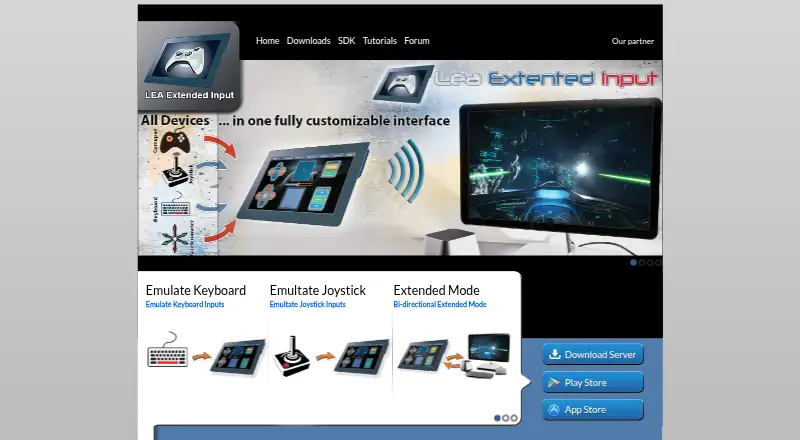
What LEA Extended Input is
LEA Extended Input lets you use Android or iOS devices to send keyboard and joystick inputs to a PC. Its clients and standalone server are free. On the PC, the server emulates four joysticks and one keyboard, and can redirect gamepad and joystick input to them. Multiple clients can connect to one PC, with their statuses synchronized.
Choose from 13 standard controls, build custom ones, or import controls shared by the community. Controls can be adjusted by shape, size, orientation, color, and texture. The client includes a macro editor. In Extended mode, compatible PC games can send information such as inventory, a mini-map, or radar to the client interface. Users can export projects through LEA Resources Manager on PC to share with the community. A C# SDK is offered; the SDK page lists a C++ SDK as available soon. The server requires a 64-bit edition of Windows 7 or higher.
Good
- Free clients and server.
- Supports Android, iOS, and Windows.
- Custom controls can be shaped and styled.
- Multiple clients can connect to one PC.
- Macros and Extended mode are available.
Watch out
- The server requires 64-bit Windows 7 or higher.
- Extended mode requires a compatible PC game.
- C++ SDK is listed as available soon.
Who it suits
LEA Extended Input suits PC players who want to use mobile devices as input clients or customize controls for games. It may also suit developers interested in its C# SDK or game-to-client information display.
Verdict
LEA Extended Input combines configurable mobile controls with PC-side keyboard and joystick emulation. Check the Windows server requirement and game compatibility for Extended mode before choosing it.
Plans and prices
From LEA Extended Input's own pricing page, checked 29 Sep 2026.
| Plan | Price | What it gives you |
|---|---|---|
| Free | Free | Clients and server are free |
The facts
Each one read from LEA Extended Input's own pages, with the date it was checked.
What it does
- Control customization
- Controls can be customized by shape, size, orientation, color, and texture.checked 29 Sep 2026
- Custom controls
- Users can choose from 13 standard controls, create their own, or import controls shared by the community.checked 29 Sep 2026
- Extended mode
- A PC game that supports LEA can send information to the client UI for display, such as inventory, a mini-map, or radar.checked 29 Sep 2026
- Mobile clients
- The user guide says the client is available in the App Store for iOS and on Google Play for Android.checked 29 Sep 2026
- Multiple clients
- The product supports connecting multiple clients to one PC and synchronizes client statuses.checked 29 Sep 2026
- Purpose
- LEA Extended Input lets users emulate keyboard and joystick inputs from client devices connected to a PC.checked 29 Sep 2026
- SDK
- The maker offers a C# SDK; its SDK page lists the C++ SDK as available soon.checked 29 Sep 2026
- Server capacity
- The standalone server emulates four joysticks and one keyboard and can redirect gamepad and joystick inputs to them.checked 29 Sep 2026
- Sharing
- Users can export projects through LEA Resources Manager on PC to share them with the community.checked 29 Sep 2026
- Tutorials and support
- The maker directs users to its YouTube channel for tutorials on basic and advanced functions and lists a user forum in its navigation.checked 29 Sep 2026
Where it runs
- Macros
- The client includes a macro editor for creating macros.checked 29 Sep 2026
- Windows requirement
- The server is available for 64-bit editions of Windows 7 and higher.checked 29 Sep 2026
The company
- Maker
- The download page carries the copyright notice “Copyright @2015 Thomas Brillet.”checked 29 Sep 2026
The full review of LEA Extended Input
LEA Extended Input is a mobile client and PC server for emulating keyboard and joystick inputs. It suits players who want to build custom touchscreen layouts, use macros, or connect multiple clients to one PC. Its free client-and-server setup is a strong draw, but the Windows server and compatible-game requirements make it a focused choice.
Overview
LEA turns Android and iOS devices into configurable input surfaces for a PC. Its standalone server emulates four joysticks and one keyboard, and can redirect gamepad and joystick inputs to them. That gives a multi-device gaming setup room to grow, but it is not a fit for someone who wants a mobile-only controller or cannot run the server on Windows.
Key features
Custom controls and macros
Users can choose from 13 standard controls, create their own, or import community-shared controls. Shape, size, orientation, color, and texture are adjustable, so the layout can be tailored to a game or screen rather than limited to a fixed virtual pad. The client’s macro editor adds another way to configure input; users can also switch profiles and keep profiles per app.
Multi-client and extended mode
Multiple clients can connect to one PC, with their statuses synchronized. Extended mode lets compatible PC games send information to the client interface, including an inventory, mini-map, or radar. That can make a phone useful as more than a control surface, but it depends on game support for LEA.
Sharing and development
Projects can be exported through LEA Resources Manager on PC for community sharing. The maker offers a C# SDK, while its C++ SDK is listed as available soon. Tutorials cover basic and advanced functions on the maker’s YouTube channel, and a user forum is also available.
Pricing
| Plan | Price | What it suits |
|---|---|---|
| Free | free | Clients and server are free |
The free plan covers both the mobile clients and server, so there is no paid tier to weigh against the core setup. It is the straightforward choice for players willing to use the Windows server and check whether their games support the features they want.
Platforms
Mobile clients are available for Android and iOS, with the server available for 64-bit editions of Windows 7 and higher. LEA is therefore multiplatform across those devices, but the PC side is specifically Windows rather than a Linux or macOS server.
Who it's for
LEA is best for players who want extensive control over touchscreen layouts, macro creation, per-app profiles, or several mobile clients connected to one PC. Community imports and project exports may also appeal to users who want to share customized layouts. Look elsewhere if you need a server outside Windows or rely on Extended mode in a game that does not support LEA.
Pros and cons
Pros
- Free clients and server: the full client-server arrangement costs nothing.
- Flexible layouts: 13 standard controls, custom controls, community imports, and appearance adjustments give users room to tailor touchscreen input.
- Room for multi-device setups: the server emulates four joysticks and one keyboard, and supports multiple clients on one PC.
- Beyond basic input: macros, per-app profiles, and compatible-game information in Extended mode add useful configuration options.
Cons
- Windows server dependency: the server requires a 64-bit Windows 7-or-higher edition, ruling out a PC setup without Windows.
- Extended mode depends on game support: its client-side inventory, map, or radar display is useful only with a PC game that supports LEA.
- PC-oriented setup: mobile clients alone do not provide the keyboard and joystick emulation; the standalone server is central to the product.
Alternatives
For a broader shortlist, browse Game Controller Mapper Software. Choose GameFlow instead if you want a free, open-source beta with Windows, Linux, and macOS archives. AntiMicroX is a free GPL v3 desktop application for Linux and Windows, making it a more suitable direction for a desktop-focused setup. Consider Monect PC Remote Play when core PC remote-control features across Android, iOS, macOS, web, or Windows better match your needs; its Premium plan is for ad-free use and higher feature limits, with custom pricing.
ControllerBuddy, JoyShockMapper, OmniControl, PadForge, and PlayAbility Adaptive Software are other options to compare.
Verdict
Choose LEA Extended Input if you want a free, highly configurable mobile control surface for a Windows PC, particularly for multi-client play or custom touch layouts. Its main advantage is the breadth of input and layout options without a client or server charge. Look elsewhere if you need a non-Windows server or your games cannot use LEA’s Extended mode.
Alternatives to LEA Extended Input
- 1
Monect PC Remote Play
Free planAndroidiOSWebmacOS7.6Free plan - 2
GameFlow
Free planOpen sourceWebLinuxmacOSSelf-hosted7.4Free plan - 3

OmniControl
Free planWindows7.3From $59.99 a year - 4

ControllerBuddy
Free planOpen sourceLinuxmacOSWindows7.2Free plan - 5
JoyShockMapper
Free planOpen sourceLinuxSelf-hostedWindows7.2Free plan - 6
reWASD
AndroidiOSWindows7.1$14.99 one-time