agedu
agedu is a free, MIT-licensed utility that scans a directory tree and relates disk usage to file access times.
What agedu is
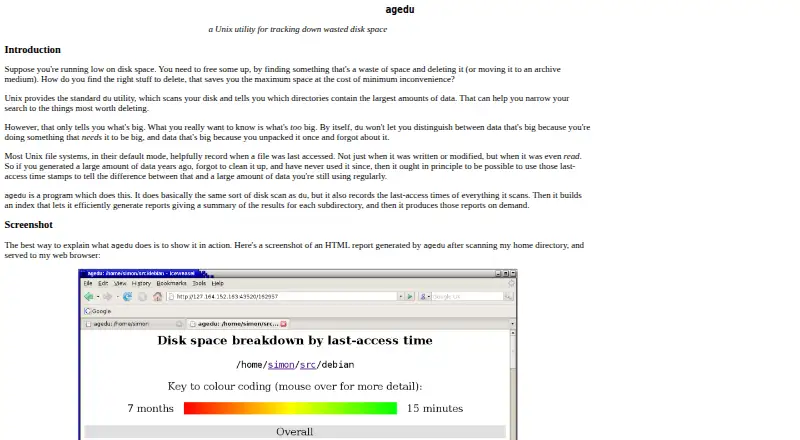
agedu is a free, MIT-licensed utility that scans a directory tree and relates disk usage to file access times. It helps identify large data that has gone unused, but cannot determine whether that data is safe to delete. It generates text and HTML reports, or serves navigable HTML reports through a miniature web server. HTML reports use red for disused data and green for recently accessed data; text reports can be limited to files not accessed for a chosen age, such as six months. Scan options can cross filesystem boundaries and include, exclude or prune files and directories. Results can be exported as text on one machine and loaded into an index on another, including across differing CPU architectures. Index files have restrictive permissions because they may expose confidential filesystem information. The built-in web server uses Linux user-based checks or HTTP Basic authentication by default when those checks are unavailable. CGI mode has no access control of its own, so access must be restricted by the web server. agedu has no native Windows port, though a separate Windows scan utility can create a dump for loading on Unix.
Good
- Free and MIT-licensed.
- Generates text and navigable HTML reports.
- Text reports can filter by file access age.
- Scan options can cross filesystem boundaries.
- Results can be transferred between differing CPU architectures.
Watch out
- Cannot determine whether data is safe to delete.
- No native Windows port.
- CGI mode provides no access control.
Who it suits
agedu suits Linux users looking for likely disk-cleanup candidates based on file access age. It may also suit users who need text or browser-readable reports and can manage web access controls where needed.
Verdict
agedu can help locate large, older data and present it in reports, but cleanup decisions remain yours. Take particular care with access controls when serving reports through CGI.
Plans and prices
From agedu's own pricing page, checked 7 Oct 2026.
| Plan | Price | What it gives you |
|---|---|---|
| agedu | Free | MIT-licensed Unix utility; source archive available |
The facts
Each one read from agedu's own pages, with the date it was checked.
What it does
- Age filtering
- Text reports can show only files that have not been accessed for a chosen age, such as six months.checked 7 Oct 2026
- Custom scans
- Scan options can cross filesystem boundaries and include, exclude, or prune files and directories.checked 7 Oct 2026
- Data transfer
- Scan results can be dumped as text on one machine and loaded into an index on another, including across differing CPU architectures.checked 7 Oct 2026
- Exportable reports
- Yeschecked 23 Sep 2026
- File-type breakdown
- Nochecked 23 Sep 2026
- License
- agedu is distributed under the MIT licence and is free to copy, redistribute, use, and reuse.checked 7 Oct 2026
- Limit
- agedu identifies promising places to investigate but cannot determine whether data is truly safe to delete.checked 7 Oct 2026
- Purpose
- Scans a directory tree and correlates disk usage with file last-access times to help identify large, disused data.checked 7 Oct 2026
- Reports
- Generates text and HTML reports, or serves navigable HTML reports through a miniature web server.checked 7 Oct 2026
- Scan scope
- files_folderschecked 23 Sep 2026
- Security
- Index files are created with restrictive permissions because they may reveal confidential information about the scanned filesystem.checked 7 Oct 2026
- Security limitation
- CGI mode performs no access control and leaves restricting access to the web server.checked 7 Oct 2026
- Status and support
- The maker says it has had a small amount of beta testing, invites bug reports by email, and welcomes patches.checked 7 Oct 2026
- Treemap view
- Nochecked 23 Sep 2026
- Visualisation
- HTML reports use colours from red for disused data to green for recently accessed data.checked 7 Oct 2026
- Web access control
- The built-in web server defaults to Linux user-based access checks or HTTP Basic authentication with an invented password when those checks are unavailable.checked 7 Oct 2026
Where it runs
- Application sizes
- Nochecked 23 Sep 2026
- Desktop platforms
- Linux; web browser for HTML reportschecked 23 Sep 2026
- Windows support
- agedu has no native Windows port; a separate Windows scan utility can create a dump for loading into agedu on a Unix machine.checked 7 Oct 2026
Money
- Free plan
- Yeschecked 23 Sep 2026
The full review of agedu
agedu is a free, MIT-licensed Unix utility for finding where substantial disk use coincides with old access times. It suits Linux users who are comfortable reviewing reports and making their own retention decisions. The result is a focused cleanup investigation tool, not an automatic disk janitor.
Overview
agedu scans a directory tree and correlates file size with the time files were last accessed. That combination helps separate merely large data from large data that may no longer be in regular use. It produces text and HTML reports, and its miniature web server can present a navigable HTML report in a browser.
This approach is valuable when storage pressure calls for prioritising what to inspect. It does not establish that any item is safe to remove, so organisations with retention obligations or poorly documented data need a human review before deletion. The MIT licence permits copying, redistribution, use and reuse without a paid tier.
Key features
- Age-filtered text reports: A chosen threshold, such as six months, limits output to files not accessed within that period. This is practical for a targeted review, although access time alone is not proof that data is obsolete.
- Colour-coded HTML: The report runs from red for disused data to green for recently accessed data, making relative age quick to scan. There is no treemap, application-size view or file-type breakdown, so users wanting broad visual categorisation should choose a fuller disk analyser.
- Controlled scan scope: Scans can cross filesystem boundaries and include, exclude or prune files and directories. Those controls make it possible to focus on relevant trees instead of treating an entire system as one undifferentiated scan.
- Portable indexes: Results can be dumped as text on one machine and loaded into an index on another, including across different CPU architectures. This helps when collection and analysis happen on separate Unix systems.
- Report serving and security: Index files use restrictive permissions because they can expose confidential filesystem information. The built-in server uses Linux user checks or HTTP Basic authentication with an invented password when those checks are unavailable; CGI mode has no access control, leaving protection to the web server.
Pricing
agedu — free: The free plan is the complete MIT-licensed Unix utility, with a source archive available. There is no free trial because the software is already free, and no paid upgrade or seat quota is stated. It is the natural choice for individuals and teams willing to operate a Unix utility themselves; readers seeking vendor-backed commercial packaging should look elsewhere.
Platforms
agedu runs on Linux and presents HTML reports in a web browser. It has no native Windows port. A separate Windows scan utility can create a dump for loading into agedu on a Unix machine, which offers a workaround for mixed environments but not a Windows-native agedu experience.
Who it's for
Choose agedu when you need to find large, potentially neglected files in Linux directory trees and can interpret text or HTML output. Administrators who need selective scans, portable results or a browser-based report will benefit most. It is a poor fit for users expecting automatic deletion decisions, treemaps, application or file-type summaries, or a polished native Windows application. Anyone exposing reports through CGI must provide the missing access controls at the web-server layer.
Pros and cons
Pros
- Combines disk usage with last-access age, giving cleanup reviews a useful prioritisation signal.
- Text and navigable HTML reports support both scripted workflows and browser-based investigation.
- Include, exclude, prune and cross-filesystem options adapt scans to complex directory layouts.
- MIT licensing and portable dump files suit reuse across Unix systems without licensing cost.
Cons
- It cannot determine whether a candidate is safe to delete, so every cleanup action requires informed judgement.
- No treemap, application-size or file-type views limits its value as a general-purpose visual analyser.
- No native Windows port means Windows users need a separate scan utility and a Unix host for loading results.
- CGI mode performs no access control, creating an avoidable exposure risk unless the surrounding web server is configured correctly.
Alternatives
For a broader directory of choices, see Disk Space Analyzers, or browse SSH Clients and Terminal Emulators for remote-access tools.
- electerm is the better pick when you need a free, MIT-licensed terminal and file manager across Android, iOS, Linux, macOS, self-hosted, web and Windows, with SSH, SFTP, FTP, Telnet, Serial, RDP, VNC and Spice.
- Termius suits users wanting a cross-platform SSH/SFTP client with a free Starter tier and a Pro plan at $10 a month when billed annually, including AI-powered autocomplete and port forwarding.
- Royal TS is preferable for connection management across desktop and mobile platforms, with a free Lite tier capped at 10 connections, 10 credentials and one document.
- XPipe is an option for Linux, macOS and Windows users seeking an open-core approach with a free Community plan.
- Tabby is a free FOSS terminal emulator for Linux, macOS and Windows.
- Bast is a free SSH host manager with cloud host sync and SSH/SFTP features.
- OpenSSH is the choice for a free SSH protocol suite on Linux, macOS, self-hosted and Windows under a BSD-style licence.
- WindTerm provides free commercial and non-commercial use on Linux, macOS and Windows, with source code partially open.
Verdict
agedu is a strong choice for Linux administrators who need an inexpensive, scriptable way to connect storage consumption with stale access times. Its focused reports and flexible scans reveal promising places to investigate without pretending to make deletion decisions. Look elsewhere if you need native Windows operation, rich visual breakdowns or software that manages cleanup and access control for you.
Alternatives to agedu
- 1

WizTree
Free planmacOSWindows8.0Free plan - 2
LumaDisk
Free planmacOSWindows7.9$6.89 one-time - 3

Disk Usage Analyzer
Free planOpen sourceLinuxmacOS7.7Free plan - 4

FolderSizes
Free planWindows7.7$30 one-time - 5
SizeTrend
Free planWindows7.7$69.99 one-time - 6
dust
Free planOpen sourceLinuxmacOSWindows7.6Free plan