
FolderSizes
FolderSizes is a Windows tool for seeing how files and folders use space across local and network storage.
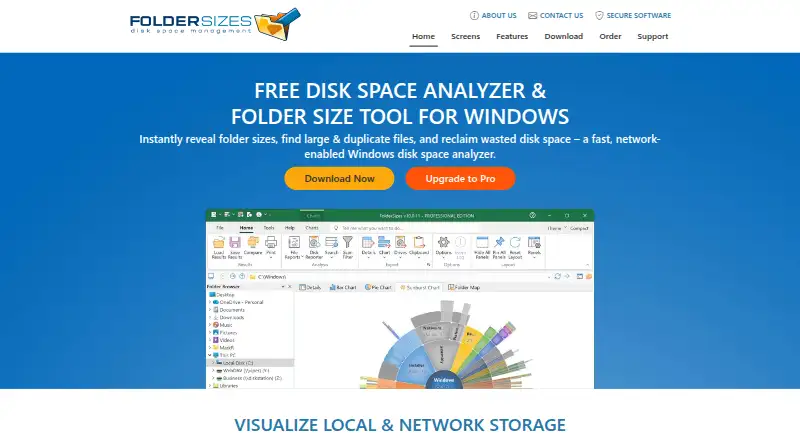
What FolderSizes is
FolderSizes is a Windows tool for seeing how files and folders use space across local and network storage. It scans local drives, external drives, mapped network drives, UNC paths, and network shares. Results can be viewed as treemap, sunburst, bar, or pie charts, and searches can be narrowed by age, name, attributes, size, owner, date, or depth-related criteria. Reports can be exported to Excel, PDF, HTML, CSV, or XML. Recurring scans can send automated email reports, while disk and folder usage tracking and file system snapshots help show changes over time. The free edition has no time limit and includes four visualizations, reports, advanced search, and scan filtering; the free trial has no feature limitations. Paid licenses include a $30, paid once Personal Edition for personal and home network use, and a $60, paid once Single-User Pro license for one user. Pro upgrades include priority technical support and free minor version upgrades.
Good
- Scans local, external, and network storage.
- Offers four chart styles for viewing usage.
- Searches by size, age, owner, and other criteria.
- Exports reports in five formats.
- Can schedule scans and track usage over time.
Watch out
- Windows is the only listed platform.
- Personal Edition is restricted to personal and home network use.
- Single-User Pro costs $60, paid once.
Who it suits
FolderSizes suits Windows users who want to inspect storage on local or network drives, filter files, and export reports. Its personal license is for home use, while Pro licenses include options for individual users, organizations, and consultants.
Verdict
FolderSizes combines storage visualizations, detailed search filters, reports, and trend tracking. The no-time-limit free edition covers core analysis; paid licenses add options for professional use and support.
Plans and prices
From FolderSizes's own pricing page, checked 28 Sep 2026.
| Plan | Price | What it gives you |
|---|---|---|
| Personal Edition license | $30, paid once | Personal and home network use only; unavailable to organizations; lower-priority support. · Personal and home network use only · Up to two personal computers · Perpetual license |
| Single-User Pro license | $60, paid once | For one user; suitable for servers, workstations, and company networks. · One user · Buy once, use forever |
| Single-User Pro license - 5 Pack | $210, paid once | Five-pack license with 30% discount. · Perpetual license · 5-pack |
| Single-User Pro license - 10 Pack | $360, paid once | Ten-pack license with 40% discount. · Perpetual license · 10-pack |
| Site-Wide Pro license | $700, paid once | Unlimited users and installations within a single location or city. · Unlimited users and installations within a single location or city · Within a single location or city |
| Country-Wide Pro license | $2,200, paid once | Unlimited users and installations within the purchaser's country of origin. · Unlimited users and installations within purchaser's country · Within purchaser's country of origin |
| Enterprise-Wide Pro license | Priced on request | Unlimited users and installations globally within a single organization. · Unlimited users and installations globally within one organization |
| Single-Consultant Pro license | $499, paid once | One consultant may use the software on up to 5 concurrent customer computers. · One consultant · Up to 5 concurrent customer computers · one-time fee |
| Multi-Consultant Pro license | $1,399, paid once | Up to 5 consultants may use the software on up to 15 concurrent customer computers. · Up to 5 consultants · Up to 15 concurrent customer computers · one-time fee |
| Free edition | Free | No time limit; includes visualization types, file reports, advanced search, and scan filtering. |
The facts
Each one read from FolderSizes's own pages, with the date it was checked.
The company
- Company history
- FolderSizes has been continuously developed since 2003 by Key Metric Software, LLC.checked 28 Sep 2026
- Founded
- 2003checked 23 Sep 2026
- Headquarters
- Traverse City, Michigan, United Stateschecked 23 Sep 2026
What it does
- Customer count
- The company says more than 60,000 clients worldwide use the software.checked 28 Sep 2026
- Exportable reports
- Yeschecked 23 Sep 2026
- Export formats
- Exports reports to Excel, PDF, HTML, CSV, and XML.checked 28 Sep 2026
- File snapshots
- Can capture file system snapshots to track disk usage trends.checked 28 Sep 2026
- File-type breakdown
- Yeschecked 23 Sep 2026
- Network scan scope
- Scans local drives, mapped network drives, UNC paths, and network shares.checked 28 Sep 2026
- Paid from
- 30checked 23 Sep 2026
- Report scheduling
- Supports recurring scans with automated email reports.checked 28 Sep 2026
- Scan scope
- files_folderschecked 23 Sep 2026
- Search filters
- Searches by age, name, attributes, size, owner, date, or depth-related criteria.checked 28 Sep 2026
- Security claims
- The company states its software is malware-, spyware-, adware-, and quality-guaranteed.checked 28 Sep 2026
- Support coverage
- Pro upgrades include priority technical support and free minor version upgrades.checked 28 Sep 2026
- Treemap view
- Yeschecked 23 Sep 2026
- Trend analysis
- Tracks disk usage and folder sizes over time.checked 28 Sep 2026
- Visualization types
- Provides treemap, sunburst, bar, and pie charts.checked 28 Sep 2026
Where it runs
- Desktop platforms
- Windowschecked 23 Sep 2026
Money
- Free edition limits
- The free edition has no time limit and includes four visualizations, reports, advanced search, and scan filtering.checked 28 Sep 2026
- Free plan
- Yeschecked 23 Sep 2026
- Trial feature limits
- The free trial version has no feature limitations.checked 28 Sep 2026
The full review of FolderSizes
FolderSizes is a Windows tool for analyzing storage on computers and network locations. It is best suited to people who need to investigate disk usage in detail or produce repeatable reports, rather than just glance at a drive’s free space. Its standout advantage is the combination of deep search and ongoing reporting; home users can start free, while organizations need a Pro license.
Overview
FolderSizes brings visual analysis, file-level search, and reporting into one storage workflow. It can scan local and external drives, mapped network drives, UNC paths, and network shares, which gives IT staff a way to examine storage beyond a single workstation. For a one-off check, that breadth may be more than a casual user needs; it matters when diagnosing space use across multiple locations or tracking changes over time.
Key features
Four visualizations—treemap, sunburst, bar, and pie—show storage distribution from different angles, and file-type breakdowns help identify what kinds of files occupy space. Search filters for age, name, attributes, size, owner, date, and depth let users narrow results to specific cleanup or investigation questions. The range is useful for focused analysis, though people seeking only a simple visual overview may not need this level of detail.
Reports export to Excel, PDF, HTML, CSV, and XML. Recurring scans can send automated email reports, while file system snapshots and trend analysis track disk usage and folder sizes over time. These tools make FolderSizes a more compelling choice for ongoing capacity monitoring than for occasional manual scans.
The free edition has no time limit and includes the four visualizations, reports, advanced search, and scan filtering. The free trial has no feature limitations, so readers can evaluate the full feature set before deciding whether a paid license is warranted. The company also states that its software is malware-, spyware-, adware-, and quality-guaranteed; Pro upgrades include priority technical support and free minor-version upgrades.
Pricing
FolderSizes uses perpetual licenses rather than recurring subscriptions. The free edition covers core analysis without a time limit, making it a practical starting point for personal use. Paid options chiefly determine who may use the software, how many computers or consultants are covered, and whether Pro support benefits apply.
- Free edition: No charge and no time limit; includes visualizations, reports, advanced search, and scan filtering. A good fit for home users who need the core analysis features.
- Personal Edition license — $30, paid once: A perpetual license for personal and home-network use on up to two personal computers. It is unavailable to organizations and has lower-priority support, so it is not the right license for workplace use.
- Single-User Pro license — $60, paid once: A perpetual license for one user, suitable for servers, workstations, and company networks. This is the direct choice for an individual professional who needs organizational use.
- Single-User Pro 5-pack — $210, paid once: A five-pack perpetual license with a 30% discount, for teams covering five users.
- Single-User Pro 10-pack — $360, paid once: A ten-pack perpetual license with a 40% discount, for broader user coverage.
- Site-Wide Pro license — $700, paid once: Unlimited users and installations within a single location or city. It fits organizations with a concentrated deployment.
- Country-Wide Pro license — $2,200, paid once: Unlimited users and installations within the purchaser’s country of origin, for wider national deployment.
- Enterprise-Wide Pro license: Custom pricing for unlimited users and installations globally within one organization.
- Single-Consultant Pro license — $499, paid once: One consultant may use the software on up to five concurrent customer computers.
- Multi-Consultant Pro license — $1,399, paid once: Up to five consultants may use the software on up to 15 concurrent customer computers.
The lower-cost Personal Edition is restricted to personal and home-network use; organizations should choose a Pro license. Pro upgrades add priority technical support and free minor-version upgrades, so the free edition and personal license trade away those support benefits.
Platforms
FolderSizes runs on Windows. Its scan scope includes external drives as well as local and network storage, but the software itself is not offered for other desktop platforms.
Who it's for
FolderSizes suits Windows users who need more than a basic disk-space view: IT staff inspecting network shares, administrators generating recurring reports, and consultants scanning customer computers all have license options aligned to those uses. Home users can get useful analysis from the no-time-limit free edition, while someone who only wants a quick, occasional check may find the search and reporting depth unnecessary.
Pros and cons
- Pro: The free edition has no time limit and includes visualizations, reports, advanced search, and scan filtering, so core analysis does not require a trial countdown.
- Pro: Network paths and shares are in scope, making it useful for storage investigations beyond a local drive.
- Pro: Multiple export formats, scheduled email reports, and trend tracking support repeatable operational work.
- Con: Windows-only availability rules it out for teams that need a cross-platform analyzer.
- Con: Organizational use is excluded from the Personal Edition, requiring a Pro purchase even when a home-oriented license might otherwise seem sufficient.
Alternatives
Compare disk space analyzers if you want to weigh FolderSizes against more tools in the category.
- WizTree is worth considering for users who want a freemium option that supports both Windows and macOS; its listed Individual Supporter Code is $25 a month, with codes that do not expire and a perpetual personal-use license.
- TreeSize is another Windows freemium option with a free trial, making it an alternative for readers who want to compare another Windows tool before choosing.
- SizeTrend may suit Windows users who want free local analysis, including cleanup and storage recommendations.
- Disk Analyzer Pro is a freemium option on Windows and macOS; its free personal edition includes local-drive usage reports, file and folder deletion, and duplicate-file reports.
- eDirStat is a free option for readers comparing tools across Linux, macOS, web, and Windows.
- StorageRadar is a macOS alternative with a free tier that includes deep storage scanning, treemap and sunburst views, and local snapshots.
- Drive Atlas is worth a look for Linux or Windows users: its free plan covers the first two drives with all features and no card or timer.
- Disk Auditor is a free Windows alternative offered as a portable single executable, with scanning, visualization, and exports to several formats.
Verdict
Choose FolderSizes if you need Windows-based storage analysis that reaches network locations and pairs detailed filters with scheduled reports and trend tracking. Its no-time-limit free edition is a strong starting point for personal use, and perpetual Pro licenses accommodate professional and larger deployments. Look elsewhere if you need a non-Windows app or only a lightweight, occasional disk check.
Alternatives to FolderSizes
- 1

WizTree
Free planmacOSWindows8.0Free plan - 2
LumaDisk
Free planmacOSWindows7.9$6.89 one-time - 3

Disk Usage Analyzer
Free planOpen sourceLinuxmacOS7.7Free plan - 4
SizeTrend
Free planWindows7.7$69.99 one-time - 5
dust
Free planOpen sourceLinuxmacOSWindows7.6Free plan - 6
Drive Atlas
Free planLinuxWindows7.4Free plan