SizeTrend
SizeTrend is a Windows tool for examining how files, folders and applications use disk space.
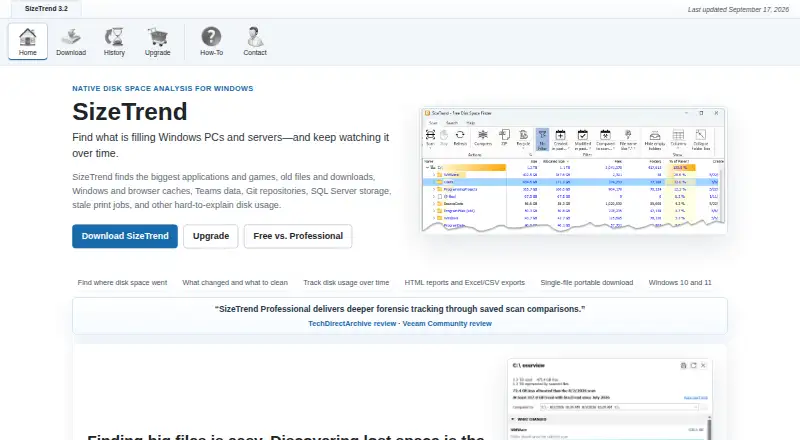
What SizeTrend is
SizeTrend is a Windows tool for examining how files, folders and applications use disk space. Its scans show application sizes and file-type breakdowns, and it can analyze file contents and find duplicates. Search can filter by name, text, binary content, type, size or date; duplicate detection compares names, sizes or content. The free edition includes local analysis, saved scan snapshots and one What Changed comparison when a compatible snapshot is available. A single-file portable download is also offered, and files or folders can be compressed in place. Professional adds network-folder scans, scheduled scans, automatic storage history, unlimited snapshot comparisons and exports to HTML, Excel or CSV. Recurring scans can run one-time, daily, weekly or monthly through Windows Task Scheduler. Logged-off scheduled tasks cannot access EFS-encrypted files. SizeTrend Professional costs $69.99 one-time, with no subscription and future versions included. Volume pricing is available from five licenses.
Good
- Free edition includes local disk analysis.
- Shows application sizes and file-type breakdowns.
- Searches by name, content, type, size or date.
- Professional exports HTML, Excel and CSV reports.
- Professional purchase includes future versions.
Watch out
- Available for Windows 10 and Windows 11 only.
- Professional costs $69.99 one-time.
- Free edition allows one eligible What Changed comparison.
- Logged-off scheduled tasks cannot access EFS-encrypted files.
Who it suits
It suits Windows users who want to review local or network storage, compare snapshots or export scan data. The free edition is suitable for local analysis, while Professional adds scheduled and network scans.
Verdict
SizeTrend offers useful file and storage analysis in a free Windows edition, with Professional adding scheduling, network scans and exports. Its one-time license avoids a subscription, but note the EFS limitation for logged-off scheduled tasks.
Plans and prices
From SizeTrend's own pricing page, checked 28 Sep 2026.
| Plan | Price | What it gives you |
|---|---|---|
| SizeTrend Free | Free | Core local-analysis features remain free. · Local drive and folder scans · Overview with cleanup and storage recommendations · File, content, and duplicate-file analysis · Save scan snapshots |
| SizeTrend Professional | $69.99, paid once | No subscription; all future versions are included. · Scheduled scans · Network-folder scans · HTML, Excel, and CSV exports · Unlimited saved-snapshot comparisons · Automatic storage history · One-time purchase. No subscription. All future versions are included. |
| 5+ licenses | $49.99, paid once | Volume pricing applies per order. · 5 licenses minimum · 5+ licenses |
| 10+ licenses | $39.99, paid once | Volume pricing applies per order. · 10 licenses minimum · 10+ licenses |
| 20+ licenses | $29.99, paid once | Volume pricing applies per order. · 20 licenses minimum · 20+ licenses |
| 40+ licenses | $19.99, paid once | Volume pricing applies per order. · 40 licenses minimum · 40+ licenses |
| Unlimited single-site license | $999.99, paid once | For organizations needing broad coverage. · Unlimited single-site coverage · Unlimited single-site license |
The facts
Each one read from SizeTrend's own pages, with the date it was checked.
Where it runs
- Application sizes
- Yeschecked 22 Sep 2026
- Desktop platforms
- windowschecked 22 Sep 2026
- Supported Platform
- Windows 10 and Windows 11checked 28 Sep 2026
Money
- Billing Model
- One-time purchase with no subscriptionchecked 28 Sep 2026
- Free Comparison Limit
- Free allows one What Changed comparison when a compatible snapshot existschecked 28 Sep 2026
- Free plan
- Yeschecked 22 Sep 2026
- Free Tier
- Free edition includes everyday local disk analysis toolschecked 28 Sep 2026
- Professional Price
- $69.99 one-time licensechecked 28 Sep 2026
What it does
- Checkout Provider
- Purchases are processed by FastSpringchecked 28 Sep 2026
- Duplicate Detection
- Finds duplicate files by name, size, or contentchecked 28 Sep 2026
- Encryption Limitation
- Logged-off scheduled tasks cannot access EFS-encrypted fileschecked 28 Sep 2026
- Exportable reports
- Yeschecked 22 Sep 2026
- External drive scans
- Yeschecked 22 Sep 2026
- File Compression
- Compresses files or folders in placechecked 28 Sep 2026
- File-type breakdown
- Yeschecked 22 Sep 2026
- Network Scanning
- Professional can scan network folderschecked 28 Sep 2026
- Paid from
- 69.99checked 22 Sep 2026
- Portable Download
- Available as a single-file portable downloadchecked 28 Sep 2026
- Professional Exports
- Exports HTML reports and Excel or CSV scan datachecked 28 Sep 2026
- Scan History
- Professional keeps automatic storage history and removes comparison limitschecked 28 Sep 2026
- Scan scope
- files_folders_appschecked 22 Sep 2026
- Scheduled Scans
- Supports one-time, daily, weekly, or monthly scheduled scanschecked 28 Sep 2026
- Search Features
- Searches by name, text, binary content, type, size, or datechecked 28 Sep 2026
- Task Scheduler
- Uses Windows Task Scheduler for recurring scans and reportschecked 28 Sep 2026
The full review of SizeTrend
SizeTrend is a Windows utility for examining storage use across files, folders, and applications. It suits people who want detailed local analysis and cleanup guidance, with paid tools for recurring or network scans and reports. Its free edition covers everyday local analysis, while Professional adds depth without a subscription.
Overview
SizeTrend combines storage analysis with ways to investigate files: it breaks down application sizes and file types, searches by name, text, binary content, type, size, or date, and identifies duplicates by name, size, or content. It can also compress files and folders in place. That breadth is useful when a simple folder-size view is not enough, though the user still needs to decide what is safe to remove or compress.
The free edition supports local drive and folder scans, cleanup and storage recommendations, file and content analysis, duplicate-file analysis, and saved snapshots. Its single “What Changed” comparison is useful for an occasional check, but it is a narrow allowance: a compatible snapshot must exist, and further comparisons require Professional.
Key features
- Detailed file analysis: Search filters include content, type, size, and date, so users can investigate storage use beyond the largest folders. Duplicate detection by name, size, or content offers several ways to find redundant files.
- Snapshots and history: Both editions can save snapshots. Professional removes comparison limits and keeps automatic storage history, making it the better fit for tracking changes over time.
- Scheduled and network scans: Professional can scan network folders and schedule one-time, daily, weekly, or monthly scans through Windows Task Scheduler. That is useful for routine reporting, but logged-off scheduled tasks cannot access EFS-encrypted files.
- Exportable results: Professional exports HTML reports and scan data in Excel or CSV formats, which is more practical for record-keeping or sharing results than an on-screen scan alone.
- Portable use: A single-file portable download is available, a useful option for users who prefer not to install a conventional application.
Pricing
SizeTrend Free costs nothing. It includes local drive and folder scans, cleanup and storage recommendations, file, content, and duplicate-file analysis, and saved snapshots. The main constraint is one “What Changed” comparison when a compatible snapshot exists; scheduled scans, network-folder scans, exports, unlimited comparisons, and automatic storage history are Professional features.
SizeTrend Professional costs $69.99, paid once as a one-time purchase with no subscription. It includes all future versions, scheduled and network-folder scans, HTML, Excel, and CSV exports, unlimited saved-snapshot comparisons, and automatic storage history. The 14-day trial provides access to Professional features, making it a sensible way to assess whether its reporting and recurring-scan tools warrant the purchase. Purchases are processed by FastSpring.
Volume pricing lowers the per-license price for qualifying orders: $49.99, paid once for 5+ licenses, $39.99, paid once for 10+ licenses, $29.99, paid once for 20+ licenses, and $19.99, paid once for 40+ licenses. Each tier has its stated minimum license count. An unlimited single-site license costs $999.99, paid once and suits organizations needing broad coverage.
Platforms
SizeTrend supports Windows 10 and Windows 11. Its single-file portable download adds flexibility for Windows users, but it does not serve macOS or Linux systems.
Who it's for
SizeTrend Free is a strong starting point for Windows users who want to investigate local storage use and clean up without paying. Professional is the better fit for people who need recurring scans, network-folder coverage, exports, or ongoing comparisons. Organizations can use the volume tiers or unlimited single-site license; anyone needing a cross-platform analyzer should look elsewhere.
Pros and cons
- Pro: Free includes meaningful local analysis, duplicate detection, recommendations, and saved snapshots, rather than limiting the basic scan to a preview.
- Pro: Professional is a one-time purchase and includes future versions, with reporting and scheduling tools for repeat use.
- Pro: Search by content and several file attributes helps narrow investigations that folder size alone cannot answer.
- Con: Free permits just one comparison, limiting its usefulness for users who want to track storage changes regularly without upgrading.
- Con: Scheduled tasks run while logged off cannot access EFS-encrypted files, which may leave encrypted content outside recurring scans.
- Con: Windows-only support rules it out for users who need a native macOS or Linux tool.
Alternatives
Browse Disk Space Analyzers for more options. WizTree is worth considering for people who need macOS as well as Windows support; its personal-use Individual Supporter Code is $25 a month, with perpetual-license terms. TreeSize is another Windows option with a free plan and free trial. FolderSizes may suit personal and home-network use; its Personal Edition license is $30, paid once and is unavailable to organizations. Disk Usage Analyzer is a free Linux alternative for Linux desktop scanning.
Disk Analyzer Pro offers a free personal edition for local-drive usage reports, unwanted-file deletion, and duplicate-file reporting, with macOS and Windows support. eDirStat has an itch.io download with a $4.99, paid once minimum price and also has a Mac App Store option. StorageRadar is a free-plan alternative for macOS. Drive Atlas is a Linux and Windows option whose free plan covers its first two drives.
Verdict
Choose SizeTrend if you use Windows and want useful local storage analysis for free, or need scheduled scans, network folders, exports, and ongoing history for a one-time purchase. Its combination of file investigation tools and subscription-free Professional licensing is compelling for those workloads. Look elsewhere if you need another desktop platform or depend on logged-off scheduled scans to inspect EFS-encrypted files.
Alternatives to SizeTrend
- 1

WizTree
Free planmacOSWindows8.0Free plan - 2
LumaDisk
Free planmacOSWindows7.9$6.89 one-time - 3

Disk Usage Analyzer
Free planOpen sourceLinuxmacOS7.7Free plan - 4

FolderSizes
Free planWindows7.7$30 one-time - 5
dust
Free planOpen sourceLinuxmacOSWindows7.6Free plan - 6
Drive Atlas
Free planLinuxWindows7.4Free plan