XPipe
XPipe is a connection hub for managing remote connections and opening shell sessions in a preferred terminal.
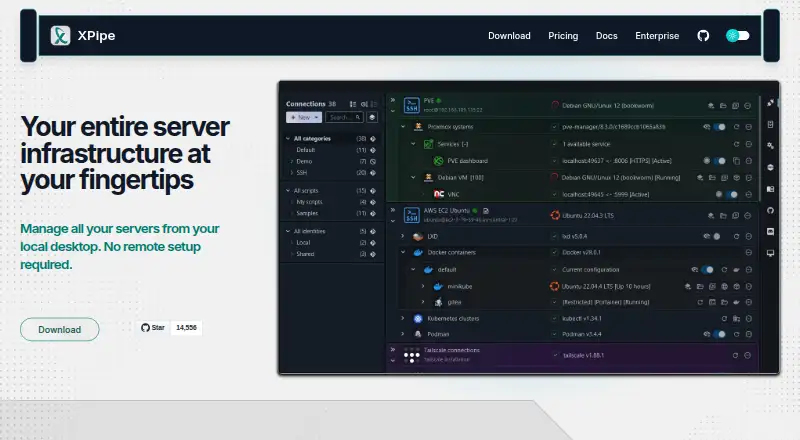
What XPipe is
XPipe is a connection hub for managing remote connections and opening shell sessions in a preferred terminal. It supports SSH and SFTP, loads SSH configuration files, and works with SSH agents, jump servers, tunnels, smart cards, and PKCS#11 libraries. Its remote file browser lets users transfer files and open remote files in locally installed programs. XPipe connects with tools including Docker, Podman, Kubernetes, Proxmox, VMware, and WSL, and includes a VNC viewer; it can launch RDP sessions and tunnel VNC or RDP over SSH. Shell scripts, templates, shell environments, and automatic port tunnels support automation. Connection data can be synchronized among systems and team members through remote Git repositories, including self-hosted repositories. XPipe says connection data stays on the local machine and connected systems. Stored sensitive data can be encrypted using a generated vault key file or custom passphrase. It runs on Windows, macOS, and Linux. Community is free; Homelab costs $5/month or $40/year, and Professional costs $10/month or $80/year.
Good
- Supports SSH, SFTP, and remote file management.
- Connects with container and virtualization tools.
- Synchronizes connection data through remote Git repositories.
- Community plan is free.
Watch out
- Some paid features are not open source.
- Homelab costs $5/month or $40/year.
- Professional costs $10/month or $80/year.
Who it suits
XPipe suits engineers managing remote infrastructure, including containers and virtual machines. Its team synchronization and remote connection tools may also suit groups that share connection data.
Verdict
XPipe brings remote connections, file management, and shell sessions into one hub, with integrations and synchronization options. A free Community plan is available, while advanced features are divided across paid plans.
Plans and prices
From XPipe's own pricing page, checked 30 Sep 2026.
| Plan | Price | What it gives you |
|---|---|---|
| Community | Free | Unlimited connections · File management · Shell scripting · Vault git sync · Free |
| Homelab | $5 a month | All Community features · Unlimited hypervisors · Advanced SSH features · $5/month or $40/year |
| Professional | $10 a month | All Homelab features · Enterprise OS support · Enterprise tool support · $10/month or $80/year |
| Homelab | $40 a year | All Community features · Unlimited hypervisors · Advanced SSH features · $5/month or $40/year |
| Professional | $80 a year | All Homelab features · Enterprise OS support · Enterprise tool support · $10/month or $80/year |
| Enterprise | Priced on request | All Professional features · Bulk licensing · Customized plans · Priority support · Let's talk |
The facts
Each one read from XPipe's own pages, with the date it was checked.
What it does
- Automation
- XPipe supports custom shell scripts, templates, shell environments, and automatic tunneling of ports for remote services.checked 30 Sep 2026
- File management
- Its remote file browser supports using locally installed programs to open and edit remote files and transferring files to and from the desktop.checked 30 Sep 2026
- Integrations
- It integrates with Docker, Podman, Kubernetes, LXD, Incus, Proxmox, Hyper-V, KVM, VMware, WSL, Cygwin, and MSYS2.checked 30 Sep 2026
- Intended users
- XPipe says its mission is to improve productivity and collaboration for engineers managing modern server infrastructure, including containers and virtual machines.checked 30 Sep 2026
- Limits
- The pricing feature matrix lists a connection limit and limits of one for concurrent active tunnels, Tailscale tailnets, Netbird profiles, Docker contexts, Proxmox community nodes, and workspaces in specified plans.checked 30 Sep 2026
- Open source
- XPipe describes itself as open-core, with its application core available on GitHub under Apache License 2.0 and some paid features not open source.checked 30 Sep 2026
- Product
- XPipe is a connection hub for managing remote connections and launching shell sessions in a user's preferred terminal.checked 30 Sep 2026
- Remote desktops
- XPipe includes a VNC viewer and supports launching RDP sessions and tunneling VNC and RDP over SSH.checked 30 Sep 2026
- Security
- XPipe states that connection data is stored and used on the local machine and connected systems, with no external component handling that data.checked 30 Sep 2026
- SSH
- XPipe loads SSH configuration files and supports existing SSH agents, jump servers, tunnels, smart cards, and PKCS#11 libraries.checked 30 Sep 2026
- Support
- The Enterprise plan includes priority support, and XPipe lists [email protected] as a contact address.checked 30 Sep 2026
- Synchronization
- Connection data can be synchronized across systems and team members through a remote Git repository, including self-hosted repositories.checked 30 Sep 2026
- Vault encryption
- Stored sensitive data can be encrypted using a generated vault key file or custom passphrase; the documented cipher is AES-128 GCM and keys are generated with Argon2.checked 30 Sep 2026
The company
- Company location
- XPipe UG (haftungsbeschränkt) lists its location as Ludwigsburg, Germany.checked 30 Sep 2026
- Headquarters
- Ludwigsburg, Germanychecked 28 Sep 2026
The full review of XPipe
XPipe is a hub for remote connections, shell sessions, and infrastructure tools, aimed at engineers working across servers, containers, and virtual machines. Its appeal is the breadth of work it brings together; the trade-off is that advanced SSH and tool support require a paid plan.
Overview
XPipe organizes remote connections and opens shell sessions in the terminal you prefer. It can load existing SSH configuration and use SSH agents, jump servers, tunnels, smart cards, and PKCS#11 libraries, making it a natural fit for established SSH workflows rather than a replacement that requires rebuilding them.
The product also emphasizes keeping connection data on the local machine and connected systems, without an external component handling it. Sensitive stored data can be encrypted with a generated vault key file or a custom passphrase; XPipe documents AES-128 GCM encryption and Argon2 key generation. Its application core is open source under Apache License 2.0, though some paid features are not.
Key features
The remote file browser transfers files between a remote system and the desktop, and opens or edits remote files with locally installed programs. That makes XPipe more useful for day-to-day administration than a connection launcher limited to shell access. It also supports custom shell scripts, templates, shell environments, and automatic port tunneling for remote services.
Infrastructure integrations span Docker, Podman, Kubernetes, LXD, Incus, Proxmox, Hyper-V, KVM, VMware, WSL, Cygwin, and MSYS2. A VNC viewer, RDP session launching, and SSH tunneling for VNC and RDP extend the hub to remote desktops. The range suits varied environments, but the plan differences matter: advanced SSH features begin with Homelab, while broader enterprise operating-system and tool support requires Professional.
Connection data can be synchronized across systems and team members through a remote Git repository, including self-hosted repositories. That provides a way to share connection setups without routing the data through an external XPipe component, consistent with the product's stated local-and-connected-systems data model.
Pricing
Community is free at no cost and includes unlimited connections, file management, shell scripting, and vault Git sync. It is a substantial starting point for individual users who need core connection and file workflows, though it does not include the advanced SSH features or unlimited hypervisors named in Homelab.
Homelab costs $5 a month, billed at $5/month or $40/year. It includes all Community features, unlimited hypervisors, and advanced SSH features, making it the practical step up for users managing virtualization alongside SSH-heavy work. Professional costs $10 a month, billed at $10/month or $80/year, and adds enterprise OS and tool support to Homelab. That tier is better suited to engineers whose environment depends on those broader integrations; it costs twice the monthly price of Homelab.
Enterprise has custom pricing and includes all Professional features, bulk licensing, customized plans, and priority support. It is aimed at organizations needing licensing or plan customization rather than a fixed-price individual subscription.
The pricing feature matrix also sets limits of one for concurrent active tunnels, Tailscale tailnets, Netbird profiles, Docker contexts, Proxmox community nodes, and workspaces in specified plans. Those caps can constrain setups that depend on several simultaneous instances of these resources, so users should compare their intended configuration with the relevant plan before choosing.
Platforms
XPipe supports Windows, macOS, and Linux. It supports SSH and SFTP, port forwarding, team session management, and team session sharing. The desktop platform range and team features make it relevant to mixed-OS infrastructure groups, while mobile platforms are not part of its supported list.
Who it's for
XPipe is best suited to engineers managing modern server infrastructure, especially when their work crosses SSH, containers, and virtual machines. Teams can use Git-based synchronization and session sharing, while the free Community plan gives individual users a way to handle core connections, files, scripts, and vault sync. Users who need advanced SSH, unlimited hypervisors, or enterprise tool support should budget for a paid tier.
Pros and cons
- Pros: One hub covers shell sessions, remote file handling, VNC, RDP, and a broad set of container and virtualization integrations, reducing the need to switch among separate tools for those tasks.
- Pros: Existing SSH configuration and agents, plus jump servers, smart cards, and PKCS#11 support, help it accommodate established SSH environments.
- Pros: Free Community includes unlimited connections and file management, while Git synchronization can use self-hosted repositories.
- Cons: Advanced SSH features are reserved for Homelab and above, and enterprise OS and tool support starts at the higher-priced Professional tier.
- Cons: Several resource categories have a limit of one in specified plans, which may be restrictive for users who need multiple concurrent tunnels or profiles.
- Cons: Some paid features are not open source, despite the Apache-licensed application core.
Alternatives
For a broader platform spread and a free terminal and file manager covering SSH, SFTP, FTP, Telnet, Serial, RDP, VNC, and Spice, consider electerm. Termius is another freemium option, with a free Starter plan for local vault, SSH and SFTP, AI-powered autocomplete, and port forwarding; its Pro plan is $10 a month when paid annually.
Royal TS offers a free Lite plan limited to 10 connections, 10 credentials, and one document, as well as a 49.00 EUR one-time Single User License. Tabby is a free FOSS option for Linux, macOS, and Windows. agedu is a free MIT-licensed Unix utility for Linux and web.
Bast is a free option with SSH host management, cloud host sync, and SSH/SFTP. WindTerm is free for commercial and non-commercial use, with source code partially open. WinSCP is a free, open-source Windows file transfer client supporting SFTP, FTP, FTPS, SCP, WebDAV, and S3. Browse more options in SSH Clients.
Verdict
Choose XPipe if you want one desktop hub for SSH-based access, remote file work, and a diverse server, container, or virtualization environment, with Git synchronization for teams. Community makes the core workflow accessible without a subscription, and Homelab is the sensible paid step for advanced SSH and unlimited hypervisors. Look elsewhere if you need mobile support, want advanced SSH without paying, or depend on multiple instances of resources capped at one in your plan.