
1up
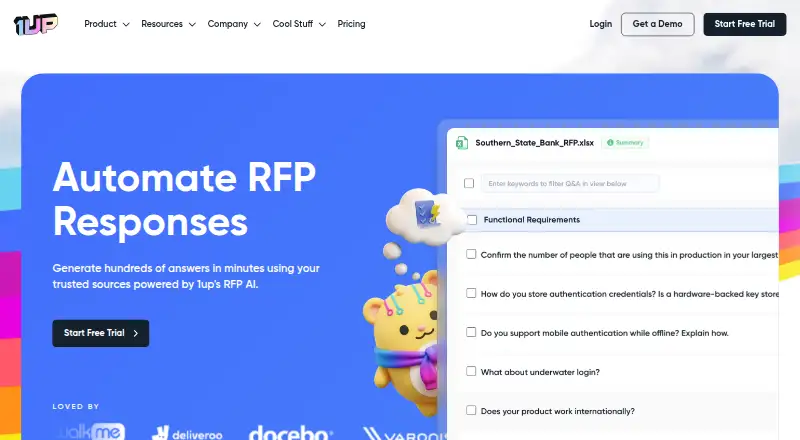
1up automates responses to RFPs and security questionnaires by drafting answers from company knowledge sources.
What 1up is
1up automates responses to RFPs and security questionnaires by drafting answers from company knowledge sources. It can draw on websites, product documentation, previous RFPs, Google Drive, and SharePoint, then let teammates review and edit answers; it retains their changes for similar questions. Teams can assign responses for review, set approval workflows, and track questionnaire status. It handles Word, Excel, Google Sheets, PDF, and web questionnaires, and says it can understand documents and generate responses in over 20 languages. Use it on the web or through its Chrome and Edge extension for web questionnaires. Named integrations include Confluence, Slack, Microsoft Teams, Google Chat, and Single Sign-On providers. 1up says it encrypts data at rest and in transit, is SOC 2 Type II compliant, and does not use uploaded documents to train AI models. The free plan includes 50 answers per month and 50 knowledge uploads. Paid plans listed include MCP at $50 per month plus automation usage, Starter at $300 per month for one questionnaire, and Plus at $900 per month for six questionnaires.
Good
- Uses company knowledge sources to draft answers.
- Supports several document and questionnaire formats.
- Retains edits for similar questions.
- Offers review assignments and approval workflows.
- Includes 50 monthly answers on the free plan.
Watch out
- Free plan is limited to 50 answers monthly.
- MCP plan adds automation usage charges.
- Starter lists one questionnaire at $300 per month.
- Plus lists six questionnaires at $900 per month.
Who it suits
It suits sales teams handling customer questions and Infosec teams responding to security questionnaires. Teams that want review assignments, approval workflows, and shared answer editing may also find its workflow relevant.
Verdict
1up combines answer drafting from internal knowledge with collaboration and questionnaire tracking. Its free plan has monthly answer and knowledge-upload limits, while paid plans list questionnaire and usage terms.
Plans and prices
From 1up's own pricing page, checked 14 Oct 2026.
| Plan | Price | What it gives you |
|---|---|---|
| Free | Free | 1 admin · 50 knowledge uploads · 50 answers/month |
| MCP | $50 a month | MCP server included · Pay-as-you-go questionnaire automation at $0.05 per question answered · Monthly, plus automation usage |
| Starter | $300 a month | Unlimited users · Unlimited answers · Slack, Teams, Google Chat and browser plugins · 1 questionnaire · Monthly |
| Plus | $900 a month | Everything in Starter · KB Plushie · Team training · 6 questionnaires · Monthly |
| Enterprise | Priced on request | Everything in Plus · Dedicated success manager · Unlimited admins and users · Custom plan |
The facts
Each one read from 1up's own pages, with the date it was checked.
What it does
- API and SDK scope
- The opened developer documentation describes an MCP server and does not document a general public REST API or SDK for the questionnaire product.checked 14 Oct 2026
- Collaboration
- Teams can assign questions to colleagues for review, editing, and improvement within the response workflow.checked 14 Oct 2026
- Data control
- Customers may choose US, EU, or AU availability zones and can modify or delete uploaded data at any time.checked 30 Sep 2026
- Data regions
- Customers may choose AWS availability zones in the United States, European Union, or Australia.checked 14 Oct 2026
- Data use
- The vendor says uploaded documents are not used to train AI models or shared outside the customer's workspace.checked 14 Oct 2026
- Documentation
- The help center includes procedural guides for MCP setup, Slack, browser extensions, security and privacy, and purchasing.checked 14 Oct 2026
- Encryption and isolation
- The vendor says customer data is isolated by workspace and encrypted at rest with AES-256.checked 14 Oct 2026
- File formats
- It supports questionnaires in Word, Excel, Google Sheets, PDF, and web-based formats.checked 30 Sep 2026
- Funding
- The company reports $8.5 million raised and names RRE Ventures, Lightbank, Upfront, 8-Bit Capital, and Aviso Ventures among its investors.checked 14 Oct 2026
- Integrations
- Named integrations include Google Drive, Confluence, SharePoint, Slack, Microsoft Teams, Google Chat, and Single Sign-On providers such as Okta, Azure, FusionAuth, and Ping Identity.checked 30 Sep 2026
- Intended users
- 1up says sales teams use it to answer customer questions, while Infosec teams use it to automate security questionnaires.checked 30 Sep 2026
- Knowledge sources
- 1up can use websites, Google Drive, prior RFPs, SharePoint, and other connected material to build answers.checked 14 Oct 2026
- Languages
- The RFP product lets users choose a preferred answer language, including when source material is in another language.checked 14 Oct 2026
- License
- The opened vendor pages provide no open-source license for the product or MCP client, so 1up is not presented there as open source.checked 14 Oct 2026
- Limit: Answer quality depends on source material
- A G2 reviewer cautions that the usefulness of answers depends on the quality of the connected knowledge base and assets.checked 14 Oct 2026
- Limit: Customization
- A G2 reviewer wanted more control over brand voice and the ability to add prompts to generated RFP answers.checked 14 Oct 2026
- Limit: Interface preference
- A G2 reviewer accustomed to Excel preferred a table-style interface over the web response editor and needed time to adjust.checked 14 Oct 2026
- Limit: Product maturity
- A G2 reviewer reported that some features were still missing at the time of their review, while noting ongoing improvements.checked 14 Oct 2026
- MCP setup
- The MCP guide documents Python 3.10+ client installation options, login commands, OAuth credentials, environment variables, and client configuration examples for Claude, Cursor, and Windsurf.checked 14 Oct 2026
Where it runs
- Browser support
- The browser plugin is available for Chrome and Edge and generates answers in web-based questionnaires.checked 30 Sep 2026
The company
- Company identity
- The about page identifies the company as 1up Corp.checked 14 Oct 2026
- Company size and founding year
- LinkedIn lists 1up as privately held, headquartered in New York City, founded in 2024, with 11–50 employees.checked 14 Oct 2026
- Headquarters
- 1up says its team is fully remote and calls New York City home.checked 14 Oct 2026
- Maker location
- 1up says it is based in New York City and calls New York City its home.checked 30 Sep 2026
The full review of 1up
Overview
1up is software for preparing responses to RFPs and other customer questionnaires. It drafts answers from company knowledge sources, including product documentation, earlier RFPs, company websites, Google Drive and SharePoint. The aim is to give teams a starting point based on existing material, rather than composing each response from scratch.
It is positioned for sales teams answering customer questions and Infosec teams handling security questionnaires. Teams can review and edit generated responses, assign work for review, set approval workflows and track questionnaire status. 1up remembers teammates’ edits for similar questions, and completed responses can be exported as DOCX or PDF. For readers comparing tools in this category, see our RFP Response Software list.
Key features
- Questionnaire coverage: 1up supports documents and forms in Word, Excel, Google Sheets, PDF and web-based formats.
- Knowledge sources: It can draw on company websites, product documentation, previous RFPs, Google Drive and SharePoint.
- Team review and approvals: Teammates can edit answers, assign responses for review, create approval workflows and follow questionnaire progress.
- Language support: 1up says it can understand documents and generate responses in more than 20 languages.
- Browser plugin: The plugin works with Chrome and Edge and can generate answers in web-based questionnaires.
- Integrations: Named integrations include Google Drive, Confluence, SharePoint, Slack, Microsoft Teams and Google Chat, as well as single sign-on providers including Okta, Azure, FusionAuth and Ping Identity.
- Security and data controls: 1up says it is SOC 2 Type II compliant, encrypts data at rest and in transit, and does not use uploaded documents to train AI models. Customers can choose US, EU or AU availability zones and modify or delete uploaded data at any time.
Pricing
1up has a free plan and paid options. Its pricing note lists paid plans from $50/mo and a 14-day trial. Listed plan details are:
- Free: free, with one admin, 50 knowledge uploads and 50 answers per month.
- MCP: $50 a month, plus automation usage. It includes an MCP Server and pay-as-you-go questionnaire automations at $0.05 per question answered.
- Starter: $300 a month for unlimited users and answers, Slack, Teams, Google Chat and browser plugins, and one questionnaire.
- Plus: $900 a month. It includes everything in Starter, KB Plushie, Team Training and six questionnaires.
- Enterprise: Custom pricing, with everything in Plus, a dedicated success manager and custom questionnaire volume.
The pricing page also describes Free as covering 50 monthly answers, Starter as one questionnaire for $300 per month and Plus as six for $900 per month. The listed MCP price is subject to automation usage, while Enterprise pricing is not specified.
Platforms
1up is available on the web and as a browser extension. Its plugin supports Chrome and Edge, including for answering web-based questionnaires. The product also names integrations with document, communication and single sign-on services.
Who it's for
Sales and Infosec teams are the clearest intended users: sales can use 1up to respond to customer questions, while Infosec teams can apply it to security questionnaires. It may suit organizations that handle recurring questionnaires and want shared review and approval steps around drafted answers. Organizations should check that the plan’s questionnaire allowance and usage charges fit their workload.
Pros and cons
Pros
- Works across common office documents, spreadsheets, PDFs and web questionnaires.
- Uses multiple company knowledge sources and retains team improvements for similar questions.
- Includes team assignment, approval workflows and questionnaire status tracking.
- Offers a free plan, with defined monthly answer and upload limits.
- Provides stated data protections and regional availability-zone choices.
Cons
- The Free plan is limited to 50 answers per month and 50 knowledge uploads.
- MCP automation usage is billed separately at $0.05 per question answered.
- Starter and Plus plans specify questionnaire counts, and Enterprise pricing is not listed.
Alternatives
Other options to compare include Presel, RFP Response Builder, Tribble, Tenderbolt, BidGenie, RFP.ai, SiftHub and Steerlab.
Verdict
1up brings knowledge-based answer drafting together with collaborative editing, approvals and questionnaire tracking. Its breadth of supported formats and named integrations may be useful for teams working across both uploaded files and browser-based forms. The main purchasing questions are volume and plan fit: Free has a monthly answer cap, Starter and Plus set questionnaire counts, and MCP adds per-question automation charges. The listed security practices and regional data choices are also relevant considerations for teams handling sensitive responses.
Getting started
- Open the 1up website.
- Choose the free plan or a paid plan; MCP is $50 per month plus usage, Starter is $300 per month, and Plus is $900 per month.
- Use the web app or the Chrome or Edge extension for web questionnaires.
- Add knowledge sources such as company websites, product documentation, previous RFPs, Google Drive, or SharePoint.
- Have teammates review answers and set up assignments or approval workflows as needed.
Limits worth knowing
The free plan allows one admin, 50 knowledge uploads, and 50 answers per month. MCP costs $50 per month plus $0.05 per question answered; Starter covers one questionnaire, and Plus covers six.
Questions
Does 1up have a free plan?
Yes. Free includes one admin, 50 knowledge uploads, and 50 answers per month.
How much do the paid plans cost?
MCP is $50 per month plus $0.05 per question answered. Starter is $300 per month for one questionnaire, and Plus is $900 per month for six questionnaires.
Which platforms does 1up support?
1up is available on the web and as a Chrome or Edge browser extension.
Which knowledge sources and integrations are named?
Knowledge sources include company websites, product documentation, previous RFPs, Google Drive, and SharePoint. Named integrations also include Confluence, Slack, Microsoft Teams, Google Chat, and single sign-on providers such as Okta, Azure, FusionAuth, and Ping Identity.
Can teams review and approve responses together?
Yes. Teammates can review and edit answers, and teams can assign responses, create approval workflows, and track questionnaire status.
What does 1up say about data security?
1up says it is SOC 2 Type II compliant, encrypts data at rest and in transit, and does not use uploaded documents to train AI models. Customers can choose US, EU, or AU availability zones and modify or delete uploaded data.
Alternatives to 1up
- 1
Presel
Free planWeb7.5From $19 a month - 2
RFP Response Builder
WebmacOSWindows7.0 - 3

AutogenAI
AndroidiOSWebAPI6.8 - 4
XaitProposal
AndroidiOSWebAPI6.8 - 5

AutoRFP.ai
WebAPIExtension6.7From $899 a month - 6

Loopio
WebAPIExtensionmacOS6.6