
Zoho Social
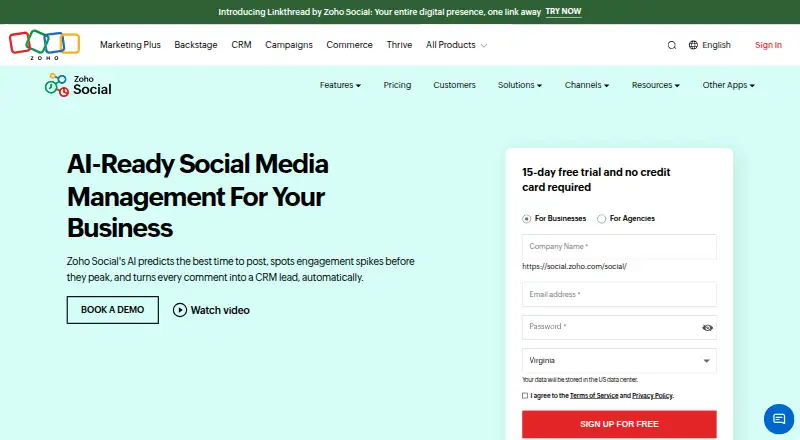
Zoho Social is a social media management tool for planning posts, monitoring activity, and reviewing reports.
What Zoho Social is
Zoho Social is a social media management tool for planning posts, monitoring activity, and reviewing reports. It supports networks including X, Instagram, Facebook, Google Business Profile, LinkedIn, TikTok, Pinterest, Mastodon, YouTube, Threads, and Bluesky. A publishing calendar organizes content, while SmartQ predicts when an audience is active and Custom Queues let users set recurring daily publishing slots. Monitoring columns support real-time listening and engagement. Analytics include pre-built reports and custom reports based on selected statistics. Instagram tools include publishing, hashtag monitoring, and reposting user-generated content. Integrations include Zoho CRM, Zoho Desk, and Canva. Agencies can create branded dashboards and invite clients, and team collaboration features include editing posts, approving drafts, and sharing copy ideas. Plans include a free option with one brand, six social channels, and one team member. Zoho lists web, iOS, and Android availability, plus a 15-day trial that does not require a credit card. Subscriptions can be canceled at any time.
Good
- Supports a broad list of social networks.
- Calendar, SmartQ, and Custom Queues help plan publishing.
- Offers pre-built and custom reports.
- Integrates with Zoho CRM, Zoho Desk, and Canva.
- 15-day trial does not require a credit card.
Watch out
- Free plan is limited to six social channels.
- Free plan includes one team member.
- Social inbox is not available.
- Approval workflow is not available.
Who it suits
Zoho Social is suited to individuals, teams, and agencies organizing posts across social networks. Agencies can use its branded dashboard and client invitations, while teams can collaborate on drafts and approvals.
Verdict
Zoho Social brings scheduling, monitoring, and reporting together for several types of users. Its free plan has limited channel and team capacity, so review plan details for larger operations.
Plans and prices
From Zoho Social's own pricing page, checked 22 Sep 2026.
| Plan | Price | What it gives you |
|---|---|---|
| Free | Free | 1 brand · 6 social channels · 1 team member |
| Standard | — | Available on a monthly or yearly subscription basis. · 1 brand · 12 social channels · 1 team member |
| Professional | — | Available on a monthly or yearly subscription basis. · 1 brand · 12 social channels · 1 team member |
| Premium | — | Available on a monthly or yearly subscription basis. · 1 brand · 14 social channels · 3 team members |
| Agency | Priced on request | For digital agencies; choose according to business requirements. · 10 clients · 140 social channels · 5 team members |
| Agency Plus | Priced on request | For digital agencies; choose according to business requirements. · 20 clients · 280 social channels · 5 team members |
The facts
Each one read from Zoho Social's own pages, with the date it was checked.
What it does
- Agency Dashboard
- Agencies can create an agency-branded dashboard and invite clients.checked 28 Sep 2026
- Analytics level
- basicchecked 22 Sep 2026
- Cancellation Policy
- Subscriptions can be canceled at any time.checked 28 Sep 2026
- Canva Integration
- Integrates with Canva for creating and editing visual designs.checked 28 Sep 2026
- Content Calendar
- Provides a publishing calendar for organizing posts across time.checked 28 Sep 2026
- CRM Integration
- Integrates with Zoho CRM to help generate leads and close deals.checked 28 Sep 2026
- Custom Queues
- Custom Queues provide unique publishing time slots for each day of the week.checked 28 Sep 2026
- Desk Integration
- Integrates with Zoho Desk to convert social updates into support tickets.checked 28 Sep 2026
- Instagram Features
- Supports Instagram publishing, hashtag monitoring, and reposting user-generated content.checked 28 Sep 2026
- Intended Users
- Designed for individuals, small and large teams, and agencies.checked 28 Sep 2026
- Post Scheduling
- Schedules posts using best-time predictions or a custom publishing schedule.checked 28 Sep 2026
- SmartQ Predictions
- SmartQ predicts the best time to post when the audience is active.checked 28 Sep 2026
- Social accounts
- 12checked 22 Sep 2026
- Social Analytics
- Offers pre-built reports and custom reports based on selected statistics.checked 28 Sep 2026
- Social inbox
- Nochecked 22 Sep 2026
- Social Monitoring
- Uses multiple listening columns for real-time monitoring and engagement.checked 28 Sep 2026
- Supported networks
- X,Instagram,Facebook,Google Business Profile,LinkedIn,TikTok,Pinterest,Mastodon,YouTube,Threads,Blueskychecked 22 Sep 2026
Where it runs
- Approval workflow
- Nochecked 22 Sep 2026
- Mobile Apps
- Available through the App Store and Google Play.checked 28 Sep 2026
- Supported Platforms
- Supports X, Instagram, Facebook, Google My Business, LinkedIn, YouTube, Pinterest, Mastodon, and TikTok.checked 28 Sep 2026
The company
- Founded
- 1996checked 28 Sep 2026
- Headquarters
- Chennai, Indiachecked 28 Sep 2026
Money
- Free plan
- Yeschecked 22 Sep 2026
- Free Trial
- 15-day free trial with no credit card required.checked 28 Sep 2026
The full review of Zoho Social
Zoho Social is a social media management platform for planning, publishing, monitoring and reporting across social networks. It is a strong fit for individuals, teams and agencies that want scheduling options and connections to Zoho’s CRM and support tools. Its broad network support is balanced by basic analytics and a free plan limited to one brand, six channels and one team member.
Overview
The publishing calendar gives users a way to organize posts over time, while SmartQ predicts when an audience is active and Custom Queues let them set publishing slots for each day of the week. That flexibility suits people managing a regular posting routine; it does not overcome the limited capacity of the free tier for a larger operation.
Multiple listening columns support real-time monitoring and engagement. Reports can be pre-built or customized around selected statistics, though analytics are basic. Zoho CRM integration connects social activity with lead generation, and Zoho Desk can turn social updates into support tickets. Canva integration supports creating and editing visual designs.
Key features
- Scheduling: SmartQ predictions and custom weekly slots give users two approaches to planning publication. The calendar helps keep scheduled content organized.
- Monitoring and Instagram: Listening columns support ongoing monitoring; Instagram features include publishing, hashtag monitoring and reposting user-generated content.
- Reports: Pre-built and custom reports provide a way to review selected statistics, but the basic analytics level is a constraint for readers who need more depth.
- Agency tools: Agencies can create a branded dashboard and invite clients. Agency and Agency Plus plans scale to 10 or 20 clients, respectively, though each includes five team members.
- Collaboration: Team members can edit posts, approve drafts and share copy ideas. However, the product’s approval workflow is marked as unavailable, so teams should not assume a formal approval process is included across the service.
Pricing
Zoho Social uses a freemium model, with a free plan and a 15-day trial that does not require a credit card. Subscriptions can be canceled at any time. Paid-plan prices are custom pricing; Standard and Professional are offered monthly or yearly, while the agency plans are described as configurable to business requirements.
| Plan | Price | Capacity | Best suited to |
|---|---|---|---|
| Free | free | 1 brand, 6 social channels, 1 team member | One person trying the service at small scale. |
| Standard | Custom pricing | 1 brand, 12 social channels, 1 team member | A solo user needing twice the free plan’s channel capacity. |
| Professional | Custom pricing | 1 brand, 12 social channels, 1 team member | A solo user considering this tier; the same listed brand, channel and seat limits as Standard make a direct plan comparison important. |
| Premium | Custom pricing | 1 brand, 14 social channels, 3 team members | A small team that needs more channels and seats than the lower tiers. |
| Agency | Custom pricing | 10 clients, 140 social channels, 5 team members | A digital agency managing several client accounts. |
| Agency Plus | Custom pricing | 20 clients, 280 social channels, 5 team members | An agency needing twice Agency’s client and channel capacity. |
The free tier is a useful entry point, but its single seat and six-channel cap leave little room for team collaboration or a broad portfolio. Standard and Professional increase channel capacity to 12 but remain single-seat plans; Premium is the first tier listed with three team members. Agencies get much higher client and channel limits, while the five-seat cap stays the same between Agency and Agency Plus.
Platforms
Zoho Social is available on the web, iOS and Android. Supported networks include X, Instagram, Facebook, Google Business Profile, LinkedIn, TikTok, Pinterest, Mastodon, YouTube, Threads and Bluesky, giving it broad coverage for users managing several major social channels.
Who it's for
Individuals can use the scheduling calendar and SmartQ to manage a publishing routine, while small teams may value the calendar, monitoring columns and post collaboration. Agencies have the clearest reason to consider the upper tiers: branded client dashboards and capacity for up to 20 clients. Readers who need deeper analytics, a formal approval workflow, or more seats than the plan caps allow should look elsewhere.
Pros and cons
- Pros: Broad support for 11 networks gives multi-channel users room to manage varied accounts.
- Pros: SmartQ predictions, custom queues and a publishing calendar cover both suggested and user-defined scheduling routines.
- Pros: Zoho CRM and Desk integrations connect social activity to lead and support workflows.
- Pros: Agency-branded dashboards and client capacity up to 20 accounts serve agency operations.
- Cons: Basic analytics may not meet the needs of users seeking more detailed reporting.
- Cons: The free plan has one team member and six channels, and even the 12-channel Standard and Professional plans list one seat each.
- Cons: No social inbox or approval workflow limits its appeal for teams seeking centralized message handling or formal review controls.
Alternatives
Buffer is worth considering for a simpler free start: its free plan supports up to three channels and 10 scheduled posts per channel. Later may suit readers comparing another freemium scheduling option, though its free plan limits calendar access to two weeks in the past and future. Metricool offers a free plan for one brand with up to 20 posts per month, a useful alternative for users whose main constraint is post volume.
Agorapulse is another option for a free entry tier, with one user, three social profiles and 10 scheduled posts. Social Champ offers three social accounts, one user and 15 scheduled posts per account on its free plan. Planable may appeal to users who prefer a free plan measured in 50 total posts.
Publer provides a free plan with one user, one workspace, three social accounts and 10 scheduled posts per account. Iconosquare is another freemium alternative with a free plan limited to 10 posts per profile per month and one month of analytics history. For a broader comparison, browse Social Media Management Tools or Social Media Scheduling Software.
Verdict
Zoho Social is a sensible choice for individuals and agencies that value flexible scheduling, broad network coverage and Zoho CRM or Desk integrations. The agency dashboard and client capacity make its upper plans particularly relevant to service providers. Choose another platform if you need a social inbox, formal approval workflow, deeper analytics or more team seats than the listed caps provide.
Getting started
- Visit https://www.zoho.com/social/
- Choose the Free plan or review the listed monthly and yearly subscription options
- Use the 15-day free trial without a credit card if you want to try the service
- Access Zoho Social on the web, iOS, or Android
Limits worth knowing
The Free plan includes one brand, six social channels, and one team member. No limits are listed for the 15-day trial beyond its duration.
Questions
Is there a free plan?
Yes. The Free plan is listed as free and includes one brand, six social channels, and one team member.
How long is the free trial?
The free trial lasts 15 days and does not require a credit card.
Which platforms can I use?
Zoho Social is available on the web, iOS, and Android.
Which social networks does it support?
Listed networks include X, Instagram, Facebook, Google Business Profile, LinkedIn, TikTok, Pinterest, Mastodon, YouTube, Threads, and Bluesky.
What integrations are listed?
Zoho Social integrates with Zoho CRM, Zoho Desk, and Canva.
Can subscriptions be canceled?
Yes. Subscriptions can be canceled at any time.
Alternatives to Zoho Social
- 1

Planable
Free planAndroidiOSWebAPI9.0From $390 a year - 2

Buffer
Free planAndroidiOSWebAPI8.9From $5 a month - 3

Metricool
Free planAndroidiOSWebAPI8.9From $240 a year - 4

Social Champ
Free planAndroidiOSWebExtension8.9From $5 a month - 5

Later
Free planAndroidiOSWeb8.7From $225 a year - 6
Iconosquare
Free planAndroidiOSWebAPI8.7Free plan