
Planable
Planable is a social media planning tool for organizing and managing posts across Facebook, LinkedIn, Instagram, X, Google Business Profile, YouTube, TikTok,…
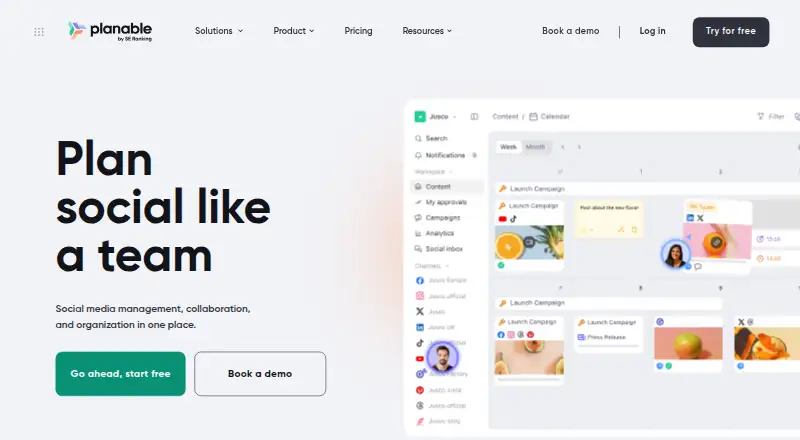
What Planable is
Planable is a social media planning tool for organizing and managing posts across Facebook, LinkedIn, Instagram, X, Google Business Profile, YouTube, TikTok, Pinterest, and Threads. It is available on the web, iOS, and Android, and includes a social inbox, approval workflows, and advanced analytics. Its Free plan allows 50 total posts. For teams needing a recurring monthly allowance, Basic costs $33 a month with annual billing and covers 60 posts per workspace each month, four social pages per workspace, three campaigns per workspace, and 10 GB of storage. The Basic plan includes unlimited users, and its pricing page displays two months free for annual billing. Pro costs $49 a month with annual billing, with 150 monthly posts per workspace, 10 social pages, 10 campaigns, 50 GB of storage, and unlimited users. Planable was founded in 2016.
Good
- Supports nine named social networks.
- Available on web, iOS, and Android.
- Includes a social inbox and approval workflow.
- Advanced analytics are included.
- Paid plans allow unlimited users.
Watch out
- Free plan is limited to 50 total posts.
- Basic allows 60 posts per workspace each month.
Who it suits
Planable suits individuals or teams coordinating social publishing across its supported networks, particularly where review workflows and a shared social inbox matter. Its higher plans offer more posts, pages, campaigns, and storage while allowing unlimited users.
Verdict
Choose Planable if you need to coordinate social posts across its supported networks with approval workflows and an inbox. The Free plan has a 50-post total allowance; teams needing more can consider paid plans starting at $33 a month with annual billing.
Plans and prices
From Planable's own pricing page, checked 20 Sep 2026.
| Plan | Price | What it gives you |
|---|---|---|
| Free | Free | 50 total posts |
| Basic | $39 a month | 60 posts/workspace/month · unlimited users · 4 social pages/workspace · 2 approval types · Feed and Calendar views · 3 campaigns/workspace · per workspace/month |
| Pro | $59 a month | 150 posts/workspace/month · unlimited users · 10 social pages/workspace · 3 approval types · per workspace/month |
| Social Inbox add-on | $9 a month | comments and direct messages · unified inbox · per workspace/month |
| Analytics add-on | $14 a month | cross-channel statistics · page-level insights · post-level metrics · audience insights · per workspace/month |
| Social Listening add-on | $99 a month | brand, topic and competitor monitoring · sentiment and mention data · per workspace/month |
| Basic | $390 a year | 60 posts/workspace/month · unlimited users · 4 social pages/workspace · 2 approval types · Feed and Calendar views · 3 campaigns/workspace · per workspace/year |
| Pro | $590 a year | 150 posts/workspace/month · unlimited users · 10 social pages/workspace · 3 approval types · per workspace/year |
| Enterprise | $2,500 a year | unlimited posts · unlimited campaigns · multi-level approvals · SSO · dedicated account manager · custom pricing starting around $2,500/year |
The facts
Each one read from Planable's own pages, with the date it was checked.
What it does
- AI features
- Planable AI can generate or rewrite captions, read captions from images and videos, suggest hashtags and recommend posts based on prior content.checked 15 Oct 2026
- Analytics coverage
- The Analytics add-on covers Facebook, Instagram, LinkedIn, TikTok, YouTube, Google Business Profile and X; X and Google Business Profile are single-channel only.checked 15 Oct 2026
- Analytics level
- advancedchecked 20 Sep 2026
- API controls
- API tokens support read or write scopes, workspace restrictions, selectable expiry periods and a maximum of 10 active tokens per company.checked 15 Oct 2026
- Collaboration
- Teams can comment, suggest edits, annotate content, share one-time review links and hide posts from clients.checked 15 Oct 2026
- Content views
- The product provides feed, calendar, grid and list views, with grid available on Pro and Enterprise and list on Enterprise.checked 15 Oct 2026
- Creation and previews
- Post creation supports platform-specific text, media, carousels, GIFs, links, stories, reels, hashtags, targeting, tags and previews.checked 15 Oct 2026
- Developer documentation
- Interactive endpoint documentation is provided at api.planable.io/api/v1/docs, with the API base URL documented as https://api.planable.io/api/v1.checked 15 Oct 2026
- Integrations
- Official integrations include Canva, Slack, Zapier, viaSocket, iCal calendars, a Public API and an MCP connector for AI assistants.checked 15 Oct 2026
- Limit: mobile reliability
- An Apple App Store reviewer reports frequent video-upload failures requiring desktop use.checked 15 Oct 2026
- Limit: pricing
- Reviewers report that pricing can feel high or inflexible, especially when many workspaces or add-ons are required.checked 15 Oct 2026
- Notable news
- Planable announced in its company history that it joined forces with SE Ranking in 2025 and launched the Social Inbox add-on.checked 15 Oct 2026
- Paid from
- 33checked 20 Sep 2026
- Praise: support
- Software Advice reviewers rate customer support 4.6 out of 5, and multiple reviews describe support as responsive or top notch.checked 15 Oct 2026
- Praise: usability and collaboration
- Independent reviewers repeatedly praise the clean visual calendar, intuitive scheduling, client collaboration, approvals and ease of onboarding.checked 15 Oct 2026
Where it runs
- Approval workflow
- Yeschecked 20 Sep 2026
- Approval workflows
- Approval modes range from no approval to optional, required and multi-level sequential approvals, depending on plan.checked 15 Oct 2026
- Limit: Android experience
- A Google Play reviewer describes the app as confusing with fewer options than competing products, while another reports carousel publishing format errors.checked 15 Oct 2026
- Limit: platform gaps
- Reviewers cite missing advanced platform-specific functions, Instagram story auto-publishing limitations and occasional publishing failures.checked 15 Oct 2026
- Mobile app capabilities
- The mobile app supports creating, editing, reviewing, approving, commenting, grid/calendar/feed viewing and scheduling.checked 15 Oct 2026
The company
- Company facts
- LinkedIn lists Planable as privately held, founded in 2016, headquartered in Lewes, Delaware, with 11–50 employees.checked 15 Oct 2026
- Company history
- Planable says it began at a Transylvania hackathon in 2016, joined Techstars in London in 2017, reached 5,000 customers in 2023 and joined SE Ranking in 2025.checked 15 Oct 2026
- Founded
- 2016checked 28 Sep 2026
Money
- Free plan
- Yeschecked 20 Sep 2026
The full review of Planable
Overview
Planable is a social media planning and management platform for teams coordinating posts across major social networks. Its strongest case is a shared workflow: teams can schedule content, route it for approval and manage an inbox, with advanced analytics for reviewing performance.
The trade-off is capacity: the free plan stops at 50 total posts, while the paid tiers impose monthly post, page, campaign and storage limits.
Key features
Planable supports Facebook, LinkedIn, Instagram, X, Google Business Profile, YouTube, TikTok, Pinterest and Threads. That breadth makes it a plausible central workspace for teams publishing across several networks rather than juggling separate planning processes.
Approval workflows and a social inbox address two practical coordination needs: getting posts reviewed before publication and handling social interactions in the same tool. Advanced analytics round out the workflow for teams that need more than scheduling alone. The supplied account allowance is four social accounts, so teams should compare that figure with their actual channel setup before choosing a plan.
Pricing
| Plan | Price and terms | What it includes |
|---|---|---|
| Free | free | 50 total posts |
| Basic | $33 a month, billed Annual billing; page displays 2 months free | 60 posts/workspace/month, unlimited users, 4 social pages/workspace, 3 campaigns/workspace, 10 GB storage |
| Pro | $49 a month, billed Annual billing; page displays 2 months free | 150 posts/workspace/month, unlimited users, 10 social pages/workspace, 10 campaigns/workspace, 50 GB storage |
| Enterprise | Custom pricing | Unlimited posts, unlimited campaigns, custom storage |
Free is useful for a small trial or light publishing, but its 50-post allowance is total, not monthly; it is not a durable option for an active content calendar. Basic is the entry point for teams that can stay within 60 monthly posts, four social pages and three campaigns. Unlimited users are a notable advantage for collaboration, though the annual billing term matters if you want to avoid a longer commitment.
Pro raises the monthly allowance to 150 posts and expands workspace capacity to 10 pages and 10 campaigns, with five times Basic's storage. It suits busier teams that would otherwise hit Basic's ceilings. Enterprise removes post and campaign limits, but custom storage and custom pricing make it the tier to consider when fixed quotas are the obstacle, not when price certainty is essential.
Platforms
Planable is available on web, iOS and Android. That combination suits teams planning on a desktop and checking or coordinating work from mobile devices.
Who it's for
Planable is best suited to marketing and social teams that publish across multiple supported networks and need approvals, scheduling and inbox work in one workflow. Teams with several contributors may find the unlimited-user paid tiers appealing, provided their post and workspace limits fit.
It is a weaker fit for solo or low-volume users who need only occasional scheduling, or for high-volume teams that cannot work within Basic or Pro quotas and do not want custom pricing. Check the four-account allowance against your channels as well as the plan-specific page limits before committing.
Pros and cons
- Pros: Approval workflow and social inbox support collaboration beyond simply queueing posts.
- Pros: Coverage across nine named social networks gives multi-channel teams a broad publishing footprint.
- Pros: Basic and Pro include unlimited users, so adding collaborators does not consume a stated seat allowance.
- Cons: Free provides only 50 total posts, which limits its usefulness for ongoing publishing.
- Cons: Basic's 60 monthly posts, four pages and three campaigns can constrain growing teams; Pro costs more and still has quotas.
- Cons: Paid pricing is tied to annual billing, and Enterprise requires custom pricing.
Alternatives
Choose CoSchedule if its Starter plan's one-user seat and three-profile allowance suit a smaller operation, or if its listed monthly option is preferable to Planable's annual-billed entry tier.
Atheer, FlowQi, QuickProof, Wonderful, WorkTogethr, Varum and Orangescrum are other alternatives to compare.
For broader category comparisons, see Marketing Project Management Software, AI Social Media Management Software, Social Media Management Tools and Social Media Scheduling Software.
Verdict
Choose Planable if your team needs a multi-network publishing workflow with approvals and an inbox, and its post and page quotas match your calendar. Look elsewhere if you need generous ongoing capacity without annual billing or want to avoid custom pricing at the top end.
Getting started
- Visit https://planable.io/.
- Choose web, iOS, or Android.
- Start with the Free plan or select a paid plan.
- Use the plan allowances to organize posts, social pages, and campaigns.
Limits worth knowing
The Free plan allows 50 total posts. The cheapest paid plan, Basic, allows 60 posts per workspace per month, four social pages per workspace, three campaigns per workspace, and 10 GB of storage.
Questions
Is Planable free?
Yes. Its Free plan costs nothing and allows 50 total posts.
What does Basic cost?
Basic costs $33 a month with annual billing. Its pricing page displays two months free.
Which platforms can I use Planable on?
Planable is available on the web, iOS, and Android.
Which social networks does it support?
It supports Facebook, LinkedIn, Instagram, X, Google Business Profile, YouTube, TikTok, Pinterest, and Threads.
What does Pro cost and include?
Pro costs $49 a month with annual billing. It includes 150 posts per workspace per month, 10 social pages and campaigns per workspace, 50 GB of storage, and unlimited users.
Who makes Planable, and when was it founded?
Planable is made by Planable, which was founded in 2016.
Alternatives to Planable
- 1

Buffer
Free planAndroidiOSWebAPI8.9From $5 a month - 2

Metricool
Free planAndroidiOSWebAPI8.9From $240 a year - 3

Social Champ
Free planAndroidiOSWebExtension8.9From $5 a month - 4

Later
Free planAndroidiOSWeb8.7From $225 a year - 5

Iconosquare
Free planAndroidiOSWebAPI8.7Free plan - 6
Typefully
Free planAndroidiOSWebAPI8.7From $99 a year