Watermark Soft
Watermark Soft provides batch processing for photos and videos, with tools for watermarking, resizing, cropping, compression, and format conversion.
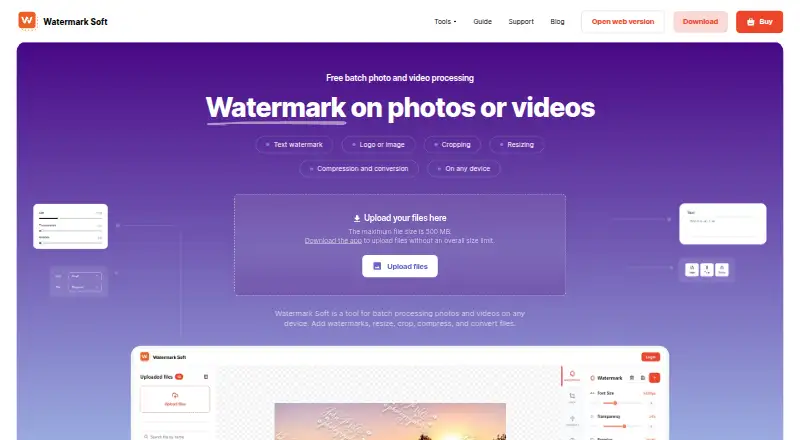
What Watermark Soft is
Watermark Soft provides batch processing for photos and videos, with tools for watermarking, resizing, cropping, compression, and format conversion. Users can add text or logo/image watermarks and adjust font, size, color, transparency, rotation, and placement. Watermarks can be applied to hundreds of photos or videos at once, with saved settings available as templates and more than 500 fonts to choose from. Listed formats include JPG, PNG, WEBP, HEIC, BMP, TIFF, GIF, SVG, RAW, MP4, AVI, MOV, MKV, WMV, WEBM, and PDF. The service supports web, Windows, macOS, and Linux; mobile devices are also supported. The web upload page has a 500 MB maximum file size, while the computer app is described as having no overall file size limit. Watermark Soft has a free plan and a free trial with no credit card required, but no trial duration is stated. Paid plans are $7 a month or $48 a year. Content is processed locally when possible, and server-side processed content is automatically deleted within one hour.
Good
- Batch watermarking for hundreds of photos or videos
- Text and logo/image watermark options
- Templates save watermark settings
- Supports photo, video, and PDF formats
- Free trial requires no credit card
Watch out
- Web uploads are limited to 500 MB per file
- No trial duration is stated
- Monthly plan costs $7 a month
- Annual plan costs $48 a year
Who it suits
Watermark Soft suits photographers, videographers, designers, marketers, and online store owners who need batch image or video processing. It may be useful when watermarking and format conversion are part of the same workflow.
Verdict
Watermark Soft offers watermarking alongside other batch photo and video tools, with a free plan and trial. Choose the computer app if the web upload size limit is a concern.
Plans and prices
From Watermark Soft's own pricing page, checked 30 Sep 2026.
| Plan | Price | What it gives you |
|---|---|---|
| Monthly | $7 a month | Watermark-free exports · Unlimited files per batch · All photo & video tools · Priority support · Billed monthly |
| Annual | $48 a year | Watermark-free exports · Unlimited files per batch · All photo & video tools · Priority support · Billed annually · $4.00/month |
The facts
Each one read from Watermark Soft's own pages, with the date it was checked.
What it does
- Batch processing
- The site says users can add watermarks to hundreds of photos or videos at once.checked 30 Sep 2026
- File formats
- Listed supported formats include JPG, PNG, WEBP, HEIC, BMP, TIFF, GIF, SVG, RAW, MP4, AVI, MOV, MKV, WMV, WEBM, and PDF.checked 30 Sep 2026
- Intended users
- The site names photographers, videographers, content managers, designers, online store owners, and marketers as users who may need the tool.checked 30 Sep 2026
- Operator and location
- The terms say Watermark Soft is operated by Borys Spektor, registered as a sole proprietor in Tbilisi, Georgia.checked 30 Sep 2026
- Privacy
- The privacy policy says content is processed locally whenever possible and server-side processed content is automatically deleted within one hour after processing.checked 30 Sep 2026
- Purpose
- Watermark Soft provides batch processing for photos and videos, including watermarking, resizing, cropping, compression, and format conversion.checked 30 Sep 2026
- Refunds
- The refund policy offers a three-day money-back guarantee for subscriptions purchased directly through Watermark Soft, with requests due within three calendar days of purchase.checked 30 Sep 2026
- Security
- The privacy policy says the service uses commercially reasonable safeguards, including encrypted HTTPS connections, secure cloud infrastructure, authentication controls, and restricted access to production systems.checked 30 Sep 2026
- Support
- The pricing page includes priority support with paid plans, and the site directs users to contact support by email.checked 30 Sep 2026
- Templates and fonts
- Users can save watermark settings as templates and choose from a library of more than 500 fonts.checked 30 Sep 2026
- Third-party services
- The privacy policy lists Google Analytics, Google Sign-In, Hotjar, PayPal, 2Checkout (Verifone), and Amazon Web Services as service providers.checked 30 Sep 2026
- Watermark options
- Users can add text or logo/image watermarks and adjust settings such as font, size, color, transparency, rotation, and placement.checked 30 Sep 2026
- Web upload limit
- The web upload page states a maximum file size of 500 MB, while the computer app is described as having no overall file size limit.checked 30 Sep 2026
Money
- Free access and trial
- The pricing page describes a free trial with no credit card required, and the terms identify a Free Plan; no trial duration is stated on those pages.checked 30 Sep 2026
The company
- Headquarters
- Tbilisi, Georgiachecked 28 Sep 2026
Alternatives to Watermark Soft
- 1

Watermark.ws
Free planAndroidiOSWebAPI7.9From $4 a month - 2

DoWatermark
Free planAndroidiOSWeb7.8$4.99 one-time - 3
eZy Watermark
Free planAndroidiOSWebmacOS7.3From $1.99 a month - 4
Watermarkly
Free planAndroidiOSWebLinux7.3From $19.95 a year - 5
Watermark Maker
Free planAndroidiOS6.9$24.99 one-time - 6
Terma
Free planWebLinuxmacOSSelf-hosted6.8Free plan