Watermark & Resize Studio
Watermark & Resize Studio is a browser tool for batch resizing and watermarking images, then exporting the results.
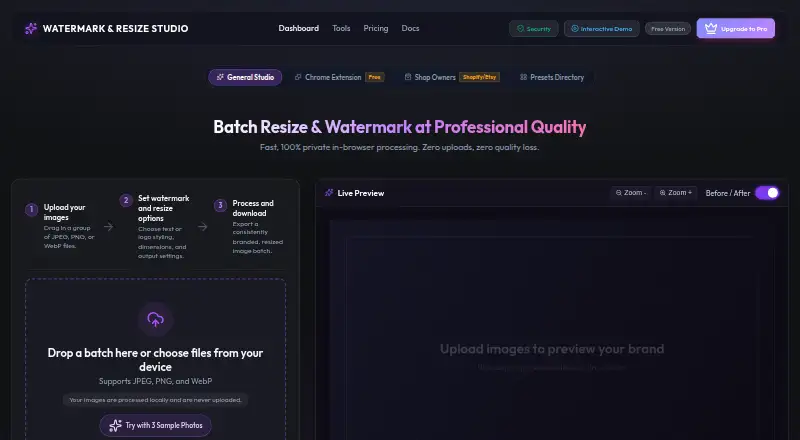
What Watermark & Resize Studio is
Watermark & Resize Studio is a browser tool for batch resizing and watermarking images, then exporting the results. It works with JPEG, PNG, and WebP files, and lists platform presets, a live before-and-after preview, and ZIP batch export. The free plan allows 10 images per batch, text watermarks, and exports up to 1080p. Pro supports unlimited batches, higher-resolution exports, PNG logo watermarks, EXIF and GPS stripping, and sequential renaming. It can layer text and logo marks with separate positioning and opacity controls. For shop workflows, one batch can use export sizing for Etsy, Shopify, and Instagram. A Chrome extension can send web images to the studio or offer watermarking and downloading from a right-click menu. The maker says processing happens locally in the browser and can continue offline once the app has loaded; images are not uploaded or stored on its servers. The free tier is available forever. The Pro Lifetime License costs $28.99, paid once-time payment and includes lifetime updates and priority support.
Good
- Accepts and exports JPEG, PNG, and WebP.
- Free tier processes 10 images per batch.
- Shop sizing covers Etsy, Shopify, and Instagram.
- Processing stays in the browser, according to the maker.
- Pro includes unlimited batches and logo watermarks.
Watch out
- Free exports are limited to 1080p.
- Free batches are limited to 10 images.
- Pro Lifetime License costs 28.99 USD one-time.
Who it suits
It suits creators, photographers, ecommerce sellers, and agencies handling batches of images. The free tier may fit smaller batches, while Pro is intended for bulk processing.
Verdict
Watermark & Resize Studio combines batch resizing, watermarking, and shop-oriented export sizing in a browser workflow. The free tier has defined batch and resolution limits; Pro removes the batch limit and adds higher-resolution exports and logo watermarking.
Plans and prices
From Watermark & Resize Studio's own pricing page, checked 9 Oct 2026.
| Plan | Price | What it gives you |
|---|---|---|
| Free Tier | Free | 10 images per batch · text watermark · exports up to 1080p · WebP, JPEG, PNG · in-browser processing · free forever |
| Pro Lifetime License | $28.99, paid once | Unlimited batch processing · 4K, 8K and native resolution exports · PNG logo watermarking · EXIF and GPS stripping · sequential renaming · lifetime updates and priority support · $49 $28.99 / one-time payment |
| Creator Suite Lifetime Pass | $38.99, paid once | Watermark & Resize Studio Pro + QuickCast Screen Recorder Pro · $38.99 |
The facts
Each one read from Watermark & Resize Studio's own pages, with the date it was checked.
Where it runs
- Browser extension
- The maker describes a Chrome extension that can send web images to the studio or watermark and download an image from a right-click menu.checked 9 Oct 2026
- Supported browsers
- The trust page lists Chrome 90+, Firefox 88+, Safari 15+, and Edge 90+ as supported browsers.checked 9 Oct 2026
What it does
- Image formats
- It accepts JPEG, PNG, and WebP files and can export those formats.checked 9 Oct 2026
- Integrations
- The shop workflow provides Etsy, Shopify, and Instagram export sizing from the same batch.checked 9 Oct 2026
- Intended users
- The maker describes Pro as intended for photographers, creators, ecommerce sellers, and agencies needing bulk processing.checked 9 Oct 2026
- Large images
- The FAQ says there is no hard maximum image size, but recommends images under 8000×8000 pixels for best performance.checked 9 Oct 2026
- Offline use
- The maker says that once the app is loaded, image processing can continue without an internet connection.checked 9 Oct 2026
- Payment privacy
- The privacy policy says Lemon Squeezy processes purchase billing details and the maker does not store or receive payment card numbers.checked 9 Oct 2026
- Privacy
- The maker says image processing happens locally in the browser and images are not uploaded or stored on its servers.checked 9 Oct 2026
- Processing limits
- The free tier allows 10 images per batch, while Pro allows unlimited batches.checked 9 Oct 2026
- Resize and export
- The maker lists platform presets, a live before-and-after preview, and ZIP batch export among its features.checked 9 Oct 2026
- Support
- The pricing page lists priority support with the Pro Lifetime License and a 30-day money-back guarantee.checked 9 Oct 2026
- Watermarks
- It supports text watermarks, and Pro can layer text and logo watermarks with independent positioning and opacity controls.checked 9 Oct 2026
- What it does
- The browser tool batch resizes and watermarks images, then exports the processed files.checked 9 Oct 2026
Alternatives to Watermark & Resize Studio
- 1

Watermark.ws
Free planAndroidiOSWebAPI7.9From $4 a month - 2

DoWatermark
Free planAndroidiOSWeb7.8$4.99 one-time - 3
eZy Watermark
Free planAndroidiOSWebmacOS7.3From $1.99 a month - 4
Watermarkly
Free planAndroidiOSWebLinux7.3From $19.95 a year - 5
Watermark Maker
Free planAndroidiOS6.9$24.99 one-time - 6
Terma
Free planWebLinuxmacOSSelf-hosted6.8Free plan