VoxelShop
VoxelShop is a free, open-source program for creating and editing voxel models on Linux, macOS, and Windows.
What VoxelShop is
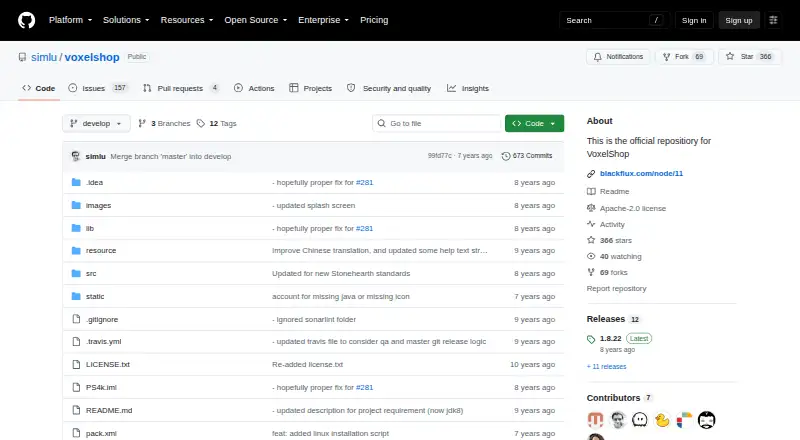
VoxelShop is a free, open-source program for creating and editing voxel models on Linux, macOS, and Windows. Users can work in a 3D view or use front, top, and left-axis views, with tools for drawing and erasing voxels, flood filling, selecting, copying, moving, cloning, rotating, and mirroring. A reusable palette supports RGB, CMYK, HSB, and hexadecimal color entry. Models can be organized into layers that can be hidden, renamed, reordered, merged, or used to limit where tools apply. For cleanup, the 3D view can fill cavities or remove interior voxels, which may reduce exported file sizes. The documentation lists image and voxel import formats, and releases document MagicaVoxel and Collada export as well as bitmap exports of model slices. Users can bind their own keyboard shortcuts. The project provides tutorials, usage documentation, and a forum link. Its maker describes animation support as in development; the GitHub releases page lists version 1.8.26 as a pre-release with minor installation-script fixes.
Good
- Free and open source.
- Multiple views support model editing from different angles.
- Layers can restrict where tools apply.
- Cavity filling and interior voxel removal are available.
- Custom keyboard shortcuts can be assigned.
Watch out
- Animation support is still in development.
- Version 1.8.0 cannot import VSD into an existing scene.
- Version 1.8.26 is listed as a pre-release.
Who it suits
VoxelShop suits people creating or editing voxel models who want layered editing, palette controls, and model cleanup tools. It is available for Linux, macOS, and Windows.
Verdict
VoxelShop covers voxel creation, editing, cleanup, and export with no paid plan stated. Its animation support remains in development, and VSD import into an existing scene is limited in version 1.8.0.
Plans and prices
From VoxelShop's own pricing page, checked 9 Oct 2026.
| Plan | Price | What it gives you |
|---|---|---|
| VoxelShop | Free | No paid plans or usage limits stated on the opened maker pages |
The facts
Each one read from VoxelShop's own pages, with the date it was checked.
What it does
- Animation
- The maker’s documentation says model animation support is in development.checked 9 Oct 2026
- Color management
- Users can manage a reusable color palette and choose colors using RGB, CMYK, HSB, or hexadecimal values.checked 9 Oct 2026
- Editing tools
- Its tools include drawing and erasing voxels, color picking, flood fill, selection, copy and paste, move, clone, rotation, and mirroring.checked 9 Oct 2026
- Editing views
- It provides front, top, and left axis views alongside a 3D view for viewing and editing models.checked 9 Oct 2026
- Export
- VoxelShop can export to multiple file formats, and its releases document MagicaVoxel and Collada exporters and exporting model slices as bitmap images.checked 9 Oct 2026
- Import formats
- The documentation lists image formats PNG, JPG, JPEG, and BMP, plus voxel formats including BINVOX, KV6, KVX, QB, RAWVOX, MagicaVoxel VOX, Vox Game VOX, Voxlap VOX, and VXL.checked 9 Oct 2026
- Import limitation
- Version 1.8.0 cannot import VSD files into an existing scene; a saved model can only be opened as a new scene.checked 9 Oct 2026
- Keyboard shortcuts
- Users can freely bind shortcuts, including single-letter shortcuts, in the shortcut manager.checked 9 Oct 2026
- Layers
- Models can use multiple layers that can be hidden, renamed, reordered, merged, or selected to restrict tool use.checked 9 Oct 2026
- License and security
- The GitHub repository displays an Apache-2.0 license and a Security and quality count of 0.checked 9 Oct 2026
- Model optimization
- The 3D view includes tools to fill model cavities or remove interior voxels, which can reduce exported file sizes.checked 9 Oct 2026
- Purpose
- VoxelShop provides tools to create, optimize, and generate voxel models.checked 9 Oct 2026
- Recent release status
- The GitHub releases page lists version 1.8.26 as a pre-release and says it contains minor fixes to the installation script.checked 9 Oct 2026
- Support
- The maker’s documentation links to a VoxelShop forum and provides tutorials and usage documentation.checked 9 Oct 2026
The full review of VoxelShop
VoxelShop is an open-source voxel modeling workspace for desktop creators who need control over geometry, color, layers, and export. It is a strong fit for static assets and game-ready model preparation, but animation-focused artists will need another tool.
Its broad editing and cleanup set costs nothing, while the pre-release status of the newest release and a restriction around VSD scene imports matter when choosing it for a production pipeline.
Overview
VoxelShop brings voxel creation, optimization, scene editing, texture painting, and game-engine export into one application for Linux, macOS, and Windows. The workspace combines a 3D perspective with front, top, and left-axis views, allowing precise alignment as well as an overall inspection of a model. That combination is more useful than a single-view block editor when proportions and hidden surfaces matter.
The Apache-2.0 license and free distribution make it accessible to hobbyists, students, educators, and independent developers who do not want subscription costs. The repository currently labels version 1.8.26 as a pre-release with minor installation-script fixes. Teams that require a settled release should account for that status before adopting a specific build.
Key features
Core modeling tools cover drawing and erasing voxels, color picking, flood fill, selection, copy and paste, movement, cloning, rotation, and mirroring. In practice, this supports both one-voxel corrections and substantial restructuring without switching applications. It is well suited to props, environment pieces, and other static models; it is not a substitute for a dedicated animation package.
Layers provide practical control over complex scenes: they can be hidden, renamed, reordered, merged, or selected as the only area affected by tools. This makes it easier to isolate components and avoid accidental edits. A reusable palette, with color entry through RGB, CMYK, HSB, or hexadecimal values, serves both rapid painting and exact color matching.
Cleanup tools in the 3D view can fill cavities or remove interior voxels. Removing unseen material can reduce an exported model's file size, a useful step before handing assets to a game engine or another pipeline. Texture painting and scene editing broaden the workflow beyond simple voxel placement.
Import covers PNG, JPG, JPEG, and BMP images, along with BINVOX, KV6, KVX, QB, RAWVOX, MagicaVoxel VOX, Vox Game VOX, Voxlap VOX, and VXL voxel formats. Version 1.8.0 cannot bring a VSD file into an existing scene; opening a saved VSD model creates a new scene instead. Export supports multiple formats, with releases documenting MagicaVoxel and Collada exporters plus bitmap export of model slices. Animation support remains unavailable, and the maker describes it as in development.
Keyboard shortcuts can be freely bound, including single-letter commands, so experienced users can tailor repetitive operations. A forum, tutorials, and usage documentation provide a route for learning and troubleshooting.
Pricing
| Plan | Price | Best for |
|---|---|---|
| VoxelShop | free | Anyone needing the complete open-source desktop editor without a paid plan |
No paid plans or usage limits are stated. There is no subscription renewal or seat charge to factor into a budget, making it straightforward for personal projects and small teams.
Platforms
VoxelShop runs on Linux, macOS, and Windows. That desktop coverage suits creators working across the major computer platforms, but it does not provide a mobile or browser edition.
Who it's for
Choose VoxelShop for static voxel assets, cleanup-heavy workflows, and projects that benefit from layered editing, exact color controls, and broad import and export coverage. Game developers can use its engine-export path and geometry-reduction tools when lean files matter. It is a weaker choice for teams whose core deliverable is animated characters or effects, since animation tools are not available.
Pros and cons
Pros
- Free and open source: The 0.00 USD plan removes purchase and renewal costs, while Apache-2.0 licensing supports open distribution.
- Deep static-model toolkit: Multiple views, extensive transforms, layers, palettes, and cleanup tools cover detailed asset work.
- Broad interchange: Image and voxel imports, documented MagicaVoxel and Collada export, and bitmap slice output fit varied pipelines.
- Custom shortcuts: Freely bound commands can speed up workflows built around repeated edits.
Cons
- No animation tools: Animated-model production requires another application.
- VSD scene limitation: Version 1.8.0 opens VSD files as new scenes rather than importing them into an existing one.
- Pre-release latest build: Version 1.8.26 is identified as a pre-release, which may concern teams standardizing production software.
- Security and quality count of 0: Organizations with formal quality signals to evaluate should treat this repository indicator cautiously.
Alternatives
Browse all voxel editors for a wider comparison. Goxel is the better pick when Android or iOS access matters, or when an unlimited-scene desktop edition is preferred. Choose Vengi VoxEdit for a free, open-source option that also runs on the web, accepting that it is under development. Blockhammer suits users wanting an early-access editor with downloads for all three desktop platforms. Qubicle Voxel Editor is worth considering if a paid product with a free demo is acceptable. Facet fits browser-based Windows workflows and offers a one-time full version for OBJ export. Mega Voxels is aimed at Android and iOS users who want mobile content and optional premium licensing. Sproxel is another free, open-source desktop voxel project. Voxel Builder is the alternative to choose when Android, iOS, web, and desktop availability in one product matters.
Verdict
VoxelShop is a compelling choice for artists and developers making static voxel assets who want a capable, no-cost editor with layers, color precision, cleanup, and flexible interchange. Look elsewhere if animation is central to your work, if VSD files must merge into existing scenes, or if your team prefers a stable release over a pre-release build.
Alternatives to VoxelShop
- 1
Goxel
Free planOpen sourceAndroidiOSLinuxmacOS8.5Free plan - 2
Mega Voxels
Free planAndroidiOS6.9From $1.99 a month - 3
Facet
Free planWebWindows6.7$10 one-time - 4
Solid Editor
Free planLinuxWindows6.6$10 one-time - 5
VoxelAI Studio
Free planWebAPI6.6From C$8 a month - 6
Qubicle Voxel Editor
Free planmacOSWindows6.5$0.99 one-time