
Blockhammer
Blockhammer is a free voxel editor for building scenes from cubic blocks on macOS, Windows, and Linux.
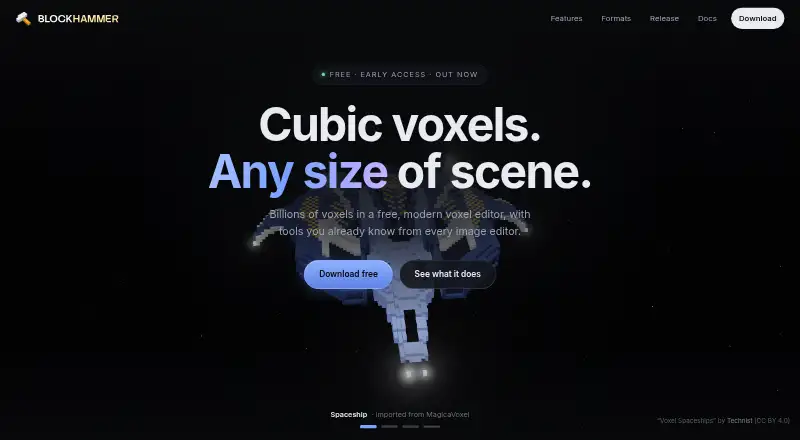
What Blockhammer is
Blockhammer is a free voxel editor for building scenes from cubic blocks on macOS, Windows, and Linux. Its modeling tools include layers, named objects, precise position and size controls, reversible effects, and undo. Users can paint block faces at sixteen times the blocks’ resolution, including text, images, glass, metal, and glowing paint. The editor imports and exports MagicaVoxel .vox files, and can export .glb, .obj, Minecraft .schem, and image or animation formats. The maker names Unity, Unreal, Godot, Blender, Minecraft, and Teardown as destinations for exported work. Blockhammer autosaves every minute and can restore work after a crash. Scenes and files stay on the user's machine, and an account is not required. Crash reports may contain errors, recent activity, and graphics hardware details; reporting can be disabled in settings. Optional AI texture generation is off by default and sends a typed prompt to the image API configured with the user's own key. The maker describes the software as under active development, so features may change. Requirements include macOS 11 or later, Windows 10 or later on x86_64, and x86_64 Linux with glibc from Ubuntu 22.04 or newer.
Good
- Imports and exports MagicaVoxel .vox files
- Exports .glb, .obj, and Minecraft .schem
- Autosaves every minute and can restore crashed work
- Crash reporting can be disabled
Watch out
- Software is under active development
- Platform downloads have specified minimum requirements
- AI texture prompts go to the configured image API
Who it suits
Blockhammer suits people creating voxel scenes who need block modeling, detailed face painting, and exports for listed tools and engines. It may also suit users who want scene files to remain on their own machine without an account.
Verdict
Blockhammer combines voxel modeling, high-resolution face painting, and several scene export formats. Consider its development status and platform requirements when deciding whether it fits your workflow.
Plans and prices
From Blockhammer's own pricing page, checked 30 Sep 2026.
| Plan | Price | What it gives you |
|---|---|---|
| Free | Free | Free voxel editor; macOS, Windows, and Linux downloads; early access |
The facts
Each one read from Blockhammer's own pages, with the date it was checked.
What it does
- Autosave and recovery
- The editor autosaves every minute and can restore work after a crash.checked 30 Sep 2026
- Data handling
- The maker says scenes and files stay on the user's machine and the app has no account requirement.checked 30 Sep 2026
- Diagnostics
- Crash reports may include the error, recent activity, and graphics hardware details; users can disable crash reporting in settings.checked 30 Sep 2026
- Early access
- The maker describes the software as under active development, with features that may be reworked or replaced as it changes.checked 30 Sep 2026
- Formats
- It imports and exports MagicaVoxel .vox files and exports .glb, .obj, Minecraft .schem, and image or animation formats.checked 30 Sep 2026
- Integrations
- The maker lists Unity, Unreal, Godot, Blender, Minecraft, and Teardown as destinations for exported work.checked 30 Sep 2026
- Large scenes
- The maker says Blockhammer has rendered a 113-million-block scene and has tested scenes beyond one billion blocks.checked 30 Sep 2026
- Modeling
- It supports layers, named objects, exact position and size controls, reversible effects, and undo.checked 30 Sep 2026
- Optional AI feature
- Optional AI texture generation is off by default and sends the typed prompt to the image API configured with the user's own key.checked 30 Sep 2026
- Painting
- Users can paint block faces at sixteen times the blocks’ resolution, including text, images, glass, metal, and glowing paint.checked 30 Sep 2026
- Product
- Blockhammer is a free voxel editor for building scenes from cubic blocks.checked 30 Sep 2026
- Support
- Users can send feedback from the editor, and the maker lists [email protected] for questions or removal requests.checked 30 Sep 2026
Where it runs
- Platform requirements
- The downloads page specifies macOS 11 or later, x86_64 Linux with glibc from Ubuntu 22.04 or newer, and Windows 10 or later on x86_64.checked 30 Sep 2026
The full review of Blockhammer
Blockhammer is a free desktop editor for building and painting scenes from cubic blocks. It suits voxel artists who want precise scene controls and several ways to export their work. Its breadth is appealing, but its active-development status matters if your workflow depends on a stable feature set.
Overview
Blockhammer combines scene editing, detailed surface painting, and export in one application. Layers and named objects help organize a project; exact position and size controls support deliberate placement, while reversible effects and undo make revisions less costly. Those controls are useful for structured scenes, though they may be more than a casual block-building project needs.
Scenes and files remain on the user's machine, and no account is required. Autosave runs every minute and can restore work after a crash, which helps reduce the risk of losing a longer session. Crash reports may include the error, recent activity, and graphics hardware details; reporting can be turned off in settings. Optional AI texture generation starts disabled and sends the typed prompt to the image API configured with the user's own key.
Key features
Fine-grained modeling and painting
Face painting operates at sixteen times the blocks' resolution and supports text, images, glass, metal, and glowing paint. That gives creators room for surface detail that basic block placement alone cannot provide. The trade-off is that users seeking only simple, low-detail modeling may not need this extra painting capability.
Large scenes and export options
The maker says Blockhammer has rendered a scene with 113 million blocks and tested scenes beyond one billion, a notable target for creators working at large scale. It imports and exports MagicaVoxel .vox files, and exports .glb, .obj, Minecraft .schem, plus image and animation formats. Listed destinations for exported work include Unity, Unreal, Godot, Blender, Minecraft, and Teardown. Animation tools are not included, so the image and animation export formats should not be mistaken for a built-in animation workflow.
Pricing
The Free plan costs nothing and includes the free voxel editor, macOS, Windows, and Linux downloads, and early access. There is no paid tier or trial to weigh against it. The practical cost is instead the software's development status: the maker says features may be reworked or replaced as the application changes.
Platforms
Blockhammer runs on macOS 11 or later, x86_64 Linux with glibc from Ubuntu 22.04 or newer, and Windows 10 or later on x86_64. It is a desktop option rather than a mobile or browser editor, and Linux users need a compatible 64-bit system.
Who it's for
Blockhammer is a strong fit for desktop voxel artists and game creators who want organized scene controls, high-resolution face painting, and routes into common 3D and game-development tools. Its local-file approach and lack of an account requirement may also suit users who prefer to keep project files on their device. It is a weaker choice for mobile-first creators, users who need a browser editor, or anyone who requires a settled feature set.
Pros and cons
- Pro: Layers, named objects, exact transforms, reversible effects, and undo support controlled scene work.
- Pro: Sixteen-times-resolution face painting and multiple export formats cover both detailed surfaces and varied handoffs.
- Pro: Autosave, crash recovery, local files, and optional crash reporting controls support a more private, resilient desktop workflow.
- Con: The software is in active development, and features may change or be replaced.
- Con: Platform support is limited to desktop macOS, Linux, and Windows, with specific minimum requirements.
- Con: It has no animation tools, despite supporting animation-format export.
Alternatives
For a broader directory of options, browse Voxel Editors.
- Goxel is another free option for desktop users, and its scene size is described as unlimited; choose it if that stated scene-size scope is the priority, or if you need Android or iOS support.
- Vengi VoxEdit is free and open source, with Linux, macOS, web, and Windows availability. It is also under development, so it is a reasonable alternative for users who want an open-source option and can accept a changing product.
- Facet offers a browser-based demo that saves and reloads JSON projects, while its $10.00 USD once full version adds one-click OBJ export. Choose it if browser access or that direct export route matters more than Blockhammer's wider format set.
- Mega Voxels is a mobile option for Android and iOS, with a free app download and free content licenses; choose it for a phone or tablet workflow.
- Voxel Builder is another free option across Android, iOS, Linux, web, and Windows.
- Roxel is a free option for macOS and Windows with a name-your-own-price model.
- The Sandbox Game Maker is free for personal, educational, and commercial projects on macOS and Windows; publishing to virtual LAND requires LAND ownership.
- pixemboss is a free in-browser editor that needs no installation or account to start.
Verdict
Choose Blockhammer if you want a free desktop voxel editor with precise scene organization, unusually fine face painting, and several export routes. Its local-file workflow and recovery features strengthen the case for longer projects. Look elsewhere if you need mobile or browser access, built-in animation tools, or confidence that the feature set will remain unchanged.
Getting started
- Open the Blockhammer website.
- Choose the download for macOS, Windows, or Linux that matches your system requirements.
- Install and open the editor; no account is required.
- Build a scene with blocks, layers, and named objects.
- Export in a supported format for a listed destination.
Limits worth knowing
The Free plan costs nothing and is described as an early-access voxel editor. Features may be reworked or replaced as development continues.
Questions
How much does Blockhammer cost?
The Free plan is free. A free trial is not offered.
Which platforms does it support?
Blockhammer has downloads for macOS, Windows, and Linux. Requirements are macOS 11 or later, Windows 10 or later on x86_64, or x86_64 Linux with glibc from Ubuntu 22.04 or newer.
What file formats can it use?
It imports and exports MagicaVoxel .vox files. It also exports .glb, .obj, Minecraft .schem, and image or animation formats.
Can I use exported work in game engines or 3D tools?
The maker lists Unity, Unreal, Godot, Blender, Minecraft, and Teardown as destinations for exported work.
Does Blockhammer require an account?
No account is required, and scenes and files stay on your machine. Optional AI texture generation sends the typed prompt to the image API configured with your own key.
Alternatives to Blockhammer
- 1
Goxel
Free planOpen sourceAndroidiOSLinuxmacOS8.5Free plan - 2

Mega Voxels
Free planAndroidiOS6.9From $1.99 a month - 3
Facet
Free planWebWindows6.7$10 one-time - 4
Solid Editor
Free planLinuxWindows6.6$10 one-time - 5
VoxelAI Studio
Free planWebAPI6.6From C$8 a month - 6
Qubicle Voxel Editor
Free planmacOSWindows6.5$0.99 one-time