Facet
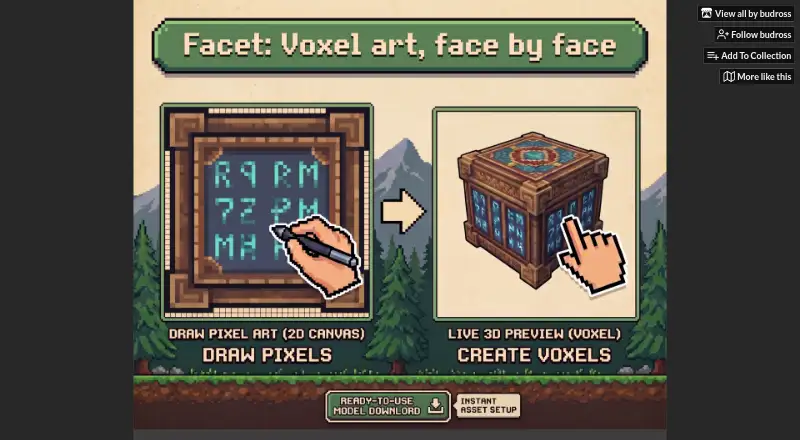
Facet is a voxel modeling and texturing application for making 3D meshes from voxel shapes and painting pixel-perfect textures on their faces.
What Facet is
Facet is a voxel modeling and texturing application for making 3D meshes from voxel shapes and painting pixel-perfect textures on their faces. Its shaping tools include edge chamfering and filleting, while the Pattern tool lets users save pixel-art designs and stamp them across multiple faces. The Facade Depth Editor extrudes individual pixels into sub-voxel details. A browser demo supports face painting, compound shapes, patterns, pixel extrusion, and saving projects as JSON for later reload or sharing. The paid Windows version adds OBJ export with UVs and texture atlases handled automatically. The maker links a Godot plugin intended to address texture bleeding and UV alignment when importing OBJ files; the demo page also says exported models are ready for Godot, Blender, or any engine. Facet is in development. The free browser demo is available alongside a $10.00 USD or more one-time Windows installer purchase, which includes future updates.
Good
- Browser demo supports painting and reusable patterns
- Exports OBJ files with UVs and texture atlases
- Projects can be shared as JSON
- Purchases include future updates
Watch out
- In development
- OBJ export is part of the paid version
- Paid version requires Windows installer
Who it suits
Facet suits pixel artists and indie developers who want to make original 3D game assets. It also fits users who need voxel modeling, texture painting, or OBJ export for a game engine.
Verdict
Facet combines voxel shaping, face painting, and pixel extrusion in a browser demo, with OBJ export in its paid Windows version. Its in-development status and Windows-only installer are worth weighing before purchase.
Plans and prices
From Facet's own pricing page, checked 5 Oct 2026.
| Plan | Price | What it gives you |
|---|---|---|
| Facet Demo | Free | Browser-based · saves and reloads JSON projects · full version adds one-click OBJ export · Free demo |
| Facet | $10, paid once | Windows installer · OBJ export with UVs and texture atlases · future updates included · $10.00 USD or more; minimum purchase price is $10 USD |
The facts
Each one read from Facet's own pages, with the date it was checked.
What it does
- Audience
- The maker describes the browser demo as intended for pixel artists and indie developers who want original 3D game assets.checked 5 Oct 2026
- Demo features
- The browser demo supports painting voxel faces, compound shapes, reusable patterns, pixel extrusion, and saving work as JSON.checked 5 Oct 2026
- Development status
- Facet is listed as in development.checked 5 Oct 2026
- Download
- The purchase provides a standalone Windows MSI installer and a README guide; the listed downloadable archive is Facet.zip.checked 5 Oct 2026
- Export
- Facet exports OBJ files with texture atlases and automatically handled UVs.checked 5 Oct 2026
- Facade Depth Editor
- The Facade Depth Editor extrudes individual pixels into sub-voxel 3D details.checked 5 Oct 2026
- Godot integration
- The maker links a Godot plugin that addresses texture bleeding and UV alignment issues when importing OBJ files.checked 5 Oct 2026
- Other engine compatibility
- The demo page says exported models are ready for Godot, Blender, or any engine.checked 5 Oct 2026
- Pattern tool
- The Pattern tool saves pixel art designs for stamping across multiple voxel faces.checked 5 Oct 2026
- Project sharing
- Users can copy project JSON to share creations, including by pasting it into Discord.checked 5 Oct 2026
- Purpose
- Facet is a voxel modeling and texturing application for creating 3D meshes and painting pixel-perfect textures on voxel faces.checked 5 Oct 2026
- Shape tools
- It includes edge chamfering and filleting tools to reshape voxels.checked 5 Oct 2026
- Support
- The maker invites users to join the Facet Discord to share creations and shape future development.checked 5 Oct 2026
- Updates
- Purchases include future updates through Itch.io, and the maker says buyers will receive a complimentary Steam key when Facet officially launches on Steam.checked 5 Oct 2026
The full review of Facet
Facet is a voxel editor for making 3D game assets with pixel-art textures. It is best for pixel artists and indie developers who want face-level painting and sculpting in one focused workflow.
The browser demo makes it possible to try that workflow for free; OBJ export requires the $10 Windows version.
Overview
Facet joins voxel modeling and texturing rather than aiming to be a general-purpose 3D package. Its appeal is the way it lets artists shape forms and add pixel detail in the same tool. That focus is useful for stylized game assets, but less suited to work built around broader mesh-modeling needs.
The demo runs in a browser and can save projects as JSON. The downloadable version is a standalone Windows MSI, and Facet is still in development, so buyers should be comfortable with an evolving product. Purchases include future updates through Itch.io, and the maker says buyers will receive a complimentary Steam key when the software officially launches there.
Key features
Shape and surface detail
Chamfering and filleting reshape voxel edges, while the Pattern tool saves pixel-art designs for stamping across multiple faces. Reusing patterns can help keep repeated details consistent. The Facade Depth Editor extrudes individual pixels into sub-voxel details, adding depth without leaving the pixel-art workflow.
The browser demo includes face painting, compound shapes, patterns, pixel extrusion, and JSON saving. That gives prospective users a way to explore the main creative tools before paying. Projects can also be shared by copying their JSON, including through Discord; this is a straightforward way to pass work along, though it is separate from the model-export workflow.
Export and engine workflow
The paid version exports OBJ files with texture atlases and automatically handled UVs. The maker’s Godot plugin addresses texture bleeding and UV alignment when importing OBJ files, which makes it particularly relevant to Godot users. The demo page also describes exported models as ready for Blender or any engine.
Pricing
| Plan | Price | What it includes |
|---|---|---|
| Facet Demo | free | Browser-based demo; saves and reloads JSON projects. One-click OBJ export is part of the full version. |
| Facet | $10, paid once | Windows installer, OBJ export with UVs and texture atlases, and future updates. |
The free demo is the right starting point for anyone who wants to try the modeling and painting tools without paying. It gives up one-click OBJ export, so game-asset creators who need to move finished models into other software should choose the one-time paid version. The minimum purchase price is $10 USD.
Platforms
Facet is available on the web and Windows. The web demo lowers the barrier to trying it, but the paid installer is Windows-only, which rules it out as a purchase for users who need a native version on another desktop platform.
Who it's for
Facet is a good fit for pixel artists and indie developers who want original voxel-based game assets, especially those who value pixel painting, reusable patterns, and small-scale 3D details in one workflow. Godot users may find its export plugin especially useful. It is a weaker fit for people seeking broad mesh-modeling tools or a paid app for macOS or Linux.
Pros and cons
- Pros: The browser demo includes the central modeling and texturing tools, so users can explore the workflow before committing.
- Pros: OBJ export bundles texture atlases with automatically handled UVs, and a maker-provided plugin addresses common Godot import issues.
- Pros: The $10 one-time purchase includes future updates.
- Cons: OBJ export is excluded from the free demo, making the paid plan necessary for a direct model-export workflow.
- Cons: The paid installer is Windows-only, limiting desktop buyers on other platforms.
- Cons: Facet is in development, which may not suit users looking for a settled production tool.
Alternatives
Voxel Editors is the category directory for comparing more tools.
- Goxel is a free alternative with an unlimited-scene-size desktop version and support for Android, iOS, Linux, macOS, and Windows.
- Vengi VoxEdit is a free, open-source option for Linux, macOS, web, and Windows; it is also under development.
- Blockhammer is a free early-access voxel editor with downloads for Linux, macOS, and Windows.
- Qubicle Voxel Editor is another option for macOS and Windows.
- VoxelShop is a free option for Linux, macOS, and Windows.
- Mega Voxels is a freemium mobile alternative for Android and iOS.
- Sproxel is a free, open-source option for Linux, macOS, and Windows.
- Voxel Builder supports Android, iOS, Linux, web, and Windows.
Verdict
Choose Facet if you want a focused voxel-and-pixel-art workflow and value the browser demo, then pay $10 for OBJ export if you are on Windows. Look elsewhere if you need a more general modeling tool, a paid desktop version outside Windows, or a product that is no longer in development.
Alternatives to Facet
- 1
Goxel
Free planOpen sourceAndroidiOSLinuxmacOS8.5Free plan - 2
Mega Voxels
Free planAndroidiOS6.9From $1.99 a month - 3
Solid Editor
Free planLinuxWindows6.6$10 one-time - 4
VoxelAI Studio
Free planWebAPI6.6From C$8 a month - 5
Qubicle Voxel Editor
Free planmacOSWindows6.5$0.99 one-time - 6
Voxel Builder
AndroidiOSWebLinux6.5