VisualSVN Server
VisualSVN Server is a self-hosted Apache Subversion server for Windows, delivered as one installation package.
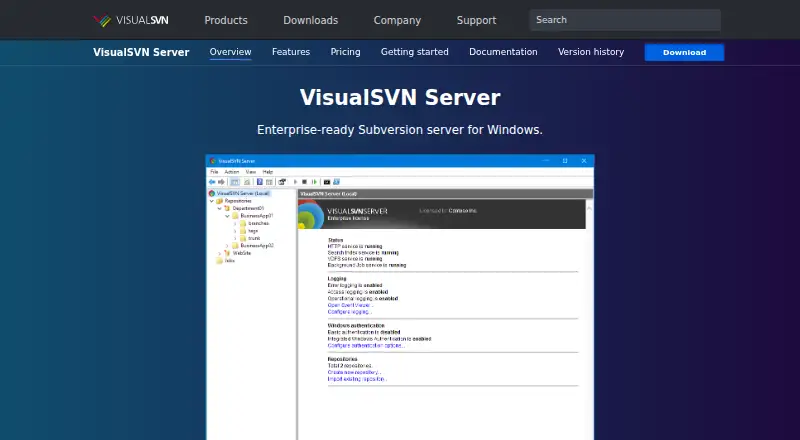
What VisualSVN Server is
VisualSVN Server is a self-hosted Apache Subversion server for Windows, delivered as one installation package. It supports repository hosting, full-text search across contents and revision history, replication, backup, authentication, and administration. VDFS replicates writable repositories between geographically distributed sites. Backup and Restore provides hot backups and scheduled repository verification. Active Directory users can authenticate with Windows credentials through Kerberos V5 or NTLM; two-factor authentication and smart cards are supported. Administrators receive an MMC console and PowerShell cmdlets. The server can log HTTP requests and Subversion operations to the Windows Event Log and temporarily block IP addresses after repeated authentication failures. RESTful web URLs connect repository content with issue trackers and other applications. It works with Apache Subversion clients and standard repository formats. Supported operating systems include Windows Server 2012 R2–2025 and Windows 8.1 or later.
Good
- Single-package Subversion installation
- Full-text repository and history search
- Writable geographic replication with VDFS
- Hot backups and verification
- Free Community plan
Watch out
- Windows server deployment required
- Community plan limited to 15 users
- Not a distributed version-control system
Who it suits
VisualSVN Server suits teams hosting Subversion repositories on supported Windows systems. It fits organizations needing search, writable site replication, backups, directory authentication, and administrative automation.
Verdict
VisualSVN Server provides centralized Subversion hosting with replication, search, backup, and enterprise authentication options. Review Windows requirements and user limits when selecting a license.
Plans and prices
From VisualSVN Server's own pricing page, checked 3 Oct 2026.
| Plan | Price | What it gives you |
|---|---|---|
| Community | Free | Unlimited repositories · up to 15 users · free for commercial use · Free |
| Essential | $55, paid once | For home usage or small teams · license size determines user and VDFS repository limits · Perpetual license; 12 months of free upgrades |
| Enterprise | $350, paid once | For SMB or Enterprise · license size determines user and VDFS repository limits · Perpetual license; 12 months of free upgrades |
| Enterprise Multinode | $350, paid once | For all nodes in one VDFS cluster · unlimited VDFS repositories · license size determines user limit · Perpetual license; 12 months of free upgrades |
The facts
Each one read from VisualSVN Server's own pages, with the date it was checked.
What it does
- Administration
- VisualSVN Server includes an MMC management console and PowerShell cmdlets for administration and automation.checked 3 Oct 2026
- Authentication
- In Active Directory environments, users can sign in with Windows credentials using Kerberos V5 or NTLM; two-factor authentication and smart cards are supported.checked 3 Oct 2026
- Backup
- Its Backup and Restore feature supports hot backups and scheduled repository verification.checked 3 Oct 2026
- Compatibility
- The server is compatible with all Apache Subversion clients and stores repositories in the standard format.checked 3 Oct 2026
- Installation
- It is distributed as a single installation package that sets up a full-featured Subversion server.checked 3 Oct 2026
- Integrations
- The web interface uses RESTful URLs to link repository content with issue trackers and other third-party applications.checked 3 Oct 2026
- Purpose
- VisualSVN Server is an enterprise-ready Apache Subversion server for Windows.checked 3 Oct 2026
- Replication
- VDFS provides replication between geographically distributed sites, and distributed repositories are writable.checked 3 Oct 2026
- Repository search
- Full-text search covers repository contents and history across folders and revisions, with continuous indexing of new revisions.checked 3 Oct 2026
- Security
- The product can log HTTP requests and Subversion operations to the Windows Event Log, and temporarily block IP addresses after repeated authentication failures.checked 3 Oct 2026
- Support
- The company says free technical support is available regardless of license type.checked 3 Oct 2026
The company
- Company
- VisualSVN Software Ltd says it has provided version control tools and solutions since 2005 and lists its address in Limassol, Cyprus.checked 3 Oct 2026
- Founded
- 2005checked 28 Sep 2026
- Headquarters
- Limassol, Cypruschecked 28 Sep 2026
Where it runs
- Platform limits
- The download page lists Windows Server 2012 R2–2025 and Windows 8.1 or later as supported operating systems.checked 3 Oct 2026
Alternatives to VisualSVN Server
- 1

Unity
Free planAndroidiOSWebAPI8.4Free plan - 2

Unity Version Control
Free planWebAPILinuxmacOS8.1Free plan - 3

Perforce P4 (Helix Core)
Free planWebAPILinuxmacOS7.9From $39 a month - 4

Diversion
Free planWebAPILinuxmacOS7.8From $25 a month - 5

GitHub CodeQL
Free planWebExtensionLinuxmacOS7.5From $30 a month - 6
GitUI
Free planOpen sourceAndroidLinuxmacOSSelf-hosted7.5Free plan