VideoCaptioner
VideoCaptioner processes video subtitles through speech transcription, semantic segmentation, correction, translation, and video synthesis.
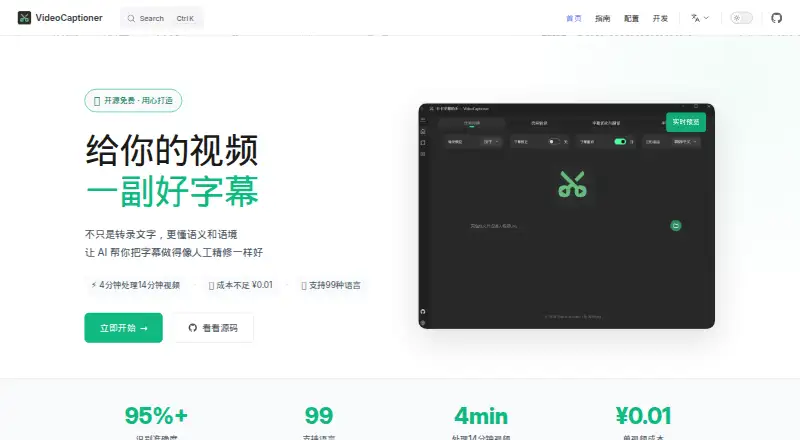
What VideoCaptioner is
VideoCaptioner processes video subtitles through speech transcription, semantic segmentation, correction, translation, and video synthesis. It supports SRT, ASS, and VTT subtitle formats, and can produce hard subtitles burned into the video or soft subtitles embedded as a track. The homepage says it recognizes 99 languages and translates into 37. Recognition options include FasterWhisper, WhisperCpp, and Whisper API; translation choices include LLM translation, Bing Translate, Google Translate, and DeepLX. Listed LLM integrations include OpenAI, DeepSeek, SiliconCloud, Gemini, Ollama, LM Studio, and ChatGLM. Users can provide video files or YouTube and Bilibili links, and a batch workflow queues multiple videos. Processing can be local or cloud-based; local operation can run on a CPU with optional GPU acceleration. The homepage says user data stays local when using local processing. VideoCaptioner is free and open source under the MIT license, with Linux, macOS, Windows, and self-hosted platforms listed. Docker deployment is labeled experimental and described as basic.
Good
- Supports SRT, ASS, and VTT subtitles.
- Can burn captions in or embed a subtitle track.
- Offers batch processing for multiple videos.
- Supports video files and YouTube or Bilibili links.
- Local processing can use CPU or optional GPU acceleration.
Watch out
- Docker deployment is experimental.
- Docker deployment is described as basic.
- Requires Windows 10/11, macOS 10.15+, or specified Linux versions.
Who it suits
It suits people who need to transcribe, correct, translate, or style subtitles for videos, including batches of files. Users who prefer local processing can run it on CPU, with optional GPU acceleration.
Verdict
VideoCaptioner covers subtitle creation from transcription through translation and output, with local and cloud processing options. Its broad recognition and translation integrations may suit varied workflows, while Docker use remains experimental and basic.
Plans and prices
From VideoCaptioner's own pricing page, checked 11 Oct 2026.
| Plan | Price | What it gives you |
|---|---|---|
| VideoCaptioner | Free | Free and open source · MIT license |
The facts
Each one read from VideoCaptioner's own pages, with the date it was checked.
What it does
- Batch processing
- The getting started guide describes a batch processing workflow for adding multiple video files to a queue.checked 11 Oct 2026
- Burn-in captions
- Yeschecked 22 Sep 2026
- Caption styling
- Yeschecked 22 Sep 2026
- Deployment limitation
- The guide labels Docker deployment experimental and says that version is currently basic.checked 11 Oct 2026
- Languages
- The homepage says it recognizes 99 languages and translates into 37 languages.checked 11 Oct 2026
- LLM integrations
- The LLM guide lists OpenAI, DeepSeek, SiliconCloud, Gemini, Ollama, LM Studio, and ChatGLM.checked 11 Oct 2026
- Local processing
- The homepage says the application can run locally on CPU, with optional GPU acceleration, and offers cloud or local processing.checked 11 Oct 2026
- Privacy
- The homepage says user data stays local and describes local use as keeping privacy under the user's control.checked 11 Oct 2026
- Purpose
- VideoCaptioner processes video subtitles with speech transcription, semantic segmentation, correction, translation, and video synthesis.checked 11 Oct 2026
- Recognition engines
- The getting started guide lists FasterWhisper, WhisperCpp, and Whisper API among its speech recognition options.checked 11 Oct 2026
- Subtitle export
- other formatschecked 22 Sep 2026
- Subtitle formats
- It supports SRT, ASS, and VTT subtitle formats.checked 11 Oct 2026
- Subtitle output
- The guide says users can create hard subtitles burned into video or soft subtitles embedded as a track.checked 11 Oct 2026
- Support
- The homepage directs users with questions to submit GitHub issues, where the community can help.checked 11 Oct 2026
- System requirements
- The guide specifies Windows 10/11 64-bit, macOS 10.15 or later, and Ubuntu 20.04+, Debian 11+, or Fedora 35+ for Linux.checked 11 Oct 2026
- Translation integrations
- The guide lists LLM translation, Bing Translate, Google Translate, and DeepLX as translation options.checked 11 Oct 2026
- Video input
- The guide says users can provide video files or links from YouTube and Bilibili.checked 11 Oct 2026
Money
- Free plan
- Yeschecked 22 Sep 2026
The full review of VideoCaptioner
Overview
VideoCaptioner is a free, MIT-licensed desktop and self-hosted application for turning speech into subtitles, refining their timing and structure, translating them, and producing captioned video. It is best suited to creators and technical users who want control over local processing, batch jobs, and the services used for recognition or translation. The broad workflow is compelling, but Docker deployment is still experimental and basic, and support is community-driven through GitHub issues.
Local CPU operation with optional GPU acceleration gives privacy-conscious users a way to keep data on their own machines, while cloud processing remains an option when convenience or service availability matters. That flexibility is useful, though it places more responsibility on the user to choose and configure engines and integrations.
Key features
The application covers transcription, semantic segmentation, correction, translation, and video synthesis rather than stopping at a raw transcript. It recognizes 99 languages and translates into 37, making it a practical choice for multilingual publishing, although the quality and behavior will depend on the selected engine or service.
Subtitle work supports SRT, ASS, and VTT. Caption styling is available, and output can be either hard subtitles burned permanently into the video or soft subtitles embedded as a selectable track. That distinction matters: burned captions are ready for platforms or viewers that do not handle subtitle tracks, while soft subtitles preserve the option to turn captions off or change tracks.
Recognition choices include FasterWhisper, WhisperCpp, and Whisper API. Translation can use LLM translation, Bing Translate, Google Translate, or DeepLX. The listed LLM connections—OpenAI, DeepSeek, SiliconCloud, Gemini, Ollama, LM Studio, and ChatGLM—cover both hosted and local-oriented setups. The range is a strength for users with a preferred provider, but less experienced users face more configuration decisions than with a single-service caption app.
Batch processing lets users queue multiple videos. Input can be a local video file or a YouTube or Bilibili link, which suits recurring channel work and source material hosted online. Local processing keeps data under the user's control; cloud processing can be selected when local hardware or setup is limiting.
Pricing
VideoCaptioner — free. The Free and open source plan is MIT licensed, with no subscription charge. It is the right fit for individuals, educators, and small production workflows that can run the software themselves and do not need a paid support contract. There are no paid tiers or published seat-based upgrades to compare, but users should account for their own hardware and any charges from optional cloud services or LLM providers.
Platforms
VideoCaptioner runs on Linux, macOS, and Windows, and can also be self-hosted. Supported systems are Windows 10 or 11 64-bit, macOS 10.15 or later, and Linux distributions including Ubuntu 20.04+, Debian 11+, and Fedora 35+. Docker deployment is marked experimental and currently basic, so a conventional installation is the safer choice for dependable use.
Who it's for
Choose it if you need a no-cost, end-to-end subtitle workflow, multiple language options, batch queues, or the ability to keep processing local. It is particularly suitable for technically comfortable creators managing several recognition and translation back ends. Look elsewhere if you want a polished hosted service with minimal setup, guaranteed vendor support, or a tightly managed mobile-first experience.
Pros and cons
- Pros: Free MIT-licensed software; local CPU processing with optional GPU acceleration; cloud or local choices; recognition across 99 languages and translation into 37; SRT, ASS, and VTT support; styled hard or soft subtitle output; batch queues and YouTube/Bilibili inputs; broad recognition, translation, and LLM integrations.
- Cons: Docker use is experimental and basic; choosing among engines and providers requires configuration; cloud and LLM usage can introduce separate costs; help is routed through community GitHub issues rather than a stated commercial support channel.
Alternatives
Browse AI Video Caption Generators for a wider category comparison.
SmartSub is the better pick when you want free local transcription, translation, TTS, and rendering with no local usage limits, while retaining optional paid cloud services.
Choose Captions instead for Android, iOS, web, or API access and a hosted subscription model, including the Max plan at $24.99 a month with 500 credits and AI editing features.
CaptionRoom suits users wanting a browser-capable editor with a forever-free tier, 1080p export, SRT output, and no watermark.
Whisper is a narrower open-source option when you primarily need local speech recognition code and model weights installed with Python and ffmpeg.
SRTGen is an alternative for web or API-based localization workflows with free SRT, VTT, and TXT export.
Moonshot is a web service with a limited free allowance and a 9.00 USD-per-month Creator plan.
Fluen AI Subtitle Generator fits users seeking a hosted tool with a free trial and up to three files of 90 minutes each.
GetCaptions is suited to web/API users who prefer a quota-based starter tier with 60 transcription minutes per month and 720p export.
Verdict
VideoCaptioner is a strong recommendation for creators who want a free, flexible subtitle pipeline and the option to keep video processing local. Its main reason to choose it is the combination of broad language coverage, batch handling, format and rendering support, and many recognition and translation back ends. Look elsewhere if you need turnkey cloud operation, polished Docker deployment, or formal support rather than a configurable community project.
Alternatives to VideoCaptioner
- 1

Captions
Free planAndroidiOSWebAPI9.1From $4.99 a month - 2

Whisper
Free planOpen sourceAPILinuxmacOSSelf-hosted8.9$0.01 usage-based - 3

SRTGen
Free planWebAPI8.3From $4 a month - 4
Fluen AI Subtitle Generator
Free planWebAPIExtensionmacOS8.2Free plan - 5
ZapCap
Free planAndroidiOSWebAPI8.1From $8 a month - 6
ngram
Free planWebAPIExtension8.1From $29 a month