GetCaptions
GetCaptions generates, edits, and exports video subtitles and captions, with tools for styled captions, burned-in video, and subtitle files.
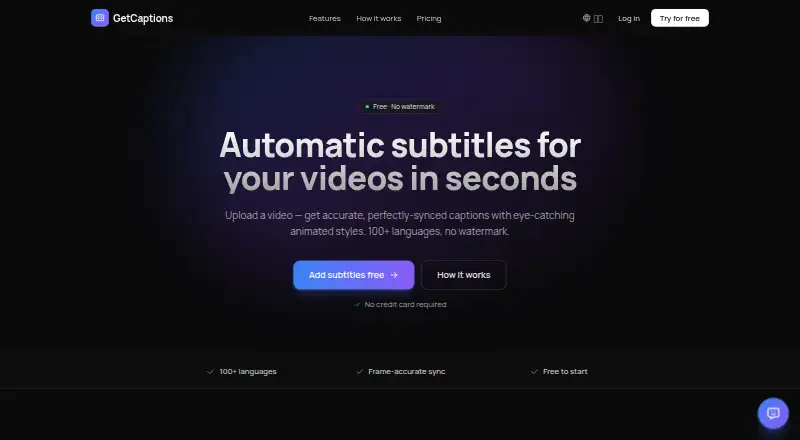
What GetCaptions is
GetCaptions generates, edits, and exports video subtitles and captions, with tools for styled captions, burned-in video, and subtitle files. Its AI transcribes speech with word-level timing and supports more than 100 languages. The editor offers 18+ animated subtitle templates, including karaoke, highlight, neon, and pop styles, and users can translate finished captions into dozens of languages. A brand kit can apply a user's logo, colors, and fonts, importing them from a website or YouTube channel. Uploaded video formats include MP4, MOV, and WebM. The free Starter plan includes 60 minutes of transcription per month, up to five minutes per video, and three projects. Pro costs $15 a month and includes 500 monthly transcription minutes, videos up to 60 minutes, and 50 projects. Studio costs $35 a month and adds one-click publishing to TikTok, Instagram, and YouTube, team access, API access, 4K export, and unlimited usage subject to fair use. Captions can be burned into video or downloaded as SRT and VTT files.
Good
- Transcribes speech with word-level timing in 100+ languages.
- Offers 18+ animated subtitle templates.
- Exports burned-in video, SRT, and VTT.
- Brand kit applies logos, colors, and fonts.
Watch out
- Starter limits videos to five minutes each.
- Starter includes three projects.
- Pro costs $15 a month.
- Studio unlimited usage is subject to fair use.
Who it suits
GetCaptions suits creators who need to caption, style, translate, or export video subtitles. Starter fits short videos and limited projects; longer videos and larger monthly workloads require a paid plan.
Verdict
GetCaptions covers transcription, styling, translation, and several export options, with plan limits that scale from short clips to longer videos. Pro and Studio add higher allowances and publishing or brand tools at their listed monthly prices.
Plans and prices
From GetCaptions's own pricing page, checked 5 Oct 2026.
| Plan | Price | What it gives you |
|---|---|---|
| Starter | Free | 60 min transcription/mo · Up to 5 min per video · Basic templates · 720p export · 3 projects · Standard queue |
| Pro | $15 a month | 500 min transcription/mo · Up to 60 min per video · All animated templates · 1080p export · Priority processing · Translation & dubbing · 50 projects · Monthly |
| Studio | $35 a month | Everything in Pro · Publish to TikTok, Instagram & YouTube in one click · Unlimited (fair-use) · 4K export · Brand kit · Team access · API access · Highest priority · Monthly |
The facts
Each one read from GetCaptions's own pages, with the date it was checked.
What it does
- API
- The Studio plan includes API access.checked 5 Oct 2026
- Audio processing
- Speech recognition runs on GetCaptions' own servers, and the privacy policy says uploaded audio is not sent to a third-party transcription service.checked 5 Oct 2026
- Brand caption presets
- Yeschecked 22 Sep 2026
- Brand kit
- The brand kit applies a user's logo, colors, and fonts to videos and can import them from a website or YouTube channel.checked 5 Oct 2026
- Burn-in captions
- Yeschecked 22 Sep 2026
- Caption styling
- Yeschecked 22 Sep 2026
- Data handling
- The privacy policy says video files are stored so users can reopen and edit projects, then deleted when the project or account is deleted.checked 5 Oct 2026
- Exports
- Users can export video with burned-in captions or download SRT and VTT subtitle files.checked 5 Oct 2026
- Max video length
- 60checked 22 Sep 2026
- Paid from
- 15checked 22 Sep 2026
- Product
- GetCaptions automatically generates, edits, and exports video subtitles and captions.checked 5 Oct 2026
- Publishing
- The Studio plan offers one-click publishing to TikTok, Instagram, and YouTube.checked 5 Oct 2026
- Refunds
- The refund policy offers a full refund within 14 days of a first paid subscription charge; monthly renewals after that period are non-refundable.checked 5 Oct 2026
- Security
- The privacy policy describes HTTPS/TLS encryption in transit, access controls, and managed, regularly patched infrastructure.checked 5 Oct 2026
- Service availability
- The terms say uninterrupted or error-free service is not guaranteed.checked 5 Oct 2026
- Subtitle export
- srt and vttchecked 22 Sep 2026
- Subtitle styles
- The editor offers 18+ animated subtitle templates, including karaoke, highlight, neon, and pop styles.checked 5 Oct 2026
- Support
- GetCaptions says it typically replies to support and billing emails within 1–2 business days.checked 5 Oct 2026
- Transcription
- The AI transcribes speech with precise word-level timing and supports transcription in 100+ languages.checked 5 Oct 2026
- Translation
- Users can translate finished captions into dozens of languages in one click.checked 5 Oct 2026
- Upload formats
- The homepage says users can upload MP4, MOV, or WebM video files.checked 5 Oct 2026
Money
- Free plan
- Yeschecked 22 Sep 2026
Alternatives to GetCaptions
- 1

Captions
Free planAndroidiOSWebAPI9.1From $4.99 a month - 2

Whisper
Free planOpen sourceAPILinuxmacOSSelf-hosted8.9$0.01 usage-based - 3

SRTGen
Free planWebAPI8.3From $4 a month - 4
Fluen AI Subtitle Generator
Free planWebAPIExtensionmacOS8.2Free plan - 5
ZapCap
Free planAndroidiOSWebAPI8.1From $8 a month - 6
ngram
Free planWebAPIExtension8.1From $29 a month