
CaptionRoom
CaptionRoom is a video-editing and captioning tool for creating styled captions, editing timelines and exporting subtitles.
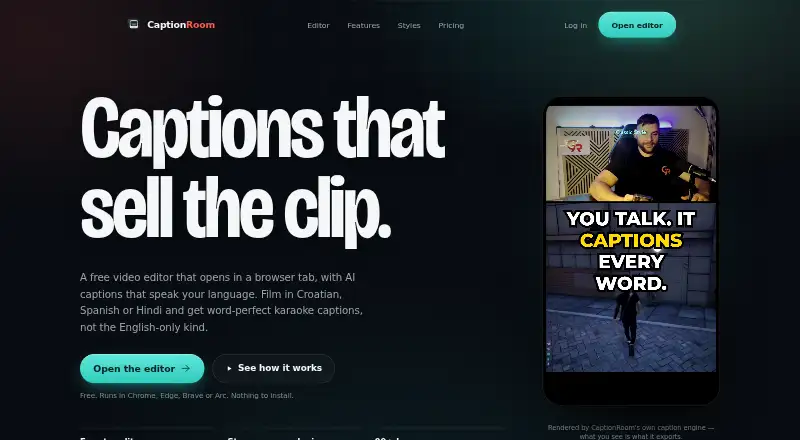
What CaptionRoom is
CaptionRoom is a video-editing and captioning tool for creating styled captions, editing timelines and exporting subtitles. Its free plan includes timeline editing with cuts, layers, text, images, colour and audio, along with manual captions in two styles. It supports 1080p exports with SRT subtitles and no watermark. Captions can also be burned into video, and brand caption presets are available. The Pro plan adds AI-generated captions in 99+ languages, AI Clips, caption translation and styles, AI-generated titles, descriptions and hashtags, and a brand kit. Pro costs $12.00 per month when billed annually; Pro Monthly costs $20.00 per month. A Lifetime licence is listed at $99.00 per month. CaptionRoom runs on the web, Windows, macOS and Linux. Subtitle export is SRT only.
Good
- Free plan includes timeline editing and manual captions
- 1080p export with SRT and no watermark
- Burn-in captions and brand caption presets
- Available on web, Windows, macOS and Linux
Watch out
- Subtitle export is SRT only
- AI auto-captions require a paid plan
Who it suits
CaptionRoom suits creators who want to edit video and add styled captions, with a free option for manual captioning or paid features for AI captioning and translation.
Verdict
CaptionRoom combines basic timeline editing with caption styling and subtitle export. Its free plan covers manual captions, while AI features are included in paid plans.
Plans and prices
From CaptionRoom's own pricing page, checked 8 Oct 2026.
| Plan | Price | What it gives you |
|---|---|---|
| Free | Free | Full editor · manual captions with 2 styles · exports up to 1080p + .srt · no watermark · AI credits earned by watching ads · forever |
| Pro | $12 a month | AI auto-captions in 99+ languages · AI Clips · Caption translation · Caption styles · AI title, description and hashtag generation · Brand kit · billed annually |
| Pro Monthly | $20 a month | Pro feature set · Monthly billing · billed monthly |
| Lifetime | $99 a month | Lifetime licence |
| Pro (annual) | $12 a month | Unlimited AI tools · all 7 caption styles · exports up to 4K · priority support · annually — $144/year |
| Pro (monthly) | $20 a month | Unlimited AI tools · all 7 caption styles · exports up to 4K · priority support · monthly |
| Pro lifetime | $99, paid once | Lifetime licence · Pro toolkit · once |
The facts
Each one read from CaptionRoom's own pages, with the date it was checked.
What it does
- Account and payments
- Users sign in with a Caption Room account, and Pro payments are handled through Stripe; Caption Room says it stores no card details.checked 8 Oct 2026
- AI captions
- Pro AI captions transcribe and time words in 99+ languages, with an editable transcript and karaoke-style captions.checked 8 Oct 2026
- AI text data
- Pro translation, cleanup, and title or hashtag tools send caption text to Caption Room’s servers, not the video or audio.checked 8 Oct 2026
- AI tools
- Pro includes AI Clips, caption translation, filler-word cleanup, and AI-generated titles, descriptions, and hashtags.checked 8 Oct 2026
- Brand caption presets
- Yeschecked 19 Sep 2026
- Burn-in captions
- Yeschecked 19 Sep 2026
- Caption styling
- Yeschecked 19 Sep 2026
- Exports
- The free plan exports up to 1080p and .srt files, while Pro exports up to 4K.checked 8 Oct 2026
- Paid from
- 12checked 19 Sep 2026
- Privacy
- Video files, projects, edits, and exports stay on the user’s device; auto-captioning sends extracted audio for transcription and the page says it is not retained afterward.checked 8 Oct 2026
- Product
- Caption Room is a browser-based video editor with AI captions and a timeline editor.checked 8 Oct 2026
- Social formats
- The editor can reframe exports to 9:16, 1:1, 4:5, or 16:9 and names TikTok, Reels, and Shorts as target platforms.checked 8 Oct 2026
- Subtitle export
- srt onlychecked 19 Sep 2026
- Support
- The contact page says the team usually replies within a couple of business days, and Pro includes priority support.checked 8 Oct 2026
- Video editing
- The editor supports cuts, picture-in-picture layers, text and image overlays, audio tracks, and colour effects.checked 8 Oct 2026
Where it runs
- Browser support
- The web editor runs in Chrome, Edge, Brave, or Arc on Windows, Mac, and Linux without an installation.checked 8 Oct 2026
Money
- Free AI credits
- Free accounts can earn AI credits by watching short ads, and individual AI jobs spend credits.checked 8 Oct 2026
- Free plan
- Yeschecked 19 Sep 2026
The full review of CaptionRoom
Overview
CaptionRoom is a browser-based video editor for making captioned videos, with a timeline for basic editing and options for styling and exporting subtitles. It is best for creators who want to edit and caption social clips in one workflow. Its free plan is a practical starting point for manual captions; regular AI captioning and the full toolkit require Pro.
Key features
The timeline handles cuts, picture-in-picture layers, text and image overlays, audio tracks, and colour effects. That breadth is useful when a clip needs straightforward assembly alongside captions, but CaptionRoom is a less compelling fit if your main need is a dedicated tool for one specialized editing task.
Free users can add captions manually in two styles and export .srt files. Pro adds transcription and word timing in 99+ languages, an editable transcript, karaoke-style captions, and all seven caption styles. Brand presets and a brand kit help keep a creator’s caption look consistent. Pro also bundles AI Clips, translation, filler-word cleanup, and generated titles, descriptions, and hashtags, making it a broader publishing tool than a subtitle exporter alone.
Free accounts can earn AI credits by watching short ads, and each AI job spends credits. That makes the free tier suitable for occasional experimentation, not dependable ongoing AI caption work. Pro’s unlimited AI tools remove that credit uncertainty.
Exports can be reframed to 9:16, 1:1, 4:5, or 16:9, with TikTok, Reels, and Shorts as target platforms. Free exports reach 1080p; Pro raises the ceiling to 4K. Subtitle export is .srt only, so CaptionRoom is less suitable when a workflow needs another subtitle file format. Captions can also be burned into the video.
Video files, projects, edits, and exports stay on the user’s device. Auto-captioning sends extracted audio for transcription, which CaptionRoom says is not retained afterward; Pro translation, cleanup, and text-generation tools send caption text to its servers, not video or audio. Users need a Caption Room account to sign in. Pro payments go through Stripe, and CaptionRoom says it stores no card details.
Pricing
| Plan | Price | What it includes |
|---|---|---|
| Free | free, billed forever | Full editor, manual captions in two styles, exports up to 1080p and .srt, no watermark, and AI credits earned by watching ads. |
| Pro annual | $12 a month, billed annually — $144/year | Unlimited AI tools, all seven caption styles, exports up to 4K, and priority support. |
| Pro monthly | $20 a month, billed monthly | The same Pro toolkit with monthly billing. |
| Pro lifetime | $99, paid once, billed once | Lifetime licence and Pro toolkit. |
Free is the right choice for manual captioning and occasional AI trials, but ad-earned credits make AI use unpredictable. Annual Pro is the lower-cost route for regular AI use if paying for a year upfront works for you; monthly Pro costs more per month but avoids annual billing. The lifetime option is a one-time payment for the Pro toolkit. Pro has priority support; the contact team usually replies within a couple of business days.
Platforms
CaptionRoom supports Linux, macOS, Windows, and the web. The browser editor runs in Chrome, Edge, Brave, or Arc on Windows, Mac, and Linux without installation, so it suits people who want to avoid setting up desktop software.
Who it's for
CaptionRoom fits solo creators and small publishing workflows that need basic timeline editing, styled captions, and social aspect-ratio exports in one place. It is less suited to anyone who needs predictable free AI capacity or subtitle export beyond .srt.
Pros and cons
- Pro combines editing and captioning: cuts, overlays, audio tracks, colour effects, and caption tools cover basic clip finishing without a separate caption-only workflow.
- Useful free manual workflow: the editor has no watermark and exports up to 1080p with .srt, but automatic AI jobs depend on ad-earned credits.
- Wide social reframing: four aspect ratios support common short-form destinations, while Pro’s 4K ceiling gives higher-resolution exports.
- Limited subtitle formats: .srt-only export rules it out for workflows that require other subtitle files.
- Clear privacy distinction: local video and project handling keeps media on-device, while AI transcription sends extracted audio and Pro text tools send caption text to CaptionRoom.
Alternatives
Captions is worth considering for Android or iOS use and offers AI video creation and digital twins or custom AI actors on its Max plan at $24.99 a month, billed $24.99/mo, with 500 credits per month.
Whisper is the better fit for a free, local transcription setup: its open-source code and model weights are MIT-licensed and can be installed with Python and ffmpeg.
SRTGen is an option for API-based subtitle work and offers SRT, VTT, and TXT export on its free tier, alongside a 5-minute screen-recording limit and 2 GB storage.
Moonshot is a web alternative with 109 transcription languages, though its free plan allows only five minutes to upload and preview ever and does not export video.
Fluen AI Subtitle Generator is another option, with a free plan and trial.
GetCaptions suits readers who want a defined free transcription allowance: its Starter plan includes 60 minutes per month, up to five minutes per video, and 720p export.
AutoCap India is an alternative for Mac, Windows, or web users; its free plan includes two minutes of transcription per month and watermarked exports.
SubtitleGenerator offers a web-based free tier with 60 minutes of subtitle time per month, a 512 MB per-video limit, and 720p export.
Browse the AI Video Caption Generators category for more options.
Verdict
Choose CaptionRoom if you want one browser-based workspace for basic timeline edits, styled captions, and social-ready exports, and are willing to pay for regular AI features. Its strongest reason to choose it is that editing and caption production sit together; look elsewhere if you need free, predictable AI use or subtitle formats beyond .srt.
Getting started
- Open the editor in Chrome, Edge, Brave, or Arc on Windows, Mac, or Linux.
- Sign in with a Caption Room account.
- Start editing in the browser without installing the editor.
- Use manual captions on the free plan, or choose Pro for AI captions and additional tools.
- Export up to 1080p with the free plan, or up to 4K with Pro.
Limits worth knowing
The free plan is limited to exports up to 1080p and manual captions in two styles; AI jobs use credits earned by watching ads. Pro exports up to 4K and costs $12 a month billed annually or $20 a month billed monthly.
Questions
Is CaptionRoom free?
Yes. Its free plan includes the full editor, manual captions in two styles, exports up to 1080p with SRT, and no watermark.
How much does Pro cost?
Pro is $12 a month when billed annually. Pro monthly billing costs $20 a month.
Is there a lifetime option?
A lifetime licence is listed for $99.00 USD once.
Which platforms can run CaptionRoom?
It supports web, Windows, macOS, and Linux. The browser editor runs in Chrome, Edge, Brave, or Arc on Windows, Mac, and Linux.
What subtitle formats can I export?
Subtitle export is SRT only. Captions can also be burned into video.
What happens to video and caption data?
Video files, projects, edits, and exports stay on the user's device. Auto-captioning sends extracted audio for transcription, and Pro translation, cleanup, and title or hashtag tools send caption text to CaptionRoom's servers.
Alternatives to CaptionRoom
- 1

Captions
Free planAndroidiOSWebAPI9.1From $4.99 a month - 2

Whisper
Free planOpen sourceAPILinuxmacOSSelf-hosted8.9$0.01 usage-based - 3

SRTGen
Free planWebAPI8.3From $4 a month - 4
Fluen AI Subtitle Generator
Free planWebAPIExtensionmacOS8.2Free plan - 5
ZapCap
Free planAndroidiOSWebAPI8.1From $8 a month - 6
ngram
Free planWebAPIExtension8.1From $29 a month