SmartSub
SmartSub is an open-source desktop application for turning video and audio into translated, edited, and rendered subtitles.
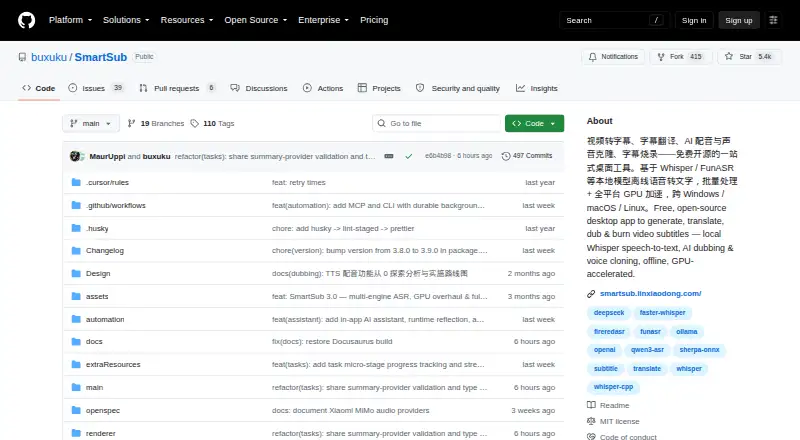
What SmartSub is
SmartSub is an open-source desktop application for turning video and audio into translated, edited, and rendered subtitles. Its workflow combines transcription, translation, proofreading, speech generation, and video output in one tool. Transcription can use the included whisper.cpp engine or selectable alternatives: faster-whisper, FunASR, Qwen3-ASR, and FireRedASR. For translation, users can choose among 20 services, including a built-in free option and connections to DeepSeek, Gemini, and Ollama.
The proofreading workspace pairs subtitle editing with video playback and includes undo and redo, search and replace, and AI proofreading. SmartSub can synthesize speech from subtitle lines, align it with the video timeline, and clone voices through ZipVoice, Volcengine, or ElevenLabs. For the finished video, users can preview caption styles, burn subtitles into the picture, or package soft subtitles, with an option to include dubbed audio. It also downloads videos from links on more than 1,800 sites, including Bilibili and YouTube. Its repository describes MCP and CLI automation with 111 tools and commands. Local models process files on the computer; cloud transcription sends audio to the configured provider. Desktop builds are available for Windows, macOS, and Linux.
Good
- Free local transcription, translation, speech generation, and subtitle rendering
- Selectable transcription engines include whisper.cpp and four alternatives
- Twenty translation services, including a built-in free option
- Video-synced editing includes undo, redo, search, and replace
- Burn subtitles in or package soft subtitles with dubbed audio
- Desktop builds cover Windows, macOS, and Linux
Watch out
- Cloud transcription uploads audio to the configured provider
- Voice cloning options include paid services such as ElevenLabs
Who it suits
SmartSub suits people who want a desktop workflow spanning transcription, translation, subtitle editing, dubbing, and video rendering. It is also a fit for users who want local processing or need to automate media workflows through its MCP and CLI tools.
Verdict
Choose SmartSub if you want a free, open-source desktop app that brings subtitle creation, translation, dubbing, and rendering together. Local processing is available, while cloud transcription sends audio to the chosen provider, so the local workflow is the better fit for sensitive files.
Plans and prices
From SmartSub's own pricing page, checked 15 Oct 2026.
| Plan | Price | What it gives you |
|---|---|---|
| Free | Free | local transcription, translation, TTS and FFmpeg workflow · no API key or usage limit for local steps · optional paid cloud providers · free |
The facts
Each one read from SmartSub's own pages, with the date it was checked.
What it does
- AI assistant
- The in-app copilot provides workspace context, conversational editing, screenshot diagnostics, file chat and tool execution.checked 15 Oct 2026
- AI-client integrations
- The settings workflow can connect Cursor, OpenAI Codex and Claude Code through generated MCP configuration.checked 15 Oct 2026
- Automation
- The repository README describes MCP and CLI automation with 111 tools and commands for media processing workflows.checked 11 Oct 2026
- Brand caption presets
- Yeschecked 19 Sep 2026
- Burn-in captions
- Yeschecked 19 Sep 2026
- Caption styling
- Yeschecked 19 Sep 2026
- Cloud transcription privacy
- For cloud transcription, audio is uploaded to the configured provider endpoint, and the README advises against using it for sensitive content.checked 11 Oct 2026
- Cloud voice services
- Cloud dubbing options include Edge TTS, OpenAI-compatible endpoints, Azure Speech, Volcengine, ElevenLabs and Xiaomi MiMo.checked 15 Oct 2026
- Core workflow
- Each stage can be run separately or chained into batch pipelines.checked 15 Oct 2026
- Developer build
- Contributors clone the repository, run yarn install and yarn dev, with yarn native:fetch available when native downloads fail.checked 15 Oct 2026
- Documentation and support
- The project publishes a Docusaurus documentation site with usage guides and FAQ pages and directs support to GitHub issues and community chat.checked 15 Oct 2026
- Dubbing
- Local Kokoro and VITS engines provide 103 and 174 voices respectively, while ZipVoice supports zero-shot cloning from a reference clip.checked 15 Oct 2026
- GPU acceleration
- The download guide lists CUDA for NVIDIA and Vulkan for AMD or Intel on Windows and Linux, and Core ML or Metal on Apple-silicon Macs.checked 11 Oct 2026
- Hardware acceleration
- Acceleration paths include NVIDIA CUDA, AMD/Intel Vulkan and Apple Core ML/Metal, with CPU fallback when acceleration fails.checked 15 Oct 2026
- Installation
- macOS users can install through Homebrew using the buxuku tap and smartsub cask.checked 15 Oct 2026
- Licence
- The repository is released under the MIT licence, with copyright attributed to Lin Xiaodong in 2024.checked 15 Oct 2026
- License and support
- The project uses the MIT license and directs users to documentation, FAQs, community groups, GitHub issues, and pull requests for help or participation.checked 11 Oct 2026
- Limit: crashes
- A GitHub issue reports tasks crashing around 20 percent completion even in CPU-only mode on older hardware.checked 15 Oct 2026
- Limit: external translation dependency
- Hysen Labs noted that free Bing and Google translation endpoints are subject to rate limits and network reachability outside the project’s control.checked 15 Oct 2026
- Limit: hardware dependence
- The same review found CPU transcription slow, long videos more practical with a GPU and AMD/Intel Vulkan slower than NVIDIA CUDA.checked 15 Oct 2026
- Limit: live captions
- The independent review said SmartSub is unsuitable for real-time live-caption streams.checked 15 Oct 2026
- Limit: manual dubbing review
- Hysen Labs reported that over-long dubbed lines are placed in a manual review list rather than handled fully automatically.checked 15 Oct 2026
Money
- Free plan
- Yeschecked 19 Sep 2026
Where it runs
- Intel Mac limitation
- The Intel macOS build runs CPU-only and does not support GPU acceleration.checked 15 Oct 2026
The full review of SmartSub
Overview
SmartSub is an open-source desktop app for creating and translating subtitles, proofreading transcripts, dubbing speech, and rendering video. It is a strong fit for people who want one free tool for the full workflow and are comfortable working on a computer. Its breadth and unrestricted local use are compelling; cloud transcription is a poor choice for sensitive audio.
Key features
Transcription is not tied to a single engine: SmartSub includes whisper.cpp and offers faster-whisper, FunASR, Qwen3-ASR, and FireRedASR as alternatives. That range gives users flexibility, while local models keep files on the device during processing. Cloud transcription changes the privacy trade-off because it uploads audio to the configured provider endpoint.
Translation covers 20 services, including a built-in free option and integrations such as DeepSeek, Gemini, and Ollama. The proofreading workspace combines video-synced editing with undo and redo, search and replace, and AI proofreading, making it suited to revising both subtitle text and its timing in context.
For dubbed videos, SmartSub can synthesize speech from subtitle lines, align the audio to the timeline, and clone voices through ZipVoice, Volcengine, or ElevenLabs. Rendering supports burned-in captions or soft-subtitle packaging, style previews, and a dubbed audio track. Caption styling, brand presets, and speaker identification add control over the finished subtitles.
The app also downloads video from links on more than 1,800 sites, including Bilibili and YouTube, using yt-dlp and lux. Its README describes MCP and CLI automation with 111 tools and commands for media workflows. These capabilities make SmartSub more than a caption editor, though its wide scope will be most useful to users who want a connected production workflow rather than a single-purpose tool.
Pricing
SmartSub’s Free plan costs nothing. It includes local transcription, translation, text-to-speech, and subtitle rendering with no local usage limits; cloud services are optional and may be paid. There is no free trial because the local plan is free to use. This is a particularly strong fit for individuals or teams that can run their work locally and do not need a paid cloud service.
The main cost to weigh is not a subscription cap but the local-versus-cloud choice: local processing keeps files on the computer, while cloud transcription uploads audio to the selected provider. For sensitive material, use a local workflow.
Platforms
SmartSub has desktop builds for Windows, macOS, and Linux. Packages cover Windows x64, macOS arm64 and x64, and Linux x64. The download guide lists CUDA acceleration for NVIDIA and Vulkan for AMD or Intel on Windows and Linux, plus Core ML or Metal on Apple-silicon Macs. This makes it a desktop option rather than a browser-based editor, and the acceleration choices depend on the user’s hardware and system.
The project uses the MIT license. Documentation, FAQs, community groups, GitHub issues, and pull requests are routes for support or participation.
Who it's for
SmartSub suits video creators and subtitle editors who want transcription, translation, revision, dubbing, and rendering in one desktop workflow, especially when local processing and unlimited local use matter. Its automation options may also suit users building repeatable media workflows. It is less suitable for anyone who needs a browser or mobile app, or who wants cloud transcription for sensitive files.
Pros and cons
Pros
- Broad workflow at no local cost: transcription, translation, TTS, and rendering are included in the free plan without local usage limits.
- Multiple transcription and translation choices: users can select among five transcription engines and 20 translation services, including a built-in free translation option.
- Flexible subtitle delivery: users can style captions, preview them, burn them into video, or package soft subtitles, with the option to add dubbed audio.
- Local processing and automation: local models keep files on-device, while the README describes MCP and CLI options for media workflows.
Cons
- Cloud transcription is a privacy trade-off: audio is uploaded to the configured provider, so this mode is unsuitable for sensitive content.
- Desktop-only: builds target Windows, macOS, and Linux, leaving out browser and mobile use.
- Optional cloud services may cost extra: the free plan’s unlimited usage applies to local workflows, not paid cloud services.
Alternatives
AI Video Caption Generators is a broader category comparison for readers who want to consider multiple caption tools.
- Captions is a better fit for someone seeking Android, iOS, web, or API access, or AI video creation and digital twins through its Max plan at $24.99 a month or Frontier plan at $69.99 a month.
- CaptionRoom suits users who want a web option alongside desktop builds and a free editor with manual captions, two styles, exports up to 1080p and .srt, and no watermark.
- Whisper is a focused alternative for users who want open-source code and model weights installed locally with Python and ffmpeg.
- VideoCaptioner is another free, open-source option for readers comparing captioning tools.
- SRTGen is a web and API alternative for users who want SRT, VTT, and TXT export; its free tier includes a five-minute screen-recording limit and 2 GB of storage.
- Moonshot is a web-based option for users who want to try transcription and preview with 109 languages, though its free plan allows only five minutes of upload and preview and has no video export.
- Fluen AI Subtitle Generator may suit users looking for a trial-based option across web, desktop, API, or extension platforms; its free plan allows up to three files, each up to 90 minutes.
- GetCaptions is a web and API alternative for users whose needs fit its free monthly allowance of 60 minutes of transcription, five minutes per video, 720p export, and three projects.
Verdict
Choose SmartSub if you want a free, open-source desktop workflow that carries video from transcription through subtitle editing, translation, dubbing, and rendering, with no local usage limits. Its main advantage is the range of capabilities in one local app; look elsewhere if you need browser or mobile access, or if your workflow depends on cloud transcription for sensitive audio.
Getting started
- Open the SmartSub project website on GitHub.
- Choose the desktop build for Windows, macOS, or Linux.
- Use local models for transcription, translation, speech generation, and subtitle rendering without local usage limits.
- Select a transcription engine and translation service, then edit, dub, or render the subtitles.
Limits worth knowing
The Free plan has no local usage limits for transcription, translation, text-to-speech, or subtitle rendering. Cloud services are optional and may be paid; cloud transcription uploads audio to the configured provider endpoint.
Questions
Is SmartSub free?
Yes. The Free plan costs nothing and includes local transcription, translation, text-to-speech, and subtitle rendering with no local usage limits.
Which systems does SmartSub support?
It has desktop builds for Windows, macOS, and Linux. Listed packages include Windows x64, macOS arm64 and x64, and Linux x64.
Is SmartSub open source?
Yes. It is open source and uses the MIT license.
Does SmartSub process files locally?
Local models process files on the user's computer, so those files do not leave the device during local processing. Cloud transcription uploads audio to the configured provider endpoint.
Can SmartSub translate subtitles?
Yes. It offers 20 translation services, including built-in free translation and integrations such as DeepSeek, Gemini, and Ollama.
Where can users get help?
The project directs users to documentation, FAQs, community groups, GitHub issues, and pull requests.
Alternatives to SmartSub
- 1

Captions
Free planAndroidiOSWebAPI9.1From $4.99 a month - 2

Whisper
Free planOpen sourceAPILinuxmacOSSelf-hosted8.9$0.01 usage-based - 3

SRTGen
Free planWebAPI8.3From $4 a month - 4
Fluen AI Subtitle Generator
Free planWebAPIExtensionmacOS8.2Free plan - 5
ZapCap
Free planAndroidiOSWebAPI8.1From $8 a month - 6
ngram
Free planWebAPIExtension8.1From $29 a month