Vibe Canvas
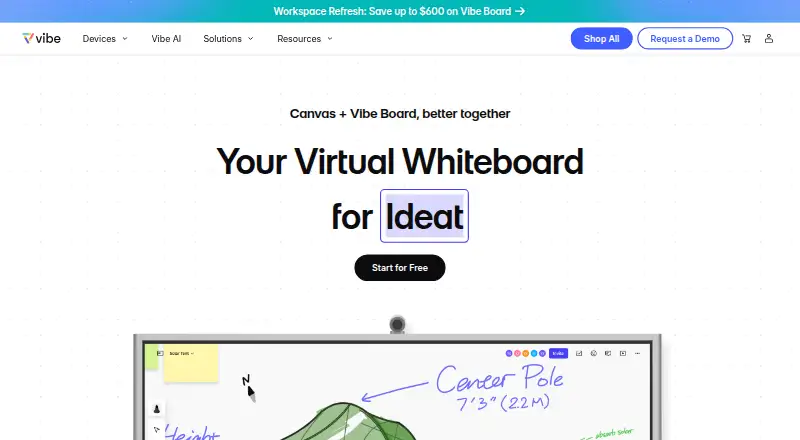
Vibe Canvas is an online whiteboard for teams to write, draw, add content, and collaborate remotely using browsers or touchscreens.
What Vibe Canvas is
Vibe Canvas is an online whiteboard for teams to write, draw, add content, and collaborate remotely using browsers or touchscreens. Its infinite canvas has zoom controls, while Brush Mode supports stylus drawing with lifelike brushes and vivid colors. Smart Text Recognition converts handwriting into text, and Smart Shape turns hand-drawn shapes into forms and supports flowcharts. Teams can use customizable templates for strategy, OKRs, roadmaps, project management, decision trees, customer journeys, and fishbone diagrams. Boards can contain pens, shapes, sticky notes, text, images, and PDFs. Collaboration tools include comments, sticker voting, to-do marks, guest editing, and multi-device work across a Vibe Board, computer, tablet, or smartphone. Presentation options include annotations, presenter follow-along, a presentation view, and transition effects. Canvas file uploads integrate with Google Drive, OneDrive, Dropbox, and Box. Vibe says it encrypts data in transit and at rest using SSL v2, AES-256, and AWS KMS; sharing policies let users choose who can see work and set permission levels. Plans include a free option, Pro at $39 a year, and Business at $59.50 a year, billed per device per month annually. The company is based in Seattle and was founded in 2017.
Good
- Infinite canvas includes zoom controls.
- Handwriting recognition converts writing into text.
- Boards support comments, voting, and guest editing.
- Uploads integrate with four listed cloud services.
Watch out
- Business plan lists a limited-time offer alongside $119.
- Enterprise plan has no listed price.
- Live chat support hours are Monday through Friday.
Who it suits
Vibe Canvas suits remote teams that want to sketch, organize ideas, and collaborate on shared boards. Its templates and presentation features may also suit teams working on strategy, roadmaps, or diagrams.
Verdict
Vibe Canvas combines free-form drawing, structured templates, collaboration, and presentation tools. A free plan is available, with paid options billed annually per device.
Plans and prices
From Vibe Canvas's own pricing page, checked 3 Oct 2026.
| Plan | Price | What it gives you |
|---|---|---|
| Free | Free | 5G Vibe Cloud Storage · Canvas, Screen, and One · Multiple-device support · Free forever |
| Pro | $39 | Unlimited Vibe cloud storage · 1-10 workspace members · Canvas brand kit, unlimited custom templates, and version history · per device / month Billed Annually |
| Business | $59.50 | Unlimited Vibe cloud storage · 1-100 workspace members · SAML SSO · Device management policies · per device / month Billed Annually · Limited Time Offer (page also shows $119) |
| Enterprise | Priced on request | Unlimited cloud storage · 100+ workspace members · Audit trail · Dedicated customer success manager · Billed Annually |
The facts
Each one read from Vibe Canvas's own pages, with the date it was checked.
What it does
- Access control
- Vibe says Canvas sharing policies let users select who can see their work and set different permission levels.checked 3 Oct 2026
- AI handwriting
- Smart Text Recognition converts handwriting into text using AI handwriting recognition.checked 3 Oct 2026
- Canvas
- The infinite canvas has zoom controls for viewing detail or the larger picture.checked 3 Oct 2026
- Collaboration
- Canvas supports comments, sticker voting, to-do marks, and multi-device collaboration on a Vibe Board, computer, tablet, or smartphone.checked 3 Oct 2026
- Drawing
- Brush Mode lets users draw with a stylus using lifelike brushes and vivid colors.checked 3 Oct 2026
- File content
- The FAQ says boards can include pens, shapes, sticky notes, text, images, and PDFs, and can be presented and reused as templates.checked 3 Oct 2026
- Integrations
- The Vibe Plus pricing page lists Google Drive, OneDrive, Dropbox, and Box integrations for Canvas file uploads.checked 3 Oct 2026
- Presentation
- Presentation features include annotations, presenter follow-along, presentation view, and transition effects.checked 3 Oct 2026
- Product
- Vibe Canvas is an online free-form whiteboard designed for touchscreens and browsers, for teams to write, draw, add content, and collaborate remotely.checked 3 Oct 2026
- Security
- Vibe says it encrypts customer data in transit and at rest using SSL v2 and AES-256 alongside AWS KMS.checked 3 Oct 2026
- Shapes
- Smart Shape converts hand-drawn shapes into forms and supports creating flowcharts by connecting dots.checked 3 Oct 2026
- Support
- Vibe advertises live chat Monday through Friday, 8 AM–5 PM Pacific Time.checked 3 Oct 2026
- Templates
- The app offers customizable templates for strategy, OKRs, and roadmaps, including project management, decision tree, customer journey, and fishbone diagram templates.checked 3 Oct 2026
The company
- Founded
- 2017checked 28 Sep 2026
- Headquarters
- Seattle, Washington, United Stateschecked 28 Sep 2026
- Maker
- Vibe says it was founded in 2017 and is based in Seattle, Washington.checked 3 Oct 2026
Where it runs
- Platforms
- The Canvas page links to a web app and identifies mobile app downloads for iOS and Android.checked 3 Oct 2026
Alternatives to Vibe Canvas
- 1

Miro
Free planAndroidiOSWebAPI8.3From $8 a month - 2
Boardmix
Free planAndroidiOSWebAPI8.2From $5 a month - 3
Explain Everything
Free planAndroidiOSWebmacOS8.2Free plan - 4

FigJam
Free planAndroidiOSWebAPI8.2From $3 a month - 5
Groupboard
Free planAndroidiOSWebAPI8.2From $9.99 a month - 6

Klaxoon
Free planAndroidiOSWebAPI8.2From $24.90 a month