
Uptrace
Uptrace is an OpenTelemetry-native observability platform that brings traces, metrics, and logs together.
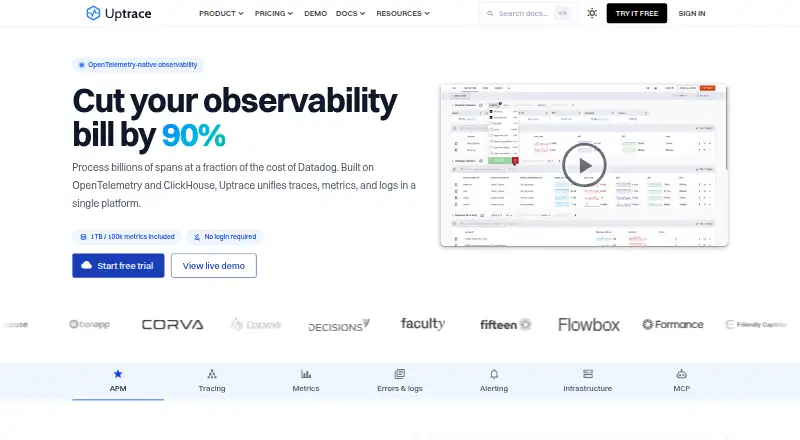
What Uptrace is
Uptrace is an OpenTelemetry-native observability platform that brings traces, metrics, and logs together. Teams can query spans and logs with UQL and use a PromQL-compatible engine for metrics. Custom dashboards draw on spans, events, logs, and metrics, and can be configured in the UI or YAML. Metric and error monitors can send notifications through email, Slack, PagerDuty, and other channels. Uptrace lists Grafana integration as a Prometheus and Tempo data source, along with a built-in MCP server for AI assistants. It offers cloud and self-hosted deployment; self-hosted installation options include Docker, Ansible, and Kubernetes, with Linux packages and precompiled binaries for Linux, macOS, and Windows. Uptrace Cloud keeps data for four weeks by default, with cold storage options for up to 100 weeks. Live database data is mostly not encrypted at rest, though data in transit and database backups are encrypted.
Good
- Combines traces, metrics, and logs.
- Custom dashboards can use UI or YAML.
- Alerts can notify through email, Slack, and PagerDuty.
- Self-hosted options include Docker, Ansible, and Kubernetes.
- Supports precompiled binaries for Linux, macOS, and Windows.
Watch out
- Cloud retention defaults to four weeks.
- Most live database data is not encrypted at rest.
- Cloud free plan includes 50 GB per month.
Who it suits
Uptrace suits teams that need to correlate traces, metrics, and logs, and choose between cloud and self-hosted deployment. Its listed editions range from Community for individuals to Business for reliability and compliance needs.
Verdict
Uptrace brings several observability data types into one platform, with query, dashboard, and alerting options. Check its retention and encryption details against your requirements before choosing Cloud or self-hosted deployment.
Plans and prices
From Uptrace's own pricing page, checked 14 Oct 2026.
| Plan | Price | What it gives you |
|---|---|---|
| Community | Free | unlimited usage · core features · 14 days retention · basic alerting · community support · forever |
| Uptrace Cloud | Free | 50 GB free/mo · 5,000 timeseries/mo · 28-day default retention · 50 GB free/mo; then $0.075/GB; unlimited users, services, and hosts |
| Starter | $39 a month | up to 50 GB/day · custom retention · two-factor authentication · email support · per month |
| Team | $199 a month | up to 200 GB/day · RBAC · alert routing · faster support · per month |
| Business | $499 a month | up to 500 GB/day · OIDC/SAML SSO · priority support · per month |
| Enterprise | Priced on request | custom usage · Kafka and scaling · audit logs · dedicated support · custom |
The facts
Each one read from Uptrace's own pages, with the date it was checked.
What it does
- Alerting
- Metric and error monitors can notify through email, Slack, PagerDuty and other channels.checked 14 Oct 2026
- Analysis
- It supports UQL for querying spans and logs and a PromQL-compatible engine for metrics.checked 30 Sep 2026
- API
- The self-hosting documentation identifies a browser UI REST API, while the public API covers projects, services, queries, alerts and dashboards.checked 14 Oct 2026
- Dashboards
- Custom dashboards can be created through the interface or YAML and can use spans, events, logs and metrics.checked 14 Oct 2026
- Database requirements
- Manual installation requires ClickHouse 26.3 or later, PostgreSQL 15 or later and Redis.checked 14 Oct 2026
- Data residency
- The homepage says Uptrace Cloud servers and data are located in Germany and Finland, with a stated 99.9% uptime SLA.checked 14 Oct 2026
- Deployment
- Self-hosted installation options include Docker, Ansible, and Kubernetes, and Linux packages are available for amd64 and arm64.checked 30 Sep 2026
- Documentation depth
- The guides index lists 50 OpenTelemetry integration guides spanning Go, Python, JavaScript, Java, PHP, Ruby, Elixir, databases, infrastructure and AI.checked 14 Oct 2026
- Funding
- CheckThat reports no publicly available funding rounds, investor information, valuation or revenue data for Uptrace.checked 14 Oct 2026
- Integrations
- Telemetry can arrive through OpenTelemetry, Prometheus, Vector, Fluent Bit and CloudWatch, and Grafana can use Uptrace as Prometheus or Tempo data sources.checked 14 Oct 2026
- Intended users
- The self-hosted editions page describes Community as for individuals, Starter as suitable for side projects, Team as a production default, and Business for reliability and compliance.checked 30 Sep 2026
- License
- The main Uptrace repository is licensed AGPL-3.0; several SDK repositories use BSD-2-Clause and the Helm chart uses Apache-2.0.checked 14 Oct 2026
- Limit: API discoverability
- Headless Index reports no public OpenAPI specification found across its probes, which limits machine-readable API discovery.checked 14 Oct 2026
- Limit: cloud geography
- Modern DataTools notes that cloud infrastructure is EU-only, which can increase latency for users outside Europe.checked 14 Oct 2026
- Limit: ecosystem
- Modern DataTools says Uptrace has a smaller ecosystem and fewer community dashboards or plugins than larger observability vendors.checked 14 Oct 2026
- Limit: enterprise AI
- Gappsy lists less mature enterprise tooling and fewer AI capabilities than large incumbent APM products.checked 14 Oct 2026
- Limit: operations
- Gappsy says self-hosting requires operating and scaling ClickHouse, adding infrastructure work for customers.checked 14 Oct 2026
- Limit: status pages
- Better Stack's comparison says Uptrace does not provide customer-facing status pages, so teams may need another service.checked 14 Oct 2026
- Logs and errors
- The product groups logs and errors, supports text or attribute search, and exposes stack traces and related records.checked 14 Oct 2026
- MCP integration
- The feature catalog lists a built-in Model Context Protocol server for querying telemetry, alerts and dashboards from AI assistants.checked 14 Oct 2026
- Metrics
- Uptrace offers prebuilt infrastructure and application dashboards plus interactive metric exploration with PromQL-compatible queries.checked 14 Oct 2026
- Notable news
- Uptrace announced that prices would rise by about 15% from April 10, 2026 because of Hetzner infrastructure cost increases, with metrics billing changing to datapoints.checked 14 Oct 2026
- On-premises
- The pricing FAQ says on-premises deployments keep telemetry within the customer's infrastructure and list SOC 2 certification on request.checked 30 Sep 2026
The company
- Company profile
- LinkedIn lists Uptrace as a privately held IT services company with 2–10 employees headquartered in Chisinau.checked 14 Oct 2026
The full review of Uptrace
Overview
Uptrace is an OpenTelemetry-native observability platform for teams that want traces, metrics, and logs in one place. It suits developers and operations teams who need shared querying, dashboards, and alerting, with either Cloud or self-hosted deployment.
Its breadth is the central advantage: one platform can cover several telemetry types and connect them to monitors. The trade-off is that Cloud retention, usage charges, and data-at-rest protections deserve close attention before adoption.
Key features
Uptrace combines distributed and transaction tracing with metrics and logs. UQL queries spans and logs, while a PromQL-compatible engine handles metrics; this gives teams distinct query paths suited to their data rather than forcing everything through one query language.
Dashboards can draw on spans, events, logs, and metrics, and can be built in the UI or YAML. That flexibility suits both interactive dashboard work and configuration-driven workflows. Metric and error monitors can send notifications through email, Slack, PagerDuty, and other channels. The product also supports dependency mapping, log correlation, and real user monitoring.
Grafana can use Uptrace as a Prometheus and Tempo data source, and a built-in MCP server connects it with AI assistants. These integrations extend how teams can use their telemetry, though the core value remains the unified observability workspace.
Pricing
Uptrace has a freemium model, a 14-day trial, and paid plans starting at $39 per month. Cloud and self-hosted plans have different limits and retention terms, so the right entry point depends on where data should live and how much arrives.
- Uptrace Cloud: Free, with 50 GB/month included, then $0.075/GB; unlimited users, services, and hosts; 5,000 timeseries/month; and 28-day default retention. It is a low-friction way to try the hosted service, but the included ingestion and timeseries caps can matter as monitoring expands. Cold storage can extend retention up to 100 weeks.
- Community: $0 forever, with unlimited usage, 14 days of data retention, basic alerting, and community support. It is aimed at individuals; shorter retention and basic alerting make it less suited to teams needing production support.
- Starter: $39 per month, up to 50 GB/day, custom data retention, two-factor authentication, and email support. This fits side projects that need more controlled retention and a support channel.
- Team: $199 per month, up to 200 GB/day, RBAC, alert routing, and faster support. It is the stated production default, with access controls and routing that better fit shared operational ownership.
- Business: $499 per month, up to 500 GB/day, OIDC/SAML single sign-on, and priority support. Reliability- and compliance-focused teams get stronger identity and support options, at a substantial step up in price.
- Enterprise: Custom pricing for custom usage, Kafka and scaling, audit logs, and dedicated support. It is for organizations with scale or governance requirements beyond the fixed tiers.
Cloud data resides in Hetzner data centers in Germany, with redundant backups in Finland. Telemetry is encrypted in transit via SSL/TLS and database backups are encrypted, but most live database data is not encrypted at rest. On-premises deployment keeps telemetry within the customer's infrastructure; SOC 2 certification is available on request. Support is offered by email or scheduled call and typically responds within a few hours.
Platforms
Uptrace supports API, Linux, macOS, Windows, web, and self-hosted environments. Self-hosted installation options include Docker, Ansible, and Kubernetes; precompiled binaries are available for Linux, macOS, and Windows, with Linux packages for amd64 and arm64. This range gives teams deployment flexibility, while self-hosting places infrastructure responsibility with the customer.
Who it's for
Uptrace is strongest for teams already working with OpenTelemetry that want tracing, metrics, and logs together, plus dashboards and alerting in the same platform. Individuals can start with Community, side projects with Starter, production teams with Team, and organizations prioritizing reliability and compliance with Business. Teams requiring telemetry to remain inside their own infrastructure have an on-premises path; those choosing Cloud should be comfortable with its retention and encryption profile.
Pros and cons
- Pro: Traces, metrics, and logs share one platform, with query engines suited to spans/logs and metrics respectively; this reduces the need to split core observability work across separate tools.
- Pro: Cloud and self-hosted deployment options, including Docker, Ansible, and Kubernetes, let teams choose where telemetry is managed.
- Con: Cloud includes only 50 GB/month and 5,000 timeseries/month on the free tier, with additional ingestion charged at $0.075/GB; growing workloads can outpace the free allowance.
- Con: Cloud defaults to 28-day retention, and most live database data is not encrypted at rest, which may rule it out for some retention or security requirements.
- Con: Self-hosting keeps telemetry in the customer's infrastructure but makes that deployment choice a responsibility to weigh against Cloud's managed option.
Alternatives
Distributed Tracing Tools, Application Performance Monitoring, Observability Platforms, and Container Monitoring are useful category roundups for comparing tools by focus.
- Grafana Cloud Application Observability is worth comparing for a hosted freemium option; its Free plan includes 2,232 host hours, while Pro charges $0.025 per host hour plus a $19 monthly platform fee.
- Tracetest is a free alternative with an open-source edition from Kubeshop; choose it when that project is a better fit than Uptrace's combined observability platform.
- Apache SkyWalking is a free, self-hosted open-source observability platform for readers prioritizing that deployment model.
- Honeycomb is another freemium option; its free plan includes up to 20 million events/month, 100 million metrics data points/month, and two triggers.
- Hubble is a free open-source observability layer of Cilium and requires Cilium to be installed.
- Jaeger is a free, 100% open-source, cloud-native project for readers seeking that approach.
- SigNoz offers freemium plans, including a self-hosted community edition where infrastructure, storage, scaling, upgrades, and backups are self-managed.
- VictoriaLogs offers a free open-source edition for single-node or cluster deployments under the Apache License 2.0.
Verdict
Choose Uptrace if your team wants an OpenTelemetry-native home for traces, metrics, and logs with flexible dashboards, query options, and alerting—and you can match a Cloud or self-hosted plan to your operating needs. Look elsewhere if Cloud's 28-day default retention or limited at-rest encryption is unacceptable, or if the usage caps and tier prices do not suit your workload.
Getting started
- Visit https://uptrace.dev/.
- Choose Uptrace Cloud or a self-hosted edition.
- For self-hosting, use Docker, Ansible, Kubernetes, or a Linux package; precompiled binaries are available for Linux, macOS, and Windows.
- Select the free plan or a paid plan starting at $39 per month.
- Use the 14-day trial if choosing a plan with a trial.
Limits worth knowing
Uptrace Cloud's free plan provides 50 GB per month, 5,000 timeseries per month, and 28-day default retention. Community is free forever, with 14 days of retention, basic alerting, and community support.
Questions
Is there a free plan?
Yes. Uptrace Cloud includes 50 GB per month and 5,000 timeseries per month, with unlimited users, services, and hosts. The self-hosted Community plan is also free forever.
What do paid plans cost?
Starter is $39 per month, Team is $199 per month, and Business is $499 per month. Enterprise pricing is custom.
What platforms and deployment options are available?
The listed platforms include API, Linux, macOS, self-hosted, web, and Windows. Self-hosted installation options include Docker, Ansible, and Kubernetes.
What integrations are listed?
The features page lists Grafana as a Prometheus and Tempo data source and a built-in MCP server for AI assistants.
Where does Uptrace Cloud store data?
The pricing FAQ says Uptrace Cloud runs in Hetzner data centers in Germany, with redundant backups in Finland.
What does Community include?
Community includes unlimited usage, 14 days of data retention, basic alerting, and community support.
Alternatives to Uptrace
- 1
Netdata
Free planOpen sourceAndroidiOSWebAPI8.7From $4.50 a month - 2
Grafana Cloud Application Observability
Free planAndroidiOSWebAPI8.4From $0.03 a month - 3
Coroot
Free planOpen sourceWebAPILinuxSelf-hosted8.2From $1 a month - 4

Middleware
Free planAndroidiOSWebAPI8.2$0.30 usage-based - 5

Embrace
Free planAndroidiOSWebAPI8.1$0.80 usage-based - 6

BugSnag
Free planAndroidiOSWebAPI7.8Free plan