UltraSearch
UltraSearch is a Windows file-search tool that finds names and contents across local storage, company networks, and SharePoint.
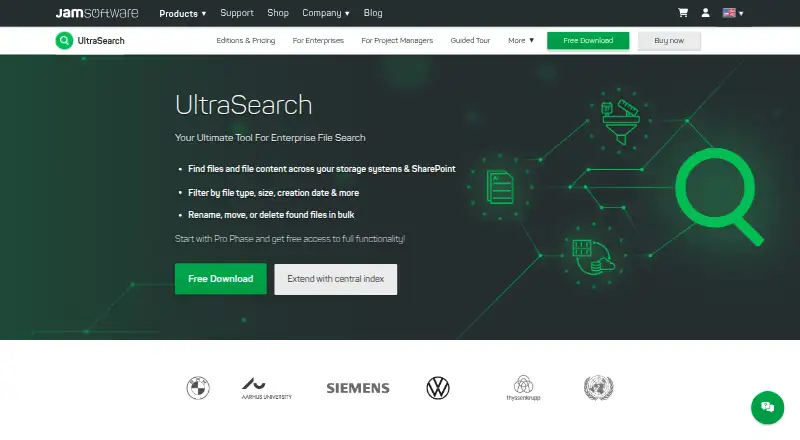
What UltraSearch is
UltraSearch is a Windows file-search tool that finds names and contents across local storage, company networks, and SharePoint. Results appear as you type, and direct SharePoint searches do not require indexing. Queries can include words or phrases from file contents, wildcards, regular expressions, and AND/OR terms. Search locations include local and network drives, external drives, USB sticks, SD cards, and SharePoint. The Free edition costs nothing and is restricted to private, non-commercial use; it includes 30 days of Professional features. Professional costs $30 a year, billed annually, for Windows Desktop and Windows Server. It adds filters by file type, date, and size, ZIP searches, and bulk actions to move, archive, delete, or rename files from results. Professional also supports Google Drive searches and can connect to DataCentral, an on-premises central full-text and metadata index for multiple users. DataCentral stores its index locally and integrates with NTFS permissions and Active Directory, according to the maker. Downloads do not require registration; an online manual and contact form are available for support.
Good
- Searches file contents as well as names.
- Results appear while you type.
- Supports wildcards, regular expressions, and AND/OR terms.
- Professional adds ZIP search and bulk file actions.
Watch out
- Free edition is restricted to private, non-commercial use.
- Professional costs $30 a year, billed annually.
- Professional features in Free last 30 days.
Who it suits
UltraSearch suits Windows users who need to locate files by name or content across local and network storage. The free edition is limited to private, non-commercial use, while Professional adds business-oriented locations and file actions.
Verdict
UltraSearch offers quick file-name and content searches, with additional locations and management actions in Professional. Choose the edition based on whether your use is private or commercial and which search locations you need.
Plans and prices
From UltraSearch's own pricing page, checked 8 Oct 2026.
| Plan | Price | What it gives you |
|---|---|---|
| Free | Free | Windows Desktop · Private, non-commercial use · 30 days of Professional features |
| Professional | $30 a year | Windows Desktop & Windows Server · Teams and power users · From $30.00 per user per year · Annual billing |
The facts
Each one read from UltraSearch's own pages, with the date it was checked.
What it does
- Bulk file actions
- Professional supports moving, archiving, deleting, and bulk renaming files from search results.checked 8 Oct 2026
- Central index
- Professional can connect to DataCentral, which creates a central full-text and metadata index for multiple users.checked 8 Oct 2026
- Download and registration
- The maker says users do not need to register to download UltraSearch.checked 8 Oct 2026
- Filters
- Professional can filter by file type, dates, and file size.checked 8 Oct 2026
- Integrations
- Professional supports searching SharePoint and Google Drive in addition to local and network drives.checked 8 Oct 2026
- Permissions
- The maker says DataCentral integrates with NTFS permissions and Active Directory.checked 8 Oct 2026
- Purpose
- UltraSearch searches file names and file contents across local storage, company networks, and SharePoint.checked 8 Oct 2026
- Search options
- Search supports text and phrases in file contents, wildcards, regular expressions, and AND/OR query terms.checked 8 Oct 2026
- Search speed
- The product provides search results as you type, without requiring indexing for direct SharePoint searches.checked 8 Oct 2026
- Security and data location
- DataCentral runs on premises, stores its index locally, and does not require or use cloud services.checked 8 Oct 2026
- Support
- The maker provides an online manual and says its support team can be contacted through a contact form.checked 8 Oct 2026
- Usage limit
- The Free edition is limited to private, non-commercial use; the maker says it is not suitable for business use.checked 8 Oct 2026
- ZIP search
- Professional can search inside ZIP files.checked 8 Oct 2026
The company
- Founded
- 1998checked 28 Sep 2026
- Headquarters
- Trier, Germanychecked 28 Sep 2026
Alternatives to UltraSearch
- 1
Recoll
Free planOpen sourceAndroidWebAPIExtension7.9Free plan - 2

GitHub CodeQL
Free planWebExtensionLinuxmacOS7.5From $30 a month - 3
Open Semantic Desktop Search
Free planOpen sourceWebAPIExtensionLinux7.5Free plan - 4

Agent Ransack
Free planWindows6.6$20 one-time - 5
Magpie
Free planWindows6.6Free plan - 6
WizFile
Free planWindows6.6$20 one-time