
Toby
Toby organizes browser tabs, links, and other web resources into Spaces for projects, teams, or ideas.
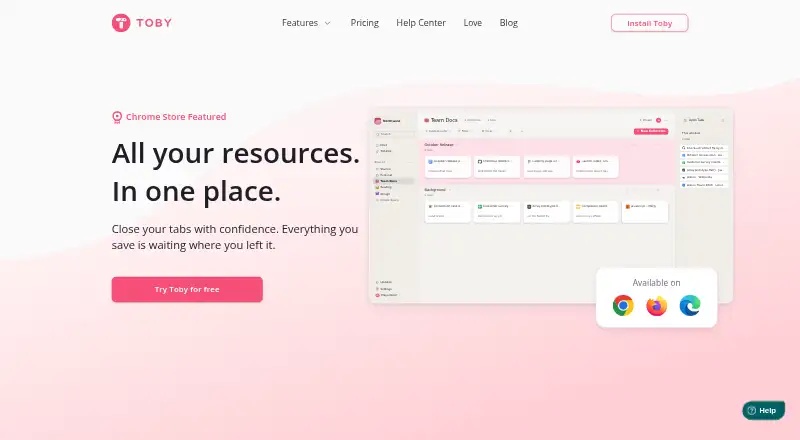
What Toby is
Toby organizes browser tabs, links, and other web resources into Spaces for projects, teams, or ideas. One-Click Save captures all currently open tabs so users can sort them later. Search locates pages across Spaces by title, link, or note, and Smart Sort groups related tabs for review. Shared Spaces let teammates add and arrange links, while collections can be shared through a link that anyone can view. Toby can also save Chrome tab groups as collections and keep changes in sync, though that feature is Chrome-only. The service lists Chrome, Firefox, and Edge support, plus apps for Android and iOS. Google Sign-On is available. The free Starter plan includes up to 60 saved tabs; beyond that limit, existing saved tabs remain viewable, openable, and exportable, but users cannot save more until they reduce the total or upgrade. Paid plans include unlimited saved tabs, and Team adds priority support. Toby says it stores account tabs and lists but does not track the sites users visit.
Good
- Spaces organize links by project, team, or idea
- Search covers titles, links, and notes
- Shared Spaces let teammates add and organize links
- Android and iOS apps are listed
- Existing tabs remain accessible above the Starter limit
Watch out
- Starter is limited to 60 saved tabs
- Chrome tab-group syncing is Chrome-only
- Unlimited saved tabs require a paid plan
Who it suits
Toby suits people who want to organize and revisit browser resources, or teams that need shared collections and Spaces. It may also fit users who want access across listed browsers and mobile apps.
Verdict
Toby combines tab saving, search, and shared organization across browsers and mobile apps. Review the Starter cap and paid-plan terms if you expect to save more than 60 tabs.
Plans and prices
From Toby's own pricing page, checked 15 Oct 2026.
| Plan | Price | What it gives you |
|---|---|---|
| Starter | Free | Up to 60 saved tabs · unlimited members · basic features |
| Productivity | $4.50 a month | Unlimited saved tabs · advanced search · duplicate removal · AI · per member / month billed yearly ($54/year) |
| Team | $8 a month | Productivity features · SSO · priority support · centralized billing · per member / month billed yearly ($96/year) |
The facts
Each one read from Toby's own pages, with the date it was checked.
What it does
- AI data scope
- Toby says its AI reads saved-tab website titles, collection titles and feedback, while excluding page contents, passwords, browsing history and personal files.checked 15 Oct 2026
- AI features
- Paid Smart features can name collections, sort tabs and group open tabs; AI is opt-in.checked 15 Oct 2026
- Chrome tab groups
- Toby can save Chrome tab groups as collections and keep group changes in sync; the feature is Chrome-only.checked 30 Sep 2026
- Collaboration
- Shared Spaces let invited teammates add, organize and share links collaboratively.checked 15 Oct 2026
- Custom share links
- A collection can be turned into a shareable link that other people can view.checked 15 Oct 2026
- Funding record
- Crunchbase shows one seed funding round for Axiom Zen but does not disclose the amount.checked 15 Oct 2026
- Google sign-on
- Toby supports Google Sign-On, which the help article describes as a way to sign in using a Google account.checked 30 Sep 2026
- Limit: mobile experience
- Reviewers report that the Android app cannot reliably create collections, has obstructed controls and requires manually entering link titles.checked 15 Oct 2026
- Next feature
- The Next list lets users pin tabs they need to handle soon.checked 15 Oct 2026
- Notable news
- Toby announced its 2.0 rebuild on September 12, 2026, highlighting smoother drag-and-drop, a side panel, richer notes and a refreshed design.checked 15 Oct 2026
- Notes
- Toby supports notes with checklists, links and text formatting on the workspace board.checked 15 Oct 2026
- Official service form
- The terms describe Toby as a website service and Chrome extension intended primarily for business use.checked 15 Oct 2026
- One-click save
- The extension saves all open tabs as a session with one click and can close them after saving.checked 15 Oct 2026
- Praise: organization
- G2 reviewers repeatedly praise collections, easy project switching, one-click tab opening and replacing bookmarks.checked 15 Oct 2026
Where it runs
- Browser availability
- The site lists Google Chrome, Mozilla Firefox, and Microsoft Edge as available browsers.checked 30 Sep 2026
- Limit: iOS feature gaps
- An Apple reviewer calls the mobile app bare-bones, citing missing sorting, dark mode and open-all-websites functionality.checked 15 Oct 2026
- Limit: missing phone app
- A G2 reviewer says Toby lacks a dedicated phone app and finds selecting only some pages to add frustrating.checked 15 Oct 2026
- Mobile apps
- The site links to Toby apps for iOS and Android.checked 30 Sep 2026
The company
- Company legal name
- Crunchbase identifies the maker’s legal name as Launch Labs, Inc.checked 15 Oct 2026
- Company relationship
- Toby’s privacy policy identifies the product developer as Launch Labs, Inc. doing business as Axiom Zen.checked 15 Oct 2026
- Company size
- Crunchbase lists Axiom Zen in the 51–100 employee range.checked 15 Oct 2026
- Founded
- Axiom Zen states that it was founded in 2012.checked 15 Oct 2026
- Headquarters
- Axiom Zen lists Vancouver, Canada as its location, and Crunchbase also places it in Vancouver, British Columbia.checked 15 Oct 2026
- Licence and ownership
- Toby is proprietary software: its terms say Launch Labs/Axiom Zen owns the service technology and grant no ownership rights to users.checked 15 Oct 2026
The full review of Toby
Toby is a tab, link, and web-resource organizer built around project-based Spaces. It suits individuals and teams that need shared collections, cross-space search, and access on both browsers and phones. The main decision is whether its collaboration tools and multi-device workflow justify per-member paid plans.
Overview
Toby gives each project, team, or idea a Space for keeping tabs and links together. That structure is more useful than a single undifferentiated bookmark pile when work spans several subjects, while search still finds pages across Spaces by title, link, or note. Cross-device sync, session restore, and tab search make it practical for returning to saved material rather than merely parking it.
The service stores account tabs and lists as part of its operation, but its privacy policy says it does not track the sites users visit. Google Sign-On is available for account access. Toby is offered as a freemium service, with apps and browser extensions covering a broad set of devices.
Key features
One-Click Save captures every open tab in a session with one action, after which the collection can be organized. This is particularly useful when a research or work session has become unwieldy and needs to be cleared without losing its contents. Smart Sort groups related tabs and suggests groups for review and application; it can speed initial cleanup, but users still decide whether the proposed structure fits their project.
Shared Spaces let invited teammates add and organize links together, making Toby suitable for collaborative research and team resources. Collections can instead be turned into shareable links that anyone with the link can view. That distinction keeps collaborative editing separate from simple distribution.
Chrome users can save Chrome tab groups as collections and synchronize changes to those groups. It is a useful connection between Chrome's native organization and Toby's longer-term storage, but the tab-group feature is Chrome-only. Toby lists Google Chrome, Mozilla Firefox, and Microsoft Edge support, alongside iOS and Android apps.
Pricing
Starter costs nothing and includes basic features, unlimited members, and up to 60 saved tabs. Once the limit is exceeded, existing saved tabs remain viewable, openable, and exportable, but new tabs cannot be saved until the count falls below the cap or the account is upgraded. This is workable for light personal use, but restrictive for anyone who routinely archives large sessions.
Productivity costs $6 a month, billed per member per month. It removes the saved-tab ceiling and adds advanced search and duplicate removal, while retaining unlimited members. It is the sensible individual or small-workgroup upgrade when tab volume and cleanup are the main concerns. Team costs $10 a month per member and adds SSO, priority support, and centralized billing alongside unlimited saved tabs. Those additions target organizations that need administrative control rather than merely more storage. Toby also states that paid plans start from $4.50 a month when billed annually, so the billing term should be checked against the monthly plan prices before subscribing. Paid plans are charged per member, even though member counts are unlimited.
Platforms
Toby runs on the web and through extensions for Chrome, Firefox, and Edge, with iOS and Android apps. Multi-browser coverage and cross-device sync suit people who move between desktop and mobile. Chrome users receive the extra tab-group save-and-sync workflow; that specific capability does not apply to Firefox or Edge.
Who it's for
Choose Toby for project-based tab management, shared team Spaces, and searchable collections that need to follow you between browser and phone. Starter fits modest personal libraries. Productivity is better for heavy savers who need unlimited tabs and duplicate cleanup, while Team is aimed at organizations requiring SSO, priority support, and centralized billing. Users who only need a lightweight local tab stash, or who will not use Spaces and sharing, may be paying for capabilities they do not need.
Pros and cons
Pros
- Spaces, cross-Space search, and shared editing keep project resources distinct while still discoverable.
- One-Click Save and Smart Sort address both rapid session capture and subsequent organization.
- Collections can be distributed by view-only link, and Chrome tab groups can stay synchronized with collections.
- Web, extension, iOS, and Android access supports a cross-device workflow.
Cons
- Starter stops accepting new saved tabs at 60, limiting users with large archives.
- Paid pricing is per member, so team costs rise with participation even though member counts are unlimited.
- Chrome tab-group synchronization is not a cross-browser feature.
- Toby stores account tabs and lists, which may not suit users seeking entirely local storage.
Alternatives
Tabblar is a better fit when unlimited tabs, five workspaces, and tab search are wanted on a free Basic plan, with broader desktop operating-system coverage.
Workona suits users seeking established individual spaces and a separate team plan, including desktop apps and browser coverage beyond Toby's listed platforms.
Pinako is worth choosing for a free extension with local backups, rich-text notes, and tab/bookmark trees.
tabExtend fits users who want basic saves without an account, though its free tier allows up to 30 saves.
OneTab is the simpler free choice for tab saving and organization without signup.
Tabmanager.io targets extension users who want window and session management with history.
Tabox offers extension-based collections, folders, restore, and Google Drive sync.
TabTabTab is a free, MIT-licensed extension with no stated paid tiers or usage limits.
See the Tab Management Software list for more options.
Verdict
Toby is a strong choice for people who organize browser resources by project and need search, sharing, and synchronized access across desktop and mobile. Its best reason to choose it is the combination of collaborative Spaces and practical session capture. Look elsewhere if a 60-tab free ceiling, per-member billing, or reliance on a hosted account conflicts with your workflow.
Alternatives to Toby
- 1

Tabblar
Free planAndroidiOSWebAPI8.0From $5 a month - 2
tabExtend
Free planAndroidiOSWebExtension8.0From $8 a month - 3
Workona
Free planiOSWebExtensionLinux7.6From $12 a month - 4

Pinako
Free planWebLinuxWindows6.9From $5 a month - 5
Tabmanager.io
Free planExtension6.4From $35.88 a year - 6
Tabs Outliner
Free planExtension6.4$15 one-time