
OneTab
OneTab converts open browser tabs into a saved list that can be restored one tab at a time or all at once.
What OneTab is
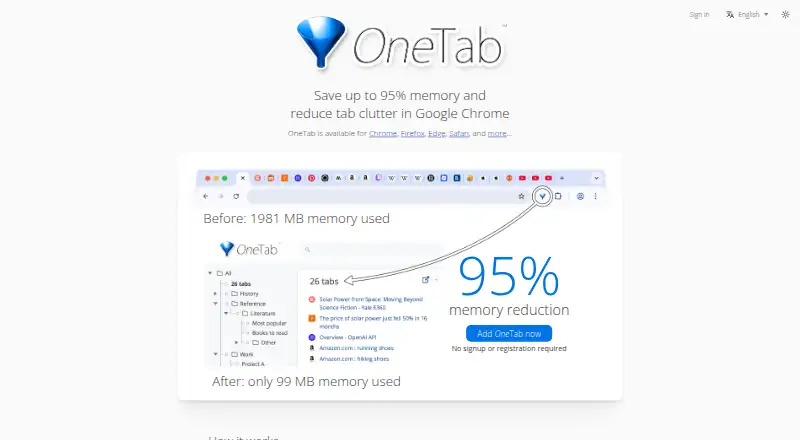
OneTab converts open browser tabs into a saved list that can be restored one tab at a time or all at once. It is available as an extension for Chrome, Firefox, Edge, Safari, and other browsers, with macOS and Windows listed as platforms. The maker says reducing open tabs can save up to 95% of memory. Saved tabs can be arranged into folders, reordered, merged into groups, or managed with quick lists, search, tasks, and stars. Users can import and export tab lists or share a list as a web page. OneTab is free at no cost, with no signup required for tab saving and organization. Its optional Backup & Sync encrypts data on the device before upload and uses end-to-end AES-256 encryption, according to the maker. Sync covers saved tabs and settings, not browsing history or currently open tabs. OneTab remains accessible offline, and offline changes sync when the user is online again.
Good
- Restore saved tabs individually or all at once.
- Organize saved tabs with folders and search.
- Import, export, or share tab lists.
- Accessible offline, with changes syncing later.
Watch out
- Sync excludes browsing history and currently open tabs.
- Uninstalling OneTab causes the browser to delete stored tabs.
- Backup & Sync license details do not list a price.
Who it suits
OneTab suits people who want to save and organize browser tabs instead of keeping them open. Its folders, search, and import and export options may help users managing multiple tab lists.
Verdict
OneTab offers free tab saving and organization, with offline access and browser support across several platforms. Backup & Sync is optional and covers saved tabs and settings rather than all browser activity.
Plans and prices
From OneTab's own pricing page, checked 11 Oct 2026.
| Plan | Price | What it gives you |
|---|---|---|
| OneTab | Free | No signup required; tab saving and organization features |
| Backup & Sync | Priced on request | 1 license per user · up to 100 browsers or profiles · sync and encrypted cloud backup |
The facts
Each one read from OneTab's own pages, with the date it was checked.
Where it runs
- Browser availability
- OneTab is available for Chrome, Firefox, Edge, Safari, and other browsers.checked 11 Oct 2026
What it does
- Core use
- OneTab converts open browser tabs into a list that can be restored one at a time or all at once.checked 11 Oct 2026
- Data-loss limitation
- Uninstalling OneTab causes the browser to delete stored tabs, so the maker advises restarting the browser to troubleshoot loading problems.checked 11 Oct 2026
- Encrypted sync
- Backup & Sync encrypts data on the device before upload and uses end-to-end AES-256 encryption, according to the maker.checked 11 Oct 2026
- Import and export
- OneTab can import and export tab lists and share a list as a web page.checked 11 Oct 2026
- License limit
- A single Backup & Sync license covers multiple computers, browsers, and browser profiles up to a maximum of 100.checked 11 Oct 2026
- Memory reduction
- The maker says OneTab can save up to 95% of memory by reducing the number of open tabs.checked 11 Oct 2026
- Offline use
- OneTab remains accessible offline, and changes made offline sync the next time the user is online.checked 11 Oct 2026
- Organization
- Users can organize saved tabs into folders, reorder and merge groups, and use a quick list, search, tasks, and stars.checked 11 Oct 2026
- Privacy
- The maker says tab URLs are not transmitted or disclosed, except when a user chooses to share a list as a web page.checked 11 Oct 2026
- Support
- The maker accepts bug reports, feature requests, and other feedback through its contact form.checked 11 Oct 2026
- Sync scope
- Backup & Sync covers saved OneTab tabs and settings, not browsing history or currently open tabs.checked 11 Oct 2026
The company
- Headquarters
- Harrow, United Kingdomchecked 28 Sep 2026
- Team use
- Teams can buy additional licenses with centralized billing, and each team member's data remains private from the license purchaser.checked 11 Oct 2026
The full review of OneTab
OneTab is a browser extension for turning an unwieldy set of open pages into an organized, restorable queue. It is best for researchers, shoppers, and anyone who habitually leaves tabs open while working. The free core is unusually broad, but users who need dependable cross-device backup must pay for a separately scoped service.
Overview
OneTab replaces active tabs with a saved list, letting you reopen pages individually or bring back the whole group. That simple handoff is valuable when a browser session has become a drain on attention or system resources: pages are preserved without remaining loaded. The maker claims the reduction in open tabs can cut memory use by as much as 95%; treat that as a possible ceiling rather than an assured result, since the actual benefit depends on the pages and browser involved.
It works with Chrome, Firefox, Edge, Safari, and other browsers, and the extension is offered on macOS and Windows. Lists can be viewed without an internet connection, so a saved research trail remains usable during travel or an outage. If Backup & Sync is enabled, edits made offline are synchronized when connectivity returns. There is an important durability caveat: removing the extension prompts the browser to delete its stored tabs, making an uninstall a potential data-loss event.
Key features
Organization tools go beyond a flat dump of URLs. Folders, drag-and-drop reordering, and group merging suit projects that accumulate several related sessions. A quick list, search, tasks, and stars provide different retrieval methods, so occasional bookmarks and active work queues can coexist. Import and export let you move collections between setups, while sharing a list as a web page is a practical way to hand a packet of links to a colleague.
Privacy is strong for the free workflow: the maker says tab URLs are neither transmitted nor disclosed unless you deliberately publish a list as a web page. Backup & Sync encrypts information locally before upload and uses end-to-end AES-256 encryption, according to the maker. However, this is not a mirror of browser activity. It synchronizes saved OneTab tabs and settings, not browsing history or tabs that are currently open.
Pricing
OneTab
The core plan costs free, requires no account, and includes tab saving and organization. It is the right choice for a single user who mainly wants to reduce clutter on one machine or manage lists manually. There is no stated quota in this plan, but relying on local storage means the uninstall warning matters.
Backup & Sync
Backup & Sync has custom pricing rather than a published amount. One license covers one user across multiple computers, browsers, and profiles, up to 100 in total, and adds synchronization plus encrypted cloud backup. It is aimed at people moving between many browser environments or wanting an off-device copy; it does not add history or live-tab synchronization. Teams can purchase additional licenses with centralized billing, while each member's data remains private from the purchaser.
Platforms
OneTab is a browser extension for macOS and Windows, with support for Chrome, Firefox, Edge, Safari, and other browsers. Its cross-browser reach makes it more flexible than a tool tied to one vendor, although the synced data remains the saved OneTab collection rather than a complete browser profile.
Who it's for
Choose OneTab if your workflow involves collecting pages for later, switching between research projects, or needing a quick way to release memory without discarding links. It also suits privacy-conscious users who prefer local tab handling and only share URLs intentionally. Look elsewhere if you require automatic replication of currently open tabs, browsing history, or a published low-cost price for encrypted backup.
Pros and cons
- Pros: The free, no-signup tier covers both saving and meaningful organization.
- Pros: Folders, search, stars, tasks, and import/export support large or long-lived tab collections.
- Pros: Offline access and broad browser support fit mobile work patterns across macOS and Windows desktops.
- Pros: The stated privacy model keeps URLs undisclosed unless you choose web-page sharing.
- Cons: Uninstalling the extension deletes stored tabs, so maintenance mistakes can erase a collection.
- Cons: Backup & Sync excludes history and currently open tabs, limiting its value as a full browser migration tool.
- Cons: Sync pricing is custom, making costs harder to judge before purchase.
Alternatives
For broader desktop filing rather than browser-tab control, see Desktop Organization Software. For a category-focused comparison of tab tools, browse Tab Management Software.
- Tabbles is the better fit when you need freemium Windows organization with rules, file limits, and API or extension support.
- Desktop Broom suits users wanting a completely free macOS or Windows desktop cleaner with no ads or sign-up.
- iTop Easy Desktop is for Windows users who prefer desktop boxes and optional Pro wallpaper features.
- Nimi Places is a Windows-only choice for non-commercial desktop organization.
- AutoShelf fits macOS users who want rule-based folder filing, with unlimited rules as a one-time upgrade.
- BitDock is a Windows dock-oriented alternative.
- DeskBox is a permanently free Windows 10/11 desktop organizer.
- Desktop Fences+ is a portable, MIT-licensed Windows option for grouping files in user-writable locations.
Verdict
OneTab is an excellent first choice for anyone who needs to collapse tab overload into searchable, reusable lists at no cost. Its organization depth, offline access, and browser coverage are the main reasons to choose it. Look elsewhere when you need live-tab or history synchronization, or when deletion risk from uninstalling and undisclosed sync pricing outweigh the benefits.
Alternatives to OneTab
- 1
BitDock
Free planWindows7.2Free plan - 2

DeskBox
Free planOpen sourceWindows7.0Free plan - 3
iTop Easy Desktop
Free planWindows6.6From $11.99 a year - 4
Tabbles
Free planAPIExtensionWindows6.6From €3 a year - 5

AutoShelf
Free planmacOS6.5$19.99 one-time - 6
Right Click Enhancer
Free planWindows6.5$9.99 one-time