
Desktop Broom
Desktop Broom sorts loose files from a desktop, Downloads folder, or another chosen folder into folders grouped by file type.
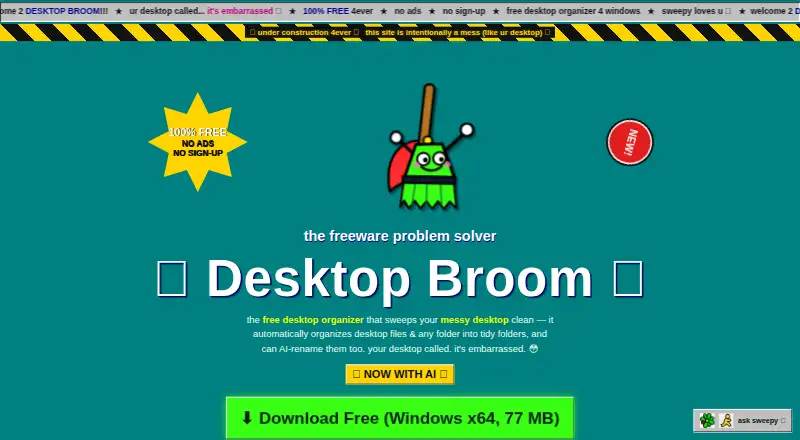
What Desktop Broom is
Desktop Broom sorts loose files from a desktop, Downloads folder, or another chosen folder into folders grouped by file type. It can organize files on any drive the computer can access, including USB and external drives. Before making changes, it previews the planned moves. Files are moved rather than deleted, and one-click undo is available. Existing folders and projects are left alone: Desktop Broom does not open, move, or rename them.
Its default Rules mode works offline, according to the maker’s GitHub README. Optional Smart Mode uses Claude, GPT, or DeepSeek with the user’s own key to suggest descriptive filenames. Smart Mode is off by default; when enabled, it sends small text snippets to the selected provider, while the site says the key stays on the user’s machine. Desktop Broom is free forever and donation-supported, with no ads, sign-up, or premium tier. Windows support covers Windows 10 and 11 on 64-bit x64, and the site provides a macOS DMG download.
Good
- Previews planned moves before changes
- Moves files without deleting them
- Offers one-click undo
- Default Rules mode works offline
- Free with no ads or sign-up
Watch out
- Smart Mode sends small text snippets to a provider
- Windows or Chrome may show an unknown-publisher warning
- The software is provided as-is without warranty
- The iOS companion app has no download yet
Who it suits
Desktop Broom suits Windows and macOS users who want to sort loose files without changing existing folders or projects. It may also suit users who prefer a free organizer with an offline default mode.
Verdict
Desktop Broom focuses on sorting loose files while leaving existing folders untouched, with previews and undo for file moves. Keep a backup, as the maker provides the software without warranty.
Plans and prices
From Desktop Broom's own pricing page, checked 7 Oct 2026.
| Plan | Price | What it gives you |
|---|---|---|
| Free | Free | No ads · no sign-up · no premium tier |
The facts
Each one read from Desktop Broom's own pages, with the date it was checked.
What it does
- AI data handling
- Smart Mode is off by default and sends small text snippets to the selected provider; the site says the key stays on the user's machine.checked 7 Oct 2026
- AI providers
- Smart Mode supports Claude, GPT, or DeepSeek with the user's own key.checked 7 Oct 2026
- AI renaming
- Optional Smart Mode can use AI to suggest descriptive filenames for files.checked 7 Oct 2026
- Existing folders
- It only touches loose files and does not open, move, or rename existing folders or projects.checked 7 Oct 2026
- File organization
- Desktop Broom sorts loose files in a desktop, downloads folder, or other chosen folder into folders by type.checked 7 Oct 2026
- Offline mode
- The maker's GitHub README says default Rules mode works 100% offline.checked 7 Oct 2026
- Preview
- It shows a preview of planned moves before doing anything.checked 7 Oct 2026
- Pricing
- Desktop Broom is free forever and donation-supported, with no ads, sign-up, or premium tier.checked 7 Oct 2026
- Publisher warning
- The maker says Windows or Chrome may warn that the new freeware has an unknown publisher or is not commonly downloaded, and says a verified publisher signature is on the way.checked 7 Oct 2026
- Supported drives
- It can organize files on any drive the computer can access, including USB and external drives.checked 7 Oct 2026
- Undo and deletion
- It moves files without deleting them and offers one-click undo.checked 7 Oct 2026
- Warranty
- The site provides the software as-is without warranty and advises users to keep a backup.checked 7 Oct 2026
Where it runs
- iOS status
- The iOS companion app is planned and has no download yet.checked 7 Oct 2026
- Mac support
- The site provides a macOS DMG download.checked 7 Oct 2026
- Windows support
- The site says Desktop Broom works on Windows 10 and 11, 64-bit x64.checked 7 Oct 2026
The full review of Desktop Broom
Desktop Broom is a free utility that sorts loose files into folders by type on macOS and Windows. It suits people who want to clear a desktop or Downloads folder without disturbing existing folders. Its preview, move-only workflow and undo make it a cautious choice for routine cleanup, though the maker provides no warranty.
Overview
Desktop Broom focuses on loose files: choose a desktop, Downloads folder or other location, and it sorts the files into type-based folders. It can work on any drive the computer can access, including USB and external drives. Because it leaves existing folders and projects alone, it is useful for tidying a busy location without reshaping a carefully arranged folder tree. It is not a tool for reorganizing files already inside folders.
Key features
Review before moving
A preview shows the planned moves before they happen, so users can check the proposed arrangement before committing. The app moves files rather than deleting them and offers one-click undo. That makes a mistaken sort easier to reverse, but it does not replace a backup: the maker supplies the software as-is, without warranty, and advises keeping one.
Offline sorting and optional AI
Default Rules mode works fully offline, which suits users who want predictable sorting without relying on an online service. Optional Smart Mode uses Claude, GPT or DeepSeek to suggest descriptive filenames, with the user supplying their own key. Smart Mode is off by default; when enabled, it sends small text snippets to the selected provider, while the site says the key stays on the user's machine. Users who do not want that data flow can leave Smart Mode off and use Rules mode.
Pricing
Desktop Broom is free forever and donation-supported. The Free plan costs nothing and includes the full product without ads, sign-up or a premium tier. There is no free trial because there is no paid tier to try, and there are no paid-plan renewal terms or seat limits to weigh. The straightforward price is appealing for personal cleanup, though users who prefer paid software with a warranty should look elsewhere.
Platforms
Desktop Broom is available for macOS as a DMG download and for Windows 10 and 11 on 64-bit x64 systems. Windows users may see a warning from Windows or Chrome because the freeware is new or not commonly downloaded; the maker says a verified publisher signature is on the way. The planned iOS companion app has no download yet, so this is currently a desktop utility rather than a cross-device option.
Who it's for
Choose Desktop Broom if you want to sort loose files on a Mac or Windows PC, especially across locations or drives, while preserving existing folders. Preview and undo help keep the process deliberate, and offline Rules mode suits users who want to avoid AI-assisted renaming. It is a poor fit if you need to reorganize material inside existing folders, want an iOS app now, or require warranty-backed software.
Pros and cons
- Pro: Preview, move-only sorting and one-click undo give users a chance to inspect and reverse cleanup without deleting files.
- Pro: Rules mode works offline, and sorting can include USB and external drives accessible to the computer.
- Pro: The free plan has no ads, sign-up or premium tier, so there is no upgrade gate.
- Con: It handles loose files only; it will not sort the contents of existing folders or projects.
- Con: Smart Mode sends small text snippets to the chosen AI provider, so privacy-minded users should keep it off unless they accept that trade-off.
- Con: The software comes without warranty, and Windows or Chrome may warn about its publisher status.
Alternatives
For a broader comparison, see Desktop Organization Software.
- iTop Easy Desktop is a Windows freemium alternative with a free plan that includes three boxes and limited wallpapers, plus a free trial.
- BitDock is a Windows freemium alternative with a free plan.
- DeskBox is a free Windows alternative for Windows 10 21H2 or later and Windows 11, with x64 and ARM64 support.
- Desktop Fences+ is a free, MIT-licensed open-source Windows 10/11 portable option that works only in user-writable locations.
- Desktop Frames+ is a free, open-source portable option for Windows 10/11.
- Desktop Organizer is a macOS freemium alternative with a free download and in-app purchases.
- DesktopBox is a free portable single-file app for 64-bit Windows 10/11.
- Portals: Desktop Organization is a Windows alternative with a pay-what-you-want license and a free option.
Verdict
Desktop Broom is a good fit for Mac and Windows users who want to sort loose files by type without disturbing existing folders. Its offline Rules mode, preview and undo are sensible safeguards, and the no-cost plan has no ads or premium tier. Look elsewhere if you need deeper folder reorganization, an iOS app today, or software backed by a warranty.
Getting started
- Visit https://www.desktopbroom.com/.
- Download the macOS DMG or use the Windows version for Windows 10 or 11 on 64-bit x64.
- Choose a desktop, Downloads folder, or other folder to organize.
- Review the planned moves before applying them.
- Optionally enable Smart Mode and use your own Claude, GPT, or DeepSeek key for filename suggestions.
Limits worth knowing
Desktop Broom has no paid tier or premium features. Smart Mode is off by default and sends small text snippets to the selected provider when enabled; the maker advises keeping a backup because the software is provided as-is without warranty.
Questions
How much does Desktop Broom cost?
It is free forever and donation-supported, with no ads, sign-up, or premium tier.
Which platforms does it support?
It supports Windows 10 and 11 on 64-bit x64, and the site provides a macOS DMG download.
Does it work offline?
The maker’s GitHub README says the default Rules mode works 100% offline.
What does Smart Mode do?
It can use Claude, GPT, or DeepSeek with your own key to suggest descriptive filenames. It is off by default and sends small text snippets to the selected provider when enabled.
Does Desktop Broom delete files?
No. It moves files without deleting them and offers one-click undo.
Is there an iOS app?
An iOS companion app is planned, but there is no download yet.
Alternatives to Desktop Broom
- 1
BitDock
Free planWindows7.2Free plan - 2

DeskBox
Free planOpen sourceWindows7.0Free plan - 3
iTop Easy Desktop
Free planWindows6.6From $11.99 a year - 4
Tabbles
Free planAPIExtensionWindows6.6From €3 a year - 5

AutoShelf
Free planmacOS6.5$19.99 one-time - 6
Right Click Enhancer
Free planWindows6.5$9.99 one-time