
Portals: Desktop Organization
Portals: Desktop Organization displays selected folder contents directly on a Windows desktop as customizable portals.
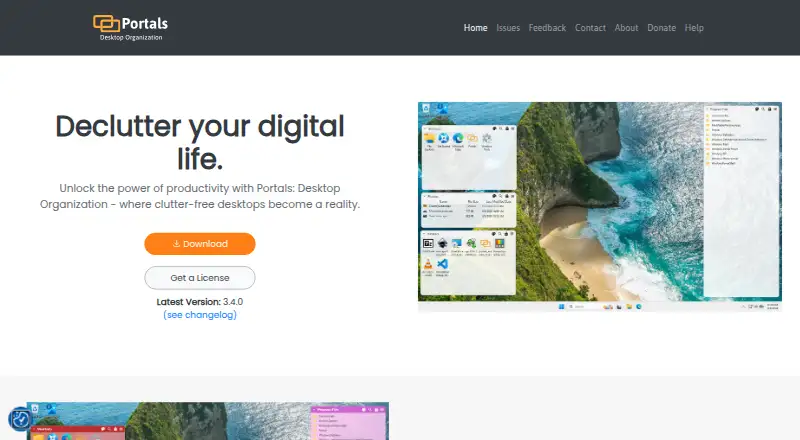
What Portals: Desktop Organization is
Portals: Desktop Organization displays selected folder contents directly on a Windows desktop as customizable portals. Users can adjust colors, fonts, borders, margins, header placement, icon sizes, and backgrounds; individual portals can override some settings. Portals can be minimized, sorted with predefined or custom orders, and divided into tabs linked to different folders. The folders themselves can be stored outside the desktop, such as in Documents. Users can save portal arrangements as layouts and apply them automatically when display setups change, then link settings profiles to those layouts. A configurable keyboard shortcut brings all portals to the top. The application also supports command-line actions for creating portals and applying layouts or profiles. It can use QuickLook or Seer for file previews, selected in settings. Its Windows installer can add registry keys for Portals buttons in folder and desktop-background context menus. The maker describes the app as lightweight with minimal resource use in the background. Portals is free with a pay-what-you-want license, allowing users to enter any amount.
Good
- Shows selected folder contents directly on the desktop.
- Supports tabs linked to separate folders.
- Saves portal arrangements as layouts.
- Can apply layouts when display setups change.
- Offers QuickLook and Seer preview integrations.
Watch out
- Available for Windows only.
- File previews require QuickLook or Seer integrations.
- Installer can add Windows registry keys.
Who it suits
Portals suits Windows users who want selected folders visible on the desktop in adjustable containers. Its layouts and settings profiles may help people who switch display setups.
Verdict
Portals organizes folder contents in desktop containers with extensive appearance controls, tabs, layouts, and profiles. It is a Windows-only option, and its installer can add registry keys for context-menu buttons.
Plans and prices
From Portals: Desktop Organization's own pricing page, checked 1 Oct 2026.
| Plan | Price | What it gives you |
|---|---|---|
| Pay-what-you-want license | Free | free option · enter any amount · $0.00+ |
The facts
Each one read from Portals: Desktop Organization's own pages, with the date it was checked.
What it does
- Command line
- The application supports command-line actions to create portals and apply layouts or settings profiles.checked 1 Oct 2026
- Customization
- Users can customize colors, fonts, borders, margins, header position, icon sizes and backgrounds.checked 1 Oct 2026
- Desktop folder organization
- Portals displays the contents of selected folders directly on the desktop.checked 1 Oct 2026
- File preview integrations
- Portals supports the QuickLook and Seer file preview tools, selectable in settings.checked 1 Oct 2026
- Folder location
- Portal folders do not need to be on the desktop and can be stored elsewhere, such as Documents.checked 1 Oct 2026
- Installation
- The Windows installer can add registry keys that enable Portals buttons in Windows folder and desktop background context menus.checked 1 Oct 2026
- Layouts
- Users can save sets of portals into layouts and apply them automatically when display setups change.checked 1 Oct 2026
- Peek feature
- Peek brings all portals to the top using a configurable keyboard shortcut.checked 1 Oct 2026
- Per-portal settings
- Each portal can override settings such as colors and fonts.checked 1 Oct 2026
- Portal organization
- Portals supports minimized portals, custom or predefined sort orders, and multiple tabs linked to separate folders.checked 1 Oct 2026
- Resource usage
- The maker describes Portals as lightweight with minimal resource usage while running in the background.checked 1 Oct 2026
- Settings profiles
- Users can save customization settings as profiles and link them to layouts.checked 1 Oct 2026
- Support
- The contact page lists [email protected] as the support contact.checked 1 Oct 2026
The company
- Maker
- Portals is developed by Ross Patterson.checked 1 Oct 2026
Alternatives to Portals: Desktop Organization
- 1
BitDock
Free planWindows7.2Free plan - 2

DeskBox
Free planOpen sourceWindows7.0Free plan - 3
iTop Easy Desktop
Free planWindows6.6From $11.99 a year - 4
Tabbles
Free planAPIExtensionWindows6.6From €3 a year - 5

AutoShelf
Free planmacOS6.5$19.99 one-time - 6
Right Click Enhancer
Free planWindows6.5$9.99 one-time