Desktop Organizer
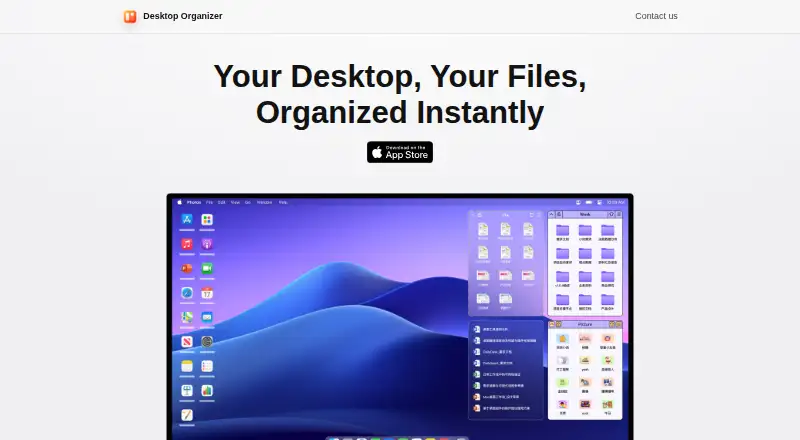
Desktop Organizer arranges files, folders, and icons into named areas on a Mac desktop called File Zones.
What Desktop Organizer is
Desktop Organizer arranges files, folders, and icons into named areas on a Mac desktop called File Zones. Each desktop section reflects a folder inside a DesktopOrganizer folder that the app creates in a storage location you choose. The maker says the sections display folder contents without having permission to delete the original files. App Zones serve a different purpose: they launch apps chosen through a right-click menu, and files cannot be dragged into them. You can adjust zone size and position and choose among several themes; decorative widgets are also available. Listed organization features include multi-tab zones, automatic expanding and collapsing, drag-and-drop sorting, and list view. The version history also notes optimized zone display for multi-monitor setups. Desktop Organizer is for macOS 12.0 or later. The maker says it does not request, store, or collect personal, device, or other user data. A free plan is available; listed paid options are $1.99 a month, $19.99 a year, or $24.99, paid once.
Good
- Desktop sections correspond to folders in a chosen location.
- The maker says original files cannot be deleted through sections.
- Zones offer themes, widgets, and adjustable size and position.
- Listed features include multi-tab zones and list view.
- The maker says it does not collect user data.
Watch out
- Available only for Mac.
- Requires macOS 12.0 or later.
- App Zones do not accept dragged files.
- Paid options are listed alongside the free plan.
Who it suits
It suits Mac users who want to group desktop items into folder-backed areas and adjust their appearance. App Zones may help users who want to launch selected apps from those areas.
Verdict
Desktop Organizer combines folder-backed desktop sections with app-launching zones and visual customization. Check the macOS requirement and the limits of App Zones before choosing it.
Plans and prices
From Desktop Organizer's own pricing page, checked 4 Oct 2026.
| Plan | Price | What it gives you |
|---|---|---|
| Free | Free | Free download · in-app purchases available |
| Monthly Subscription | $1.99 a month | — |
| Annual Subscription | $19.99 a year | — |
| Lifetime | $24.99, paid once | — |
The facts
Each one read from Desktop Organizer's own pages, with the date it was checked.
Where it runs
- App Zones
- App Zones are designed to launch apps selected through the right-click menu; dragging files into an App Zone is unsupported.checked 4 Oct 2026
- Platform requirement
- The App Store listing says Desktop Organizer is only for Mac and requires macOS 12.0 or later.checked 4 Oct 2026
What it does
- Customization
- The app offers multiple zone themes, decorative desktop widgets, and adjustable zone size and position.checked 4 Oct 2026
- File access
- The maker says the desktop sections display folder contents and do not have permission to delete the original files.checked 4 Oct 2026
- File storage
- The app creates a DesktopOrganizer folder in a storage location you choose, and each desktop section corresponds to a folder there.checked 4 Oct 2026
- Multi-monitor support
- The version history says zone display logic was optimized for multi-monitor setups.checked 4 Oct 2026
- Organization features
- Version history lists multi-tab zones, automatic expand and collapse, drag-and-drop sorting, and list view.checked 4 Oct 2026
- Privacy
- The maker’s privacy policy says the app does not request, store, or collect personal information, device information, or other user data.checked 4 Oct 2026
- Purpose
- Desktop Organizer organizes files, folders, and icons into designated desktop areas called File Zones.checked 4 Oct 2026
- Support
- The maker lists [email protected] for questions or suggestions about its privacy policy.checked 4 Oct 2026
The company
- Maker
- The App Store identifies the seller as Shenzhen Chengsi Technology Co., Ltd.checked 4 Oct 2026
Alternatives to Desktop Organizer
- 1
BitDock
Free planWindows7.2Free plan - 2

DeskBox
Free planOpen sourceWindows7.0Free plan - 3
iTop Easy Desktop
Free planWindows6.6From $11.99 a year - 4
Tabbles
Free planAPIExtensionWindows6.6From €3 a year - 5

AutoShelf
Free planmacOS6.5$19.99 one-time - 6
Right Click Enhancer
Free planWindows6.5$9.99 one-time