Termshark
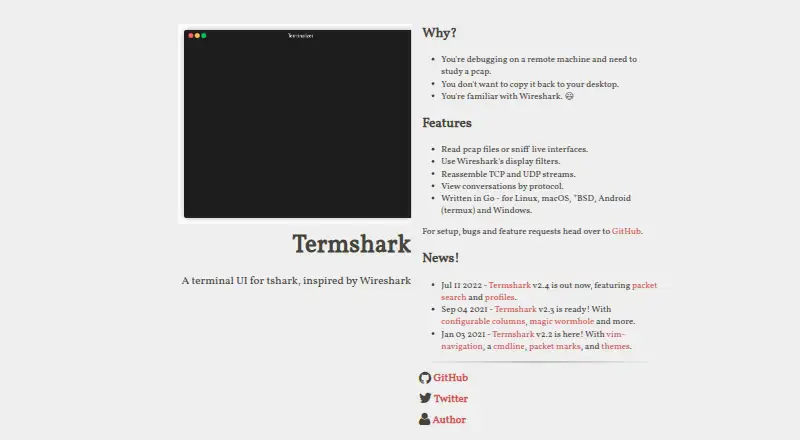
Termshark is a terminal interface for tshark, inspired by Wireshark, for examining packet captures and live traffic.
What Termshark is
Termshark is a terminal interface for tshark, inspired by Wireshark, for examining packet captures and live traffic. It reads pcap files and can sniff live interfaces when tshark permits. Display filters from Wireshark work on both saved captures and live traffic, and users can reassemble and inspect TCP and UDP flows. The conversation view covers Ethernet, IPv4, IPv6, UDP, and TCP. Packet search, packet-range copying, and profiles for colors and columns are also listed. Termshark is aimed at people debugging on remote machines who want to inspect a large capture without copying it to a desktop. Downloads are listed for Linux, macOS, BSD variants, Android through Termux, and Windows. The program is free, but packet analysis requires tshark 1.10.2 or newer in the PATH. The project also notes that tshark has capabilities Termshark does not currently expose.
Good
- Reads pcap files and can sniff live interfaces.
- Applies Wireshark display filters to captures and live traffic.
- Reassembles and inspects TCP and UDP flows.
- Available for Linux, macOS, BSD, Android, and Windows.
Watch out
- Requires tshark 1.10.2 or newer in PATH.
- Does not expose all tshark features.
- Live sniffing depends on tshark permission.
Who it suits
Termshark suits people who need to examine packet captures or live traffic from a terminal, especially when working on a remote machine. It requires comfort with installing and using tshark.
Verdict
Termshark provides terminal-based capture inspection, filtering, and flow analysis at no charge. Its usefulness depends on having tshark available, and some of tshark’s functionality is outside its interface.
Plans and prices
From Termshark's own pricing page, checked 30 Sep 2026.
| Plan | Price | What it gives you |
|---|---|---|
| Termshark | Free | Requires tshark in PATH · tshark v1.10.2 or newer · Some tshark features are not exposed |
The facts
Each one read from Termshark's own pages, with the date it was checked.
What it does
- Capture and files
- Termshark can read pcap files and sniff live interfaces when tshark is permitted.checked 30 Sep 2026
- Conversations
- Its conversation view currently supports Ethernet, IPv4, IPv6, UDP, and TCP.checked 30 Sep 2026
- Dependencies
- Termshark depends on tshark, tcell and gowid, and tshark must be available in PATH.checked 30 Sep 2026
- Downloads
- Precompiled executables are available through the project's GitHub releases.checked 30 Sep 2026
- Filtering
- It supports Wireshark display filters for pcap files and live captures.checked 30 Sep 2026
- Filters
- It filters pcaps and live captures using Wireshark display filters.checked 30 Sep 2026
- License
- The GitHub repository identifies the project as MIT licensed.checked 30 Sep 2026
- Limit
- The project notes that tshark has more features than Termshark currently exposes.checked 30 Sep 2026
- Packet copying
- It can copy ranges of packets to the clipboard from the terminal.checked 30 Sep 2026
- Packet files
- It reads pcap files and can sniff live interfaces.checked 30 Sep 2026
- Packet search
- The project homepage lists packet search among the features introduced in version 2.4.checked 30 Sep 2026
- Profiles
- The homepage says version 2.4 includes profiles for colors and columns.checked 30 Sep 2026
- Purpose
- Termshark is a terminal user interface for tshark, inspired by Wireshark.checked 30 Sep 2026
- Resource use
- The user guide says loaded packet data uses approximately 10 MB of RAM per 1,000 packets.checked 30 Sep 2026
- Runtime dependency
- Termshark requires tshark version 1.10.2 or higher in the PATH for packet analysis.checked 30 Sep 2026
- Search and profiles
- Version 2.4 added packet search and profiles for colors and columns.checked 30 Sep 2026
- Stream analysis
- It can reassemble and inspect TCP and UDP flows.checked 30 Sep 2026
- Support
- The homepage directs users to GitHub for setup, bugs, and feature requests.checked 30 Sep 2026
- Target users
- The project is aimed at people debugging on remote machines who need to study pcaps without copying them to a desktop.checked 30 Sep 2026
- Terminal support
- The program supports 16-color, 256-color and truecolor terminal modes.checked 30 Sep 2026
- Use case
- The project describes using Termshark to inspect a large pcap on a remote machine without copying it to a desktop.checked 30 Sep 2026
Where it runs
- Platform support
- The project lists downloads for Linux, macOS, BSD variants, Android through Termux, and Windows.checked 30 Sep 2026
The full review of Termshark
Termshark brings packet-capture inspection into a terminal interface for people who need to analyze traffic where it was captured. It is best suited to remote debugging and pcap review on Linux, macOS, Windows, BSD, or Android through Termux; its reliance on tshark and narrower feature set make it a poor fit for anyone who needs everything tshark can do.
Overview
Termshark is a free, MIT-licensed terminal user interface for tshark, inspired by Wireshark. Its strongest case is practical: a user can study a large pcap on a remote machine without first copying it to a desktop. It can also sniff live interfaces when tshark is permitted, so it covers both saved traces and live troubleshooting.
This is an interface rather than a replacement for tshark. Packet analysis requires tshark 1.10.2 or newer in the PATH, and tshark exposes functionality that Termshark does not. That trade-off favors users who want an interactive terminal view of common analysis tasks, not those who need the full breadth of tshark.
Key features
- Capture and file analysis: Open pcap files or sniff live interfaces. The ability to work on the remote host is useful when a capture is large or moving it is inconvenient; live capture still depends on tshark permissions.
- Display filters: Apply Wireshark display filters to saved pcaps and live captures, bringing a familiar way to narrow traffic into the terminal workflow.
- Flow and conversation analysis: Reassemble and inspect TCP and UDP flows. The conversation view supports Ethernet, IPv4, IPv6, UDP, and TCP, providing a focused view of those common protocol conversations rather than a general-purpose traffic dashboard.
- Packet search and copying: Search packets and copy ranges of packets to the clipboard from the terminal, useful for finding and carrying forward relevant portions of a trace.
- Profiles and terminal color: Profiles store color and column settings. Support for 16-color, 256-color, and truecolor terminals lets users choose among common terminal display capabilities.
Loaded packet data uses approximately 10 MB of RAM per 1,000 packets, so large traces can add up in memory even when they remain on a remote machine. Termshark depends on tshark, tcell, and gowid; the tshark requirement is the key prerequisite for packet analysis.
Pricing
Termshark costs nothing. The free plan includes offline trace analysis, live capture, display filters, pcap support, and command-line capture, with no paid tier described. It requires tshark in the PATH, specifically version 1.10.2 or newer, and does not expose some tshark features. Precompiled executables are available through GitHub releases, and the project directs setup questions, bug reports, and feature requests to GitHub.
Platforms
The project supports Linux, macOS, Windows, BSD variants, and Android through Termux. The Android route is specifically through Termux, while desktop and server users can obtain precompiled executables from the project's GitHub releases.
Who it's for
Termshark is a sensible choice for network troubleshooters and developers who need to inspect pcaps or capture traffic on a remote machine without transferring files to a desktop. It also suits terminal-oriented users who want display filtering, flow inspection, and packet search without leaving that environment. Choose something else if your work depends on tshark capabilities that Termshark does not expose, or if the tshark dependency and its capture permissions do not suit your setup.
Pros and cons
- Pro: Remote pcap inspection. Working where a large capture resides avoids the need to copy it to a desktop first.
- Pro: One terminal workflow for traces and live traffic. It supports pcap reading, permitted live capture, Wireshark display filters, and TCP/UDP flow inspection.
- Pro: No license fee. The free plan includes the analysis functions rather than reserving them for a paid tier.
- Con: Requires tshark in PATH. Users must have a sufficiently recent tshark installation available before packet analysis can work.
- Con: Does not expose all tshark features. Users who rely on the full tshark feature set may need to work with tshark directly.
- Con: Memory use scales with loaded packets. The approximate 10 MB per 1,000 packets can matter when working with large traces.
Alternatives
Compare network packet capture software if you want to weigh Termshark against other tools in the category.
- TShark is the direct alternative when you want to use tshark itself rather than Termshark's narrower interface.
- Wireshark is another free packet-analysis option if you prefer its full version over a terminal interface.
- tcpdump is a free BSD-licensed option to consider; capture permission depends on the operating system and configuration.
- Sniffnet is a free, open-source option under MIT or Apache-2.0 for users seeking an alternative to terminal-based inspection.
- Malcolm is free, Apache-licensed, self-hosted software for users looking for a self-hosted alternative.
- NetworkMiner is a free GPLv2 option for users considering a different open-source packet-analysis tool.
- Arkime is free, open-source, self-hosted software with no license fees for users evaluating a self-hosted alternative.
- PCAPdroid is an Android option with a free core; firewall, malware detection, and PCAPng are among its paid features.
Verdict
Choose Termshark if you need a free terminal tool for inspecting remote pcaps, filtering captures, or examining TCP and UDP flows without moving data to a desktop. Its tshark dependency is manageable for users who already have it available, but its limited coverage of tshark functionality is a clear reason to look elsewhere when the complete toolkit matters.
Getting started
- Visit https://termshark.io/
- Install a precompiled executable from the project's GitHub releases
- Install tshark version 1.10.2 or newer and place it in PATH
- Run Termshark on a pcap file or permitted live interface
- Apply Wireshark display filters to inspect packets and flows
Limits worth knowing
Termshark requires tshark in PATH, and the project says some tshark functionality is not currently available through Termshark. Loaded packet data uses approximately 10 MB of RAM per 1,000 packets.
Questions
What does Termshark cost?
Termshark is free. Its listed plan is free.
Which platforms are supported?
Downloads are listed for Linux, macOS, BSD variants, Android through Termux, and Windows.
Does it support live capture?
Yes. It can sniff live interfaces when tshark permits it.
What packet formats can it read?
It reads pcap files and can analyze live captures.
What dependency is required?
Packet analysis requires tshark 1.10.2 or newer in PATH; Termshark also depends on tcell and gowid.
Is Termshark open source?
The GitHub repository identifies it as MIT licensed.
Alternatives to Termshark
- 1
Wireshark
Free planOpen sourceAPILinuxmacOSSelf-hosted7.5Free plan - 2
Colasoft Capsa
Free planWindows7.4$295 one-time - 3
Sniffnet
Free planOpen sourceLinuxmacOSWindows7.4Free plan - 4

Arkime
Free planOpen sourceWebAPILinuxSelf-hosted7.3Free plan - 5
Avidemux
Free planOpen sourceWebLinuxmacOSWindows7.3Free plan - 6
NetworkMiner
Free planLinuxmacOSWindows6.9$1,300 one-time