Taskbar Hide
Taskbar Hide is a free application for Windows 10 and 11 that hides and shows the taskbar.
What Taskbar Hide is
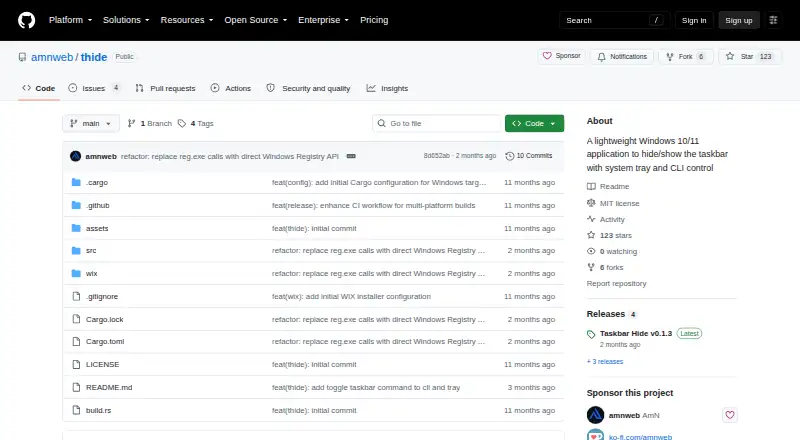
Taskbar Hide is a free application for Windows 10 and 11 that hides and shows the taskbar. It provides taskbar controls through a system tray icon and menu, or through a command-line interface with commands for starting, showing, hiding, toggling, stopping, help, and autostart. The CLI’s show, hide, and stop controls require the GUI app to be running. The project describes the executable as about 600 KB, self-contained, and built with static CRT linking. Downloads are available for Windows x64 and ARM64 as an MSI installer or portable ZIP; the ZIP can be run without installation, while the installer configures PATH for CLI access. Autostart commands add or remove an entry in the current user’s Windows Run registry key. The project also says the app is compatible with YASB and other custom status bars using the Shell_TrayWnd class name. It is published under the MIT license.
Good
- Free, with no trial required.
- Portable ZIP runs without installation.
- Available for Windows x64 and ARM64.
- CLI includes taskbar and autostart controls.
Watch out
- CLI show, hide, and stop need the GUI running.
- Available only for Windows.
Who it suits
It suits Windows users who want taskbar visibility controls from the tray or command line. Portable ZIP packages are available for users who prefer not to install the app.
Verdict
Taskbar Hide offers several ways to control taskbar visibility, including a portable option. Keep in mind that key CLI controls depend on the GUI app being open.
Plans and prices
From Taskbar Hide's own pricing page, checked 9 Oct 2026.
| Plan | Price | What it gives you |
|---|---|---|
| Taskbar Hide | Free | Windows 10/11 · x64 and ARM64 · MSI installer or portable ZIP |
The facts
Each one read from Taskbar Hide's own pages, with the date it was checked.
What it does
- Autostart
- Autostart commands add or remove an entry in the current user's Windows Run registry key.checked 9 Oct 2026
- CLI
- Its command-line interface supports start, show, hide, toggle, stop, help, and autostart commands.checked 9 Oct 2026
- Command line
- Its CLI supports start, show, hide, toggle, stop, help, and autostart commands.checked 9 Oct 2026
- Dependencies
- The README describes the executable as self-contained, with no dependencies and static CRT linking.checked 9 Oct 2026
- Download formats
- The latest listed release provides an MSI installer and a portable ZIP for each supported architecture.checked 9 Oct 2026
- Downloads
- The project offers MSI installers and portable ZIP packages for Windows x64 and ARM64.checked 9 Oct 2026
- Installer behavior
- The MSI installer configures PATH automatically for CLI access.checked 9 Oct 2026
- Integrations
- The project says it is compatible with YASB and other custom status bars using the Shell_TrayWnd class name.checked 9 Oct 2026
- Latest release
- The releases page lists Taskbar Hide v0.1.3 as the latest release, dated July 29, 2026.checked 9 Oct 2026
- License
- The repository is published under the MIT license.checked 9 Oct 2026
- Notable limitation
- CLI control commands such as show, hide, and stop require the GUI app to be running.checked 9 Oct 2026
- Portable use
- The portable ZIP can be extracted and run without installation.checked 9 Oct 2026
- Purpose
- Taskbar Hide is a lightweight Windows 10/11 application for hiding and showing the taskbar.checked 9 Oct 2026
- Resource footprint
- The README describes the app as approximately 600 KB with minimal resource usage.checked 9 Oct 2026
- Security and license
- The repository includes an MIT license; the opened project pages did not state security certifications or compliance claims.checked 9 Oct 2026
- Single instance
- The app prevents multiple instances from running.checked 9 Oct 2026
- Size and dependencies
- The project describes the app as approximately 600 KB and says its executable is self-contained with static CRT linking.checked 9 Oct 2026
- Support
- The README asks users to report bugs with details when custom status bars disappear.checked 9 Oct 2026
- System tray
- The app provides a system tray icon and menu for taskbar controls.checked 9 Oct 2026
The company
- Maker profile
- The GitHub maker profile identifies the account as AmN and links to yasb.dev; it does not state a headquarters or founding date.checked 9 Oct 2026
Where it runs
- Windows architectures
- Downloads are offered for Windows x64 and ARM64.checked 9 Oct 2026
The full review of Taskbar Hide
Taskbar Hide is a free Windows utility for people who want a focused way to hide or show the taskbar. It suits users who value compactness and direct controls over a wider desktop-customization suite. Its main trade-off is that several command-line controls work only while the app is running.
Overview
The app concentrates on one job: changing taskbar visibility. A system-tray icon and menu put those controls within reach, while command-line commands give terminal users another way to manage it. At approximately 600 KB, the executable is small and self-contained, with static CRT linking and no dependencies. It also prevents multiple instances from running.
Taskbar Hide works with YASB and other custom status bars that use the Shell_TrayWnd class name. That compatibility is useful in customized desktop setups, but the project asks users to report bugs with details if a custom status bar disappears. The MIT license makes it an option for users comfortable with open-source software.
Key features
- Tray and command-line controls: The CLI supports start, show, hide, toggle, stop, help, and autostart. The tray menu is the straightforward choice for routine changes; users seeking a CLI controller that works independently of a GUI should look elsewhere, since commands such as show, hide, and stop require the app to be running.
- Autostart: Commands add or remove an entry in the current user's Windows Run registry key. This offers a direct way to configure launch at sign-in, but it changes a per-user registry setting.
- Portable option: The ZIP can be extracted and run without installation, which suits users who want to avoid an installer. The MSI configures PATH automatically for CLI access, making it the more convenient choice for command-line use.
- Windows architecture support: Downloads are offered for Windows x64 and ARM64, so users on either architecture have an installer and portable package to choose from.
Pricing
Taskbar Hide costs nothing. Its single free plan includes Windows 10/11 support for x64 and ARM64, with an MSI installer or portable ZIP. There is no paid tier to weigh against the free option, and no free trial is offered.
Platforms
Taskbar Hide runs on Windows 10/11, with downloads for x64 and ARM64. Choose the MSI for automatic PATH configuration or the portable ZIP to run the app without installation. It is not a cross-platform choice.
Who it's for
This is a good fit for Windows users who want taskbar visibility controls without a broader customization package, especially those who value a small, self-contained executable or use compatible custom status bars. It is less suitable for anyone who needs command-line show, hide, or stop controls to work while the GUI is closed.
Pros and cons
- Pro: A narrow focus keeps the app compact at approximately 600 KB, with no dependencies and static CRT linking.
- Pro: The free Windows 10/11 build offers both installer and portable formats for x64 and ARM64.
- Pro: Tray controls, CLI commands, and per-user autostart settings give users more than one way to manage visibility and startup.
- Con: Key CLI controls require the GUI app to be running, limiting its usefulness as a standalone scripted controller.
- Con: Custom status-bar compatibility depends on using the Shell_TrayWnd class name, and the project asks users to report problems if such bars disappear.
Alternatives
Consider Deskloom if you want another free Windows option. DisplayFusion is a better fit if a free version after a trial or a per-machine lifetime Pro license at $34 per machine is more relevant to your needs. For a free, MIT-licensed Windows utility, Taskbar Groups is another option.
Winstep Nexus Dock is worth considering if you want a dock, with a free personal-use plan and paid licenses for business or Ultimate use. 7+ Taskbar Tweaker is another free Windows taskbar utility. If you want free, open-source Windows taskbar customization, consider RainbowTaskbar. RetroBar is a free alternative for Windows 7 SP1, 8.1, 10, or 11. For self-hosted software, GroupManager is a free option.
See more options in Taskbar Customization Software.
Verdict
Choose Taskbar Hide if you want a free, compact Windows 10/11 utility with tray-based taskbar controls, portable downloads, and a CLI for use while the app is open. Its focused scope and small footprint are the main reasons to pick it; look elsewhere if you need CLI control without the GUI running or a broader set of desktop changes.
Alternatives to Taskbar Hide
- 1

DisplayFusion
Free planAndroidiOSAPIWindows7.9$34 one-time - 2

TaskbarX
Free planOpen sourceWindows7.6$1.09 one-time - 3

GitHub CodeQL
Free planWebExtensionLinuxmacOS7.5From $30 a month - 4
Winstep Nexus Dock
Free planWindows6.7$12.95 one-time - 5

Deskloom
Free planWindows6.4Free plan - 6
MyDockFinder
Windows6.4$4.99 one-time