
Deskloom
Deskloom is a free Windows app for combining wallpaper, taskbar styles, widgets, desktop groups, and cursor themes into reusable scenes.
What Deskloom is
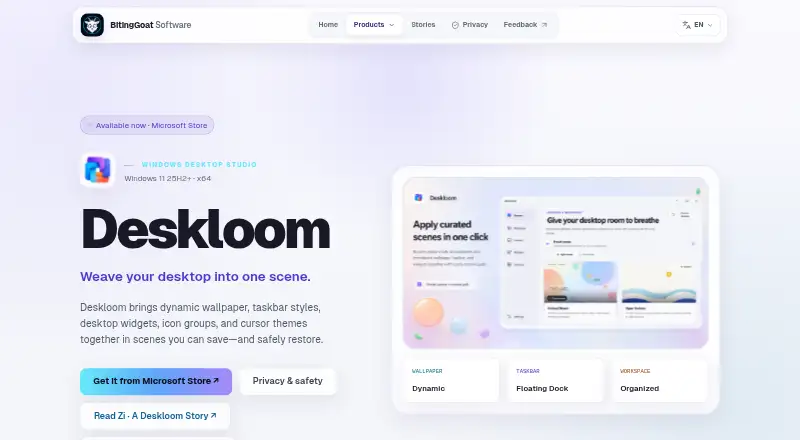
Deskloom is a free Windows app for combining wallpaper, taskbar styles, widgets, desktop groups, and cursor themes into reusable scenes. Each scene can coordinate those elements with a workspace layout. The app includes five built-in scenes and does not depend on an online gallery. Taskbar options range from System Default to Floating Dock, while widgets include clocks, system readings, Quick Notes, network throughput, storage, and battery cards. Deskloom groups existing desktop items visually without moving the files from their Windows locations. Scenes, settings, imported assets, and layouts are stored locally in the Windows user profile; the app does not require an account or an internet connection while running. It provides capability checks, recovery journals, rollback, and an option to restore Windows defaults. Deskloom 1.0 is available from the Microsoft Store, but requires x64 Windows 11 version 25H2 (build 26200) or later. It does not replace classic Windows desktop system icons.
Good
- Includes five built-in scenes
- Offers five taskbar styles
- Stores scenes and layouts locally
- Does not require an account or runtime internet
- Provides rollback and Windows defaults restoration
Watch out
- Requires Windows 11 version 25H2 or later
- Does not replace classic desktop system icons
- Weather sends configured location to MET Norway if enabled
Who it suits
Deskloom suits Windows users who want to coordinate desktop appearance and organization in reusable scenes. It is intended for users with x64 Windows 11 version 25H2 or later who prefer local operation.
Verdict
Deskloom brings several desktop appearance and organization controls together in scenes, with local storage and recovery options. Its system requirement is specific: earlier Windows versions and releases are unsupported.
Plans and prices
From Deskloom's own pricing page, checked 9 Oct 2026.
| Plan | Price | What it gives you |
|---|---|---|
| Deskloom | Free | Microsoft Store release · x64 Windows 11 25H2 (build 26200) or later |
The facts
Each one read from Deskloom's own pages, with the date it was checked.
What it does
- Availability
- Deskloom 1.0 is available from the Microsoft Store.checked 4 Oct 2026
- Built-in scenes
- The app ships with five built-in scenes and does not require an online gallery.checked 9 Oct 2026
- Desktop groups
- Deskloom organizes existing desktop items into visual groups while leaving their files in place.checked 9 Oct 2026
- Desktop organization
- Deskloom organizes existing desktop items into visual groups while leaving their files where Windows keeps them.checked 4 Oct 2026
- Imported HTML wallpaper
- Imported self-contained HTML wallpaper is blocked from network access, downloads, and external navigation.checked 4 Oct 2026
- Local operation
- An account and runtime internet connection are not required; scenes, settings, imported assets, and layouts are stored locally in the Windows user profile.checked 9 Oct 2026
- Notable limit
- The Microsoft Store 1.0 product does not replace classic Windows desktop-system icons.checked 4 Oct 2026
- Optional weather
- Weather is off by default; if enabled, Deskloom sends configured latitude and longitude to MET Norway for forecasts.checked 9 Oct 2026
- Privacy
- Deskloom has no in-app advertising, behavioral analytics, telemetry or diagnostic-upload service, cloud sync, or online gallery.checked 9 Oct 2026
- Purpose
- Deskloom combines dynamic wallpaper, taskbar styles, desktop widgets, icon groups, and cursor themes into scenes that can be saved and restored.checked 9 Oct 2026
- Recovery
- Capability checks, recovery journals, rollback, and a Restore Windows defaults option support reversible Windows changes.checked 4 Oct 2026
- Reversibility
- The product page describes capability checks, recovery journals, rollback, and a Restore Windows defaults option.checked 9 Oct 2026
- Scene controls
- A reusable scene can coordinate wallpaper, taskbar style, widgets, workspace layout, desktop groups, and cursors.checked 9 Oct 2026
- Support channel
- The privacy page says direct support opens the user's mail application and does not attach diagnostics or user files automatically.checked 9 Oct 2026
- Support diagnostics
- Support diagnostics are opt-in, stop automatically after at most 24 hours, and are not uploaded automatically; users can export or clear records.checked 9 Oct 2026
- System requirements
- Deskloom requires x64 Windows 11 version 25H2 (build 26200) or later; Windows 10 and earlier Windows 11 releases are unsupported.checked 4 Oct 2026
- Taskbar styles
- The five taskbar choices are System Default, Crystal Clear, Atmosphere Glass, Immersive Solid, and Floating Dock.checked 9 Oct 2026
- Wallpaper imports
- Imported HTML wallpaper is blocked from network access, downloads, and external navigation.checked 9 Oct 2026
- Widgets
- Widgets include clocks, system readings, Quick Notes, network throughput, storage, and battery cards.checked 9 Oct 2026
The company
- Maker
- The maker identifies itself as BitingGoat Software and describes itself as independent software; the pages reviewed do not state its headquarters or founding year.checked 9 Oct 2026
The full review of Deskloom
Overview
Deskloom is a free Windows app for coordinating desktop appearance and organization in reusable scenes. It is best suited to people who want wallpapers, taskbar styling, widgets, desktop groups and cursors managed together rather than as separate customizations.
Its strongest case is a private, local setup with recovery options; its narrow Windows 11 requirement is a substantial barrier for anyone on older releases.
Key features
A scene can bring wallpaper, taskbar style, widgets, workspace layout, desktop groups and cursors into one reusable arrangement. Five built-in scenes give newcomers a starting point without depending on an online gallery. That breadth makes Deskloom more cohesive than a single-purpose taskbar or wallpaper utility, though the Microsoft Store 1.0 release does not replace classic Windows desktop-system icons.
Taskbar styles include System Default, Crystal Clear, Atmosphere Glass, Immersive Solid and Floating Dock. The selection covers both subtle and more prominent changes. Widgets include clocks, system readings, Quick Notes, network throughput, storage and battery cards, useful for keeping glanceable information on the desktop.
Desktop groups visually organize existing items while leaving the files where Windows keeps them. This suits people who want a tidier desktop without changing file locations, but it is presentation rather than file-management functionality.
Capability checks, recovery journals, rollback and a Restore Windows defaults option support reversing Windows changes. The app stores scenes, settings, imported assets and layouts in the Windows user profile; it needs neither an account nor a runtime internet connection. It has no advertising, behavioral analytics, usage tracking, cloud sync, online gallery or maker telemetry and diagnostic-upload service.
Imported self-contained HTML wallpaper is blocked from network access, downloads and external navigation. Optional weather is off by default; enabling it sends configured latitude and longitude to MET Norway for forecasts. Support diagnostics are optional, stop automatically after at most 24 hours and are not uploaded automatically. Direct support opens the user's mail application without automatically attaching diagnostics or user files.
Pricing
Deskloom costs nothing through the Microsoft Store release. There is one free plan, with no paid tier or separate feature caps described. That makes it a straightforward option for users who meet the system requirement and want its full scene-based approach without a subscription or purchase.
Platforms
Deskloom runs on x64 Windows 11 version 25H2 (build 26200) or later. Windows 10 and earlier Windows 11 releases are unsupported, so even many Windows 11 users cannot use it. This unusually specific requirement is the clearest reason to choose another desktop utility.
Who it's for
Choose Deskloom if you want one local app to coordinate several desktop customizations, prefer keeping layouts and assets in your Windows profile, and value built-in rollback options. It is a poor fit for older Windows systems, users who need classic desktop-system icon replacement, or anyone seeking cloud-synced scenes.
Pros and cons
- Pro: Scenes coordinate multiple appearance and organization controls, rather than limiting users to wallpaper or taskbar changes alone.
- Pro: Local storage, no required account or runtime connection, and no tracking or cloud sync suit privacy-conscious users.
- Pro: Recovery journals, rollback and a Windows-defaults restore option provide a path back from supported changes.
- Con: Requiring x64 Windows 11 25H2 or later excludes Windows 10 and earlier Windows 11 releases.
- Con: The Store 1.0 release does not replace classic Windows desktop-system icons.
Alternatives
For a wider set of choices, browse Taskbar Customization Software.
- DisplayFusion is worth considering if you want a freemium Windows alternative with a free version and a Pro Standard lifetime license billed per machine for $34, paid once.
- Taskbar Groups is a free Windows utility under the MIT license, a simpler fit if taskbar grouping is the priority rather than Deskloom's broader scenes.
- Taskbar Hide is a free Windows 10/11 option, including x64 and ARM64 support, for readers whose system cannot meet Deskloom's x64 Windows 11 requirement.
- Winstep Nexus Dock offers a free personal-use plan, with paid licenses for business use or Nexus Ultimate.
- 7+ Taskbar Tweaker is a free Windows taskbar utility if you want a narrower taskbar-focused alternative.
- GroupManager is a free, GPL-3.0-licensed self-hosted option.
- RainbowTaskbar is a free, open-source Windows taskbar customization alternative.
- RetroBar supports Windows 7 SP1, Windows 8.1, Windows 10 and Windows 11, making it an option for systems outside Deskloom's supported releases.
Verdict
Deskloom is a strong fit for users on x64 Windows 11 25H2 or later who want a free, local way to coordinate desktop styling and organization, with recovery controls. Its focused feature set and privacy posture are persuasive, but the strict OS requirement and lack of classic system-icon replacement make it an easy pass for many Windows users.
Getting started
- Open the Deskloom product page.
- Get Deskloom 1.0 from the Microsoft Store.
- Confirm the PC runs x64 Windows 11 version 25H2, build 26200, or later.
- Choose one of the five built-in scenes or configure a reusable scene.
- Enable weather only if desired; it is off by default.
Limits worth knowing
Deskloom requires x64 Windows 11 version 25H2, build 26200, or later; Windows 10 and earlier Windows 11 releases are unsupported. The Microsoft Store 1.0 product does not replace classic Windows desktop-system icons.
Questions
How much does Deskloom cost?
The Deskloom plan is free through the Microsoft Store release.
Which Windows versions does it support?
It requires x64 Windows 11 version 25H2, build 26200, or later. Windows 10 and earlier Windows 11 releases are unsupported.
Does Deskloom need an account or internet connection?
No account or runtime internet connection is required. Scenes, settings, imported assets, and layouts are stored locally in the Windows user profile.
Who makes Deskloom?
The maker identifies itself as BitingGoat Software and describes itself as independent software.
Does Deskloom include cloud sync or tracking?
It has no cloud sync, advertising, behavioral analytics, usage tracking, online gallery, or BitingGoat Software telemetry or diagnostic-upload service.
What happens if weather is enabled?
Weather is off by default. If enabled, Deskloom sends configured latitude and longitude to MET Norway for forecasts.
Alternatives to Deskloom
- 1

DisplayFusion
Free planAndroidiOSAPIWindows7.9$34 one-time - 2

TaskbarX
Free planOpen sourceWindows7.6$1.09 one-time - 3

GitHub CodeQL
Free planWebExtensionLinuxmacOS7.5From $30 a month - 4
Winstep Nexus Dock
Free planWindows6.7$12.95 one-time - 5
MyDockFinder
Windows6.4$4.99 one-time - 6
GroupManager
Free planSelf-hosted6.3Free plan