
Subtitle AI
Subtitle AI is a web service for transcribing, translating, editing, and exporting video subtitles.
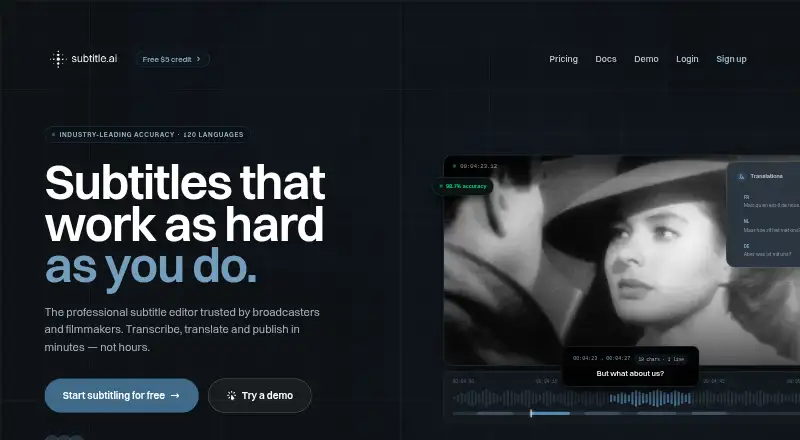
What Subtitle AI is
Subtitle AI is a web service for transcribing, translating, editing, and exporting video subtitles. It supports more than 120 languages, identifies multiple speakers, and allows caption styling or subtitles burned into exported video. Exports include SRT, VTT, EBU-STL, STL, WebVTT, DOCX, TXT, CSV, and JSON/XML. Automatic formatting follows CPL, CPS, and other industry standards. Editing tools include keyboard shortcuts for navigating, splitting, merging, and refining subtitles, and edits can be applied across hundreds of files. The Free plan includes €3 in one-off credits, accepts files up to 30 minutes long, and permits one translation per file; real videos can be tried without a credit card. Creator costs $15 a month and supports files up to 60 minutes. Team is $49 a month for up to five members, while Pro is $99 a month and includes API access. Enterprise costs $199 a month and supports unlimited members. All listed plans retain files for one month.
Good
- Supports transcription and translation in 120+ languages.
- Identifies multiple speakers.
- Burns subtitles into exported videos.
- Edits can be applied across hundreds of files.
- Free plan includes €3 in one-off credits.
Watch out
- Free credits are a one-off allowance.
- Free files are limited to 30 minutes.
- All listed plans retain files for one month.
Who it suits
Subtitle AI suits creators and teams that need subtitle transcription, translation, editing, or video caption exports. The plan options include solo use as well as team membership and API access.
Verdict
Subtitle AI combines subtitle creation, translation, editing, and export in a browser-based service. The free option has limited file duration and translation allowance, while paid plans raise those limits and add team capacity or API access.
Plans and prices
From Subtitle AI's own pricing page, checked 27 Sep 2026.
| Plan | Price | What it gives you |
|---|---|---|
| Free | Free | Includes €3 of free credits; no credit card required. · Solo organization · Maximum file duration of 30 minutes · One translation per file · SRT, VTT, and video export · AI-assisted transcription and translation · billed monthly |
| Creator | $15 a month | For creators working solo. · Solo organization · Maximum file duration of 60 minutes · One translation per file · SRT, VTT, and video export · AI-assisted transcription and translation · billed monthly |
| Team | $49 a month | Includes up to 5 team members. · Up to 5 team members · Maximum file duration of 3 hours · Unlimited translations per file · Custom vocabularies and styles · Live subtitling and revision control · billed monthly |
| Pro | $99 a month | Includes API access and training opt-out. · Up to 10 team members · Maximum file duration of 5 hours · API access · Unlimited translations per file · Training opt-out · billed monthly |
| Enterprise | $199 a month | Includes unlimited team members; contact required to get started. · Unlimited team members · Maximum file duration of 5 hours · Unlimited translations per file · Custom vocabularies and styles · Dedicated account manager and SLA · billed monthly |
The facts
Each one read from Subtitle AI's own pages, with the date it was checked.
What it does
- API access
- API access is included in the Pro plan.checked 27 Sep 2026
- Bulk operations
- Edits can be applied across hundreds of files.checked 27 Sep 2026
- Burn-in captions
- Yeschecked 19 Sep 2026
- Burn-in export
- Subtitles can be burned directly into exported videos.checked 27 Sep 2026
- Caption languages
- 120checked 19 Sep 2026
- Caption styling
- Customizable subtitle styling and caption design options are available.checked 27 Sep 2026
- Credit allowance
- The free credits are a one-off starter allowance, not a monthly allowance.checked 27 Sep 2026
- Editing workflow
- Keyboard shortcuts support navigation, splitting, merging, and subtitle refinement.checked 27 Sep 2026
- Export formats
- Exports include SRT, VTT, EBU-STL, STL, WebVTT, DOCX, TXT, CSV, and JSON/XML.checked 27 Sep 2026
- File retention
- All listed plans retain files for one month.checked 27 Sep 2026
- Max video length
- 60checked 19 Sep 2026
- Paid from
- 15checked 19 Sep 2026
- Speaker handling
- The AI understands context and handles multiple speakers.checked 27 Sep 2026
- Speaker identification
- Yeschecked 19 Sep 2026
- Subtitle export
- srt and vttchecked 19 Sep 2026
- Subtitle standards
- Automatic formatting follows CPL, CPS, and other industry standards.checked 27 Sep 2026
- Supported languages
- Transcription and translation support 120+ languages.checked 27 Sep 2026
- Support response
- Support is available by email, with typical replies within 24 hours.checked 27 Sep 2026
The company
- Company entity
- The site identifies Quantum Noodle BV as the copyright holder.checked 27 Sep 2026
- Company founder
- Ulysse Maes is identified as founder of Subtitle AI and Scribewave.checked 27 Sep 2026
Money
- Free credits
- New accounts receive €3 of one-off free credits.checked 27 Sep 2026
- Free file limit
- The Free plan allows files up to 30 minutes long.checked 27 Sep 2026
- Free plan
- Yeschecked 19 Sep 2026
- Free translation limit
- The Free plan includes one translation per file.checked 27 Sep 2026
The full review of Subtitle AI
Overview
Subtitle AI is a browser-based service for transcribing and translating video subtitles, then editing and exporting them. It suits creators who need multilingual captions and teams handling longer videos or batches of files.
Its strongest case is a flexible workflow: multiple export formats, burned-in captions and speaker-aware editing. The main trade-off is that the free plan is tightly capped, while useful team and production features require higher monthly tiers.
Key features
Transcription and translation support more than 120 languages. Subtitle AI can identify multiple speakers, and its automatic formatting follows CPL, CPS and other industry standards. Those capabilities make it better suited to subtitle production than a basic one-language caption pass, though translation volume on the lower tiers is limited.
Editors can refine subtitles with keyboard shortcuts for navigation, splitting and merging, and apply edits across hundreds of files. Captions can be styled and burned into exported video, or exported as SRT, VTT, EBU-STL, STL, WebVTT, DOCX, TXT, CSV, and JSON/XML. The range of formats is useful when a project needs both subtitle files and review or data formats.
Email support typically replies within 24 hours. Files are retained for one month on all plans, a practical constraint for projects that need longer-term access to source work.
Pricing
| Plan | Price | What it includes |
|---|---|---|
| Free | free | €3 one-off credits, files up to 30 minutes, one translation per file, SRT, VTT and video export, AI transcription and translation. |
| Creator | $15 a month | Solo organization, files up to 60 minutes, one translation per file, SRT, VTT and video export, AI transcription and translation. |
| Team | $49 a month | Up to 5 members, files up to 3 hours, unlimited translations per file, custom vocabularies and styles, live subtitling and revision control. |
| Pro | $99 a month | Up to 10 members, files up to 5 hours, API access, unlimited translations per file and training opt-out. |
| Enterprise | $199 a month | Unlimited members, files up to 5 hours, unlimited translations per file, custom vocabularies and styles, dedicated account manager and SLA; contact required to get started. |
All listed plans are billed monthly, and all retain files for one month. The free option is useful for trying real videos without a card, but its €3 credit allowance is one-off rather than monthly; each file is limited to 30 minutes and one translation. Creator raises the duration cap to 60 minutes but keeps the one-translation limit, so it is for solo users who need longer files, not repeated localization. Team is the first tier with unlimited translations and collaboration controls. Pro adds API access and training opt-out for larger workflows, while Enterprise is for organizations that need unlimited seats and a dedicated account manager. Custom pricing applies when a plan has no published price.
Platforms
Subtitle AI runs on the web, so it is an option for browser-based workflows rather than a native desktop or mobile app.
Who it's for
Choose Subtitle AI if you need to subtitle and translate video in many languages, work with multiple speakers, or produce deliverables in several formats. Creators working alone with occasional short videos can start free; solo users with longer files have the $15 a month Creator tier. Teams translating repeatedly or managing revisions will get more from Team or above.
It is less compelling for someone who only needs a free, open-source desktop editor, or whose main requirement is a generous recurring free allowance: the free credits do not renew and translation is capped at one per file.
Pros and cons
- Pros: More than 120 supported languages and speaker handling make it suitable for multilingual, multi-speaker material.
- Pros: Exports include subtitle, document, text, spreadsheet and structured-data formats, plus burned-in video.
- Pros: Keyboard editing and bulk changes support detailed refinement across many files.
- Cons: Free credits are a one-off allowance, with a 30-minute file cap and one translation per file.
- Cons: Creator raises the file limit but not translation allowance; unlimited translations start at $49 a month.
- Cons: One-month file retention applies across every plan.
Alternatives
AI Video Caption Generators is the broader category to browse if Subtitle AI's limits or workflow do not fit.
Zeemo is worth considering for web or mobile use, especially for short clips: its free plan allows 1-minute videos, 200 MB files and exports up to 720p.
Subtitle Edit is the alternative for readers who want a free, open-source subtitle editor on Windows, macOS or Linux.
SRTGen offers web and API access, with free SRT, VTT and TXT export and a 5-minute screen-recording limit.
Translate.Video is another web-based freemium option.
Captions is an option across web, iOS, Android and API.
CaptionFit is another web-based freemium choice.
SubtitleGenerator has a free plan with 60 minutes of subtitle time per month and a 10-minute-per-video cap.
Submagic is a web-based alternative with a Starter plan at $12 a month billed annually, capped at 15 videos per member monthly and two minutes per video.
Verdict
Subtitle AI is a strong fit for creators and teams that need multilingual subtitles, speaker-aware editing and flexible exports in a browser. Its broad language support and production tools are the reason to choose it; the one-off free credits, limited Creator translation allowance and one-month retention are reasons to look elsewhere if recurring free use or longer file storage matters more.
Alternatives to Subtitle AI
- 1

Captions
Free planAndroidiOSWebAPI9.1From $4.99 a month - 2

Whisper
Free planOpen sourceAPILinuxmacOSSelf-hosted8.9$0.01 usage-based - 3

SRTGen
Free planWebAPI8.3From $4 a month - 4
Fluen AI Subtitle Generator
Free planWebAPIExtensionmacOS8.2Free plan - 5
ZapCap
Free planAndroidiOSWebAPI8.1From $8 a month - 6
ngram
Free planWebAPIExtension8.1From $29 a month