Subtitle Edit
Subtitle Edit is a free, open-source subtitle editor documented for Windows, macOS, and Linux.
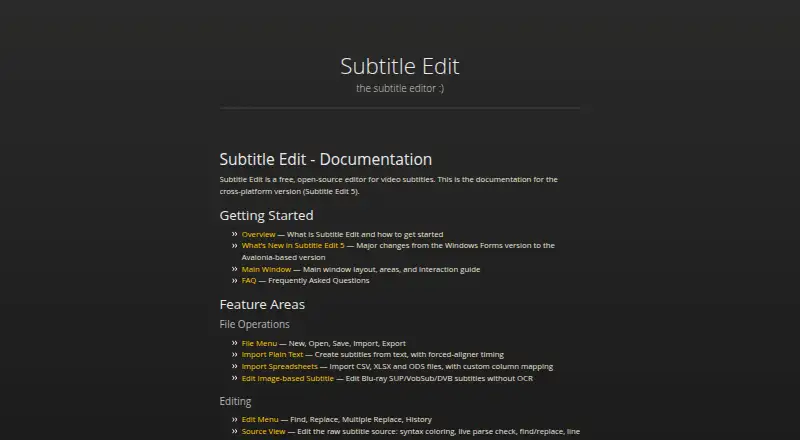
What Subtitle Edit is
Subtitle Edit is a free, open-source subtitle editor documented for Windows, macOS, and Linux. It offers caption styling, speaker identification, burn-in captions, and subtitle export in other formats. Documentation for Subtitle Edit 5 describes an Avalonia-based cross-platform version and references formats such as SRT, WebVTT, and ASSA. Speech-to-text options include Whisper, Qwen3 ASR, Crisp ASR, and related engines; translation tools include automatic translation and local engines. OCR support covers multiple engines, including Tesseract, PaddleOCR, and cloud engines. Video tools include burn-in, re-encoding, cutting, and remuxing. For proofreading, it can use llama.cpp, Ollama, or an OpenAI-compatible endpoint. The seconv command-line tool supports headless conversion, scripts, and bulk conversion, and documentation covers plugins. The project is maintained at SubtitleEdit and hosted on GitHub Pages, with documentation, a FAQ, and contributing guidance. No free-tier limits are stated.
Good
- Free and open-source
- Documented for Windows, macOS, and Linux
- Supports multiple speech-to-text and OCR engines
- Includes video processing and subtitle translation
- seconv supports headless and bulk conversion
Watch out
- No team, sharing, or administrator controls are stated
- No security or certification information is stated
- No trial or refund policy is stated
Who it suits
Subtitle Edit may suit people who need subtitle editing and conversion tools across Windows, macOS, or Linux. Its speech recognition, translation, OCR, video, and command-line tools also serve varied subtitle workflows.
Verdict
Subtitle Edit offers a broad set of subtitle, video, OCR, and translation tools as free open-source software. Readers who need team controls or documented security certifications should note that none are stated.
Plans and prices
From Subtitle Edit's own pricing page, checked 27 Sep 2026.
| Plan | Price | What it gives you |
|---|---|---|
| Free | Free | Free and open-source subtitle editor |
The facts
Each one read from Subtitle Edit's own pages, with the date it was checked.
What it does
- Admin controls
- No team, sharing, or administrator controls are statedchecked 27 Sep 2026
- AI review
- Can proofread with llama.cpp, Ollama, or an OpenAI-compatible endpointchecked 27 Sep 2026
- Brand caption presets
- Yeschecked 19 Sep 2026
- Burn-in captions
- Yeschecked 19 Sep 2026
- Caption styling
- Yeschecked 19 Sep 2026
- Command-line tool
- Includes seconv for headless conversion, scripts, and bulk conversionchecked 27 Sep 2026
- OCR support
- Supports multiple OCR engines, including Tesseract, PaddleOCR, and cloud engineschecked 27 Sep 2026
- Plugin support
- Documentation includes writing and installing pluginschecked 27 Sep 2026
- Pricing model
- Free and open-sourcechecked 27 Sep 2026
- Project hosting
- The project is hosted on GitHub Pageschecked 27 Sep 2026
- Security certifications
- No security, encryption, or certification information is statedchecked 27 Sep 2026
- Source code
- The project is open-source and maintained at SubtitleEditchecked 27 Sep 2026
- Speaker identification
- Yeschecked 19 Sep 2026
- Speech to text
- Supports Whisper, Qwen3 ASR, Crisp ASR, and related engineschecked 27 Sep 2026
- Subtitle export
- other formatschecked 19 Sep 2026
- Subtitle formats
- Documentation includes Supported Formats, SRT, WebVTT, and ASSA referenceschecked 27 Sep 2026
- Subtitle translation
- Includes automatic translation and advanced local translation engineschecked 27 Sep 2026
- Support resources
- The page provides documentation, a FAQ, and contributing guidancechecked 27 Sep 2026
- Video processing
- Includes burn-in, re-encoding, cutting, and remuxing toolschecked 27 Sep 2026
Where it runs
- Application framework
- Subtitle Edit 5 uses an Avalonia-based versionchecked 27 Sep 2026
- Platform support
- The documentation covers the cross-platform version, Subtitle Edit 5checked 27 Sep 2026
Money
- Free plan
- Yeschecked 19 Sep 2026
- Free tier limits
- No free-tier limits are stated on the pagechecked 27 Sep 2026
- Trial and refund
- No trial or refund policy is statedchecked 27 Sep 2026
The full review of Subtitle Edit
Subtitle Edit is a free, open-source subtitle editor for Windows, macOS, and Linux, built for people who want more than a basic text-and-timing workflow. Its breadth—from speech recognition and OCR to video processing and command-line conversion—makes it a strong fit for independent subtitle work and repeatable batch tasks, but less suited to teams that need administrator controls.
Overview
Subtitle Edit 5 is the cross-platform version, built with the Avalonia framework. The project is maintained at SubtitleEdit and includes documentation, a FAQ, and contributing guidance. Its range of tools gives individual editors considerable room to generate, refine, translate, and export subtitles without paying for the software.
Subtitle formats documented include SRT, WebVTT, and ASSA. Caption styling, speaker identification, and brand caption presets support more tailored output, while subtitle export covers other formats as well. For broader category browsing, see Subtitle Software and AI Video Caption Generators.
Key features
Speech recognition and translation
Subtitle Edit supports Whisper, Qwen3 ASR, Crisp ASR, and related speech-to-text engines. That choice is useful for users comparing recognition options within one editor. Automatic translation and advanced local translation engines extend the workflow beyond transcription; local engines can suit users who want translation to run on their own system.
OCR and video tools
Multiple OCR engines are supported, including Tesseract, PaddleOCR, and cloud engines. This makes the editor useful when subtitles must be recovered from text shown in video frames, though OCR adds another step to the editing workflow. Video tools include caption burn-in, re-encoding, cutting, and remuxing, so users can handle common video operations alongside subtitle work.
Proofreading and automation
For review, Subtitle Edit can proofread with llama.cpp, Ollama, or an OpenAI-compatible endpoint. The seconv command-line tool supports headless conversion, scripts, and bulk conversion, a practical advantage for repeat jobs that would otherwise require handling files one at a time. Documentation also covers writing and installing plugins, giving technically inclined users a way to extend the application.
Pricing
Subtitle Edit is free and open-source. The Free plan has no stated usage cap, and no trial or refund policy is stated. That makes it an accessible choice for occasional work as well as regular editing, without a paid tier to unlock the documented tools. Users seeking an ongoing team plan or defined commercial support arrangement should look elsewhere.
Platforms
Subtitle Edit 5 is documented for Windows, macOS, and Linux. Its cross-platform Avalonia foundation makes it relevant to editors who work across those desktop systems, rather than users looking specifically for a web-based editor.
Who it's for
Subtitle Edit is best for individual editors, translators, and technically comfortable users who need a broad desktop toolkit, support for multiple recognition and OCR engines, or scripted bulk conversion. Its combination of free access and extensive workflow tools is compelling for those users. It is a weaker fit for teams that need built-in sharing or administrator controls, or organizations requiring stated security and certification assurances.
Pros and cons
- Pros: Free and open-source, with no stated free-tier limits; useful for users who want to work without a subscription cap.
- Pros: Speech recognition, translation, OCR, and video processing sit alongside subtitle editing; this supports a wide range of individual workflows in one application.
- Pros: seconv supports scripts and bulk conversion; it suits repeatable or headless work better than a purely manual editor.
- Cons: No team, sharing, or administrator controls are stated; collaborative groups may need a different platform.
- Cons: No security, encryption, or certification information is stated; it is not an obvious choice for buyers who require documented assurances.
Alternatives
- Editsub is worth considering if you want a free tier capped at 10 subtitle files and a paid Pro option with 1,500 monthly credits, rather than Subtitle Edit's free desktop toolkit.
- SRTGen may suit users who want a web or API workflow with SRT, VTT, and TXT export; its free tier includes a five-minute screen-recording limit and 2 GB of storage.
- EZTitles is a paid Windows alternative with a free trial, for users considering a commercial option.
- Amara is a freemium web and API option whose work is available under the AGPL open-source license.
- Jubler is another free desktop subtitle editor for Linux, macOS, and Windows; its video preview and audio waveform require VLC.
- 3Play Media offers paid web plans for captioning and audio description, including options for occasional projects and annual video hours.
- FAB Subtitler is a paid Windows alternative.
- CaptionHub is a paid option with web, API, and self-hosted platforms, and a usage-based Creator & Agency plan.
Verdict
Choose Subtitle Edit if you want a free, capable desktop editor that combines subtitle work with transcription, OCR, translation, video tools, and automation. Its main limitation is the lack of stated team controls and security assurances, so organizations that need those capabilities should consider another solution.