StatusIQ
StatusIQ hosts status pages that organizations can use to communicate service health, outages, maintenance windows, and incident updates.
What StatusIQ is
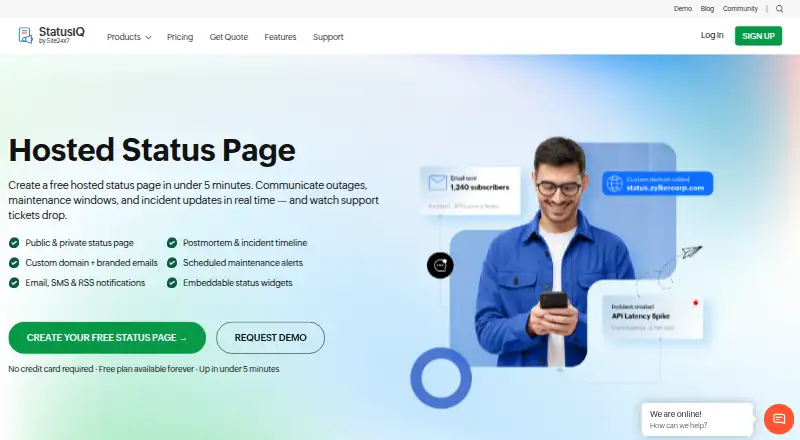
StatusIQ hosts status pages that organizations can use to communicate service health, outages, maintenance windows, and incident updates. Pages can be public or password-protected for internal teams, partners, or customer groups. Subscribers can receive email, SMS, or RSS updates, including alerts for selected components. StatusIQ supports custom domains, logos, favicons, brand colors, and custom email sender domains; paid plans add automatically provisioned SSL for custom domains. Monitoring data can come from any monitoring tool through email and REST APIs, and linked Site24x7 monitors can update page components when downtime alerts occur. Teams can also display service health with floating or inline widgets, and use a postmortem editor with rich text, tables, and links. The Free plan includes one page, 10 components, and 100 subscribers. Green costs $9.00 per month and Blue costs $50.00 per month; paid plans offer a 30-day trial without requiring a credit card. StatusIQ is available on web, Android, iOS, and API.
Good
- Public and password-protected pages are supported.
- Email, SMS, and RSS incident updates are available.
- Linked Site24x7 monitors can update components automatically.
- Free plan includes 10 components and 100 subscribers.
Watch out
- Free plan is limited to one status page.
- Free plan includes email notifications only.
- Custom-domain SSL is supported on paid plans.
Who it suits
StatusIQ suits teams that need to publish service status and send incident updates to customers or internal audiences. It may also fit teams that want monitoring integrations and per-component subscriptions.
Verdict
StatusIQ combines status pages, incident notifications, monitoring integrations, and in-product widgets. A free plan is available, while SMS notifications and custom-domain mapping are among Green plan features.
Plans and prices
From StatusIQ's own pricing page, checked 28 Sep 2026.
| Plan | Price | What it gives you |
|---|---|---|
| Free | Free | 1 Free page · 10 components · 5 team members · 1,000 API calls/day · 100 subscribers · incident history up to 1 year · component status history up to 7 days · $ 0 billed anually |
| Green | $10 a month | 1 Green + 2 Free/Basic pages · 50 components per page · unlimited team members · 50,000 API calls/day · 250 subscribers · incident history up to 5 years · component status history up to 7 days · $9/mo billed anually |
| Blue | $59 a month | 1 Blue + 2 Free/Basic pages · 200 components per page · unlimited team members · 100,000 API calls/day · 500 subscribers · 50 Auth subscribers · incident history up to 5 years · component status history up to 90 days · $50/mo billed anually |
| Additional Green page | $10 a month | Paid account holder required for add-ons · $10 per status page/month |
| Additional Blue page | $59 a month | Paid account holder required for add-ons · $59 per status page/month |
The facts
Each one read from StatusIQ's own pages, with the date it was checked.
What it does
- Analytics
- StatusIQ page analytics include status-page visits, iCalendar, and RSS feed support.checked 28 Sep 2026
- Compliance
- Site24x7 says its controls and PII processing adhere to ISO/IEC 27001, ISO/IEC 27017, ISO/IEC 27018, and GDPR.checked 28 Sep 2026
- Component limit
- 50checked 19 Sep 2026
- Custom domain
- Yeschecked 19 Sep 2026
- Custom domain SSL
- Paid plans support custom domain mapping with automatically provisioned SSL.checked 27 Sep 2026
- Customer count
- More than 13,000 customers use Site24x7 StatusIQ.checked 27 Sep 2026
- Customers
- The product page says more than 13,000 customers use Site24x7 StatusIQ.checked 28 Sep 2026
- Customization
- StatusIQ supports custom domains with automatically provisioned SSL, logos, favicons, brand colors, and custom email sender domains.checked 28 Sep 2026
- Incident notifications
- Subscribers can receive incident updates through email, SMS, and RSS, including per-component subscriptions.checked 28 Sep 2026
- Incident updates
- Incident updates cover acknowledgment, investigation, fix in progress, and resolution.checked 27 Sep 2026
- Maintenance scheduling
- Users can publish one-time or recurring maintenance windows with advance subscriber notifications and automatic status updates.checked 28 Sep 2026
- Monitoring integrations
- It can import data from any monitoring tool and display service status and metrics through email and REST APIs.checked 28 Sep 2026
- Monitor integration
- Site24x7 monitor downtime can automatically update linked status page components.checked 27 Sep 2026
- Notification channels
- Subscribers can receive incident notifications through email, SMS, or RSS.checked 27 Sep 2026
- Page visibility
- StatusIQ supports both public pages and password-protected private pages.checked 27 Sep 2026
- Paid from
- 10checked 19 Sep 2026
- Payment methods
- Online payments accept major credit cards and PayPal; purchase orders are also supported.checked 27 Sep 2026
The company
- Company ownership
- ManageEngine is a division of Zoho Corp.checked 27 Sep 2026
- Founded
- 2020checked 28 Sep 2026
- Headquarters
- Chennai, Indiachecked 28 Sep 2026
Money
- Free components
- The Free plan includes 10 components.checked 27 Sep 2026
- Free plan
- The free plan remains available forever with one status page, 10 components, and 100 subscribers.checked 27 Sep 2026
- Free subscribers
- The Free plan includes 100 subscribers.checked 27 Sep 2026
Where it runs
- Mobile apps
- The StatusIQ mobile app is available for Android and iOS.checked 28 Sep 2026
The full review of StatusIQ
StatusIQ is a hosted service for publishing service health and incident updates. It suits teams that need subscriber communications alongside status pages, especially Site24x7 users who want downtime alerts to update components automatically. Its free tier is a sensible starting point; paid plans raise capacity and add options such as SMS and custom domains.
Overview
StatusIQ brings public status pages, password-protected pages, incident updates, and maintenance scheduling into one service. Private pages can serve internal teams, partners, or selected customer groups. Subscribers can follow specific components and receive updates by email, SMS, or RSS, giving teams a way to target communications rather than send every alert to everyone.
Linked Site24x7 monitors can update page components automatically when downtime alerts occur. Other monitoring tools can feed StatusIQ through email and REST APIs, and status and metrics can be displayed on pages. Floating and inline widgets put current service health inside a product, while analytics cover page visits and support iCalendar and RSS.
Branding includes logos, favicons, colors, and custom email sender domains. Paid plans support custom-domain mapping with automatically provisioned SSL. A postmortem editor with rich text, tables, and links helps teams explain incidents after service is restored. Site24x7 says it uses SSL/TLS, AES-256 encryption, and an OWASP-based security framework, and that its controls and PII processing adhere to ISO/IEC 27001, ISO/IEC 27017, ISO/IEC 27018, and GDPR.
Key features
The strongest operational fit is the link between monitoring and communication: Site24x7 downtime alerts can flow directly to a linked status component, while other tools can provide data through email or REST APIs. That makes StatusIQ more than a manually maintained announcement page, though the automatic component update is specifically described for Site24x7 monitors.
Team alerts can go to Slack, Teams, PagerDuty, and webhooks. Unlimited team members are included with Green and Blue, which is useful for shared incident ownership without a stated seat cap. The Android and iOS apps extend the service beyond its web and API platforms.
Pricing
StatusIQ uses a freemium model, and its paid plans include a 30-day trial. No credit card is required to start a trial or free account. Online payment supports major credit cards and PayPal; purchase orders are also supported.
| Plan | Price | What it includes |
|---|---|---|
| Free | free | 1 status page, 10 components, 100 subscribers, and email notifications. Standard support. |
| Green | $9 a month | 1 Green page plus 2 Free/Basic pages; 50 components and 250 subscribers per page; SMS notifications and custom-domain mapping. Unlimited team members and Classic support. |
| Blue | $50 a month | 1 Blue page plus 2 Free/Basic pages; 200 components and 500 subscribers per page; SAML SSO and custom HTML and CSS. Unlimited team members and Classic support. |
| Additional Green page | $10 a month | Additional Green page; requires a paid account. |
| Additional Blue page | $59 a month | Additional Blue page; requires a paid account. |
Free is adequate for a small service with modest audience and email-only alerts, but its 10-component and 100-subscriber caps leave little room for growth. Green is the practical step up for teams that need SMS, a custom domain, or more capacity: its 50 components and 250 subscribers are per page, and the plan includes two extra Free/Basic pages. Blue is aimed at larger or more access-controlled deployments, with four times Green's component allowance per page, twice its subscriber limit, plus SAML SSO and custom HTML and CSS. Additional pages are not standalone purchases; a paid account is required.
Platforms
StatusIQ is available on web and API, with mobile apps for Android and iOS.
Who it's for
StatusIQ is a good match for teams that communicate service health to customers or internal groups and want monitoring data, subscriber alerts, and in-product widgets in the same workflow. Site24x7 customers get the clearest automation benefit. Teams needing a small public page can begin on Free; teams needing SMS or a custom domain have a clear entry point in Green. Organizations needing SAML SSO or greater per-page capacity should consider Blue.
Pros and cons
- Pros: Public and password-protected pages cover both customer and restricted audiences.
- Pros: Component-level subscriptions, email/SMS/RSS alerts, and Site24x7 monitor sync support targeted, partly automated incident communication.
- Pros: Green and Blue include unlimited team members, avoiding a stated seat ceiling as response teams grow.
- Cons: Free is limited to 10 components, 100 subscribers, and email notifications, so growing audiences or SMS needs require a paid plan.
- Cons: Green caps each page at 50 components and 250 subscribers; teams needing SAML SSO or custom HTML and CSS must move to Blue at $50 a month.
- Cons: Extra Green and Blue pages cost 10.00 USD and $59 a month respectively, and require a paid account.
Alternatives
Status Page Software is the broader category directory for comparing status-page tools.
- AppStatus is worth considering if a free plan with monitors, heartbeats, an agent, team members, a workspace, and a Kubernetes cluster better matches the monitoring setup.
- openstatus may suit users prioritizing a self-hosted option; its Hobby plan includes one monitor, one status page, three components, and 10-minute minimum checks.
- Spectate is another option for teams wanting a freemium service with Android, iOS, and web support.
- StatusEntry may fit a smaller public-page use case: its free plan includes one user, unlimited status updates, and two services.
- Instatus is an alternative whose free Starter plan includes 15 monitors, two-minute checks, email alerts, five team members, and two on-call members.
- StatusOwl may appeal to teams wanting a free plan with 25 monitors checked every three minutes, two team members, and 30 days of history.
- StatusPage.me is an alternative for a one-page setup with three monitors per page, 30 days of uptime history, and email notifications on its free plan.
- Freshstatus is another free status-page option.
Verdict
Choose StatusIQ if you need status pages that connect incident communication with monitoring, subscriber channels, and product widgets—and especially if your monitors already run on Site24x7. The free tier gives small services a useful start, while Green adds the custom domain and SMS many customer-facing teams will need. Look elsewhere if your requirements center on a self-hosted deployment, or if Green's per-page capacity is too low and Blue's higher price is not justified.
Getting started
- Visit https://www.site24x7.com/statusiq/.
- Start a free account or a paid-plan trial; a credit card is not required to start either.
- Create a status page and choose public or password-protected visibility.
- Add components and configure email, SMS, or RSS notifications.
- Connect monitoring data through email or REST APIs, or link Site24x7 monitors.
- Use the web, Android, or iOS app, or API access.
Limits worth knowing
The Free plan includes one status page, 10 components, and 100 subscribers, with email notifications. Green costs $9 a month and allows 50 components and 250 subscribers per page; Blue costs $50 a month and allows 200 components and 500 subscribers per page.
Questions
Is StatusIQ free?
Yes. Its Free plan costs nothing billing term and includes one status page, 10 components, 100 subscribers, and email notifications.
What do the paid plans cost?
Green costs $9 a month and Blue costs $50 a month. Additional Green pages cost $10 a month, and additional Blue pages cost $59 a month; add-ons require a paid account.
Is there a free trial?
Paid plans include a 30-day free trial. A credit card is not required to start the trial or a free account.
Which platforms does StatusIQ support?
StatusIQ is listed for web, Android, iOS, and API access.
Can status pages be private?
Yes. StatusIQ supports public pages and password-protected private pages.
Which notification and team integrations are available?
Subscribers can receive email, SMS, or RSS updates. Slack, Teams, PagerDuty, and webhooks are available for team alerts.
Alternatives to StatusIQ
- 1

OnlineOrNot
Free planWebAPILinuxmacOS7.6From $15 a month - 2

openstatus
Free planWebAPILinuxmacOS7.6From $30 a month - 3

StatusPage.me
Free planWebAPIExtensionmacOS7.6From $6 a month - 4

AppStatus
Free planWebAPILinuxmacOS7.5From $67 a year - 5

Atlassian Statuspage
Free planWebAPI7.5From $29 a month - 6
Spectate
Free planAndroidiOSWeb7.5From $12 a month