StarForce Reader
StarForce Reader is a free application for viewing PDF, EPUB, SFPDF, and PCDOC files; on mobile devices, it can also play protected videos.
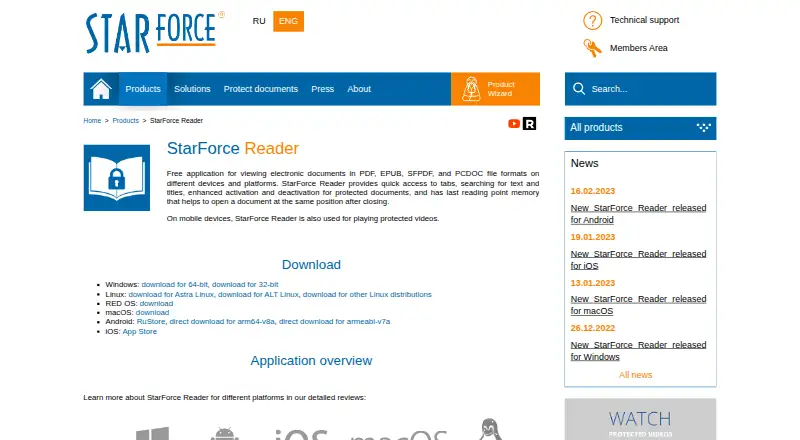
What StarForce Reader is
StarForce Reader is a free application for viewing PDF, EPUB, SFPDF, and PCDOC files; on mobile devices, it can also play protected videos. Its reading tools include tabs, text and title searches, and a saved last reading position. The product page also lists activation and deactivation controls for protected documents. Downloads are listed for Windows, Linux, RED OS, macOS, Android, and iOS. Protected-file rules affect how some documents can be used: on Windows, opening a protected document for the first time activates it and binds it to the computer’s software and hardware configuration. Printing depends on permission set by the publisher, and transferring activation to another computer may be disabled. On Android, uninstalling the app removes the protected-document license, so another activation is needed after reinstalling to view that document. The maker provides a technical support form and recommends SF Helper for diagnosing issues with protected applications.
Good
- Free viewer for PDF, EPUB, SFPDF, and PCDOC.
- Available for Windows, Linux, macOS, Android, and iOS.
- Includes tabs, searches, and reading-position memory.
- Plays protected videos on mobile devices.
Watch out
- Protected-file printing depends on publisher permission.
- Windows activation binds a document to the computer.
- Android uninstall removes protected-document licenses.
- Another activation may be needed after Android reinstall.
Who it suits
StarForce Reader suits people who need to read PDF, EPUB, SFPDF, or PCDOC files across desktop and mobile platforms. It may also suit readers who need to view protected documents or videos.
Verdict
StarForce Reader covers common ebook and PDF formats as well as protected documents, with mobile video playback. Check the activation and printing restrictions if you rely on protected files.
Plans and prices
From StarForce Reader's own pricing page, checked 29 Sep 2026.
| Plan | Price | What it gives you |
|---|---|---|
| StarForce Reader | Free | Free document viewer · no price listed |
The facts
Each one read from StarForce Reader's own pages, with the date it was checked.
Where it runs
- App size and launch
- The maker describes the app as small and says it opens quickly to allow users to start reading.checked 29 Sep 2026
- Platform availability
- Downloads are listed for Windows, Linux, RED OS, macOS, Android, and iOS.checked 29 Sep 2026
What it does
- Deactivation limit
- The Windows guide says deactivation to transfer a document's activation to another computer may be disabled.checked 29 Sep 2026
- Installation
- The maker describes the installation as clean and says it does not promote third-party programs or utilities.checked 29 Sep 2026
- Mobile reinstall limit
- The Android overview says uninstalling the app also removes the protected document license, so reinstalling requires another activation to view that document.checked 29 Sep 2026
- Printing limit
- The Windows guide says printing is available only if the publisher permits it in the serial number settings.checked 29 Sep 2026
- Protected document activation
- The Windows guide says opening a protected document for the first time activates it and binds it to the computer's software and hardware configuration.checked 29 Sep 2026
- Protected video
- On mobile devices, StarForce Reader can also play protected videos.checked 29 Sep 2026
- Purpose
- StarForce Reader is a free application for viewing PDF, EPUB, SFPDF, and PCDOC files.checked 29 Sep 2026
- Reading tools
- The product page lists tabs, text and title search, protected document activation and deactivation, and memory of the last reading position.checked 29 Sep 2026
- Support
- StarForce provides a technical support page with a feedback form and recommends its SF Helper utility for diagnosing problems with protected applications.checked 29 Sep 2026
- Supported formats
- The product page says it can view ordinary PDF and EPUB files plus protected SFPDF and PCDOC files.checked 29 Sep 2026
The company
- Founded
- 2000checked 28 Sep 2026
- Headquarters
- The contacts page lists StarForce Moscow Headquarters at 125239, Moscow, P.O.B. 12.checked 29 Sep 2026
- Maker
- The maker identifies itself as Protection Technology, LLC and says it has developed software solutions since 2000.checked 29 Sep 2026
Money
- Free plan
- Yeschecked 24 Sep 2026
The full review of StarForce Reader
Overview
StarForce Reader is a free reader for PDF and EPUB files, as well as SFPDF and PCDOC documents protected with StarForce. It suits readers who receive protected publications or video on mobile and need a way to open them. Its appeal is broad format coverage at no cost; protected documents, however, come with activation and use restrictions that can complicate transfers and reinstallation.
Key features
Tabs, search by text or title, and a saved last reading position cover useful basics for navigating and returning to a document. Mobile video playback extends the app beyond ebooks and PDFs, but only for protected videos. Reader’s role is therefore strongest when a publisher supplies StarForce-protected material, rather than for readers seeking tools beyond document viewing.
Opening a protected document for the first time on Windows activates it and binds it to that computer’s software and hardware configuration. Moving it may not be possible: deactivation to transfer an activation can be disabled. Printing is also conditional on the publisher allowing it in the serial number settings. On Android, uninstalling Reader removes a protected document’s license, so reinstalling requires another activation. These rules matter if you switch computers, print regularly, or expect to reinstall without publisher involvement.
The maker describes installation as clean, without promotion of third-party programs or utilities, and the app as small and quick to open. StarForce offers a technical support feedback form and recommends SF Helper to diagnose problems with protected applications.
Pricing
StarForce Reader is free: the StarForce Reader plan costs nothing and is described as a free document viewer. There is no paid tier to weigh against it, so the decision is about format and protection compatibility rather than feature upgrades. The zero price does not remove publisher-set printing rules or activation limits.
Platforms
Downloads are listed for Windows, Linux, RED OS, macOS, Android, and iOS. The platform field also identifies Android, iOS, Linux, macOS, and Windows. The plan itself names Windows, while mobile devices are specifically identified for protected video playback and Android has the stated license-removal limitation after uninstalling.
Who it's for
Choose Reader if you need to open ordinary PDF or EPUB files alongside StarForce-protected SFPDF or PCDOC documents, particularly when a publisher also distributes protected video for mobile playback. It is a less suitable choice for people who need dependable document transfer between computers, unrestricted printing, or frictionless Android reinstallation of protected files.
Pros and cons
- Pros: Free access to PDF, EPUB, SFPDF, and PCDOC viewing makes it useful for mixed ordinary and protected reading without a subscription.
- Pros: Tabs, text and title search, and remembered reading position support straightforward document navigation.
- Pros: Protected video playback on mobile adds a use beyond document reading.
- Cons: First-open activation binds a protected document to a Windows computer’s software and hardware configuration.
- Cons: Transfer may be blocked by disabled deactivation, and printing depends on publisher permission.
- Cons: Android uninstalling removes the protected document license, requiring another activation after reinstall.
Alternatives
For general PDF reading, consider PDF Readers. The free UPX and MPRESS, both aimed at executable formats, are alternatives only if your need is executable-format software rather than reading. TinyLoad is another free Windows alternative. Enigma Virtual Box is free Windows application virtualization software, a different fit from document viewing. For paid protection software, Sentinel EMS offers a trial and supports API, Linux, macOS, self-hosted, web, and Windows environments; consider it when those platforms and a paid protection offering suit your needs. Virbox Protector is a paid option with a trial across Android, iOS, Linux, macOS, and Windows. VMProtect is paid, offers a trial, and supports Linux, macOS, and Windows. AlushPacker is a free Windows alternative.
For adjacent categories rather than a reader replacement, browse Executable Packers or Game DRM Software.
Verdict
StarForce Reader is a sensible no-cost choice when you need to read StarForce-protected documents or play protected video on mobile, while still covering ordinary PDF and EPUB. Its key trade-off is control: activation can bind files to one computer, transfer may be disabled, printing is publisher-dependent, and Android reinstalling can require a fresh activation. If protected content is central to your reading, Reader has a clear purpose; if you need portable, freely printable documents, look elsewhere.
Getting started
- Visit the StarForce Reader product page.
- Choose a listed download for Windows, Linux, RED OS, macOS, Android, or iOS.
- Install the application and open a PDF, EPUB, SFPDF, or PCDOC file.
- For a protected document on Windows, open it to activate it on that computer.
- On mobile, use Reader to play protected video.
Limits worth knowing
Printing a protected document is available only when the publisher permits it in the serial number settings, and activation transfer to another computer may be disabled. On Android, uninstalling Reader removes the protected document license, so another activation is needed after reinstalling.
Questions
Is StarForce Reader free?
Yes. It is offered as a free application, and its plan is listed as free.
Which formats can it view?
It supports ordinary PDF and EPUB files, plus protected SFPDF and PCDOC files.
Which platforms have downloads?
Downloads are listed for Windows, Linux, RED OS, macOS, Android, and iOS.
Can it play video?
It can play protected videos on mobile devices.
Can protected documents be printed or moved to another computer?
Printing depends on whether the publisher permits it in the serial number settings. Deactivation to transfer a document’s activation may be disabled.
Who makes StarForce Reader?
The maker identifies itself as Protection Technology, LLC, and says it has developed software solutions since 2000.
Alternatives to StarForce Reader
- 1
Kiosk
Free planOpen sourceAndroidiOSWebExtension8.0Free plan - 2
KDAN PDF
Free planAndroidiOSmacOSWindows7.8From $59.99 a year - 3

MuPDF
Free planAndroidiOSWebLinux7.7From $299 a month - 4

Foxit PDF Reader
Free planAndroidiOSWebmacOS7.3Free plan - 5

Launchpad
Free planWebAPILinuxSelf-hosted7.0Free plan - 6
Okular
Free planLinuxmacOSWindows6.9Free plan