
Launchpad
Launchpad is a free collaboration platform for open-source projects and community contributors, with tools to build and publish software.
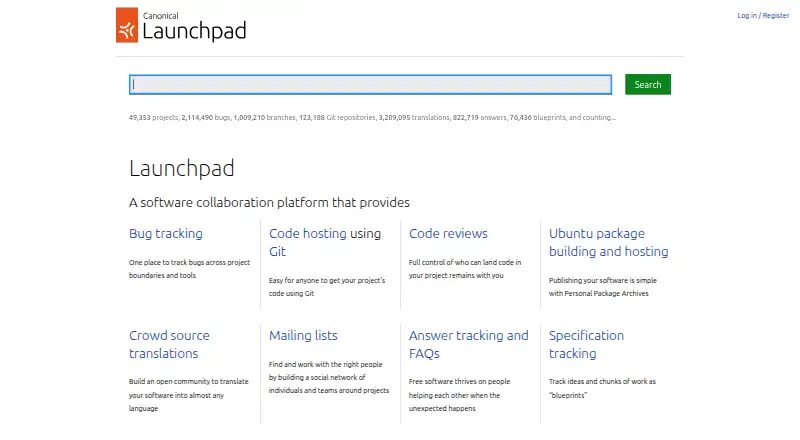
What Launchpad is
Launchpad is a free collaboration platform for open-source projects and community contributors, with tools to build and publish software. Projects can host Git repositories, review and merge changes, and connect code changes to bug reports. Its bug tracking can also integrate reports from Bugzilla, Trac, GitLab, and Mantis. Teams can build and distribute Debian packages, snaps, rocks, charms, and OCI images; documented package architectures include AMD64, AMD64v3, ARM, and RISC-V. Localization tools support importing, exporting, and sharing translations, while blueprints help projects track ideas and work. Launchpad Answers provides a place to manage community help requests and FAQs. For automation, it offers a REST-style API, the launchpadlib Python client, and webhooks. Free use is listed for open-source software projects. Commercial projects can request private code branches, bugs, teams, mailing lists, and PPAs, but these features require Canonical authorization. The security documentation describes least-privilege access, restrictive networking, and fine-grained permissions, and says automatic security monitoring was not in place as of July 2023.
Good
- Free for open-source software projects.
- Git hosting supports code review and merge proposals.
- Can build and distribute multiple package formats.
- Includes localization tools and project blueprints.
- REST-style API, Python client, and webhooks support automation.
Watch out
- Private commercial features require Canonical authorization.
- Automatic security monitoring was not in place as of July 2023.
- Security documentation says package downloads rely on client-side cryptographic verification rather than TLS.
Who it suits
It suits open-source projects and their community contributors who need code hosting, bug tracking, package building, or localization tools. Commercial projects seeking private features must obtain Canonical authorization.
Verdict
Launchpad brings code collaboration, bug tracking, package distribution, and localization into one platform for open-source projects. Commercial users should note that private project features require Canonical authorization.
Plans and prices
From Launchpad's own pricing page, checked 4 Oct 2026.
| Plan | Price | What it gives you |
|---|---|---|
| Open-source projects | Free | For open-source software projects |
| Commercial subscription | Priced on request | Private code branches · private bugs by default · private teams and mailing lists · private PPAs · requires Canonical authorization |
The facts
Each one read from Launchpad's own pages, with the date it was checked.
What it does
- API
- Launchpad operations can be scripted through its REST-style API and the launchpadlib Python client.checked 4 Oct 2026
- API and automation
- Launchpad offers a REST-style API, a launchpadlib Python client, and webhooks for automating external integrations.checked 4 Oct 2026
- Bug tracking
- Launchpad tracks bugs across projects and can integrate reports from Bugzilla, Trac, GitLab, and Mantis.checked 4 Oct 2026
- Build architectures
- The documentation lists AMD64, AMD64v3, ARM, and RISC-V among supported package architectures.checked 4 Oct 2026
- Code hosting
- Launchpad supports Git hosting, code review, and merge proposals.checked 4 Oct 2026
- Commercial privacy
- Commercial projects can request private code branches, private bugs by default, private teams and mailing lists, and private PPAs; these features require Canonical authorization.checked 4 Oct 2026
- Git hosting
- Projects can host Git repositories, review and merge changes, and connect code changes to bug reports.checked 4 Oct 2026
- Integrations
- Launchpad documentation describes bug tracker integrations with Bugzilla, Trac, GitLab, and Mantis, as well as a REST-style API, launchpadlib, and webhooks.checked 4 Oct 2026
- Intended users
- The manual describes Launchpad as a platform for open-source projects and community contributors.checked 4 Oct 2026
- Package building
- Launchpad can build and distribute Debian packages, snaps, rocks, charms, and OCI images.checked 4 Oct 2026
- Privacy controls
- Launchpad supports private security bug reports and documents privacy and confidentiality controls for projects.checked 4 Oct 2026
- Purpose
- Launchpad is designed for open-source collaboration and provides tools to build and publish software.checked 4 Oct 2026
- Security
- The security documentation says traffic is secured by TLS except package downloads, which are cryptographically verified on the client side.checked 4 Oct 2026
- Security controls
- The security documentation describes least-privilege access, restrictive networking, and fine-grained permissions.checked 4 Oct 2026
- Security monitoring
- The security page says automatic security monitoring was not in place as of July 2023 and that Launchpad had recently been externally pentested.checked 4 Oct 2026
- Support
- Users can seek help through Launchpad Answers and community support documentation.checked 4 Oct 2026
- Translations
- Launchpad provides tools to coordinate software localization, including importing, exporting, and sharing translations.checked 4 Oct 2026
Money
- Free plan
- Yeschecked 22 Sep 2026
- Planning and support
- Projects can use blueprints to track ideas and work, and Launchpad Answers to track community help requests and FAQs.checked 4 Oct 2026
The company
- Maker
- The Launchpad site identifies Canonical Ltd. in its copyright notice.checked 4 Oct 2026
The full review of Launchpad
Overview
Launchpad is a software development service for coordinating open-source projects, from source changes to releases and community support. It is a strong fit for contributor-led teams that need several parts of that workflow together; teams seeking private commercial workspaces should look elsewhere unless Canonical authorizes the required features.
Key features
Git hosting, code review, and merge proposals sit alongside bug tracking, with changes connected to bug reports. The tracker can integrate reports from Bugzilla, Trac, GitLab, and Mantis, making Launchpad useful when a project wants to coordinate work across existing trackers rather than bring every report into a single system. Blueprints add a way to track ideas and work.
Built-in CI/CD can build and distribute Debian packages, snaps, rocks, charms, and OCI images. The documented architecture range includes AMD64, AMD64v3, ARM, and RISC-V. This is a substantial release toolkit for projects using those package formats, but teams with different delivery needs should not assume it covers every deployment workflow.
Localization tools support importing, exporting, and sharing translations, while Launchpad Answers handles community questions and FAQs. A REST-style API, launchpadlib Python client, and webhooks support automation and integrations, which gives projects options for connecting Launchpad to external workflows.
Launchpad documents least-privilege access, restrictive networking, and fine-grained permissions. Traffic uses TLS, while package downloads rely on client-side cryptographic verification instead. Its security documentation says automatic monitoring was not in place as of July 2023, though Launchpad had recently undergone an external penetration test. That caveat matters to teams assessing operational security; private security bug reports and project privacy controls are also supported.
Pricing
Open-source projects: free. This plan is for open-source software projects and is the natural choice for community teams that can work publicly.
Commercial subscription: custom pricing. It can include private code branches, private bugs by default, private teams and mailing lists, and private PPAs, but those features require Canonical authorization. Commercial teams should treat that authorization requirement as a gating condition, not just a plan distinction.
Platforms
Launchpad supports web and Linux use, offers an API, and can be self-hosted. That combination suits projects that need browser-based collaboration, scripted access, or self-hosting options.
Who it's for
Launchpad is best for open-source maintainers and community contributors who want code hosting, bug coordination, package building, localization, and help requests in a shared service. It is less straightforward for commercial teams that require private project work, since access to those capabilities depends on Canonical authorization.
Pros and cons
Pros
- Combines Git review, bug tracking, packaging, translation, planning, and community support tools, reducing the need to coordinate those tasks across separate services.
- Bug tracker integrations and API, Python client, and webhooks give projects practical ways to preserve existing workflows and automate connections.
- The free open-source plan includes a broad set of collaboration and release capabilities for community projects.
Cons
- Private commercial features require Canonical authorization, which may complicate adoption for teams that need private branches, bugs, or package archives.
- Package builds target a defined set of package formats, so projects with other delivery workflows may need additional tooling.
- Automatic security monitoring was not in place as of July 2023, a consideration for organizations evaluating operational security requirements.
Alternatives
If you are choosing a window-management tool rather than an open-source project collaboration service, spectrwm is a free X11 window manager available for Linux, macOS, and Windows. For a Windows option with a free version and a paid lifetime license billed per machine, consider DisplayFusion. The other listed alternatives are Reloop, Amethyst, awesome, bug.n, i3, and Qtile.
Verdict
Choose Launchpad if you run an open-source project and want code collaboration, bug tracking, release packaging, and community localization and support in one service. Its breadth and free open-source plan are the main reasons to choose it; commercial users who need private project features should look elsewhere if Canonical authorization is not available.
Getting started
- Open https://launchpad.net/
- Choose web, Linux, API, or self-hosted access
- Create or join an open-source software project on the free plan
- Host Git repositories and configure code review or merge proposals
- Connect bug trackers, APIs, launchpadlib, or webhooks as needed
Limits worth knowing
The free Open-source projects plan is for open-source software projects. Private branches, private bugs by default, private teams and mailing lists, and private PPAs belong to the commercial subscription and require Canonical authorization.
Questions
Is Launchpad free?
Yes. Open-source software projects have a plan listed as free.
Which platforms does Launchpad support?
It is available through the web, Linux, an API, and self-hosted deployments.
Can Launchpad build packages?
Yes. It can build and distribute Debian packages, snaps, rocks, charms, and OCI images.
What integrations are available?
Bug tracking integrates with Bugzilla, Trac, GitLab, and Mantis. Automation uses a REST-style API, launchpadlib, and webhooks.
Who makes Launchpad?
The Launchpad site identifies Canonical Ltd. in its copyright notice.
Alternatives to Launchpad
- 1

DisplayFusion
Free planAndroidiOSAPIWindows7.9$34 one-time - 2
Avidemux
Free planOpen sourceWebLinuxmacOSWindows7.3Free plan - 3

Dexpot
Free planAPIWindows7.2€24.90 one-time - 4
spectrwm
Free planOpen sourceLinuxmacOSWindows7.1Free plan - 5

Reloop
Free planSelf-hosted7.0From $10 a month - 6
4t Tray Minimizer
Free planWindows6.6$19.95 one-time