awesome
Awesome is a free, highly configurable window manager for X on Linux.
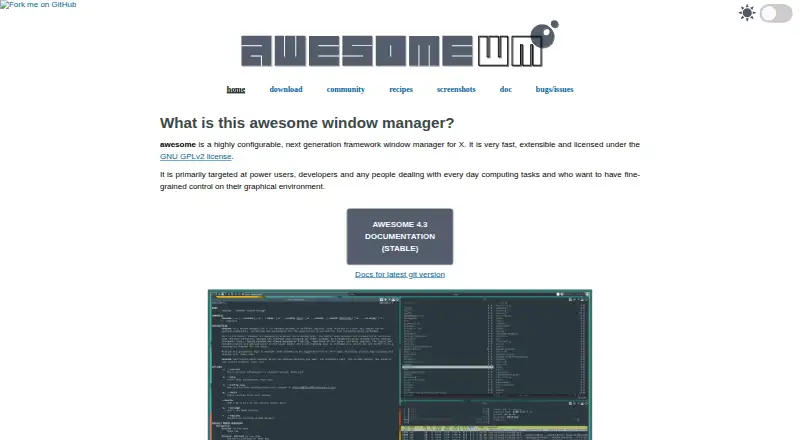
What awesome is
Awesome is a free, highly configurable window manager for X on Linux. It is a framework rather than a complete desktop environment, and is primarily aimed at power users, developers, and people who want precise control over their graphical setup. Users can extend it with Lua, and its keyboard-driven design allows everything to be done without a mouse. Windows can be assigned to one or more tags, with several tags shown at once. XRandR support provides per-screen desktops for multihead setups. Awesome implements standards including EWMH, XDG Base Directory, XEmbed, Desktop Notification, and System Tray, and it supports D-Bus. Lua extensions are available for dynamic tagging, widgets, tabs, and layouts. The project uses the asynchronous XCB library and says this makes it less subject to latency than window managers based on Xlib. Packages are available for many distributions, including Arch Linux, Debian, Ubuntu, and Fedora. The latest stable release listed is version 4.3, released on 28 January 2019.
Good
- Lua makes the framework extensible.
- Everything can be controlled from the keyboard.
- Supports per-screen desktops through XRandR.
- Windows can belong to multiple tags.
- Packages are available for many distributions.
Watch out
- It is not a desktop environment.
- Latest stable release listed is version 4.3 from 2019.
- Source builds may encounter LGI and Lua path problems.
Who it suits
Awesome suits Linux users who are comfortable configuring their environment and want keyboard control and Lua extensibility. It is a window manager, not a full desktop environment.
Verdict
Awesome offers extensive control for users willing to configure a window manager rather than choose a full desktop environment. Its listed stable release is old, and the project recommends distribution packages over source builds.
Plans and prices
From awesome's own pricing page, checked 1 Oct 2026.
| Plan | Price | What it gives you |
|---|---|---|
| Awesome | Free | GNU GPLv2 license · X window manager |
The facts
Each one read from awesome's own pages, with the date it was checked.
What it does
- Configuration
- Awesome is designed as a framework window manager that is extensible using the Lua programming language.checked 1 Oct 2026
- Distribution support
- Packages are available for distributions including Arch Linux, Debian, Ubuntu, Fedora, FreeBSD, OpenBSD, NetBSD and others.checked 1 Oct 2026
- Documentation
- Official documentation includes Lua API documentation, the awesome manpage, awesomerc manpage and awesome-client manpage.checked 1 Oct 2026
- Integrations
- Awesome supports D-Bus and offers Lua extensions for dynamic tagging, widgets, tabs and layouts.checked 1 Oct 2026
- Keyboard control
- Everything in Awesome can be performed with the keyboard without using a mouse.checked 1 Oct 2026
- Latest stable release
- The download page identifies version 4.3 as the latest stable release, released on 28 January 2019.checked 1 Oct 2026
- License
- Awesome is licensed under the GNU GPLv2 license.checked 1 Oct 2026
- Multihead support
- Awesome provides real multihead support through XRandR with per-screen desktops called tags.checked 1 Oct 2026
- Not a desktop environment
- The FAQ states that Awesome is a window manager, not a desktop environment.checked 1 Oct 2026
- Performance
- Awesome uses the asynchronous XCB library and says this makes it less subject to latency than Xlib-based window managers.checked 1 Oct 2026
- Product type
- Awesome is a highly configurable framework window manager for X.checked 1 Oct 2026
- Release verification
- The stable source archives are provided with GPG signatures.checked 1 Oct 2026
- Source installation
- The project recommends using the package supplied by your distribution because source builds can have LGI and Lua 5.1 package-search-path problems.checked 1 Oct 2026
- Standards
- Awesome implements EWMH, XDG Base Directory, XEmbed, Desktop Notification and System Tray standards.checked 1 Oct 2026
- Support
- The project directs users to the #awesome channel on OFTC IRC, Stack Overflow, Reddit and GitHub for questions and issue reports.checked 1 Oct 2026
- Target users
- It is primarily targeted at power users, developers and people who want fine-grained control of their graphical environment.checked 1 Oct 2026
- Window organization
- Windows can be assigned to one or more tags, and several tags can be displayed at the same time.checked 1 Oct 2026
The full review of awesome
Awesome is a Lua-extensible window manager for Linux and X, best suited to power users and developers who want to shape their graphical environment. Its keyboard-first controls and per-screen tags offer meaningful flexibility, provided you are willing to configure a window manager rather than expect a complete desktop.
Overview
Awesome is a framework for managing windows, not a desktop environment. That distinction matters: it gives you control over how windows are arranged and organized, but it is not a complete desktop experience. Its extensibility makes it a strong fit for users who want to build a tailored setup, while those seeking a ready-to-use desktop environment should look elsewhere.
Key features
Lua is the foundation for extending Awesome. Its extensions support dynamic tagging, widgets, tabs and layouts; layout presets, application rules and window grouping provide further ways to shape a consistent workflow. This breadth rewards configuration, but the framework approach makes Awesome less suitable for anyone who wants a fixed, preconfigured set of conventions.
Every operation can be performed from the keyboard, which suits users who prefer mouse-free control. Windows can be assigned to multiple tags, and several tags can appear at once, giving you flexible ways to group and view work. For multi-monitor setups, XRandR support gives each screen its own tags, rather than treating all displays as one workspace.
Awesome uses asynchronous XCB, which the project says is less prone to latency than Xlib-based window managers. It also supports D-Bus and implements EWMH, XDG Base Directory, XEmbed, desktop notification and system tray standards. These integrations can help it fit into a broader Linux setup, though they do not make it a desktop environment.
Pricing
Awesome is free under the GNU GPLv2 license. The Awesome plan costs nothing and provides an X window manager. With no paid tier, its trade-off is not a reduced feature set but the time and effort needed to configure a framework window manager.
Platforms
Awesome is for Linux and X. Packages are available for distributions including Arch Linux, Debian, Ubuntu and Fedora, as well as FreeBSD, OpenBSD and NetBSD. The project recommends installing your distribution's package: source builds can encounter LGI and Lua 5.1 package-search-path problems. Stable source archives carry GPG signatures. The documentation includes the Lua API, the awesome, awesomerc and awesome-client manpages; questions and issue reports are directed to OFTC IRC, Stack Overflow, Reddit and GitHub.
Who it's for
Choose Awesome if you are comfortable configuring software and want fine-grained control over keyboard behavior, window rules, layouts and multihead workspaces. Developers and power users are its natural audience. If you want a complete desktop environment or do not want to maintain a customized setup, a less framework-oriented option is a better match.
Pros and cons
- Pros: Lua extensibility supports custom tags, widgets, tabs and layouts, useful for building a window-management workflow around your needs.
- Pros: Keyboard-only operation and per-screen XRandR tags suit mouse-free work and multi-monitor organization.
- Pros: Free under GNU GPLv2, with packages across Linux and BSD distributions.
- Cons: It is a window manager, not a desktop environment, so it does not serve users looking for a complete desktop.
- Cons: Its framework design puts configuration work on the user; source installation can also run into LGI and Lua 5.1 package-search-path issues.
Alternatives
Window Management Software is the broader category to browse if Awesome's framework approach is not what you need.
- i3 is another free Linux and BSD option; choose it if you prefer its window-manager approach over Awesome's Lua framework.
- Qtile is a free Linux desktop window manager and compositor; consider it if that description better fits your needs.
- yabai is free and macOS-only, so it is the alternative for Mac users.
- komorebi covers macOS and Windows and has a freemium model; its Windows single-platform license is $10 a month, billed monthly.
- spectrwm is a free X11 window manager that supports Linux, macOS and Windows; consider it if you want an alternative with that platform range.
- bug.n is a free Windows window manager, for users who want window management on Windows.
- Amethyst is free and open source for macOS, with configurable layouts, keyboard shortcuts, and application floating or tiling rules; choose it for that platform and feature set.
- DisplayFusion is freemium for Windows, with a free version and a Pro Standard lifetime license for $34 per machine; consider it if you want a Windows option with a paid lifetime tier.
Verdict
Awesome is a strong choice for Linux power users who want keyboard control, flexible tagging and Lua-based customization in a free X window manager. Its biggest strength—being a framework—is also its main cost in effort. Look elsewhere if you want a complete desktop environment or prefer not to configure your window manager.
Alternatives to awesome
- 1

DisplayFusion
Free planAndroidiOSAPIWindows7.9$34 one-time - 2
Avidemux
Free planOpen sourceWebLinuxmacOSWindows7.3Free plan - 3

Dexpot
Free planAPIWindows7.2€24.90 one-time - 4
spectrwm
Free planOpen sourceLinuxmacOSWindows7.1Free plan - 5

Launchpad
Free planWebAPILinuxSelf-hosted7.0Free plan - 6

Reloop
Free planSelf-hosted7.0From $10 a month