Qtile
Qtile is a free tiling window manager for Linux, written and configured in Python.
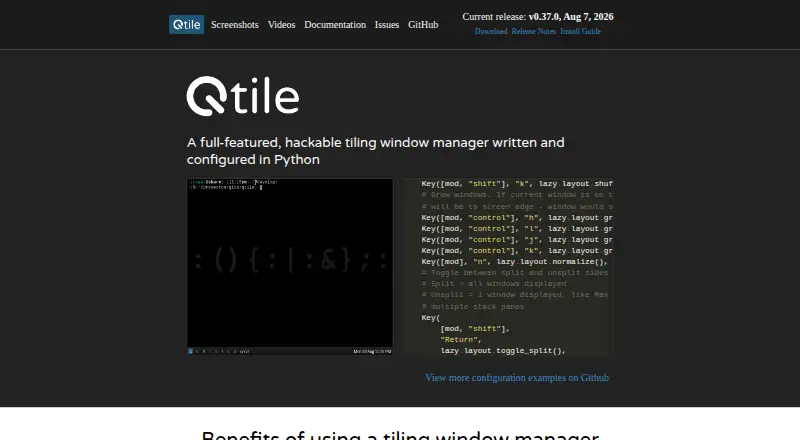
What Qtile is
Qtile is a free tiling window manager for Linux, written and configured in Python. It is available as an X11 window manager and as a Wayland compositor, whose backend uses the wlroots compositor library. Users can extend it with their own layouts and widgets, and use built-in commands. Its command shell lets users manage and inspect Qtile, while remote scripting can set up workspaces, manipulate windows, and update status-bar widgets. The project provides installation guides for Arch, Fedora, Funtoo, Ubuntu/Debian, Slackware, FreeBSD, and NixOS; its stable release can also be installed from PyPI. Qtile is distributed under the MIT license. The project aims to support the last three CPython versions and usually the latest stable PyPy. Its site separates the more stable official release from a development version that has newer features but may contain bugs. Community support is available through GitHub Discussions, IRC, and Discord.
Good
- Available as both an X11 window manager and Wayland compositor.
- Layouts and widgets can be user-created.
- Remote scripting can manage workspaces and windows.
- Distributed under the permissive MIT license.
Watch out
- The Wayland backend uses the wlroots compositor library.
- The development version may contain new bugs.
Who it suits
Qtile suits Linux users who want a Python-configured tiling window manager or Wayland compositor. The official release is aimed at users who prefer stability, while the development version is for those seeking newer features or planning to hack on Qtile.
Verdict
Qtile offers Python-based configuration and scripting across X11 and Wayland. Choose between its more stable official release and the development version with newer features and possible bugs.
Plans and prices
From Qtile's own pricing page, checked 30 Sep 2026.
| Plan | Price | What it gives you |
|---|---|---|
| Free and open-source | Free | MIT license · Linux desktop window manager/compositor |
The facts
Each one read from Qtile's own pages, with the date it was checked.
What it does
- Community support
- Support is available through GitHub Discussions, IRC and Discord, with Discord bridged to IRC.checked 30 Sep 2026
- Configuration
- Qtile is written and configured entirely in Python.checked 30 Sep 2026
- Customization
- Qtile is simple, small and extensible, with user-created layouts, widgets and built-in commands.checked 30 Sep 2026
- Display systems
- Qtile is available as both an X11 window manager and a Wayland compositor.checked 30 Sep 2026
- Installation
- The stable version can be installed from PyPI with the command `uv tool install qtile`.checked 30 Sep 2026
- Intended users
- The development version is recommended for users who want the latest features or plan to hack on Qtile, while the official release is recommended for users who want stability.checked 30 Sep 2026
- License
- Qtile is distributed under the permissive MIT license.checked 30 Sep 2026
- Release channel
- The official site distinguishes a more stable official release from a development version that has newer features but may contain new bugs.checked 30 Sep 2026
- Remote control
- Its command shell allows all aspects of Qtile to be managed and inspected.checked 30 Sep 2026
- Runtime support
- The project aims to support the last three CPython versions and usually supports the latest stable PyPy.checked 30 Sep 2026
- Scriptability
- Qtile supports remote scripting for setting up workspaces, manipulating windows and updating status-bar widgets.checked 30 Sep 2026
- Wayland dependency
- The Wayland backend uses the wlroots compositor library.checked 30 Sep 2026
- What it does
- Qtile is a full-featured, hackable tiling window manager written and configured in Python.checked 30 Sep 2026
Where it runs
- Linux distributions
- Qtile provides installation guides for Arch, Fedora, Funtoo, Ubuntu/Debian, Slackware, FreeBSD and NixOS.checked 30 Sep 2026
Alternatives to Qtile
- 1

DisplayFusion
Free planAndroidiOSAPIWindows7.9$34 one-time - 2
Avidemux
Free planOpen sourceWebLinuxmacOSWindows7.3Free plan - 3

Dexpot
Free planAPIWindows7.2€24.90 one-time - 4
spectrwm
Free planOpen sourceLinuxmacOSWindows7.1Free plan - 5

Launchpad
Free planWebAPILinuxSelf-hosted7.0Free plan - 6

Reloop
Free planSelf-hosted7.0From $10 a month