
Source 2 Viewer
Source 2 Viewer is a free, open-source tool for inspecting and working with assets from Source 2 games.
What Source 2 Viewer is
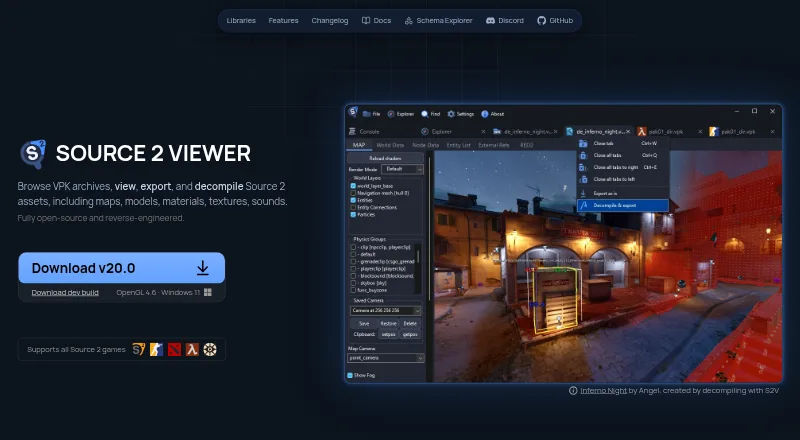
Source 2 Viewer is a free, open-source tool for inspecting and working with assets from Source 2 games. It opens VPK archives, where users can search, extract, and create archives, and it can view maps, models, materials, textures, sounds, physics, animations, particles, shaders, and other resource types. Its 3D renderer includes real-time lighting and animation playback for supported assets from CS2, Dota 2, Deadlock, and other Source 2 games. Maps, models, physics, and animations can be exported to glTF 2.0, with material conversion and batch export; maps, models, and materials can also be decompiled into editable formats for tools such as Hammer, ModelDoc, and Source 2 Workshop Tools. Texture tools cover channels, depth layers, mip levels, cubemaps, and HDR, with image export. The audio player supports WAV, MP3, and Source 2 formats. The graphical interface is Windows-only, though the guide describes running it on Linux and macOS with Wine. A command-line version supports Windows, Linux, and macOS. Some export data may be lost, and not all formats are fully supported.
Good
- Free and open-source.
- Searches, extracts, and creates VPK archives.
- Exports supported assets to glTF 2.0.
- Includes texture and audio inspection tools.
- CLI supports Windows, Linux, and macOS.
Watch out
- The graphical interface is Windows-only.
- Wine is needed to run the GUI on Linux or macOS.
- Some data may be lost during export.
- Not all reverse-engineered formats are supported.
Who it suits
It suits people exploring, extracting, or converting assets from Source 2 game files, including users who want to work with exports in Blender, Unity, or Unreal Engine. Developers can also use the command-line utility or ValveResourceFormat library to handle resource files programmatically.
Verdict
Source 2 Viewer combines archive browsing, asset inspection, export, and decompilation in one free tool. Check its format limitations and GUI platform requirements before relying on it for a particular workflow.
Plans and prices
From Source 2 Viewer's own pricing page, checked 30 Sep 2026.
| Plan | Price | What it gives you |
|---|---|---|
| Source 2 Viewer | Free | Free and open source; not affiliated with Valve |
The facts
Each one read from Source 2 Viewer's own pages, with the date it was checked.
What it does
- 3D viewer
- Its renderer displays maps, models, physics, and particles with reverse engineered PBR shaders and real time lighting.checked 30 Sep 2026
- Audio support
- The built in audio player supports WAV, MP3, and Source 2 audio formats, with waveform visualization and playback controls.checked 30 Sep 2026
- Command line
- A cross platform console application can export and decompile Source 2 resources similarly to the main application.checked 30 Sep 2026
- Decompiler
- It decompiles maps, models, and materials into editable formats for Hammer, ModelDoc, and Source 2 Workshop Tools.checked 30 Sep 2026
- Developer interfaces
- ValveResourceFormat is a .NET library for programmatically opening and extracting Source 2 resource files, with API documentation linked from the product site.checked 30 Sep 2026
- Export
- It exports maps, models, physics, and animations to glTF 2.0, with material conversion and batch export.checked 30 Sep 2026
- Export and decompilation
- It exports maps, models, physics, and animations to glTF 2.0 and decompiles maps, models, and materials into editable formats for Source 2 Workshop Tools.checked 29 Sep 2026
- Format limits
- The project says it is based on reverse engineering and that not all formats are fully supported.checked 30 Sep 2026
- Integrations
- The site describes glTF exports as compatible with Blender, Unity, Unreal Engine, and other tools.checked 30 Sep 2026
- Limitations
- The maker documents that some data may be lost during export and that certain compiled-file data cannot be recovered if Valve’s compiler discarded it.checked 29 Sep 2026
- Open source
- The project describes itself as fully open source and reverse engineered.checked 30 Sep 2026
- Other asset features
- The software includes texture, audio, and shader inspection tools, plus support for Source 2 resource files and KeyValues formats.checked 29 Sep 2026
- Portability
- The getting-started guide says the GUI is portable and requires no installation.checked 29 Sep 2026
- Project status
- The project says it is built by volunteers and is not affiliated with Valve Corporation.checked 29 Sep 2026
- Purpose
- Source 2 Viewer browses VPK archives and views, exports, and decompiles Source 2 assets such as maps, models, materials, textures, and sounds.checked 30 Sep 2026
- Related integrations
- The site says glTF exports are compatible with Blender, Unity, and Unreal Engine, and the app can detect installed Source 2 games on Steam.checked 29 Sep 2026
- Security
- The repository says free code signing is provided by SignPath.io, with a certificate from SignPath Foundation.checked 30 Sep 2026
- Support
- The maker directs users to report issues and notes that reports with a file path and error message usually get looked at quickly.checked 29 Sep 2026
- Support and audience
- The project invites contributors to join its Discord and identifies Source 2 resource exploration and export as its use case.checked 30 Sep 2026
- Texture support
- The texture viewer supports channel, depth layer, mip level, cubemap, and HDR viewing, and can export textures to PNG, TGA, or other image formats.checked 30 Sep 2026
- VPK tools
- It can search, extract, recover deleted files from, and create VPK archives, and supports all VPK versions including Source 1.checked 30 Sep 2026
Where it runs
- CLI platforms
- The command-line utility is available for Windows, Linux, and macOS.checked 29 Sep 2026
- Desktop platforms
- The GUI is Windows-only; the maker’s getting-started guide says it can run on Linux and macOS using Wine.checked 29 Sep 2026
- Platform requirement
- The site lists OpenGL 4.6 and Windows 11 beside its development build download.checked 30 Sep 2026
The full review of Source 2 Viewer
Source 2 Viewer is a free toolkit for browsing VPK archives and inspecting, exporting, or decompiling Source 2 game assets. It suits modders, asset researchers, and developers working with games such as CS2, Dota 2, and Deadlock. Its breadth is a strong reason to choose it, but reverse-engineered format support and the Windows-only GUI narrow its fit.
Overview
The project brings archive management, asset inspection, conversion, and decompilation together, rather than limiting itself to extracting files. It is open source, built by volunteers, and not affiliated with Valve. That makes it useful for exploration and modding workflows, but not a guarantee that every compiled resource will be fully readable or recoverable.
Source 2 Viewer also has a cross-platform command-line utility and ValveResourceFormat, a .NET library for programmatic access to Source 2 resources. The CLI is the more practical route for scripted work; the library is aimed at developers building their own resource tools.
Key features
Archives and asset inspection
The VPK viewer searches, extracts, and creates archives, including all VPK versions and Source 1 VPKs. Batch extraction helps when handling larger collections. The range is valuable for people who need to inspect both archive contents and individual resources in one workflow.
The 3D renderer displays maps, models, physics, and particles from CS2, Dota 2, Deadlock, and other Source 2 games, with real-time lighting and animation playback. Texture tools expose channels, depth layers, mip levels, cubemaps, and HDR, and can export images to PNG, TGA, and other formats. The audio player handles WAV, MP3, and Source 2 audio, with waveform viewing and playback controls. Shader inspection and support for resource files and KeyValues round out the asset coverage.
Export and decompilation
Maps, models, physics, and animations can be exported to glTF 2.0, with material conversion and batch export. The resulting glTF files are described as compatible with Blender, Unity, and Unreal Engine, making the exporter a useful bridge from game assets to common 3D tools. Maps, models, and materials can also be decompiled into editable formats for Hammer, ModelDoc, and Source 2 Workshop Tools.
These outputs have limits: some data may be lost during export, and information discarded by Valve's compiler cannot be recovered. Because the project relies on reverse engineering and does not fully support every format, users with a specific file type or fidelity requirement should treat compatibility as a workflow risk.
Pricing
Source 2 Viewer costs nothing. The free, open-source plan includes the archive tools, viewers, export and decompilation functions, batch extraction, and command-line support; there is no separate paid tier or free-trial decision to make. It is a compelling fit for individual modders and developers who can work within its format and platform constraints.
Platforms
The GUI is Windows-only and portable, requiring no installation. The getting-started guide says it can run on Linux and macOS using Wine, but that is a workaround rather than native GUI support. The command-line utility is available for Windows, Linux, and macOS, so cross-platform users who do not need the graphical viewer have a more direct option. The development build download lists OpenGL 4.6 and Windows 11; that requirement is specifically associated with the development build.
Steam game detection can identify installed Source 2 titles. The project invites issue reports and says reports that include a file path and error message usually receive prompt attention; contributors can also join its Discord.
Who it's for
Choose Source 2 Viewer if you need to search or repack VPKs, inspect varied Source 2 assets, or move supported maps and models into editing tools. Its CLI and .NET library make it relevant to automation and software development as well as GUI-based exploration. It is a weaker choice when you need a native Linux or macOS GUI, guaranteed coverage of a particular compiled format, or lossless recovery of source data.
Pros and cons
- Pros: Archive search, extraction, creation, and batch extraction cover more than simple file browsing.
- Pros: 3D, texture, audio, and shader tools let users inspect assets before exporting them.
- Pros: glTF export and editable decompilation connect supported assets to Blender, Unity, Unreal Engine, Hammer, and ModelDoc workflows.
- Pros: Free, open-source access includes both a cross-platform CLI and a .NET resource library.
- Cons: The graphical application is Windows-only; Linux and macOS users need Wine, while the CLI is the native cross-platform option.
- Cons: Reverse-engineered support is incomplete, and exports may lose data or omit information already discarded by the compiler.
Alternatives
For another free archive and game-asset tool, browse the Game Asset Extractors directory.
- SLADE3 is a free desktop editor for Linux, macOS, and Windows; consider it if you want a broader desktop-platform choice and can accept beta builds that may contain bugs, crashes, or unfinished features.
- VPKEdit is another free option for Linux, macOS, and Windows if a cross-platform VPK tool is the priority.
- AssetRipper offers a free tier with stable and nightly builds for Windows, Mac, and Linux, plus a Premium plan at $10 a month; it is an option for readers comparing free access with a paid tier.
- OpenKH is free software for Linux, macOS, and Windows under Apache-2.0, and requires .NET 8.0 Runtime.
- Rusted PackFile Manager is a free option for Windows, Linux, API, and self-hosted use, with an MIT license requiring a copyright notice.
- QuickBMS is a free, open-source, multiplatform alternative.
- UABEA is a free option for Linux and Windows.
- Project IGI Game Converter is a free Windows option.
Verdict
Source 2 Viewer is the best fit for Source 2 modders and developers who want one free toolkit for archives, asset inspection, export, and decompilation. Its breadth and command-line support make it useful beyond casual browsing. Look elsewhere if a native non-Windows GUI or dependable support for a specific format is essential; reverse-engineered coverage and export fidelity remain real constraints.
Getting started
- Visit the Source 2 Viewer website.
- Use the portable GUI on Windows; the guide describes running the GUI on Linux and macOS through Wine.
- Use the command-line utility on Windows, Linux, or macOS if that fits your workflow.
- Open or extract supported VPK archives and resource files.
Limits worth knowing
The project says not all formats are fully supported. Some data may be lost during export, and compiled-file data discarded by Valve’s compiler cannot be recovered.
Questions
Is Source 2 Viewer free?
Yes. Its listed plan is free, and the project describes itself as open-source.
Which platforms does it support?
The graphical interface is Windows-only, with the guide describing Wine use on Linux and macOS. The command-line utility is available for Windows, Linux, and macOS.
Can it create and extract VPK archives?
Yes. It can search, extract, and create archives, and supports all VPK versions, including Source 1.
What can it export?
It exports maps, models, physics, and animations to glTF 2.0, with material conversion and batch export.
Can its exports be used in other software?
The site describes glTF exports as compatible with Blender, Unity, Unreal Engine, and other tools.
Is it affiliated with Valve?
No. The project says it is built by volunteers and is not affiliated with Valve Corporation.
Alternatives to Source 2 Viewer
- 1
UABEA
Free planOpen sourceLinuxWindows7.0Free plan - 2
AssetRipper
Free planLinuxmacOSWindows6.6From $10 a month - 3

SLADE3
Free planLinuxmacOSWindows6.6Free plan - 4
Game Extractor
Free planWindows6.5$10 one-time - 5
Rusted PackFile Manager
Free planAPILinuxSelf-hostedWindows6.5Free plan - 6
w3m
Free planOpen sourceLinux6.3Free plan