SOP Maker
SOP Maker is a web tool for building, numbering, authorising, and printing controlled Standard Operating Procedures.
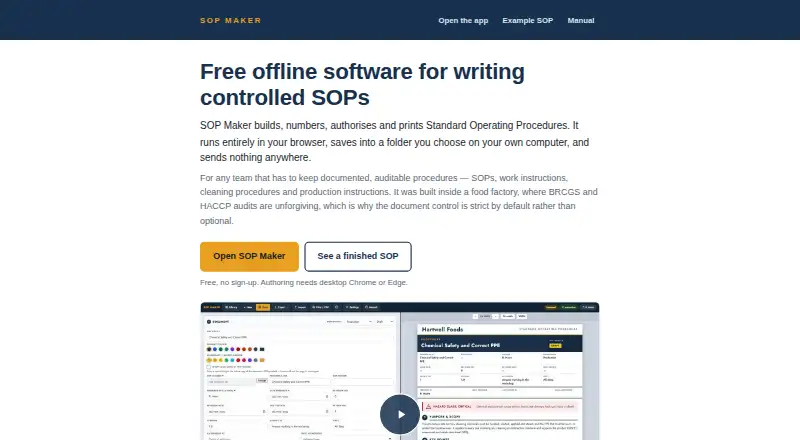
What SOP Maker is
SOP Maker is a web tool for building, numbering, authorising, and printing controlled Standard Operating Procedures. Each SOP can record prepared-by and authorised-by details, a revision number, dates, and Draft, Review, or Approved status. Finished procedures print to A4 PDF with per-page footers and steps kept together across page breaks. The editor includes 158 icons for PPE, cleaning tools, controls, and chemical classes. The tool is intended for teams that need documented, auditable procedures, including food sites working with BRCGS and HACCP audits. SOP data stays in the browser and, when connected, can also be stored in a folder chosen on the user's computer or shared drive. The maker says content is not sent to or stored on a server, and that the tool makes no AI calls or external network requests with user content. Creating or saving SOPs requires desktop Google Chrome or Microsoft Edge. Firefox, Safari, phones, and tablets can open and print issued procedures but cannot create or save them. The downloadable toolkit can run offline after being unzipped and opened; the hosted version works offline after the page loads.
Good
- Records authors, revision numbers, dates, and approval status.
- Prints A4 PDFs with per-page footers.
- Includes 158 icons for workplace procedures.
- Can work offline after setup or page loading.
Watch out
- Authoring requires desktop Google Chrome or Microsoft Edge.
- No approval-routing, electronic signatures, or training records.
- Separate-computer shared-drive saves can collide.
- No third-party security certification, penetration test, or compliance claim.
Who it suits
SOP Maker suits teams that need documented, auditable procedures, including food sites working with BRCGS and HACCP audits. It is a fit for authors able to use desktop Chrome or Edge to create and save procedures.
Verdict
SOP Maker provides structured procedure authoring and printable PDFs, with local and offline use. Its browser requirements and lack of approval-routing or read-and-sign tracking matter for teams with formal workflow needs.
Plans and prices
From SOP Maker's own pricing page, checked 7 Oct 2026.
| Plan | Price | What it gives you |
|---|---|---|
| Free | Free | No paid tier · No sign-up · No usage limit · Free for commercial work |
The facts
Each one read from SOP Maker's own pages, with the date it was checked.
Where it runs
- Browser requirements
- Authoring requires desktop Google Chrome or Microsoft Edge; Firefox, Safari, phones and tablets can open and print issued SOPs but cannot create or save them.checked 7 Oct 2026
What it does
- Document controls
- Each SOP can include prepared-by and authorised-by details, a revision number, dates and Draft, Review or Approved status.checked 7 Oct 2026
- File storage
- SOP data is stored locally in the browser and, when connected, in a folder chosen on the user's computer or shared drive.checked 7 Oct 2026
- Icons
- The software includes 158 icons for PPE, cleaning tools, controls and chemical classes.checked 7 Oct 2026
- Intended users
- It is described for teams that need documented, auditable procedures, including food sites working with BRCGS and HACCP audits.checked 7 Oct 2026
- Network and privacy
- The maker says SOP content is not transmitted to or stored on a server, and the tool makes no AI calls or external network requests with user content.checked 7 Oct 2026
- Offline use
- The downloadable toolkit can be run offline after it is unzipped and opened, and the hosted version continues working offline after the page loads.checked 7 Oct 2026
- PDF output
- Finished SOPs print to A4 PDF with per-page footers and steps kept together across page breaks.checked 7 Oct 2026
- Purpose
- SOP Maker builds, numbers, authorises and prints controlled Standard Operating Procedures.checked 7 Oct 2026
- Security assurance
- The maker says there is no third-party security certification, penetration test or compliance claim.checked 7 Oct 2026
- Shared-drive limit
- The maker says simultaneous saves from separate computers can collide, with the later write winning.checked 7 Oct 2026
- Support
- The maker invites users to email [email protected] with ideas or requests to adapt the tool.checked 7 Oct 2026
- Workflow limits
- The software does not provide approval-routing, electronic signatures, training records, read-and-sign tracking or real-time co-editing.checked 7 Oct 2026
The company
- Headquarters
- Fife, Scotlandchecked 28 Sep 2026