
SMPlayer
SMPlayer is a free, open-source media player for Windows, Linux, and macOS.
What SMPlayer is
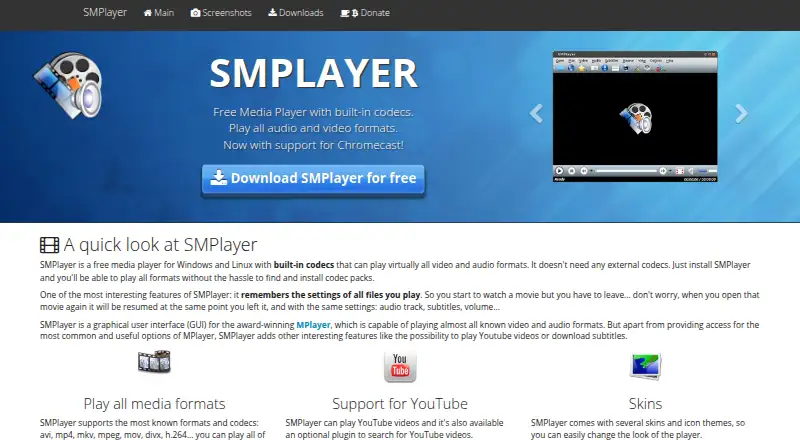
SMPlayer is a free, open-source media player for Windows, Linux, and macOS. It includes built-in codecs to play most audio and video formats without requiring external codecs, and supports network playback, subtitles, hardware acceleration, and 4K playback. Listed formats include AVI, WMV, MP4, Matroska, H.264, MP3, AAC, and more. SMPlayer provides a graphical interface for MPlayer and can also use mpv as its playback engine. It remembers where files stopped and settings such as audio track, subtitles, and volume. Playback options include speed adjustment, audio and video filters, audio and subtitle delay controls, and a video equalizer. The player can play YouTube videos, search for subtitles through OpenSubtitles, and send local videos or online streams to Chromecast devices. The project says it is available in more than 30 languages, and provides a forum for help and a bug tracker for reporting issues. The listed plan is free.
Good
- Built-in codecs support most audio and video formats.
- Available for Windows, Linux, and macOS.
- Remembers playback position and settings.
- Supports subtitles and network playback.
- Can send videos and streams to Chromecast.
Watch out
- Website uses Google Analytics and AdSense cookies.
- Privacy policy covers information submitted through forms and email.
Who it suits
SMPlayer suits people looking for a no-cost player on Windows, Linux, or macOS, especially those who need subtitles, network playback, or playback controls. It may also suit viewers who want to resume files with remembered settings.
Verdict
SMPlayer offers format playback and adjustment controls across three desktop platforms without a listed price. Its player features are broader than basic playback, though its website privacy policy notes analytics and advertising cookies.
Plans and prices
From SMPlayer's own pricing page, checked 3 Oct 2026.
| Plan | Price | What it gives you |
|---|---|---|
| SMPlayer | Free | Free media player · open source under GPL |
The facts
Each one read from SMPlayer's own pages, with the date it was checked.
What it does
- 4K playback
- Yeschecked 21 Sep 2026
- Chromecast
- SMPlayer can send local videos and online streams to Chromecast devices.checked 3 Oct 2026
- Downloads
- The official downloads page offers versions for Windows, Linux, and macOS and provides source code.checked 3 Oct 2026
- Format support
- AVI,ASF/WMV/WMA,QT/MOV/MP4,RealAudio/RealVideo,Ogg/OGM,Matroska,MPEG-1/2,H.264,MPEG-4,MP3,AAC,AC3,DTS,and morechecked 21 Sep 2026
- Hardware acceleration
- Yeschecked 21 Sep 2026
- Languages
- The website says SMPlayer is available in more than 30 languages.checked 3 Oct 2026
- License
- SMPlayer is free and open source under the GPL license.checked 3 Oct 2026
- License model
- freechecked 21 Sep 2026
- Media player
- SMPlayer is a free media player with built-in codecs that plays most audio and video formats without requiring external codecs.checked 3 Oct 2026
- Network playback
- Yeschecked 21 Sep 2026
- Playback controls
- Features include audio and video filters, playback speed adjustment, audio and subtitle delay adjustment, and a video equalizer.checked 3 Oct 2026
- Playback engine
- SMPlayer is a graphical interface for MPlayer and also supports mpv as a playback engine.checked 3 Oct 2026
- Privacy
- The website privacy policy says it collects personal information submitted through its forms and email addresses.checked 3 Oct 2026
- Resume playback
- It remembers playback position and settings such as audio track, subtitles, and volume for files played.checked 3 Oct 2026
- Subtitles
- SMPlayer can search for and download subtitles from OpenSubtitles.checked 3 Oct 2026
- Subtitle support
- Yeschecked 21 Sep 2026
- Support
- The project directs users to its forum for help and to its bug tracker to report bugs.checked 3 Oct 2026
- Website analytics
- The privacy policy says the website uses Google Analytics cookies and Google AdSense cookies for interest-based advertising.checked 3 Oct 2026
- YouTube
- SMPlayer can play YouTube videos, and an optional plugin can search for them.checked 3 Oct 2026
Money
- Free plan
- Yeschecked 21 Sep 2026
Where it runs
- Supported platforms
- Windows,Linux,macOSchecked 21 Sep 2026
The full review of SMPlayer
Its extensive adjustment options and support for three desktop platforms make it a strong no-cost choice for varied media libraries.
Overview
Built-in codecs let SMPlayer handle most audio and video formats without separate codec downloads. It also supports network playback, hardware acceleration and 4K playback, making it suitable for both local collections and online streams. Playback resumes with the previous position, audio track, subtitles and volume, a practical touch for people who move between files or return to longer videos later.
SMPlayer provides a graphical interface for MPlayer and can also use mpv as its playback engine. It plays YouTube videos, with an optional plugin for searching them, and can cast local videos and online streams to Chromecast. These additions extend its usefulness beyond a conventional local-file player, though it remains a desktop product.
Key features
Formats and playback controls
Supported formats include AVI, ASF/WMV/WMA, QT/MOV/MP4, RealAudio/RealVideo, Ogg/OGM, Matroska, MPEG-1/2, H.264, MPEG-4, MP3, AAC, AC3 and DTS, among others. Audio and video filters, playback-speed adjustment, audio and subtitle delay controls, and a video equalizer give viewers meaningful ways to tailor playback. That flexibility suits people with varied files or specific subtitle and audio timing needs; anyone seeking only basic playback may not need so many adjustments.
Subtitles and language
SMPlayer can search OpenSubtitles and download subtitles, and supports more than 30 languages. Together, these options make it a useful fit for viewers who watch foreign-language content or prefer to use the player in their own language.
Pricing
SMPlayer costs nothing. The free plan includes the open-source media player under the GPL license, with no paid tier or trial to weigh against it. That makes it a straightforward option for desktop playback without a subscription; the trade-off is that readers needing a mobile edition will have to choose another player.
Platforms
SMPlayer offers downloads for Windows, Linux and macOS, as well as source code. Its coverage works well for desktop users across those systems, but it does not serve readers looking for Android or iOS versions. The project points users to its forum for help and its bug tracker to report problems.
Who it's for
SMPlayer is best suited to desktop viewers who need broad format support, subtitle tools and playback adjustments without paying. It is less suitable for people who want a mobile player or prefer a simpler feature set. The website privacy policy says it collects information submitted through forms and email, and uses Google Analytics and Google AdSense cookies, including for interest-based advertising.
Pros and cons
- Pro: Broad audio and video format support, built-in codecs, hardware acceleration and 4K playback cover a wide range of desktop viewing needs.
- Pro: Resume settings, subtitle search, timing adjustments and playback filters offer useful control for viewers with specific preferences.
- Pro: Free and open source under GPL, with versions for Windows, Linux and macOS.
- Con: No mobile edition, so it is not a fit for readers who want one player across desktop and phone.
- Con: The website uses analytics and advertising cookies, which may matter to privacy-conscious visitors.
Alternatives
Media Player Software and Video Player Software are useful starting points for comparing players by category.
- mpv is a better fit for readers who want a command-line player with wide format, codec and subtitle support; it is free and spans Android, API, Linux, macOS and Windows.
- Infuse suits Apple-device users who want a mobile option and additional video formats or high-resolution Dolby and DTS-HD audio. Its Pro plan costs $1.99 a month, with a free seven-day trial and cancellation anytime.
- 5KPlayer is another free option for readers using iOS, macOS or Windows.
- VLC media player is a free alternative for readers who need coverage across Android, iOS, Linux, macOS and Windows.
- KMPlayer is a freemium alternative for readers comparing PC and mobile options.
- MPlayer is a free option for Linux, macOS and Windows users who want the GNU General Public License version 2.
- DivX Player suits macOS and Windows users who want free playback up to 4K, playlists, a media library and casting to DLNA-compatible devices.
- RealPlayer is a freemium choice across Android, iOS, macOS and Windows, with a free plan that includes 720p downloads.
Verdict
Choose SMPlayer if you want a free, open-source desktop player with broad format support and controls for subtitles, timing and playback speed. Its strongest appeal is the combination of flexibility and no purchase price across Windows, Linux and macOS. Look elsewhere if you need a mobile version or want to avoid the website's analytics and advertising cookies.
Getting started
- Visit https://www.smplayer.info/.
- Choose the download for Windows, Linux, or macOS.
- Install the downloaded version on your platform.
- Open a local media file or use network playback.
Questions
How much does SMPlayer cost?
The listed SMPlayer plan costs nothing. It is a free media player.
Is SMPlayer open source?
Yes. SMPlayer is free and open source under the GPL license.
Which platforms does it support?
SMPlayer has downloads for Windows, Linux, and macOS.
Can it play YouTube videos?
Yes. It can play YouTube videos, and an optional plugin can search for them.
Does it support subtitles?
Yes. It supports subtitles and can search for and download them from OpenSubtitles.
Where can users get help?
The project directs users to its forum for help and its bug tracker to report bugs.
Alternatives to SMPlayer
- 1
foobar2000
Free planAndroidiOSAPILinux8.2Free plan - 2
Volumio
Free planAndroidiOSWebAPI8.2Free plan - 3

Infuse
Free planiOSmacOS8.1From $16.99 a year - 4
mpv
Free planAndroidAPILinuxmacOS7.9Free plan - 5

Audirvāna
AndroidiOSLinuxmacOS7.7 - 6

MediaPortal
Free planAndroidiOSWebWindows7.6Free plan