foobar2000
foobar2000 is a free audio player for desktop and mobile systems, with support for network playback and a wide range of audio formats.
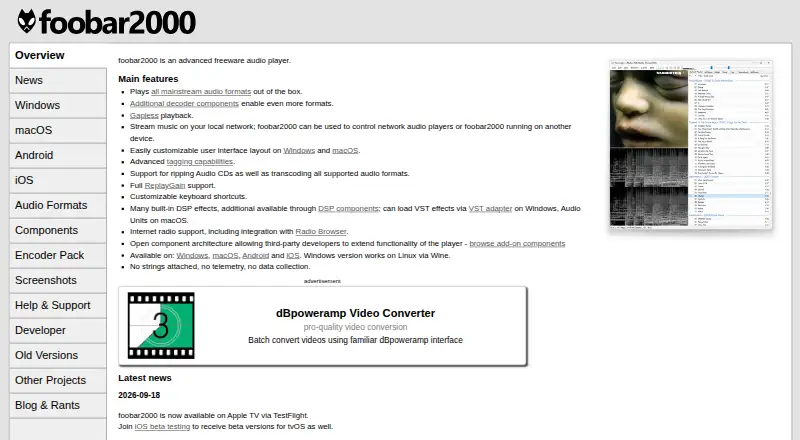
What foobar2000 is
foobar2000 is a free audio player for desktop and mobile systems, with support for network playback and a wide range of audio formats. It handles common formats such as MP3, AAC, Ogg Vorbis, Opus, FLAC, WAV, and AIFF, alongside options including Musepack, Speex, AC3, DTS, WavPack, TAK, and Monkey’s Audio. It also supports audio in Matroska/WebM and MPEG Transport Stream, Audio CD, and HLS radio. Linux use is through Wine.
Playback features include gapless playback, internet radio with Radio Browser integration, and streaming over a local network or control of compatible players on another device. Audio tools include tagging, CD ripping, transcoding, ReplayGain, and built-in DSP effects. VST effects are supported on Windows and Audio Units on macOS. Windows and macOS editions allow custom interface layouts, and keyboard shortcuts can be customized. An open component architecture allows third-party extensions, with official components for Windows and macOS. The software states that it has no telemetry and collects no data. It is free to use.
Good
- Plays a broad range of audio formats and streams.
- Supports gapless playback and local-network streaming.
- Includes tagging, CD ripping, transcoding, and ReplayGain.
- Customizable desktop layouts and keyboard shortcuts.
- States that it has no telemetry and collects no data.
Watch out
- Linux support requires Wine.
- The FAQ says translations are not supported.
- Windows requires Windows 7 or newer.
- macOS requires macOS 11 Big Sur or newer.
Who it suits
foobar2000 suits listeners who need broad audio-format support, network playback, or tools such as CD ripping and transcoding. It also fits users who want customizable controls and layouts on desktop versions.
Verdict
Choose foobar2000 if format breadth, network playback, and audio tools matter to you. Look elsewhere if you need a translated interface or native Linux support.
Plans and prices
From foobar2000's own pricing page, checked 9 Oct 2026.
| Plan | Price | What it gives you |
|---|---|---|
| foobar2000 | Free | Advanced freeware audio player |
| foobar2000 freeware | Free | No subscription or purchase price stated · Windows, macOS, Android and iOS versions · Freeware audio player |
The facts
Each one read from foobar2000's own pages, with the date it was checked.
What it does
- Audio formats
- The player handles mainstream audio formats out of the box, with decoder components available for additional formats.checked 14 Oct 2026
- Audio tools
- The player supports tagging, Audio CD ripping, transcoding, ReplayGain, built-in DSP effects, and VST effects on Windows or Audio Units on macOS.checked 9 Oct 2026
- CD ripping and conversion
- It supports ripping Audio CDs and transcoding supported formats, with the Converter component required for conversion.checked 14 Oct 2026
- Compatibility limit
- The FAQ says foobar2000 does not support translations.checked 9 Oct 2026
- Customization
- The Windows and macOS versions support customizable user interface layouts, and the player supports customizable keyboard shortcuts.checked 9 Oct 2026
- Distribution
- The license permits redistribution of unmodified installers in binary form and prohibits redistribution of foobar2000 binaries in other forms.checked 9 Oct 2026
- Documentation and support
- Official support includes a FAQ, forums and a wiki, while the FAQ directs third-party-component questions to component forums.checked 14 Oct 2026
- DSP and effects
- Built-in DSP effects are supplemented by DSP components; Windows supports VST effects through an adapter and macOS supports Audio Units.checked 14 Oct 2026
- Extensibility
- An open component architecture allows third-party developers to extend the player with add-ons.checked 14 Oct 2026
- Extensions
- An open component architecture lets third-party developers extend the player, and the official repository lists components for Windows and macOS.checked 9 Oct 2026
- Formats
- Native audio formats include MP3, AAC, Ogg Vorbis, Opus, FLAC, WavPack, WAV, AIFF, and others; more formats can be added through decoders.checked 9 Oct 2026
- Format support
- MP3,MP2,MP1,M4A/AAC/Apple Lossless,Ogg Vorbis,Opus,Musepack,Speex,AC3,DTS,WMA,FLAC/Ogg FLAC,WavPack,Monkey's Audio,TAK,WAV,Wave64,RF64,AIFF,AU/SND,Matroska/WebM,MPEG Transport Stream,Audio CD,HLS radiochecked 21 Sep 2026
- Gapless playback
- It supports gapless playback for properly encoded audio.checked 14 Oct 2026
- Interface customization
- Windows and macOS versions let users customize the interface layout.checked 14 Oct 2026
- Internet radio
- Internet radio is supported, including integration with Radio Browser.checked 14 Oct 2026
- Licence
- The foobar2000 core is distributed under a proprietary foobar2000 licence; the licence page separately lists LGPL and other licences for bundled libraries.checked 14 Oct 2026
- License model
- freechecked 21 Sep 2026
- Limit: component compatibility
- The FAQ says older third-party components may stop working after upgrades and components built for incompatible SDK versions will not load.checked 14 Oct 2026
- Limit: MP3 seeking
- Sample-accurate MP3 seeking can be slow because the player must walk MPEG stream frames to support features such as CUE playback.checked 14 Oct 2026
- Limit: playlists
- App Store reviewers report that playlist ordering and management are awkward and request easier queueing or desktop playlist import.checked 14 Oct 2026
- Limit: resource usage
- Some DSPs, crossfading, gap removal and certain output modes can consume substantial memory or CPU.checked 14 Oct 2026
The company
- Company identity
- AlternativeTo identifies Peter Pawlowski as the developer and describes the product as proprietary freeware for personal use.checked 14 Oct 2026
Where it runs
- Current Windows release
- The listed stable Windows release is 2.26.1, with a 2.26.2 preview dated 2026-10-14.checked 14 Oct 2026
Money
- Free plan
- Yeschecked 21 Sep 2026
The full review of foobar2000
Overview
foobar2000 is a free audio player for listeners who want more than basic playback, including library tools, audio processing, and network control. Its strongest case is breadth: it handles many formats and audio tasks without a license fee, though its interface is not translated and Linux support depends on Wine.
Key features
Playback and formats
Gapless playback keeps continuous albums and mixes from being broken by pauses. Support spans common compressed formats, lossless files, audio CDs, HLS radio, and less common options such as DTS, Matroska/WebM, and MPEG Transport Stream. Additional formats can be added through decoders, which makes foobar2000 a practical fit for libraries assembled from varied sources.
Network playback supports streaming music on a local network, controlling network audio players, and controlling foobar2000 on another device. Internet radio includes Radio Browser integration. These capabilities suit listeners managing playback across devices; they are less relevant to someone who only needs a local-file player.
Library tools and customization
Tagging, Audio CD ripping, transcoding, ReplayGain, and built-in DSP effects put library maintenance and playback adjustment in the same application. Windows users can add VST effects, while macOS users can use Audio Units. Windows and macOS also allow customizable interface layouts; keyboard shortcuts can be customized across the player. This depth rewards users who want to shape their setup, but it is unnecessary complexity for listeners seeking only a minimal player.
An open component architecture lets third-party developers extend the player, with an official component repository for Windows and macOS. The official overview says foobar2000 has no telemetry and collects no data.
Pricing
foobar2000 is freeware: the plan costs nothing, with no paid tier or trial required. The free plan includes the advanced audio player rather than a time-limited preview, making it suitable for listeners who want its playback and audio tools without subscription costs.
The license permits redistribution of unmodified installers in binary form, but does not permit redistribution of foobar2000 binaries in other forms. That restriction matters to anyone planning to package or redistribute the software.
Platforms
foobar2000 supports Windows, macOS, Android, and iOS; Linux users can run it through Wine rather than native Linux support. Windows 7 or newer is supported, with 32-bit, 64-bit, and ARM builds. The macOS version requires macOS 11 Big Sur or newer and supports Intel and Apple Silicon processors.
The Android app requires Android 7.0 or newer and supports phones, tablets, and TVs. Stable iOS and iPadOS releases require version 12.1 or newer. The FAQ says translations are not supported, so users who need a localized interface should choose another player. Help articles, forums, and the foobar2000 wiki provide support resources.
Who it's for
foobar2000 is best for listeners with mixed-format libraries who want gapless playback, tagging and conversion tools, network playback, or control over audio effects. It also suits users who value configurable layouts and shortcuts, particularly on Windows and macOS. It is a weaker fit for people who need native Linux support, translated controls, or a straightforward player without extra library and processing features.
Pros and cons
- Pro: Broad format support, with additional decoders available, helps accommodate varied audio collections.
- Pro: Network streaming and control across compatible players and devices extend playback beyond one computer.
- Pro: Tagging, ripping, transcoding, ReplayGain, DSP, and platform-specific plug-in support cover more than playback alone.
- Pro: The free license and stated lack of telemetry remove subscription costs and data collection concerns.
- Con: Linux use requires Wine, not a native Linux version.
- Con: The interface is not translated, which rules it out for users who need localized controls.
- Con: Layout and processing options may add needless complexity for anyone who wants only basic playback.
Alternatives
Quod Libet is another free option for Linux, macOS, and Windows users who want free software under the GNU GPL version 2 or later.
Music Player Daemon may suit users looking for free GPL software across Linux, macOS, Windows, Android, API, and self-hosted platforms.
AIMP is a free alternative for Android, Linux, and Windows; its freeware is provided “AS IS” and may be used at home or by organizations.
Audacious is a free open-source audio player for Linux, macOS, and Windows.
Winamp for Artists is a freemium option for Android, iOS, and web, with a free Essential plan for one artist profile and an Ultra plan at €12.99 a month, billed 155,88€ billed annually, for one artist profile.
BBC Sounds is free on Android, iOS, and web, but is available exclusively to UK listeners; UK residents can use it abroad for around a month.
Audirvāna is a paid alternative with a free trial across Android, iOS, Linux, macOS, and Windows. Studio Classic costs $7.99 a month on a monthly subscription and includes Studio features and an integrated streaming content service.
JRiver Media Center is a paid alternative with a free trial for Linux, macOS, and Windows. Its Master License costs $124.98 a month and applies to Windows, macOS, and Linux for a single major version; the Windows-only plan costs $99.98, paid once.
Browse audio player software or media player software for more options.
Verdict
Choose foobar2000 if you want a free player that combines wide format support with network playback and useful library and audio tools. Look elsewhere if native Linux support or a translated interface is essential, or if you have no use for its deeper customization and processing options.
Getting started
- Visit the foobar2000 website.
- Choose the version for Windows, macOS, Android, or iOS; Linux use requires Wine.
- Install the version supported by your device's operating system.
- Start with the free player and configure playback or controls as needed.
Questions
How much does foobar2000 cost?
It is free, with a free plan and free license model.
Which platforms does it support?
It supports Windows, macOS, Android, and iOS. Linux use is through Wine.
What audio formats can it play?
Formats include MP3, AAC, Ogg Vorbis, Opus, FLAC, WavPack, WAV, AIFF, and many others. Additional formats can be added through decoders.
Can it play audio over a network?
Yes. It supports internet radio and local-network streaming, and can control network audio players or foobar2000 on another device.
Can I customize the player?
Windows and macOS support customizable interface layouts, and keyboard shortcuts can be customized.
Does it collect user data?
The official overview states that foobar2000 has no telemetry and collects no data.
Alternatives to foobar2000
- 1
Volumio
Free planAndroidiOSWebAPI8.2Free plan - 2

Infuse
Free planiOSmacOS8.1From $16.99 a year - 3
mpv
Free planAndroidAPILinuxmacOS7.9Free plan - 4

Audirvāna
AndroidiOSLinuxmacOS7.7 - 5

MediaPortal
Free planAndroidiOSWebWindows7.6Free plan - 6
Haihaisoft Universal Player
Free planAndroidiOSWebmacOS7.6Free plan