
MediaPortal
MediaPortal is free, open-source software for turning a Windows PC into a multimedia center or home theater PC.
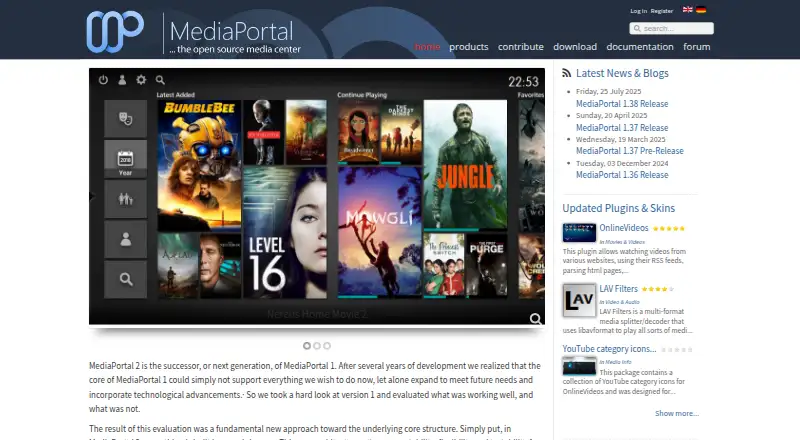
What MediaPortal is
MediaPortal is free, open-source software for turning a Windows PC into a multimedia center or home theater PC. It can show live TV, record programs, display a TV guide, and play or record TV across networked PCs. Users can browse and play videos, DVDs, music, pictures, and home videos. Radio playback can use a TV card or web stations, with radio streamed to PCs connected to the MediaPortal TV Server.
MediaPortal can also be accessed remotely through a web browser, Android, iOS, and other devices, which may serve as Wi-Fi remote controls. Community plugins and skins are available, and an extensions plugin can install, update, uninstall, and sometimes configure extensions. The download page offers MediaPortal 1 and 2: MP1 is described as stable and maintained with more plugins, while MP2 is usable and stable with fewer plugins. MP1 lists Windows Vista, 7, 8, 10, and 11; MP2 lists Windows 7, 8, 10, and 11. Help is available through forums, IRC, a manual, and a wiki. The project recommends the latest version and does not support outdated versions.
Good
- Free and open-source software.
- Supports live TV and recording.
- Plays videos, DVDs, music, and pictures.
- Offers remote access and Wi-Fi remote controls.
- Community plugins and skins are available.
Watch out
- MediaPortal is intended for Windows users.
- MP2 has fewer plugins than MP1.
- Outdated versions are not supported.
Who it suits
MediaPortal suits Windows users building a home theater PC who want live TV, recordings, and a library of media. It may also suit people who want remote access or community plugins and skins.
Verdict
MediaPortal combines TV features, media playback, and remote access for a Windows-centered home theater setup. Users choosing between editions should note that MP1 has more plugins, while the project recommends keeping to the latest version.
Plans and prices
From MediaPortal's own pricing page, checked 7 Oct 2026.
| Plan | Price | What it gives you |
|---|---|---|
| MediaPortal | Free | Free open source media center software · Windows PC |
The facts
Each one read from MediaPortal's own pages, with the date it was checked.
What it does
- Extensions
- The project offers community plugins and skins, and its extensions plugin can install, update, uninstall, and sometimes configure extensions within MediaPortal.checked 7 Oct 2026
- Format support
- MPEG-2,MPEG-1,MOV,H.264,VC-1,DivX,Xvid,AC3,DTS,MP3,AAC,Matroska,DVD,Blu-raychecked 21 Sep 2026
- Hardware acceleration
- Yeschecked 21 Sep 2026
- Intended users
- The project describes MediaPortal as a media center application accessible to Windows users and suitable for a home theater PC.checked 7 Oct 2026
- License model
- freechecked 21 Sep 2026
- Live TV
- It can show live TV, record shows, display a TV guide, and play or record TV across networked PCs.checked 7 Oct 2026
- Media library
- It supports browsing and playing videos, DVDs, music, pictures, and home videos.checked 7 Oct 2026
- Network playback
- Yeschecked 21 Sep 2026
- Purpose
- MediaPortal is free open source software for turning a PC into a multimedia center or home theater PC.checked 7 Oct 2026
- Radio
- It can tune radio through a TV card or web stations and stream radio to PCs connected to the MediaPortal TV Server.checked 7 Oct 2026
- Security and compliance
- The opened product, download, and support pages did not state a security certification or compliance standard.checked 7 Oct 2026
- Subtitle support
- Yeschecked 21 Sep 2026
- Support
- Help is available through the support forums, IRC, the manual, and the wiki.checked 7 Oct 2026
- Two editions
- The download page offers MediaPortal 1 and 2; it describes MP1 as stable and maintained with more plugins, while MP2 is usable and stable but has fewer plugins.checked 7 Oct 2026
- Version limit
- The project says it cannot provide support for outdated versions and strongly recommends using the most recent version.checked 7 Oct 2026
- Web and mobile access
- The feature page says MediaPortal can be accessed remotely through a web browser, Android, iOS, and other devices, which can also act as remote controls on Wi-Fi.checked 7 Oct 2026
The company
- Founded
- 2004checked 28 Sep 2026
Money
- Free plan
- Yeschecked 21 Sep 2026
Where it runs
- Supported platforms
- web,windows,ios,androidchecked 21 Sep 2026
- Windows support
- The download page lists Windows Vista, 7, 8, 10, and 11 for MediaPortal 1, and Windows 7, 8, 10, and 11 for MediaPortal 2.checked 7 Oct 2026
The full review of MediaPortal
MediaPortal turns a Windows PC into a home media hub, combining a browsable library with live TV and radio. It suits people building a PC-based home theater who want those functions together without a software charge. Its breadth is compelling, but its desktop focus rules it out for anyone seeking a media center native to macOS or Linux.
Overview
MediaPortal brings videos, DVDs, music, pictures, and home videos into one library, alongside live television and radio. It can show a TV guide, record programs, and make TV playback and recording available across networked PCs. That combination makes it more capable as a home setup than a simple file player, especially for households that want TV and personal media in the same place.
The project has been around since 2004 and describes the software as free and open source. Its center of gravity remains a Windows PC, even though browser and mobile access can extend some functions beyond that machine.
Key features
- Media playback: Support spans MPEG-1 and MPEG-2, MOV, H.264, VC-1, DivX, Xvid, AC3, DTS, MP3, AAC, Matroska, DVD, and Blu-ray. Subtitle support and hardware acceleration add practical coverage for a varied home library, though users should confirm that their particular files are among the supported formats.
- Live TV and radio: MediaPortal can display and record live TV and show a TV guide; TV can also be played or recorded across networked PCs. Radio can be tuned through a TV card or from web stations, then streamed to PCs connected to the MediaPortal TV Server. These functions make it a stronger choice for a home theater with TV needs than for someone who only wants to open video files.
- Remote access: A browser, Android device, or iOS device can access MediaPortal remotely, and Wi-Fi-connected devices can serve as remote controls. This helps a Windows-based installation reach into other rooms or be controlled from a phone, but does not change the software’s PC-centered foundation.
- Extensions and skins: Community plugins and skins offer ways to tailor the experience. The extensions plugin can install, update, and uninstall extensions, and sometimes configure them within MediaPortal; the broader plugin selection differs by edition.
Pricing
MediaPortal is free open source software: the MediaPortal plan costs nothing. There is no paid tier or free trial to weigh, making it an easy fit for users who want a home media center without a subscription.
The meaningful choice is between MediaPortal 1 and 2, not between price levels. MP1 is described as stable and maintained, with more plugins; MP2 is also usable and stable but has fewer plugins. For users who depend on community extensions, MP1’s wider selection is the more practical option. The project strongly recommends using the latest version and says it cannot provide support for outdated versions, so choosing an older release for a particular plugin may come with a support trade-off.
Platforms
MediaPortal is a Windows PC application, with MediaPortal 1 supporting Windows Vista, 7, 8, 10, and 11, and MediaPortal 2 supporting Windows 7, 8, 10, and 11. Browser, Android, and iOS access can complement a Windows installation, including use as a Wi-Fi remote control. Those mobile and web options are not substitutes for a native macOS or Linux desktop version.
Who it's for
MediaPortal is best suited to Windows users assembling a home theater PC who want a media library, live TV recording, radio, and network playback in one system. It is also a sensible fit for households that will make use of browser or mobile remote access. A user who simply wants a player for a Mac or Linux desktop, or who does not need the TV and home-center features, should consider a more focused cross-platform player instead.
Pros and cons
- Pro — Broad home-center scope: Library playback, TV guide, live TV recording, and radio cover more than basic video playback.
- Pro — Useful network reach: TV playback and recording can extend across networked PCs, and browser or mobile devices can provide remote access or control.
- Pro — No software cost: The open source media center is free, with no paid plan required for its core proposition.
- Con — Windows is the desktop home: Its PC application supports Windows, so people wanting a native desktop media center for another operating system should look elsewhere.
- Con — Plugin availability varies by edition: MP2 has fewer plugins than MP1, which may limit customization for users who rely on community extensions.
- Con — Old versions lose support: The project recommends staying current and does not support outdated versions, a consideration for anyone tempted to preserve an older setup.
Alternatives
Media Player Software is the category to browse if you want to compare more players. Choose mpv instead for a free player with broad format, codec, and subtitle support across Windows, macOS, Linux, Android, and an API platform. SMPlayer is another free, open source option for Windows, macOS, and Linux if you want a media player rather than MediaPortal’s home-theater functions.
Infuse is worth considering for an iOS or macOS setup; its Pro plan adds video formats and high-resolution Dolby and DTS-HD audio for $1.99 a month, billed monthly, with a free 7-day trial and cancellation anytime. 5KPlayer is a free option for Windows, macOS, or iOS if you want a player with no subscription required. foobar2000 is a free advanced audio player for Android, iOS, Linux, macOS, or Windows.
VLC media player is another free option for Android, iOS, Linux, macOS, and Windows. KMPlayer is an alternative media player. MPlayer is a free option for Linux, macOS, and Windows under the GNU General Public License version 2.
Verdict
Choose MediaPortal if you are building a Windows home theater PC and want television, radio, library playback, and networked use without paying for the software. Its strongest reason to choose it is that breadth in a free package; its strongest reason to look elsewhere is the Windows-centered desktop focus, compounded by fewer plugins in MP2 than MP1.
Alternatives to MediaPortal
- 1
foobar2000
Free planAndroidiOSAPILinux8.2Free plan - 2
Volumio
Free planAndroidiOSWebAPI8.2Free plan - 3

Infuse
Free planiOSmacOS8.1From $16.99 a year - 4
mpv
Free planAndroidAPILinuxmacOS7.9Free plan - 5

Audirvāna
AndroidiOSLinuxmacOS7.7 - 6
Haihaisoft Universal Player
Free planAndroidiOSWebmacOS7.6Free plan