Smooth Clip
Smooth Clip is a browser-based video editor accompanied by 30 free tools for editing and converting video, audio, and images.
What Smooth Clip is
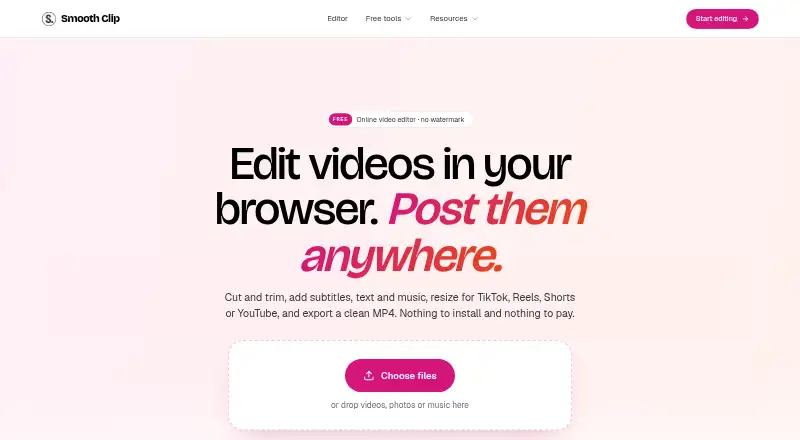
Smooth Clip is a browser-based video editor accompanied by 30 free tools for editing and converting video, audio, and images. Its timeline can trim, split, and join clips, change speed from 0.25× to 4×, and add transitions. Speech-to-subtitle generation lets users correct and style captions before downloading an SRT file. Titles, images, logos, and music can come from the library or personal files, with volume controls and fades. The editor accepts MP4, MOV, and WebM uploads and exports MP4, with 720p, 1080p, and 4K options stated on the About page. Framing choices include 9:16, 4:5, 1:1, and 16:9, with Fit or Fill controls. Free tools accept files up to 2 GB and 60 minutes, and their results are deleted after 24 hours. The free plan is free, requires no signup, and states no watermark. Smooth Clip describes outputs as ready for TikTok, Instagram Reels, and YouTube Shorts. Its privacy policy says uploads and transcripts are not used to train foundation models or shared for third-party purposes.
Good
- 30 free editing and conversion tools
- No signup and no watermark on free plan
- Speech subtitles can be styled and downloaded
- Supports 9:16, 4:5, 1:1, and 16:9
- Exports include 720p, 1080p, and 4K options
Watch out
- Free tools accept files up to 2 GB
- Free-tool results are deleted after 24 hours
- No free trial is offered
- Works through a web browser
Who it suits
It suits creators, podcasters, small businesses, teachers, teams, and others posting video who want browser editing and standalone conversion tools. Users needing subtitles, reframing, and social-oriented exports can use the free plan.
Verdict
Smooth Clip provides a broad browser editing set without signup or a stated watermark on its free plan. Its subtitle, speed, framing, and export controls fit creators producing short-form and general video.
Plans and prices
From Smooth Clip's own pricing page, checked 7 Oct 2026.
| Plan | Price | What it gives you |
|---|---|---|
| Free | Free | 30 free tools · no signup · no watermark · tools accept files up to 2 GB and 60 minutes |
The facts
Each one read from Smooth Clip's own pages, with the date it was checked.
Where it runs
- Aspect ratios
- The editor supports 9:16, 4:5, 1:1, and 16:9 framing, with Fit or Fill controls.checked 7 Oct 2026
- Platforms
- The product runs in a browser on Mac, Windows, or Chromebook and requires no installation.checked 7 Oct 2026
What it does
- Audience
- The maker describes the product as intended for creators, podcasters, small businesses, teachers, teams, and others who post video.checked 7 Oct 2026
- Data retention
- Users can delete projects at any time, and deleting an account removes content from active systems with backups purged on a rolling cycle shortly after.checked 7 Oct 2026
- Editing
- The timeline editor can trim, split, and join clips, change speed from 0.25× to 4×, and add transitions.checked 7 Oct 2026
- Formats and export
- The editor accepts MP4, MOV, and WebM uploads and exports MP4 files, with 720p, 1080p, or 4K export options stated on the About page.checked 7 Oct 2026
- Integrations
- The site describes exports ready for TikTok, Instagram Reels, and YouTube Shorts; it does not state direct account integrations on the pages reviewed.checked 7 Oct 2026
- Overlays and audio
- Users can add titles, images, logos, and music from the library or their own files, with volume controls and fades.checked 7 Oct 2026
- Privacy
- The privacy policy says uploaded videos and transcripts are not used to train foundation models or shared with third parties for their own purposes.checked 7 Oct 2026
- Product
- Smooth Clip is a browser-based video editor and set of 30 free tools for editing and converting video, audio, and images.checked 7 Oct 2026
- Security
- The privacy policy says Smooth Clip uses encryption in transit and at rest, access controls, least-privilege permissions, and routine security review.checked 7 Oct 2026
- Subtitles
- It generates subtitles from speech that users can correct, style, and download as an SRT file.checked 7 Oct 2026
The company
- Company details
- The About page does not state the maker's legal or personal name, headquarters, or founding year.checked 7 Oct 2026
- Company history
- Smooth Clip says it began as an AI clipping tool, then retired AI clip finding and rebuilt as a free editor and set of single-purpose tools.checked 7 Oct 2026
Money
- Free-tool limits
- Free tools accept files up to 2 GB and 60 minutes, and results are deleted after 24 hours.checked 7 Oct 2026
Alternatives to Smooth Clip
- 1

EchoWave Podcast Editor
Free planAndroidiOSWebAPI8.2From $9 a month - 2

Headliner
Free planAndroidiOSWebAPI8.1Free plan - 3

Flowjin
Free planAndroidiOSWeb8.0Free plan - 4

reap
Free planAndroidiOSWebAPI8.0From $9.99 a month - 5
WizCut
Free planWebAPIExtensionLinux7.7From $14 a month - 6

CapsAI
Free planAndroidiOSWeb7.6₹49 one-time