
SmartLedger AI
SmartLedger AI automates accounting work for Indian businesses, finance teams, and CA firms, including bookkeeping, reconciliations, GST and TDS filings, and…
What SmartLedger AI is
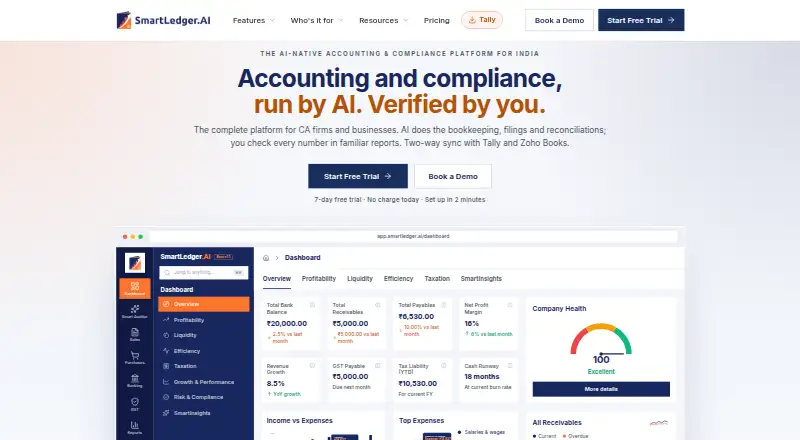
SmartLedger AI automates accounting work for Indian businesses, finance teams, and CA firms, including bookkeeping, reconciliations, GST and TDS filings, and follow-ups. Its results appear as ledgers, reports, and working papers for review. SmartAuditor lets users request tasks such as bank statement categorization or GSTR-3B preparation, then review the output; the product is designed to keep review and approval with people rather than replace accountants or finance teams. Workflows can connect with Tally, Zoho Books, Excel, Google Drive, WhatsApp, and Slack. The free plan provides core accounting but excludes AI automation. Pro and Max provide unlimited uploads under a Fair Use Policy, with AI processing up to 2,500 and 5,000 invoices or statements respectively before uploads fall back to OCR. A free Windows x64 Tally Connector is listed as version 0.15.1. The web and Windows product states that data is encrypted at rest and in transit and hosted in Indian data centres.
Good
- Automates bookkeeping, reconciliations, GST, and TDS work.
- SmartAuditor supports reviewable accounting requests.
- Connects workflows with Tally, Zoho Books, and Excel.
- Free plan includes core accounting.
Watch out
- Free plan excludes AI automation.
- AI processing limits apply to Pro and Max.
- Unlimited uploads are subject to a Fair Use Policy.
Who it suits
SmartLedger AI is aimed at accountants, finance teams, CA firms, and businesses of different sizes that want to automate accounting workflows while retaining human review. The plans also include options for CA firms managing client companies.
Verdict
SmartLedger AI brings accounting automation and human review into the same workflow, with a free core plan and paid tiers. Check the plan-specific upload and AI processing limits against your workload.
Plans and prices
From SmartLedger AI's own pricing page, checked 30 Sep 2026.
| Plan | Price | What it gives you |
|---|---|---|
| Free | Free | Core accounting · unlimited users and companies · AI automation not included · ₹0 forever |
| Plus | ₹399 a month | Unlimited users · SmartUploads 1,000/month · 10 bank statements/month · SmartAuditor · GST reconciliation and filings · email support · monthly, exclusive of GST |
| Pro | ₹699 a month | Unlimited users · unlimited SmartUploads under fair-use AI cap of 2,500 documents · unlimited bank statements · SmartInsights · Create with AI · scheduling and workflows · WhatsApp, Slack and email integrations · Google Drive · e-way bills and e-invoicing · monthly, exclusive of GST |
| Max | ₹1,199 a month | Unlimited users · unlimited SmartUploads under fair-use AI cap of 5,000 documents · highest SmartAuditor limits · top models · early module access · Notice Management beta · SharePoint and OneDrive beta · priority support · WhatsApp chat · dedicated account manager · monthly, exclusive of GST |
| CA Pro | ₹4,000 a year | Unlimited client companies and team users · 1,500 SmartUploads pages/year pooled · 2 months free for verified CA firms · ₹4,000/yr · inclusive of GST · billed annually |
| Plus | ₹4,000 a year | Unlimited users · SmartUploads 1,000/month · 10 bank statements/month · SmartAuditor · GST reconciliation and filings · email support · billed annually, exclusive of GST |
| Pro | ₹7,000 a year | Unlimited users · unlimited SmartUploads under fair-use AI cap of 2,500 documents · unlimited bank statements · SmartInsights · Create with AI · scheduling and workflows · WhatsApp, Slack and email integrations · Google Drive · e-way bills and e-invoicing · billed annually, exclusive of GST |
| CA Max | ₹8,000 a year | Unlimited client companies and team users · 2,500 SmartUploads pages/year pooled · priority support · ₹8,000/yr · inclusive of GST · billed annually |
| Max | ₹12,000 a year | Unlimited users · unlimited SmartUploads under fair-use AI cap of 5,000 documents · highest SmartAuditor limits · top models · early module access · Notice Management beta · SharePoint and OneDrive beta · priority support · WhatsApp chat · dedicated account manager · billed annually, exclusive of GST |
The facts
Each one read from SmartLedger AI's own pages, with the date it was checked.
What it does
- AI assistant
- SmartAuditor lets users request accounting work such as bank statement categorization and GSTR-3B preparation, then review the results.checked 30 Sep 2026
- API and webhooks
- The knowledge-base integrations category lists an API-access and webhooks article for custom integrations.checked 21 Oct 2026
- Bank reconciliation
- The product matches bank transactions with invoices, bills and journals and presents exceptions for review.checked 21 Oct 2026
- Bookkeeping and compliance
- It automates bookkeeping, reconciliations, GST and TDS filings, and follow-ups, with results presented in ledgers, reports, and working papers for review.checked 30 Sep 2026
- Capterra positioning
- Capterra describes Smartledger AI as a cloud platform for Indian CA firms covering accounting, compliance, practice operations, GST filing, income-tax returns and audit workflows.checked 21 Oct 2026
- Capterra rating
- 0.0 out of 5 from 0 reviews.checked 21 Oct 2026
- Compliance claim
- The company says its information-security management is ISO 27001 certified and aligned with India's Digital Personal Data Protection Act.checked 21 Oct 2026
- Contact response
- The contact page says the team will respond within 24 hours and lists [email protected].checked 30 Sep 2026
- Crunchbase headcount
- Crunchbase lists a 1–10 employee range, which conflicts with LinkedIn's 51–200 estimate.checked 21 Oct 2026
- Crunchbase legal name
- Crunchbase identifies the legal name as SmartLedger AI Pvt. Ltd. and describes the company as privately held in Bengaluru.checked 21 Oct 2026
- Documentation
- The public knowledge base is organized into modules such as sales, purchase, accounting, reports, banking, integrations, SmartUploads and Smart Auditor, with ticket submission support.checked 21 Oct 2026
- GST and tax workflows
- The platform supports preparation and review for GSTR-1, GSTR-3B, GSTR-9, TDS and ITR calendars, plus GST reconciliation.checked 21 Oct 2026
- GST features
- The plans compare GST reconciliation and GSTR returns, and the page states that returns are fetched directly from the GST portal.checked 30 Sep 2026
- Integrations
- Official integrations include Tally, Zoho Books, Excel, Google Drive, WhatsApp, Slack, email, Indian banks and GSTN workflows.checked 21 Oct 2026
- Intended users
- The product is presented for CA firms and businesses, including accountants, finance teams, and small, medium, and large businesses.checked 30 Sep 2026
- Limit: automated trust warning
- ScamAdviser displayed a trust score of 0 and described the site as very likely unsafe, citing hidden WHOIS ownership and low traffic.checked 21 Oct 2026
- Limit: independent review coverage
- Capterra showed no user reviews and a 0.0 rating when checked, so there is no substantive verified reviewer consensus there.checked 21 Oct 2026
- Limit: security reputation warning
- Gridinsoft classified smartledger.ai as phishing with a 1/100 trust score and reported eight external provider warnings as of its September 1, 2026 check.checked 21 Oct 2026
Where it runs
- Approval model
- The service says it never files entries or returns without approval; AI drafts remain subject to a reviewer checkpoint and user signing authority.checked 21 Oct 2026
The company
- Company traction claim
- The homepage claims more than 200 CA firms and 500 businesses use SmartLedger AI, with over one million pages processed and more than 1,000 returns filed.checked 21 Oct 2026
- Headquarters
- Bengaluru, Karnataka, Indiachecked 28 Sep 2026
- LinkedIn company size
- LinkedIn lists Smartledger AI as a privately held financial-services company with 51–200 employees.checked 21 Oct 2026
- LinkedIn founded
- LinkedIn lists the company as founded in 2024.checked 21 Oct 2026
- LinkedIn headquarters
- LinkedIn lists the headquarters as Bengaluru, Karnataka, India.checked 21 Oct 2026
The full review of SmartLedger AI
Overview
SmartLedger AI is an accounting automation platform built for Indian businesses, finance teams and CA firms. It suits teams that want to automate routine bookkeeping and compliance work while keeping review and approval with people. Its appeal is the breadth of its accounting workflows and a free core plan; the key trade-off is that AI processing has plan-specific limits.
Key features
SmartLedger AI automates bookkeeping, bank reconciliation, close management, document capture, approval workflows and multi-entity accounting. It handles GST and TDS filings and follow-ups, presenting results in ledgers, reports and working papers for review. That combination can reduce routine processing across a finance team, but the human review step remains central rather than optional.
SmartAuditor accepts requests for accounting work, including bank-statement categorization and GSTR-3B preparation, then returns results for review. It is a useful way to bring AI-assisted tasks into an existing workflow without handing final approval to automation. GST returns can be fetched directly from the GST portal, and the plans compare GST reconciliation and GSTR-return capabilities.
Workflows connect with Tally, Zoho Books, Excel, Google Drive, WhatsApp and Slack. The downloadable Tally Connector is a free Windows x64 installer, version 0.15.1. Security measures include AES-256 encryption at rest and in transit, Indian data centres, role-based permissions and audit logs; SmartLedger AI is ISO 27001 certified and aligned to the DPDP Act. Its privacy policy also says security cannot be guaranteed absolutely.
Pricing
The free plan costs ₹0 forever and includes core accounting, unlimited users and companies, but no AI automation. It is a practical starting point for teams that need the accounting core, not automated processing.
Plus costs ₹399/mo or ₹4,000/yr, billed annually and exclusive of GST. It adds unlimited users, 1,000 uploads a month, 10 bank statements a month and email support. The upload allowance may suit modest workloads, but the bank-statement cap is a meaningful constraint for teams reconciling frequently.
Pro costs ₹699/mo or ₹7,000/yr, billed annually and exclusive of GST. It provides unlimited users and uploads and bank statements under a Fair Use Policy, with AI processing for up to 2,500 invoices or statements before uploads fall back to OCR. It includes a 7-day trial and is the clearest fit for teams needing AI at regular volume without Max's higher threshold.
Max costs ₹1,199/mo or ₹12,000/yr, billed annually and exclusive of GST. It raises AI processing to 5,000 invoices or statements, keeps unlimited uploads under the Fair Use Policy, and adds priority support. It also has a 7-day trial. The upgrade is most relevant when Pro's processing ceiling or standard support is insufficient.
CA Pro costs ₹4,000/yr, inclusive of GST, and CA Max costs ₹8,000/yr, inclusive of GST; both are billed annually. Each includes unlimited client companies and team users. CA Pro pools 1,500 SmartUploads pages a year and gives verified CA firms two months free; CA Max pools 2,500 pages and adds priority support. The pooled page allowances make these plans distinct from the invoice-or-statement AI limits on Pro and Max.
Plus and Pro include email support; Max includes priority support plus email and WhatsApp chat. The contact page says the team responds within 24 hours and provides [email protected].
Platforms
SmartLedger AI runs on the web and Windows. The Windows Tally Connector is a separate free x64 installer, making it relevant to Tally workflows rather than a substitute for the web product.
Who it's for
It is best suited to Indian businesses and CA firms that handle recurring bookkeeping, reconciliations and GST or TDS work, especially where multiple users or client companies need to share a workflow. Smaller teams can start with core accounting or Plus; firms and businesses with heavier AI workloads should weigh the Pro, Max and CA allowances against their volume. It is less compelling for buyers seeking AI automation at no cost or processing beyond the paid tiers' thresholds.
Pros and cons
- Pros: A free plan supports unlimited users and companies, so teams can use the accounting core without a seat cap.
- Pros: Reconciliation, filing workflows and human review put automation and approval in the same process.
- Pros: CA plans allow unlimited client companies and team users, with pooled annual SmartUploads pages.
- Cons: The free plan excludes AI automation, while Plus caps uploads and bank statements monthly.
- Cons: Pro and Max AI processing stops at 2,500 and 5,000 invoices or statements respectively; uploads then fall back to OCR.
- Cons: Annual prices for Plus, Pro and Max are exclusive of GST, so the displayed annual amount is not the full tax-inclusive cost.
Alternatives
AI Accounting Software is the category list to browse if you want to compare more options. Choose Docyt instead if its free Accountant Copilot plan, with AI categorization, bank and card reconciliation, and month-end close automation, better matches your needs.
Zoho Books is another freemium option; its free plan targets solopreneurs and micro businesses with annual revenue below $50K. Pilot offers a web-based alternative with an Essentials plan priced at $99 a month for up to $100,000 in monthly expenses.
Digits is a paid alternative with a free trial and web, iOS and API platforms. Puzzle is paid, offers a free trial, and supports web and API access. Botkeeper is paid, web-based and has no free trial. Rillet uses custom pricing by sales consultation and supports web and API access. Ramp Stack is a paid web-based alternative.
Verdict
Choose SmartLedger AI if you run an Indian business or CA firm and want bookkeeping and compliance automation with human review, broad workflow integrations and room to scale across users or client companies. Its free core lowers the barrier to entry, while paid plans add defined upload and AI-processing capacity. Look elsewhere if your expected processing exceeds those thresholds or you need AI automation on the free plan.
Getting started
- Open the SmartLedger AI website
- Choose the Free, Plus, Pro, Max, CA Pro, or CA Max plan
- Use the web application or Windows version
- Install the free Windows x64 Tally Connector when connecting Tally
- Start with the available trial on an eligible paid plan
Limits worth knowing
The Free plan has no AI automation. Plus allows 1,000 uploads and 10 bank statements per month. Pro and Max allow unlimited uploads under Fair Use, but AI processing covers up to 2,500 and 5,000 invoices or statements respectively before uploads use OCR.
Questions
Is there a free plan?
Yes. Free costs ₹0 forever and includes core accounting, unlimited users, and unlimited companies, but not AI automation.
What does SmartLedger AI cost?
Plus is ₹399/mo, Pro is ₹699/mo, and Max is ₹1,199/mo. CA Pro is ₹4,000/yr and CA Max is ₹8,000/yr; annual alternatives and GST terms vary by plan.
Which platforms are supported?
SmartLedger AI is available on the web and Windows.
Does it connect to Tally?
Yes. A free downloadable Windows x64 Tally Connector is listed as version 0.15.1.
Is there a trial?
The pricing note lists a 14-day trial. Pro and Max plans separately list seven-day trials.
Who reviews the accounting output?
The product is designed to keep review and approval with people rather than replace accountants or finance teams.
Alternatives to SmartLedger AI
- 1
Sage Accounting
Free planAndroidiOSWebAPI8.3From £2 a month - 2

Docyt
Free planAndroidiOSWebAPI8.1Free plan - 3

Zoho Books
Free planAndroidiOS7.9From $15 a month - 4
QuickBooks Time
AndroidiOSWebAPI7.8From $20 a month - 5

Digits
iOSWebAPImacOS7.4From $65 a month - 6

Pilot
Free planWeb7.4From $750 a year