SimplePDF
SimplePDF is a browser-based service for editing, filling, signing and managing PDF documents.
What SimplePDF is
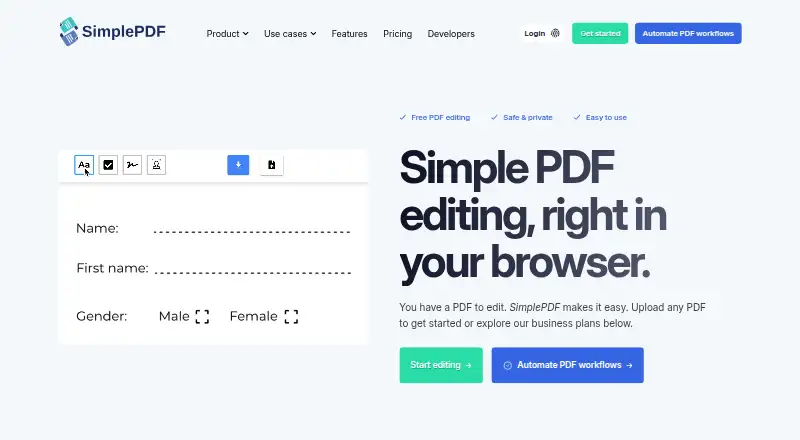
SimplePDF is a browser-based service for editing, filling, signing and managing PDF documents. Its tools add text, checkboxes and images, detect form fields automatically, and let users sign documents. Page controls support merging PDFs, reordering, rotating and deleting pages, as well as adding blank pages or additional PDFs. The maker says editing happens in the browser and documents do not leave the user’s device. Businesses can embed PDFs on websites, collect submissions and automate workflows. Integration options include a Chrome extension, React component, web script, iframe, Bubble plugin and WordPress plugin; the service also connects with Make and n8n. It supports S3-compatible storage, webhooks and email alerts for completed submissions. The free plan has no monthly quota for documents and submissions. Basic costs $99 a month for up to 2,500 combined monthly documents and submissions; Pro is $349 a month for up to 20,000; Premium is $899 a month for up to 75,000. A seven-day trial is available. All plans are marked GDPR compliant, while Free, Pro and Premium are marked HIPAA compliant.
Good
- Editing is performed in the browser.
- Includes automatic form-field detection and signature fields.
- Free has no monthly document and submission quota.
- Supports webhooks and email submission alerts.
Watch out
- Basic is limited to 2,500 combined monthly documents and submissions.
- Paid workflows involving PHI should use Bring Your Own Storage.
- Pro and Premium cost 349.00 USD and $899 a month.
Who it suits
SimplePDF suits individuals who need browser-based PDF editing, and businesses that collect document submissions or automate PDF workflows. Its integrations and storage options may fit teams embedding forms into existing sites or processes.
Verdict
SimplePDF pairs PDF editing and signing with tools for collecting and processing submissions. Its free plan has no monthly quota, while businesses should compare paid plan quotas and storage requirements for PHI workflows.
Plans and prices
From SimplePDF's own pricing page, checked 30 Sep 2026.
| Plan | Price | What it gives you |
|---|---|---|
| Free | Free | For individuals editing PDFs · no monthly quota for documents and submissions |
| Basic | $99 a month | Up to 2,500 documents and submissions/month · dashboard with 5 users · $99/ month |
| Pro | $349 a month | Up to 20,000 documents and submissions/month · dashboard with 25 users · $349/ month |
| Premium | $899 a month | Up to 75,000 documents and submissions/month · dashboard with 250 seats · $899/ month |
The facts
Each one read from SimplePDF's own pages, with the date it was checked.
What it does
- Audience
- The maker says SimplePDF is for individuals, professionals, teams, and businesses, from students and freelancers to IT teams and enterprise operations.checked 30 Sep 2026
- Automation integrations
- The features page says SimplePDF connects with Make and n8n for document processing.checked 30 Sep 2026
- Business workflows
- Businesses can embed PDFs on websites, collect submissions, and automate workflows.checked 30 Sep 2026
- Compliance
- The pricing page marks GDPR compliance on all plans and HIPAA compliance on Free, Pro, and Premium.checked 30 Sep 2026
- Editing tools
- Features include adding text, checkboxes, and images, signing documents, and automatic form-field detection.checked 30 Sep 2026
- Founder
- The maker identifies Benjamin André-Micolon as its founder and describes him as a principal engineer.checked 30 Sep 2026
- HIPAA workflows
- The maker says paid workflows involving PHI should use Bring Your Own Storage and that a BAA is available upon request.checked 30 Sep 2026
- Integrations
- The maker lists a Chrome extension, React component, web script, iframe, Bubble plugin, and WordPress plugin.checked 30 Sep 2026
- Page tools
- Users can merge PDFs, reorder, rotate, and delete pages, and add blank pages or additional PDFs.checked 30 Sep 2026
- Privacy
- The maker says editing is performed in the browser and documents do not leave the user's device.checked 30 Sep 2026
- Product
- SimplePDF edits, fills, signs, and manages PDF documents in a browser.checked 30 Sep 2026
- Storage and notifications
- The product supports saving documents to S3-compatible storage, webhooks, and email alerts for completed submissions.checked 30 Sep 2026
- Support
- Premium includes priority support, listed as 24-hour support in the feature comparison.checked 30 Sep 2026
The company
- Headquarters
- Tallinn, Estoniachecked 28 Sep 2026
Money
- Plan limits
- Monthly quotas count documents and submissions together; the listed Basic, Pro, and Premium quotas are 2,500, 20,000, and 75,000.checked 30 Sep 2026
Alternatives to SimplePDF
- 1

Jotform
Free planAndroidiOSWeb8.2From $39 a month - 2
Foxit PDF Editor
AndroidiOSWebmacOS7.7 - 3

PDFgear
Free planAndroidiOSWebExtension7.7Free plan - 4

PlatoForms
Free planAndroidWebAPI7.7From $10 a month - 5

Nitro PDF Pro
iOSWebAPImacOS7.6From $15 a month - 6
Sejda PDF Forms
Free planWebLinuxmacOSWindows7.1From $63 a year