Silex
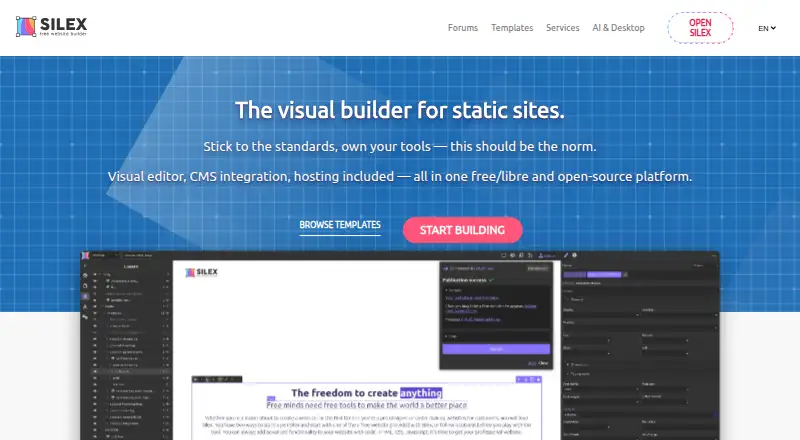
Silex is a visual builder for static websites, with a visual editor, CMS integration, and several publishing or hosting routes.
What Silex is
Silex is a visual builder for static websites, with a visual editor, CMS integration, and several publishing or hosting routes. The Cloud option uses GitLab Pages and supports custom domains, CMS integrations, collaboration, versioning, and automatic CI/CD builds. Silex lists WordPress, Directus, and Squidex as CMS or data integrations, and supports any GraphQL API as a CMS or data source; Strapi and Supabase are marked as coming soon. Sites can also be deployed through FTP/SFTP, as a ZIP download, or with CapRover. Silex is free and open source under the AGPL license. Its free Desktop app edits offline, publishes to a local folder, and requires no account; it is an early-alpha local app for Windows, macOS, and Linux. The desktop page describes an experimental on-device AI assistant, and Silex also lists a local MCP server for AI integration. Self-hosting supports Docker, CapRover, or npx. The maker, Silex Labs, is a Paris-based French nonprofit and says the project began in 2009. Silex says sites made with it have no tracking or third-party cookies, and that user data is not for sale.
Good
- Free and open-source under the AGPL license.
- Cloud option supports custom domains and automatic CI/CD builds.
- Supports WordPress, Directus, Squidex, and any GraphQL API.
- Desktop app edits offline and requires no account.
- Deployment options include GitLab Pages, FTP/SFTP, ZIP, and CapRover.
Watch out
- GitLab's free tier limits private groups to five users.
- GitLab's free tier includes 400 CI/CD minutes monthly per namespace.
- GitLab's free tier provides 10 GB total storage.
- The desktop app is in early alpha.
Who it suits
Silex suits web professionals building multiple sites, students learning design, teams seeking static-site performance, and agencies scaling client work. Its Cloud route offers GitLab Pages hosting, while the desktop and self-hosted options suit people who want offline editing or to manage their own infrastructure.
Verdict
Choose Silex for a free, open-source static-site builder with cloud, desktop, and self-hosted paths. Look elsewhere if the GitLab free-tier limits do not suit your cloud setup, or if an early-alpha desktop app is not appropriate for your workflow.
Plans and prices
From Silex's own pricing page, checked 19 Sep 2026.
| Plan | Price | What it gives you |
|---|---|---|
| Cloud | Free | Standard website builder features · GitLab Pages hosting · Custom domain name · CMS integrations · Collaboration and versioning |
| Desktop app | Free | offline editing · no account · all Silex features · local MCP server · local Git history · user-managed hosting/deployment/backups · 0 € forever free |
| Cloud with a free gitlab.com account | Free | standard builder · GitLab Pages hosting · custom domain · CMS/11ty integrations · collaboration/versioning · small teams · $0 forever |
| Self-hosted | Priced on request | all features · custom storage backends · own domain · GrapesJS/11ty plugins · GitLab pipelines · no GitLab limits · $0 + your server |
| Custom development | Priced on request | custom Silex plugins · GrapesJS components · 11ty integrations · API connectors · On quote |
The facts
Each one read from Silex's own pages, with the date it was checked.
What it does
- 11ty integration
- Silex can generate static sites through Eleventy (11ty) and deploy them with CI/CD.checked 15 Oct 2026
- AI
- The desktop page says an experimental on-device AI assistant is included; the services page lists a local MCP server for AI integration.checked 8 Oct 2026
- API support
- Silex supports any GraphQL API as a CMS or data source.checked 8 Oct 2026
- Changelog practice
- In March 2026 Silex announced that release notes moved to GitHub for clearer diffs and notifications.checked 15 Oct 2026
- CMS data model
- Silex fetches live content from GraphQL APIs and binds fields to visual elements through expressions and states.checked 15 Oct 2026
- CMS integrations
- Officially available CMS/data integrations are WordPress, Directus and Squidex; Strapi and Supabase are listed as coming soon.checked 15 Oct 2026
- Deployment
- Listed deployment options include GitLab Pages, FTP/SFTP, ZIP download, and CapRover; YunoHost is marked coming soon.checked 8 Oct 2026
- Desktop AI
- The desktop app includes an experimental on-device AI assistant and a local MCP server for compatible AI tools.checked 15 Oct 2026
- Documentation depth
- Documentation includes designer tutorials, CMS guides, publishing instructions, self-hosting, configuration, connectors, plugins, build customization and release verification.checked 15 Oct 2026
- Funding
- The project says Silex Desktop is funded by NLnet through the NGI0 Commons Fund with European Commission NGI support.checked 15 Oct 2026
- Hosting integrations
- Publishing targets include GitLab Pages, FTP/SFTP, ZIP download and CapRover, with YunoHost listed as coming soon.checked 15 Oct 2026
- Integrations
- The services page lists WordPress, Directus, and Squidex as available CMS or data integrations, with Strapi and Supabase marked coming soon.checked 8 Oct 2026
- Intended users
- The maker describes Silex as suited to web professionals building multiple sites, students learning design, teams needing static-site performance, and agencies scaling client work.checked 8 Oct 2026
- Licence
- Silex is released as free/libre software under the GNU AGPL licence.checked 15 Oct 2026
- Limit: bugs and slowness
- A G2 reviewer mentions occasional bugs and server slowness, while another Trustpilot reviewer describes a steep learning curve.checked 15 Oct 2026
- Limit: CSS coverage
- A G2 reviewer reports that not all CSS rules are available and that an external CMS is needed for data connections.checked 15 Oct 2026
- Limit: evolving features
- A G2 reviewer says the open-source project evolves continuously, so users may wait for some new features.checked 15 Oct 2026
Where it runs
- Browser support
- The web editor officially tests the latest two Chrome and Firefox versions; Safari has known issues and mobile browsers are unsupported for editing.checked 15 Oct 2026
- Desktop app
- Silex Desktop is an early-alpha local application for Windows, macOS and Linux that edits offline and publishes to a local folder without an account.checked 15 Oct 2026
- Desktop platforms
- The desktop app runs on Windows, macOS, and Linux.checked 8 Oct 2026
The company
- Founded
- 2009checked 28 Sep 2026
- Headquarters
- Paris, Francechecked 28 Sep 2026
Money
- Free plan
- Yeschecked 19 Sep 2026
- Free tier limits
- The GitLab free tier has a five-user maximum per private group, 400 CI/CD minutes per month per namespace, and 10 GB total storage.checked 8 Oct 2026
The full review of Silex
Overview
Silex is a free, open-source visual builder for static websites, combining a visual editor with CMS and data connections. It is a strong fit for web professionals, agencies and teams that want control over content sources and deployment; students learning design may also find that flexibility useful. Its no-cost routes are unusually broad, but cloud users must work within GitLab’s quotas, and the desktop app remains early alpha.
Key features
Silex connects to WordPress, Directus and Squidex, and can use any GraphQL API as a CMS or data source. That makes it more compelling for projects built around existing content systems than for people who want a builder’s own tightly integrated content workflow. Strapi and Supabase are coming soon, not current integration options.
Publishing can go through GitLab Pages, FTP/SFTP, ZIP download or CapRover. GitLab Pages supports custom domains and automatic CI/CD builds, a convenient option for small sites. Its free tier brings practical constraints: five users maximum per private group, 400 CI/CD minutes per month per namespace, and 10 GB total storage. Teams approaching those ceilings may prefer another deployment route or self-hosting.
The software is AGPL-licensed. The maker says Silex-built websites have no tracking or third-party cookies and that user data is not for sale. The desktop app includes an experimental on-device AI assistant and a local MCP server for AI integration; those are secondary capabilities, not a reason to treat an early-alpha app as a mature production environment. Community help is available through chat and forums, with paid support and consulting also offered.
Pricing
Silex’s plans are free, with no free trial. Cloud costs nothing and includes standard website-builder features, GitLab Pages hosting, a custom domain, CMS integrations, collaboration and versioning. The separate Cloud with a free gitlab.com account plan is also free, billed $0 forever, with the same core inclusions and suitability for small teams. Neither removes GitLab’s free-tier limits.
Desktop app costs nothing. It works offline, needs no account, includes all Silex features, publishes to a local folder and lets users host sites anywhere. Its early-alpha status is the key trade-off for anyone considering it for a dependable work pipeline.
Self-Hosted costs nothing and includes all features, custom storage backends, an own domain and self-managed infrastructure. The maker says self-hosted GitLab CE has no user or storage limits and supports Docker, CapRover or npx. This suits teams willing to own their infrastructure; it trades GitLab cloud convenience for management responsibility.
Platforms
Silex is available on the web and through self-hosting. Silex Desktop runs on Windows, macOS and Linux, edits offline and publishes to a local folder. The desktop release is early alpha, so it is a less cautious choice for workflows that depend on a stable local application.
Who it's for
Silex makes the most sense for web professionals building multiple sites, agencies scaling client work, and teams that value static-site performance and can choose their own content and hosting paths. Students learning design may appreciate the visual-building approach. It is less suitable for teams that need cloud collaboration beyond GitLab’s free caps or cannot accommodate an early-alpha desktop app.
Pros and cons
- Pro: Multiple publishing routes—GitLab Pages, FTP/SFTP, ZIP and CapRover—give teams more deployment control than a single-host workflow.
- Pro: WordPress, Directus, Squidex and any GraphQL API can supply content, which is useful when a project already depends on an external CMS or data source.
- Pro: Free cloud, desktop and self-hosted plans provide distinct ways to build and publish without a subscription price.
- Con: GitLab’s free tier limits private groups to five users, CI/CD to 400 minutes monthly per namespace, and storage to 10 GB, which can constrain growing teams and site collections.
- Con: The desktop app is early alpha, making it a risky foundation for workflows that require a mature local editor.
Alternatives
Framer is worth considering for readers who want a freemium builder with a free plan and trial, design pages, 10 CMS collections and 1 GB bandwidth on its Free plan.
Mailchimp is the more relevant alternative when the priority is email and audience management: its free plan allows 250 contacts, 500 emails per month, one audience and one seat.
Brizy AI may suit readers specifically seeking an AI builder; its Personal plan is $19 a month and includes one website and premium AWS hosting.
Tilda is an option for a simpler one-site start, with a free plan limited to one website and key blocks; its Personal plan is $15 a month and adds full block access and a custom domain.
Carrd is a more focused web alternative, with a free Basic plan allowing up to three sites per account.
Elementor is another self-hosted and web option for readers comparing website builders.
MailerLite may be preferable when landing pages and email campaigns matter together: its free plan includes one landing page, one website, 250 subscribers and 2,500 monthly emails.
Shogun is another freemium website-building alternative.
For broader comparisons, browse Landing Page Builders, Personal Website Builders, No-Code Website Builders or Website builders.
Verdict
Choose Silex if you want a free, open-source static-site builder with CMS flexibility and the choice of cloud, desktop or self-managed publishing. Its deployment range is the clearest reason to pick it. Look elsewhere if GitLab’s free-tier limits are too restrictive or an early-alpha desktop app is unsuitable for your workflow.
Getting started
- Visit https://www.silex.me/.
- Choose Cloud, Desktop app, or Self-Hosted.
- For Cloud, use GitLab Pages hosting and configure a custom domain if needed.
- For Desktop, download the app for Windows, macOS, or Linux and edit offline without an account.
- For self-hosting, use Docker, CapRover, or npx.
Limits worth knowing
The GitLab free tier allows at most five users per private group, 400 CI/CD minutes per month per namespace, and 10 GB total storage. The Desktop app is in early alpha.
Questions
Is Silex free and open source?
Yes. Silex is free and open-source software licensed under AGPL.
What platforms does Silex support?
Silex lists Linux, macOS, self-hosted, web, and Windows. The Desktop app runs on Windows, macOS, and Linux.
What are the Cloud plan's limits?
The GitLab free tier has a five-user maximum per private group, 400 CI/CD minutes monthly per namespace, and 10 GB total storage.
Can I use Silex without an account?
The Desktop app works offline and requires no account.
Which CMS or data integrations are available?
The services page lists WordPress, Directus, and Squidex, and Silex supports any GraphQL API as a CMS or data source. Strapi and Supabase are marked as coming soon.
Who maintains Silex?
Silex is maintained by Silex Labs, a French nonprofit based in Paris. The maker says the project began in 2009.
Alternatives to Silex
- 1

HubSpot Marketing Hub
Free planAndroidiOSWebAPI8.3Free plan - 2

Mailchimp
Free planAndroidiOSWebAPI8.3From $13 a month - 3

Framer
Free planAndroidiOSWebLinux8.2From $10 a month - 4
Elementor
Free planOpen sourceWebAPISelf-hosted7.9Free plan - 5

GetResponse
AndroidiOSWebAPI7.9From $1,915.58 a month - 6

Kit
Free planiOSWebAPI7.8From $33 a month