Signaturely
Signaturely is an electronic-signature service from Signaturely, headquartered in Covina, California.
What Signaturely is
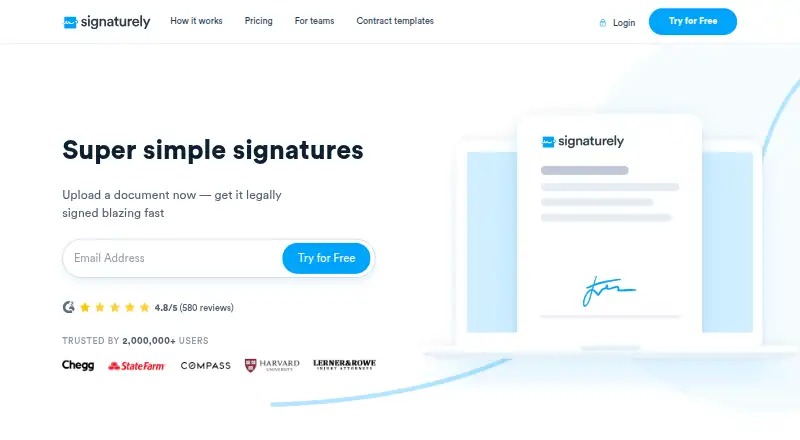
Signaturely is an electronic-signature service from Signaturely, headquartered in Covina, California. It lets users upload documents, place required fields, email documents to signers, and collect signatures electronically. A signer can enter a name by typing, draw a signature, or upload an image. Reusable templates can be created and shared with a team, while documents can follow a sequential signing order. Signaturely tracks each document’s status, sends automatic reminders, and keeps a legal audit log and history of activity. Regular plans list Google Drive, Dropbox, OneDrive, and Box connections; the API page also lists Zapier. Its API supports automated signature requests and templates, with separate API pricing and account-dependent request allowances. Security measures described by the service include encryption at rest, 256-bit encryption in transit, two-factor authentication, and regular third-party penetration tests. Signaturely also describes anti-tampering controls, AATL-compliant signed documents, and alignment with UETA, ESIGN, and eIDAS requirements. The service is available through web, Android, iOS, and API access. Pricing includes a no-fee plan, paid subscriptions, and a 7-day trial.
Good
- Free plan includes one signature request monthly
- Sequential signing order for routed documents
- Reusable templates can be shared with teams
- Automatic reminders and legal audit history
- Google Drive, Dropbox, OneDrive, and Box integrations
- API supports automated requests and templates
Watch out
- Free account allows one request per month
- Personal plan limits sending to five requests monthly
- Personal plan includes one template
- API request allowances depend on the account plan
Who it suits
Signaturely suits businesses sending paperwork to clients or employees, including teams that need templates, reminders, audit history, and sequential signing. Its API tiers target small businesses, companies, and enterprises needing automated signature requests or embedded signing.
Verdict
Choose Signaturely when you need electronic signing with templates, sequential routing, reminders, and audit records across web and mobile platforms. The free tier fits occasional signing, while Business removes listed request and template limits. Look elsewhere if your workflow needs allowances beyond the selected plan or API pricing structure.
Plans and prices
From Signaturely's own pricing page, checked 19 Sep 2026.
| Plan | Price | What it gives you |
|---|---|---|
| Free | Free | 1 document/signature request per month · Free account with no fee · Audit trail and history |
| Personal | $25 a month | 5 signature requests per month · 1 template · Cloud-storage integrations · Notifications and reminders · Audit log and history · billed monthly |
| Personal Annual | $240 a year | 5 signature requests per month · 1 template · Cloud-storage integrations · Notifications and reminders · Audit log and history · billed annually |
| Business | $50 a month | Unlimited signature requests · Unlimited templates · Team management · Custom business branding · Notifications and reminders · Audit log and history · billed monthly |
| Business Annual | $480 a year | Unlimited signature requests · Unlimited templates · Team management · Custom business branding · Notifications and reminders · Audit log and history · billed annually |
| Free account | Free | 1 signature request/month · Free plan; 1 document for e-signature per account each month |
| Personal (monthly) | $25 a month | 5 signature requests/month · 1 template · Google Drive, Dropbox, OneDrive and Box integrations · notifications and reminders · audit log and history · $25/month |
| Gold (API) | $49 a month | Limited options for basic business automation; signature request allowance depends on plan · $49/month |
| Business (monthly) | $50 a month | Unlimited signature requests · unlimited templates · Google Drive, Dropbox, OneDrive and Box integrations · notifications and reminders · audit log and history · team management · custom business branding · $50/month per user |
| Platinum (API) | $99 a month | Includes Gold features plus advanced features; OAuth and embedded signing are listed for Platinum and Titanium · $99/month |
| Titanium (API) | $199 a month | For enterprises; full API access; OAuth and embedded signing · $199/month |
| Personal (annual) | $240 a year | 5 signature requests/month · 1 template · Google Drive, Dropbox, OneDrive and Box integrations · notifications and reminders · audit log and history · $240/yr |
| Business (annual) | $480 a year | Unlimited signature requests · unlimited templates · Google Drive, Dropbox, OneDrive and Box integrations · notifications and reminders · audit log and history · team management · custom business branding · $480/yr per user |
The facts
Each one read from Signaturely's own pages, with the date it was checked.
What it does
- API
- The API supports automated signature requests and templates, and its pricing is separate from regular Signaturely plans.checked 7 Oct 2026
- API access
- Yeschecked 19 Sep 2026
- API limits
- The API page specifies OAuth and embedded signing for Platinum and Titanium plans, and says request allowances depend on the account plan.checked 7 Oct 2026
- Audit trail
- Yeschecked 19 Sep 2026
- Bulk sending
- Yeschecked 19 Sep 2026
- Document integrity
- Signaturely says it has anti-tampering controls and that documents signed with the service are AATL compliant.checked 7 Oct 2026
- Integrations
- The regular plans list Google Drive, Dropbox, OneDrive and Box integrations, and the API page says Zapier is also available.checked 7 Oct 2026
- Legal status
- The company says its e-signatures follow international regulations including UETA, ESIGN and eIDAS.checked 7 Oct 2026
- Purpose
- Signaturely lets users upload documents, add required fields, send them to signers by email and collect electronic signatures.checked 7 Oct 2026
- Security
- Signaturely says data is encrypted at rest and uses 256-bit encryption in transit, offers two-factor authentication, and performs regular third-party penetration tests.checked 7 Oct 2026
- Signing options
- Users can sign by typing their name, drawing a signature or uploading an image of it.checked 7 Oct 2026
- Support
- The site directs users to its Help Center and offers a contact option for additional questions.checked 7 Oct 2026
- Target users
- Signaturely describes its product as helping businesses make signing paperwork easier for clients and employees, and positions API tiers for small businesses, companies and enterprises.checked 7 Oct 2026
- Templates and signing order
- Users can create reusable templates, share them with a team and route documents to signers in a specified order.checked 7 Oct 2026
- Tracking and audit
- Signaturely tracks document status, sends automatic reminders and keeps a legal audit log of document activity.checked 7 Oct 2026
Money
- Free plan
- Yeschecked 19 Sep 2026
The company
- Headquarters
- Covina, California, United Stateschecked 28 Sep 2026
The full review of Signaturely
Signaturely is an electronic-signature service for sending documents, collecting signatures and monitoring completion. It fits individuals and teams with occasional or repeatable paperwork, especially when sequential routing, templates and audit records matter. Its value depends on volume: the free and Personal tiers are tightly capped, while Business is built for ongoing, higher-volume work.
Overview
Upload a document, add required fields and email it to signers. Recipients can sign by typing their name, drawing a signature or uploading an image. You can set a sequential signing order, track document status and send automatic reminders, so multi-party requests do not depend on manual follow-up.
Every request has a legal audit log and history. Signaturely says its e-signatures follow UETA, ESIGN and eIDAS, while signed documents are AATL compliant and protected by anti-tampering controls. It also cites encryption at rest, 256-bit encryption in transit, two-factor authentication and regular third-party penetration tests. Those safeguards suit business paperwork, although they do not increase plan allowances.
Key features
Templates and routing
Reusable templates can be shared with a team, and sequential routing handles documents that require approvals in a fixed order. Personal includes one template, enough for a single standard form but restrictive for businesses with several contracts or intake documents. Business removes the template ceiling and adds team management and custom business branding.
Tracking, storage and automation
Notifications, reminders, status tracking and audit history provide a clear record from sending through completion. Regular plans integrate with Google Drive, Dropbox, OneDrive and Box. The API supports automated signature requests and templates, while Zapier is also available through the API offering.
API and controls
API pricing is separate from regular plans, with request allowances tied to the account plan. Gold provides limited options for basic business automation; Platinum adds advanced features, and OAuth and embedded signing are specified for Platinum and Titanium. Titanium is positioned for enterprise use with full API access.
Pricing
The Free plan costs nothing and permits one document or signature request per account each month, with audit trail and history. It is suitable for very occasional signing, not a recurring business process.
Personal costs $25 a month, or $240 a year when billed annually. Both versions allow five signature requests per month and one template, with cloud-storage integrations, notifications, reminders and audit history. The annual price lowers the effective monthly cost, but the five-request ceiling remains.
Business costs $50 a month per user, or $480 a year billed annually. It includes unlimited signature requests and templates, team management, custom branding, storage integrations, notifications, reminders and audit history. This is the practical choice for teams whose request volume would quickly exceed Personal, though its per-user pricing raises the cost as the team grows.
API plans are $49 a month for Gold, $99 a month for Platinum and $199 a month for Titanium. Allowances depend on the account plan, so organizations should match the tier to expected automation volume. A 7-day trial is offered.
Platforms
Signaturely supports Android, iOS and web access, plus an API for integrations and automated workflows. That combination suits distributed signing between mobile and desktop users, while API customers can connect signing to their own systems.
Who it's for
Choose Free for one request a month, or Personal for an individual with up to five recurring requests and one standard template. Business fits teams that need unlimited requests, multiple templates, shared administration and branded documents. API tiers target small businesses, companies and enterprises automating signature collection; Titanium is the clearest fit when full API access is required.
Pros and cons
- Pros: sequential signing, reminders and audit history support accountable multi-party workflows.
- Pros: Business combines unlimited requests and templates with team management and branding.
- Pros: mobile apps, web access, storage integrations and API options cover varied operating environments.
- Cons: Free allows only one request monthly, and Personal allows five, limiting growing workloads.
- Cons: Personal's single template is a poor fit for organizations handling multiple document types.
- Cons: API allowances vary by plan and are priced separately, complicating automation budgeting.
Alternatives
Browse Electronic Signature Software or E-Signature Software for broader category comparisons.
- Dokobit is worth choosing if three monthly signatures, liability-document validation and 100 MB of storage meet your needs across its wider platform coverage.
- Secured Signing suits users wanting a free allowance of three documents per month and a broad desktop, mobile and API footprint.
- Certinal is the alternative for consent and compliance workflows with multi-channel capture and EMR-native integration.
- Dropbox Sign is preferable when a lower-cost paid entry and five templates are more important than Signaturely's plan structure.
- OpenSign fits organizations seeking self-hosting with unlimited digital signatures and templates.
- Xodo Sign is an option for users who need a free tier of up to three documents monthly or a low-cost API sandbox.
- BoldSign is aimed at users who can work within a free allowance of 25 envelopes and two templates.
- Leegality is an alternative for pay-per-success eSign workflows priced in INR.
Verdict
Signaturely is a solid choice for individuals and teams that need dependable electronic signing, sequential routing, reminders, templates and auditable records across web and mobile. Select Personal for light recurring use, or Business when unlimited requests and templates justify the higher per-user cost. Look elsewhere if your monthly volume exceeds the lower tiers without a Business budget, or if API allowances and separate automation pricing do not fit your procurement model.
Getting started
- Open the Signaturely website
- Create a free account or select a paid plan
- Upload a document and add required fields
- Create or select a reusable template
- Email the document to signers in sequential order
- Track status and reminders from the account
Limits worth knowing
The free account permits one document or signature request per month. Personal permits five requests monthly and one template; API request allowances vary by account plan.
Questions
Is there a free Signaturely plan?
Yes. The Free plan has no fee and includes one document or signature request monthly, with audit trail and history.
What does Personal cost?
Personal costs $25 a month when billed monthly or $240 a year when billed annually. It includes five monthly requests, one template, cloud-storage integrations, notifications, reminders, and audit history.
What does Business include?
Business costs $50 a month or $480 a year. It includes unlimited signature requests and templates, team management, custom business branding, notifications, reminders, integrations, and audit history.
Which platforms support Signaturely?
Signaturely lists Android, iOS, web, and API access.
Does Signaturely provide an API?
Yes. API plans support automated signature requests and templates. OAuth and embedded signing are listed for Platinum and Titanium, with separate API pricing.
What integrations are available?
Regular plans list Google Drive, Dropbox, OneDrive, and Box. The API page also lists Zapier.
Alternatives to Signaturely
- 1

OpenSign
Free planOpen sourceWebAPILinuxmacOS8.4From $9.99 a month - 2

Zoho Sign
Free planAndroidiOSWebAPI8.3From $10 a month - 3
Dropbox Sign
Free planAndroidiOSWebAPI8.2Free plan - 4

Jotform
Free planAndroidiOSWeb8.2From $39 a month - 5
Sertifi by Flywire
Free planAndroidiOSWebAPI8.1Free plan - 6
SigniFlow
Free planAndroidiOSWebAPI8.0From $15 a month