Shindig
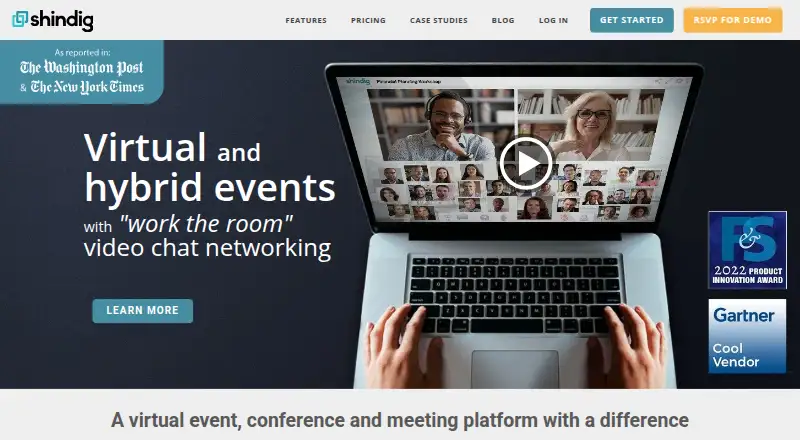
Shindig is a platform for hosting online video chat events, with stage presentations and private conversations for attendees.
What Shindig is
Shindig is a platform for hosting online video chat events, with stage presentations and private conversations for attendees. It is used for conferences, enterprise marketing and workforce events, fan events, and education. Networking groups can include 2 to 12 participants, who can move between chats while continuing to see and hear the stage. Hosts can bring attendees onstage, open a first-come-first-served podium, or spotlight selected participants. For larger programs, Shindig supports concurrent events and multi-session conferences linked through a directory of sessions, panels, suites, and booths. Events can simulcast to Facebook Live, YouTube Live, and other social media, with HD recordings available afterward. Attendees can join in a browser through a customizable URL without downloading software or creating an account; dedicated iOS and Android apps are also available. Ticket payments can use Stripe or PayPal, while Zapier can export event data to CRMs. Shindig offers a free plan with up to 100 participants per event and a 40-minute event limit. Starter costs $99 per month.
Good
- Private chats support groups of 2 to 12.
- Attendees can move between chats while following the stage.
- Supports concurrent events and multi-session conferences.
- Browser access requires no download or account.
- Free plan allows up to 100 participants per event.
Watch out
- Free events have a 40-minute maximum.
- Free plan caps monthly use at 1,000 user hours.
- Starter costs $99 per month.
- Starter events are limited to three hours each.
Who it suits
Shindig suits organizers of conferences, enterprise events, fan events, and education programs who want stage presentations alongside attendee networking. Its multi-session directory and virtual expo booths may also suit larger programs.
Verdict
Shindig combines live presentations, attendee networking, and multi-session event organization. Its free plan has time and usage limits, while Starter costs $99 per month.
Plans and prices
From Shindig's own pricing page, checked 21 Oct 2026.
| Plan | Price | What it gives you |
|---|---|---|
| Starter | $99 a month | 1 admin seat · up to 100 participants/event · unlimited events up to 3 hours · 6 speakers · recording · social livestreaming · 5,000 user-hours/month · monthly |
| Introductory | $750 a month | 10 admin seats · up to 300 participants/event · unlimited events up to 8 hours · multi-session and hybrid events · Breakouts Plus · SSO/API · 10,000 user-hours/month · monthly |
| Free | Free | 1 admin seat · up to 100 participants/event · unlimited events up to 40 minutes · 4 speakers · 1,000 user-hours/month · monthly |
| Advanced | Priced on request | unlimited admin seats · up to 2,000 participants/event · 10,000+ Shindig Live viewers · advanced production, monetization and customization · custom pricing |
| Advanced Plans | Priced on request | Custom pricing · unlimited admin seats · up to 2,000 participants per event · 10,000+ viewers with Shindig Live |
The facts
Each one read from Shindig's own pages, with the date it was checked.
What it does
- API access
- The pricing comparison includes APIs for custom sign-up on a client webpage, with SSO/API integration in the Introductory plan.checked 21 Oct 2026
- Attendee limit
- 100checked 22 Sep 2026
- Audience stage access
- Hosts can promote any of about 2,500 participants to the stage and can enable first-come, first-served open podium contributions.checked 21 Oct 2026
- Backstage green room
- A backstage video area lets organizers prepare speakers and screen prospective questioners before putting them on stage.checked 21 Oct 2026
- Breakout management
- Managed private chats and breakout rooms support assigned, sorted or random groups of 2 to 12 participants.checked 21 Oct 2026
- Conference support
- The platform supports concurrent events and multi-session conferences with a central directory connecting sessions, panels, suites, and booths.checked 30 Sep 2026
- Contact response
- The contact page says the team will respond to hosting inquiries within 24–48 hours and provides guest and administrator self-guided demos.checked 30 Sep 2026
- Founder
- LinkedIn and the company About page identify Steve Gottlieb as founder and CEO.checked 21 Oct 2026
- Funding
- Crunchbase says Shindig has received $20 million from the Pritzker Vlock Family Office to date.checked 21 Oct 2026
- Hybrid events
- A monitor mode is provided for hybrid events to reduce feedback while online and in-person audiences use the virtual lobby.checked 21 Oct 2026
- Integrations
- Official pages list Stripe and PayPal ticket payments, Zapier export, LMS integration, Facebook/LinkedIn registration, social streaming and SSO.checked 21 Oct 2026
- Interactive tools
- Features include polling, attributed published questions, announcements, screen sharing, searchable attendee directories and customizable name tags.checked 21 Oct 2026
- Limit: dated interface
- ClickUp's comparison says the Shindig user interface feels dated and unintuitive.checked 21 Oct 2026
- Limit: integration tiering
- ClickUp reports that LMS and Zapier integrations are restricted to Shindig's highest plans.checked 21 Oct 2026
- Limit: large-event performance
- G2 reviewers report occasional lag, slow speed or connectivity problems during very large events or on slower connections.checked 21 Oct 2026
- Limit: learning curve
- G2 reviewers report that first-time attendees and hosts can find the many controls, rooms and advanced features difficult to learn.checked 21 Oct 2026
- Mega-event scaling
- The feature page says presentations can cascade across multiple Shindig events to serve tens of thousands of viewers.checked 21 Oct 2026
Where it runs
- Browser access
- Events are browser-based, use customizable URLs, and require no download or account creation, according to the features page.checked 30 Sep 2026
- Browser deployment
- Events use customizable URLs and require no download or account creation for attendees; supported browsers include Chrome, Safari, Firefox and Edge.checked 21 Oct 2026
- iOS requirements
- The App Store listing requires iOS 13 or later, iPadOS 13 or later, and macOS 11 or later on Apple M1-or-newer Macs.checked 21 Oct 2026
- Limit: Android availability
- The archived Android listing says the Shindig app was removed from Google Play on February 20, 2024 and is no longer available there.checked 21 Oct 2026
- Limit: Android complaints
- Archived Android user comments report consent-checkbox failures, camera/microphone authorization problems, event time confusion and loading failures for a paid event.checked 21 Oct 2026
The company
- Company facts
- LinkedIn lists Shindig as privately held, founded in 2010, headquartered in New York City and employing 11–50 people.checked 21 Oct 2026
Money
- Free plan
- Yeschecked 22 Sep 2026
The full review of Shindig
Shindig is an online event platform that pairs presentations with attendee video conversations. It suits conference organizers who want networking and multi-session programming alongside a live stage. Its feature set is broad, but audience and usage caps make plan selection important.
Overview
Shindig is built for events that need more than a single presentation room. A central directory can connect concurrent events, sessions, panels, suites, and booths, while attendees move between private conversations and the live stage. That structure is useful for conferences and virtual expos; it is more than many organizers need for a basic meeting.
Events run in a browser through customizable URLs, with no download or account creation required for guests. Dedicated attendee apps are available for iOS and Android. Shindig also supports use cases including education, fan events, enterprise marketing, and workforce events.
Key features
Networking and participation
Private video chats support groups of 2 to 12. Attendees can move between conversations while continuing to see and hear the presentation, which keeps networking connected to the program rather than making it a separate activity. Hosts can promote attendees to the stage, open a first-come-first-served podium, or selectively spotlight participants. Those options give organizers control over audience involvement, though a program that does not need networking or live participation may not benefit from them.
Conference operations and security
Concurrent events and a central directory help organizers manage multi-session conferences, and virtual expo booths support exhibitor spaces. Shindig lists integrations with Stripe and PayPal for ticket payments, Zapier for exporting event data to CRMs, and SSO and API capabilities. Its stated SOC 2 Type II accreditation, single sign-on, no-open-mic architecture, anti-Zoombombing controls, and admin ban function address security and access needs for managed events.
Streaming, recording, and support
Events can be simulcast to Facebook Live, YouTube Live, and other social media, and HD recording files are available after events. Organizers can request full production support; administrators also have self-guided tutorials and videos. Shindig says it responds to hosting inquiries within 24–48 hours and offers self-guided demos for guests and administrators.
Pricing
Shindig has a free plan and paid plans from $99 a month. The key tradeoff is capacity: the free and Starter plans support up to 100 participants per event, while the higher tiers allow larger audiences and more admin seats.
- Free — free: One admin seat, up to 100 participants per event, a 40-minute maximum event length, four speakers on stage, and 1,000 user hours per month. It is suitable for short, small events, but the time cap and monthly hours limit make it a constrained option for recurring programming.
- Starter — $99 a month: One admin seat, up to 100 participants per event, unlimited events up to three hours each, up to six speakers, and 5,000 user hours per month. This removes the free plan’s 40-minute event ceiling, but does not increase the per-event audience limit or admin seats.
- Introductory — $750 a month: Ten admin seats, unlimited events up to eight hours each, and 10,000 user hours per month. Its participant limit is stated as up to 300 in the plan summary and up to 500 in the comparison table, so organizers should confirm the applicable cap before choosing it.
- Advanced Plans — custom pricing: Unlimited admin seats, 2,000 participants per event, 10,000+ Shindig Live viewers, and 10,000+ user hours per month. This tier is aimed at large events that exceed the lower plans’ audience capacity.
The pricing comparison gives monthly user-hour caps of 1,000 for Free, 5,000 for Starter, 10,000 for Introductory, and 10,000+ for Advanced Plans. The free plan is billed monthly; its listed price is free.
Platforms
Shindig supports web, iOS, Android, and API access. Browser-based guest access avoids requiring an app download, while the dedicated iOS and Android apps provide mobile options for attendees.
Who it's for
Shindig is a strong fit for organizers running conferences, virtual expos, or other structured events where networking, audience participation, multiple sessions, or social simulcasting matter. Starter works for organizers who need longer events but can stay within 100 participants and one admin seat. Larger teams and audiences should weigh the higher monthly cost of Introductory or seek custom pricing for Advanced Plans. For a simple meeting without these event needs, Shindig’s broader structure and its plan limits are harder to justify.
Pros and cons
- Pro: Attendees can network in small video groups without losing the stage presentation, making conversations practical within a live program.
- Pro: A central directory connects concurrent events, sessions, panels, suites, and booths, supporting multi-session conferences and virtual expos.
- Pro: Browser access requires no guest download or account creation, while dedicated mobile apps are available for iOS and Android.
- Con: Free and Starter both cap events at 100 participants; organizers need a higher tier to serve larger audiences.
- Con: The Free plan limits events to 40 minutes and 1,000 user hours monthly, while Starter still allows only one admin seat.
- Con: Introductory’s participant ceiling is stated inconsistently as 300 or 500, so organizers should confirm the limit before committing to $750 a month.
Alternatives
For a general meeting option with a free tier, Webex App offers meetings up to 40 minutes for as many as 100 attendees; choose it when that meeting format suits better than Shindig’s event directory and networking.
MootUp has a free Basic plan for meetings of up to five participants, limited to 40 minutes, with unlimited meetings, six environment templates, and SSL encryption; it is a fit when those small-meeting limits meet your needs.
EventsX offers a free plan with one admin seat, events up to 60 minutes, and up to 100 registrations per event, while its Business plan costs $99 a month; consider it when those event limits are preferable.
EventX has a free plan with unlimited events, 30 attendees per event, and a single user; it suits organizers whose events fit that smaller audience cap.
Micepad offers a free plan for up to 50 attendees and a Starter plan at $300 per event; choose it when those attendance and per-event pricing terms better fit.
Zoom Scheduler offers a basic plan with one personal booking page and one calendar connection; it is an alternative when booking pages, rather than conference programming, are the need.
SpatialChat has a free plan with two meeting hours daily, up to 12 participants, four customized rooms, and three shared screens or files at once; it is an option for smaller gatherings within those limits.
MEETYOO is another alternative.
Browse Virtual Event Platforms or Webinar Software for more options.
Verdict
Choose Shindig if you need a managed event platform that combines live presentations, attendee networking, and multi-session organization in one program. Its strongest reason to choose is that attendees can move among small private chats without losing the stage, backed by tools for participation and conference navigation. Look elsewhere if your events are simple meetings, or if the 100-person cap and one-admin Starter plan do not fit your team; larger audiences require a more expensive tier or custom pricing.
Getting started
- Open https://shindig.com/
- Choose the Free plan or a paid plan
- Create a customizable event URL
- Run the event in a browser without downloads or account creation
- Invite attendees to join private video conversations and the stage
- Connect Stripe, PayPal, Zapier, SSO, or API services as needed
- Use the iOS or Android attendee app if preferred
Limits worth knowing
The Free plan permits 100 participants per event, events up to 40 minutes, four speakers on stage, and 1,000 user hours per month. Starter allows up to 100 participants and unlimited events lasting up to three hours at $99 per month.
Questions
Is Shindig free?
Yes. The Free plan costs $0.00 per month and includes one admin seat, 100 participants per event, and 1,000 user hours monthly.
What does Starter cost?
Starter costs $99.00 per month, with one admin seat, up to 100 participants per event, and events up to three hours.
Can attendees join without installing software?
Yes. Events run in a browser through customizable URLs without requiring a download or account creation.
Does Shindig have mobile apps?
Dedicated attendee apps are available for iOS and Android.
Which payment and data integrations are available?
Shindig lists Stripe and PayPal for ticket payments, Zapier for exporting event data to CRMs, plus SSO and API capabilities.
What event formats does it support?
It supports conferences, enterprise marketing and workforce events, fan events, education, concurrent events, multi-session programs, and virtual expo booths.